
Kodi Setup & Basics
Discover the best tips and tricks to make your Kodi box run fast, efficient, and smart.
Best Kodi Remote? Try the official iOS App
[et_pb_section admin_label=”Section” fullwidth=”on” specialty=”off”][et_pb_fullwidth_menu admin_label=”Fullwidth Menu” menu_id=”2132″ background_color=”#31afe1″ background_layout=”dark” text_orientation=”center” submenu_direction=”downwards” fullwidth_menu=”off” dropdown_menu_animation=”fade”] [/et_pb_fullwidth_menu][/et_pb_section][et_pb_section admin_label=”Section” fullwidth=”on” specialty=”off” transparent_background=”off” allow_player_pause=”off” inner_shadow=”off” parallax=”off” parallax_method=”off” custom_padding=”||0px|” padding_mobile=”off” make_fullwidth=”off” use_custom_width=”off” width_unit=”on” make_equal=”off” use_custom_gutter=”off” gutter_width=”3″][et_pb_fullwidth_post_title admin_label=”Fullwidth Post Title” title=”on” meta=”on” author=”off” date=”on” categories=”on” comments=”off” featured_image=”on” featured_placement=”above” parallax_effect=”on” parallax_method=”on” text_orientation=”center” text_color=”dark” text_background=”off” text_bg_color=”rgba(255,255,255,0.9)” module_bg_color=”rgba(255,255,255,0)” title_all_caps=”off” meta_font_size=”14″ use_border_color=”off” border_color=”#ffffff” border_style=”solid” title_font=”Abel|on|||” title_font_size=”36px” meta_font=”Abel||||”] [/et_pb_fullwidth_post_title][/et_pb_section][et_pb_section admin_label=”section” transparent_background=”off” allow_player_pause=”off” inner_shadow=”off” parallax=”off” parallax_method=”off” custom_padding=”0px|||” padding_mobile=”off” make_fullwidth=”off” use_custom_width=”off” width_unit=”on” make_equal=”off” use_custom_gutter=”off” gutter_width=”3″][et_pb_row admin_label=”row” make_fullwidth=”on” use_custom_width=”off” width_unit=”on” use_custom_gutter=”off” gutter_width=”3″ padding_mobile=”off” background_color=”#ffffff” allow_player_pause=”off” parallax=”off” parallax_method=”off” make_equal=”off” parallax_1=”off” parallax_method_1=”off” parallax_2=”off” parallax_method_2=”off” column_padding_mobile=”on”][et_pb_column type=”2_3″][et_pb_text admin_label=”Text” background_layout=”light” text_orientation=”left” text_font=”Abel||||” text_font_size=”18″ use_border_color=”off” border_color=”#ffffff” border_style=”solid”]
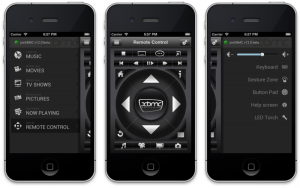
Are you looking for the best Kodi remote to control your XBMC/Kodi software now that you are running it through your big screen TV?
If you have a smart phone, check out the official Kodi Remote App!