
The guide below shows you the best Android TV boxes to buy in 2026. We’ll go over:
- The key features you need in an Android TV box today.
- Should you buy the Nvidia Shield, Amazon Fire TV, or another option?
- The best Android TV boxes we recommend in 2026, and which ones to avoid.
These boxes are used for Kodi, Netflix, IPTV, or other streaming apps.
If you’ve purchased a new box lately, comment down below and let us know.
What are the Best Android TV Boxes?
| Best Premium Android Box | Nvidia Shield TV Pro |
| Best Value Android Box | onn 4K Pro |
| Best Budget Google TV Box | Xiaomi TV Box S (3rd Gen) |
| Best for Smart Home Integration | Google TV Streamer 4K |
| Best for Alexa & Voice Control | Amazon Fire TV Cube |
| Most Affordable Android TV Box | HS86 PRO14 Android Box |
| Best Budget Streaming Stick | Amazon Fire TV Stick 4K Max |
Android TV vs. Google TV: What’s the Difference?
You’ll see both terms used for the boxes below, and it’s worth knowing what they mean before you buy. Android TV is Google’s underlying operating system for televisions and streaming boxes. Google TV is the newer interface built on top of that same OS, with a content-first home screen, personalized recommendations, and (on newer devices) Gemini-powered voice search.
Functionally, this doesn’t change much for Kodi or sideloaded apps. If a box is Android TV or Google TV certified, it still runs on Android underneath, and you can still install Kodi, the Google Play Store, and other APKs the same way. The one thing to watch is Amazon’s newest Fire TV Sticks: a few recent models have switched to Amazon’s own Vega OS instead of Android, which blocks sideloading entirely. We’ve flagged which picks below are affected.
Avoid “Fully-Loaded” Streaming Boxes
Before you shop, one warning: steer clear of boxes marketed as “fully-loaded,” “jailbroken,” or pre-installed with free live TV and premium channels. Brands like SuperBox and vSeeBox are common examples. These are typically standard Android boxes resold at a steep markup with pirated IPTV apps pre-installed, which creates real legal exposure and no guarantee the service keeps working after you’ve paid.
Every box in this guide ships with a clean, stock version of Android TV or Google TV. You install Kodi, streaming apps, or IPTV services yourself, the same way we walk through elsewhere on this site, which keeps you in control of what’s actually on your device.
The Best Android TV Box Features
Okay, so you want to buy a streaming box but you have no clue where to begin or what to buy. What next? Here are the things that actually matter in 2026:
Operating System
The best Android TV boxes run a recent version of Android TV or Google TV. Most current devices ship on Android 12 through 14, which brings a faster interface, better casting, and improved app compatibility over the Android 9/10 boxes that were common a few years ago. If a listing doesn’t mention the Android version at all, that’s usually a sign the hardware and software are both old.
4K Video Streaming
Nearly every Android TV box sold today supports 4K streaming, so this is table stakes rather than a differentiator. What varies more is whether a box also supports Dolby Vision and HDR10+ for better color and contrast, so check for that specifically if you have a 4K HDR TV.
Audio Pass-through
Most new Android TV boxes support audio pass-through for Dolby Atmos or DTS:X. You can connect your home theater or sound system via HDMI to get a full surround sound setup without impacting video quality.
H.265 Video Support
Known as High Efficiency Video Coding, H.265 is a video compression standard that most Android TV boxes support in hardware. It delivers better quality video at a smaller file size, which means less buffering and less data used, especially useful if you’re streaming Kodi add-ons or IPTV over a capped connection.
Wi-Fi 6 and Ethernet
Wi-Fi 6 (and Wi-Fi 6E on higher-end boxes) is now common and worth prioritizing, since it handles multiple connected devices and 4K streams far better than the older 802.11ac standard. If your box will sit near your router, a Gigabit or 100M Ethernet port is still the most reliable option for zero buffering.
Voice Control and AI Search
Voice control has been standard for a while, but newer Google TV and Fire TV devices now build in AI-powered search (Gemini on Google TV, Alexa+ on Fire TV) that can answer natural-language questions like “find a comedy under 90 minutes” across your installed apps.
Next, we go over the best Android TV boxes to buy.
Nvidia Shield TV Pro – Best Premium Android Box
The Nvidia Shield TV Pro has been the top pick for power users since 2019, and it’s still holding that spot in 2026. Nvidia has confirmed it isn’t discontinuing or dropping software support any time soon. The Tegra X1+ chip is dated on paper, but AI-upscaling, Dolby Vision IQ, and years of driver optimization mean it still outperforms most newer, cheaper boxes for both streaming and Kodi.
It’s also the only box on this list built for Plex server-grade transcoding and GeForce Now cloud gaming, with a real game controller included. If you want one box that does everything well and don’t mind paying for it, this is still the answer.
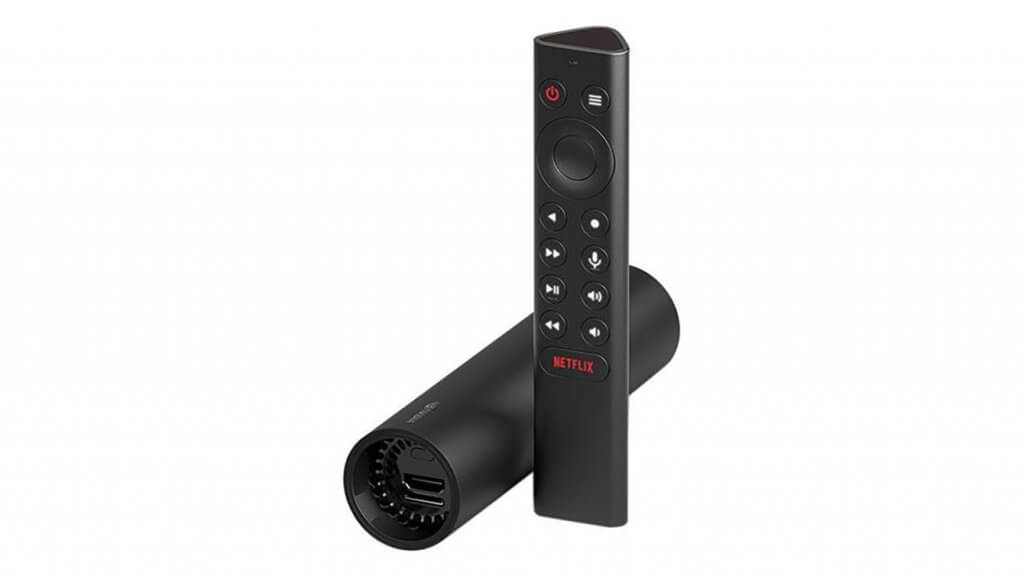
Nvidia Shield TV Pro Specifications
- CPU: Tegra X1+
- RAM: 3 GB / Storage: 16 GB
- Unlocks Netflix and Prime Video in 4K
- GeForce Now cloud gaming support
- Plex server-grade transcoding
- Dolby Vision IQ and Dolby Atmos
- 2x USB 3.0 ports for expandable storage
- Includes game controller and remote
- Dual-Band Wi-Fi and Gigabit Ethernet
[amazon box=”B07YP94PBJ”]
onn 4K Pro – Best Value Android Box
Walmart’s 2026 refresh of the onn 4K Pro is the best value pick on this list by a wide margin. For around $60, you get Google TV with Gemini built in, Wi-Fi 6, 3 GB of RAM, and 32 GB of storage, specs that would have cost twice as much just a couple of years ago.
It also adds Matter-over-Thread support, so it can double as a smart home hub, and a USB-C power connector instead of the old barrel plug. The only real downgrade from the previous generation is a single USB 2.0 port instead of USB 3.0, which won’t matter for most streaming or Kodi use.
onn 4K Pro Specifications
- OS: Google TV (Android TV based)
- CPU: Amlogic S905X5M quad-core Cortex-A55
- GPU: ARM Mali-G310 V2
- RAM: 3 GB / Storage: 32 GB
- Wi-Fi 6
- Gemini AI search built in
- Matter over Thread smart home support
- Dolby Vision and Dolby Atmos
- Ethernet, USB-A (2.0), USB-C power
[amazon box=”B0GGNGVZQT”]
Xiaomi TV Box S (3rd Gen) – Best Budget Google TV Box
The Xiaomi TV Box S 3rd Gen is one of the most affordable officially Google-certified boxes you can buy, which matters if you want guaranteed Netflix and Widevine L1 support without gambling on an unofficial device. It packs a 6nm Amlogic chip, Dolby Vision, Dolby Atmos, and DTS:X into a compact box.
It’s a great pick for a secondary TV or bedroom setup where you still want full Kodi and Google Play Store support, just without paying premium-box prices.
Xiaomi TV Box S (3rd Gen) Specifications
- OS: Google TV, officially certified
- CPU: Amlogic S905X5M-class, quad-core Cortex-A55 (6nm)
- RAM: 2 GB / Storage: 32 GB
- 4K UHD with Dolby Vision and HDR10+
- Dolby Atmos and DTS:X audio
- Wi-Fi 6, HDMI 2.1
- Voice remote included
[amazon box=”B0F3JWFL56″]
Google TV Streamer 4K – Best for Smart Home Integration
This is Google’s own flagship streaming box, and the closest thing to a “reference” Google TV experience. It’s built around Thread and Matter smart home standards, so it can act as a hub for compatible smart home devices in addition to being a streaming box, something none of the other picks here do natively.
It also includes a built-in Ethernet port (rare for a device this size), 4 GB of RAM, and Gemini-powered AI search across your installed apps.
Google TV Streamer 4K Specifications
- OS: Google TV (official Google device)
- RAM: 4 GB / Storage: 32 GB
- 4K HDR with Dolby Vision and Dolby Atmos
- Built-in Ethernet port
- Thread and Matter smart home hub
- Gemini AI-powered search
[amazon box=”B0D8WJYSF9″]
Amazon Fire TV Cube – Best for Alexa & Voice Control
The Fire TV Cube (3rd Gen) is technically Fire OS rather than pure Android TV, but it’s still Android-based underneath, still supports sideloading Kodi and other APKs, and remains the most popular streaming box on Amazon. It’s the fastest Fire TV device Amazon makes, with an octa-core processor roughly twice as powerful as the standard Fire TV Stick 4K Max.
It doubles as an Alexa smart speaker and can control your TV, soundbar, and even a cable or satellite box hands-free. An HDMI input lets you pass another device’s signal through the Cube without switching TV inputs.
Amazon Fire TV Cube Specifications
- OS: Fire OS (Android-based, supports sideloading)
- Octa-core processor
- RAM: 2 GB / Storage: 16 GB
- Wi-Fi 6E and wired Ethernet
- Built-in Alexa smart speaker
- HDMI input for pass-through control
- 4K HDR with Dolby Vision and Dolby Atmos
[amazon box=”B09BZZ3MM7″]
HS86 PRO14 Android Box – Most Affordable Android TV Box
If you want the cheapest possible way to run Kodi and streaming apps on a TV, generic Android boxes like the HS86 PRO14 still exist. Unlike some of the no-name boxes we used to recommend, this one at least ships current with Android 14 rather than a version from 2019.
Treat this as a budget option for a secondary TV rather than your main setup: 2 GB of RAM is light for heavy multitasking, and generic-brand boxes don’t carry the same long-term software support as Nvidia, Google, or Xiaomi. Stick with the official Google Play Store and Kodi’s own site for apps rather than any pre-installed shortcuts.
HS86 PRO14 Specifications
- OS: Android 14.0
- CPU: Rockchip RK3518 quad-core Cortex-A53
- RAM: 2 GB / Storage: 16 GB
- 4K/8K video playback, HDR10+
- Dual-band Wi-Fi 6 (2.4G/5.8G)
- 100M Ethernet, Bluetooth 5.0, USB 3.0
- Voice remote included
[amazon box=”B0GVDXZZ6K”]
Amazon Fire TV Stick 4K Max – Best Budget Streaming Stick
If you want a stick rather than a box, the Fire TV Stick 4K Max is the pick to get, not the newer Fire TV Stick 4K Select. The Select model switched to Amazon’s own Vega OS, which is Linux-based rather than Android and doesn’t support sideloading, so you can’t install Kodi, Downloader, or other APKs on it. The 4K Max still runs Fire OS on top of Android, and sideloading Kodi through the Downloader app still works exactly the way it always has.
For the price, it’s a genuinely capable little device: Wi-Fi 6E, Dolby Vision and Atmos, and a noticeably faster processor than the entry-level Fire TV Stick.
Amazon Fire TV Stick 4K Max Specifications
- OS: Fire OS (Android-based, supports sideloading)
- RAM: 2 GB / Storage: 16 GB
- Wi-Fi 6E
- 4K Ultra HD with Dolby Vision, HDR10, HDR10+
- Dolby Atmos audio
- Alexa Voice Remote Enhanced included
[amazon box=”B0BP9SNVH9″]
Want a VPN running on any of these boxes? Check out our Best VPN for Kodi & Firestick guide before you get started.
What is your favorite Android TV box? Comment down below and let us know.