
Kodi vs Nuvio comes down to one real question: do you want to build a streaming setup yourself, or sign into one that already works?
Kodi is a 20-plus-year-old media center you configure piece by piece. Nuvio is a newer streaming app that does far less configuring and far more just working, and it is the app that is trending right now!
This comparison is built from the same primary sources both apps point to themselves: Nuvio’s official GitHub release history and documentation, and Kodi’s own release changelog, not another blog’s recycled numbers. Where something is still moving, like Kodi 22’s beta status, that gets called out below rather than stated as settled fact.
Quick Verdict: Kodi vs Nuvio
- Best for streaming with minimal setup: Nuvio. Sign in and your addons, profiles, and watch history sync automatically.
- Best for local and NAS media libraries: Kodi. Nothing else matches its format support and library control.
- Best if you’re leaving Stremio: Nuvio, since it accepts the same Stremio-style addon manifests instead of making you rebuild from zero.
- Best if you want deep customization: Kodi, through skins and per-view tweaks Nuvio doesn’t attempt.
- Realistic answer for a lot of people: run both. Kodi for files you own, Nuvio for everything you stream.
Kodi vs Nuvio at a Glance
Before digging into each category individually, here’s how Kodi and Nuvio stack up side by side.
| Category | Kodi | Nuvio |
|---|---|---|
| What It Is | Local-first media center you configure | Cloud-synced streaming client you sign into |
| Current Version | 21 “Omega” stable; 22 “Piers” in beta | 1.0.0 stable release |
| Cost / License | Free, open source | Free, open source (GPL-3.0) |
| Setup Time | Can take an afternoon to fully configure | Minutes from install to first stream |
| Addon System | Kodi’s own repository/addon format | Stremio-style manifest URLs plus Cloudstream repos |
| Local File Playback | Best-in-class format and codec support | Basic, not the focus of the app |
| Cross-Device Sync | Needs Trakt or a self-hosted MySQL database | Built-in, automatic, free |
| Profiles | Local, per device | Up to 6, cloud-synced |
| Customization | Skins, keymaps, deep per-view control | Limited theming, fixed interface |
| Platforms | Android, Windows, macOS, Linux, and more, including old hardware | Android TV, Android mobile, desktop (alpha), Samsung/LG (WebOS/Tizen) |
What Is Nuvio, and How Is It Different From Kodi?
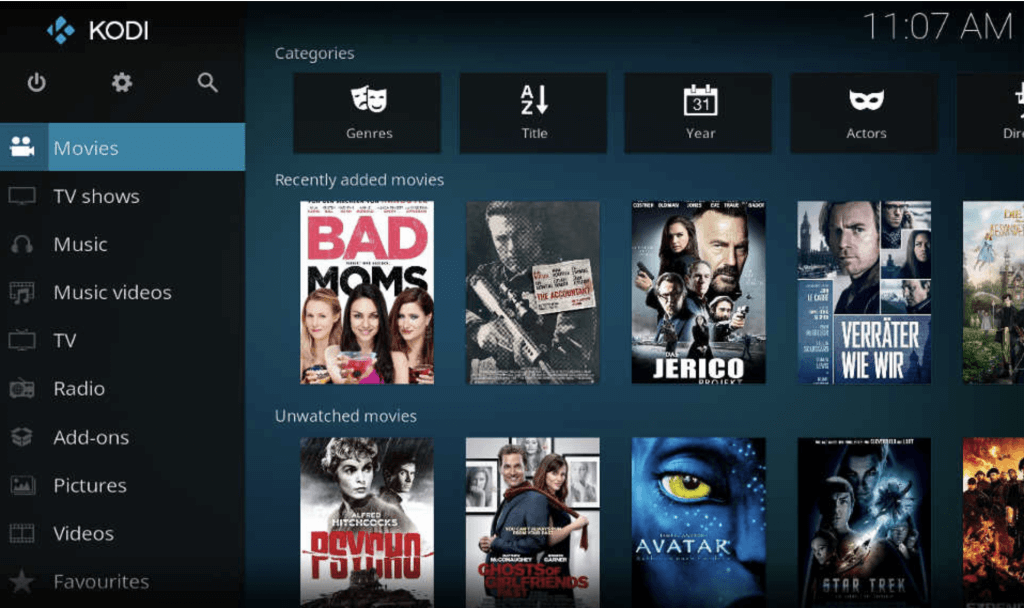
What Is Kodi?
Kodi (formerly XBMC) is free, open source home theater software that plays nearly every video, audio, and subtitle format that exists. On its own it has no content at all. You point it at your own local or network media, and you can extend it with third-party addons for extra sources and functionality. It runs on almost anything, including Windows, macOS, Linux, Android, and even old or unusual hardware like a Raspberry Pi. That flexibility is exactly why it takes real setup time to configure the way you want.
What Is Nuvio?
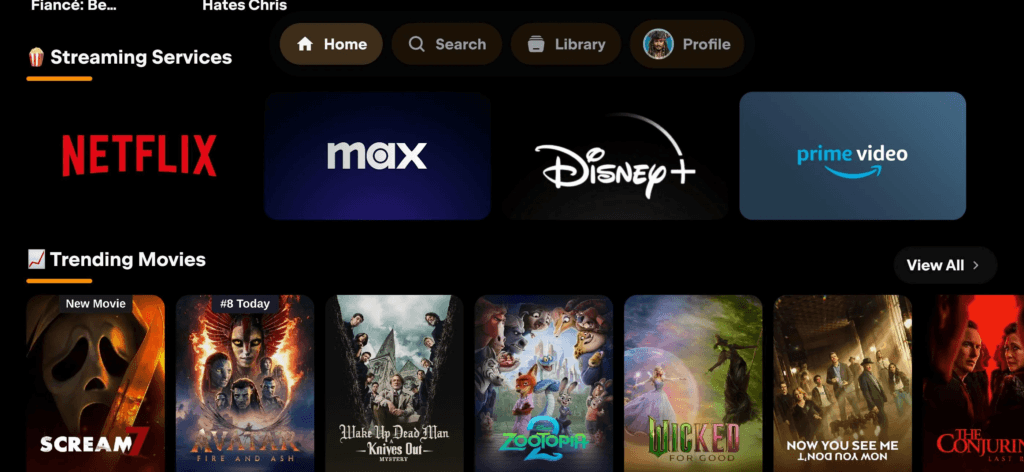
Nuvio is a newer, free, open source streaming app (GPL-3.0 licensed, developed by NuvioMedia) built around the same “bring your own sources” idea as Kodi and Stremio, but with a lot less assembly required. The official NuvioTV app recently reached its 1.0.0 stable release, out of the extended beta period some older comparisons of this app still describe.
It adds artwork, ratings, subtitles, and watch progress on top of whatever sources you connect, and syncs all of that automatically to a free account. Nuvio is available for Android TV (through Google Play or a direct APK), Android mobile, a desktop alpha build, and Samsung/LG smart TVs through WebOS and Tizen wrappers.
Setup and Installation: Which Gets You Streaming Faster?
Kodi’s setup is a real project the first time through. You install Kodi itself, then hunt down, install, and configure addons one at a time, and there is no built-in account that carries your setup to the next device. If you want that, you have to build it yourself with Trakt scrobbling or a self-hosted MySQL database.
Nuvio flips that. Install the app, sign into a free account, and your profile, any addons you’ve added, and your watch progress are already there the next time you sign in on a different device. Our full Nuvio install guide for Firestick and Android TV walks through the whole process. Setup time is the single most repeated advantage in every Kodi vs Nuvio discussion online, including on Reddit, and it holds up: minutes versus an afternoon is a real, consistent gap, not marketing.
Kodi Addons vs. Nuvio Addons: Are They the Same Thing?
No, and this is the single most common point of confusion. Kodi uses its own decades-old addon format built around repositories and XML-based add-on packages. Nuvio has nothing to do with that system. Instead, it accepts Stremio-compatible addon manifest URLs plus Cloudstream repos, meaning it speaks the same addon language as Stremio, not Kodi.
In practice: a Kodi addon will never install in Nuvio, and a Nuvio or Stremio manifest will never install in Kodi. If you’re migrating from Stremio specifically, that shared compatibility is the whole reason Nuvio is the easier landing spot compared to starting a Kodi build from scratch. It also lines up with how debrid services already connect on this site: our Real-Debrid alternatives guide and TorBox setup guide both cover services that plug into Nuvio the same way they plug into Stremio, not through a Kodi-specific resolver addon.
Which Is Better for Local Media: Kodi or Nuvio?
Kodi, and it isn’t particularly close, if you own the files. Kodi plays close to every container, codec, and subtitle format that exists, manages large local and NAS libraries with detailed scraping and metadata control, and Kodi 22 “Piers,” currently in beta, is bringing AV1 hardware-decode improvements aimed squarely at this kind of use.
That matters if your library leans on newer AV1-encoded rips, since hardware decoding is what keeps those files playing smoothly instead of dropping frames or maxing out a device’s CPU on software decode. Nuvio’s local playback works, but it’s a secondary feature bolted onto a streaming-first app, not the reason to install it.
Does Nuvio or Kodi Sync Watch Progress Better?
Nuvio wins this one outright. Every device you sign into shares watch history, continue-watching, and up to six separate cloud-synced profiles automatically, at no cost. For a household streaming box, that means everyone gets their own continue-watching row and recommendations instead of everyone’s shows piling into one shared history, the way a single Kodi profile per device would.
Kodi has no native equivalent. Syncing watch state across devices means setting up Trakt scrobbling to a third-party account or hosting your own shared MySQL database, and neither is a beginner-friendly weekend project.
Kodi Skins vs. Nuvio’s Interface: Which Is More Customizable?
Kodi, by a wide margin. Skins can rebuild the entire interface, and power users can tune library views, keymaps, and per-source behavior in ways a streaming-focused app like Nuvio doesn’t attempt. Nuvio’s customization is limited to basic theming, and the interface itself is fixed by design. That’s a genuine tradeoff rather than a flaw on either side: the same rigidity that makes Nuvio fast to set up is what makes Kodi endlessly moldable.
Kodi vs Nuvio on Firestick and Android TV: Which Runs Better?
Both run natively on Firestick and Android TV/Google TV hardware, and neither has a meaningful performance edge on typical streaming-box hardware like an Onn 4K Pro, a Fire TV Stick 4K Max, or an NVIDIA Shield. Kodi has the wider device reach overall, including Windows, macOS, Linux, and older or unusual hardware Nuvio was never built for. Nuvio’s official platform list covers Android TV, available directly through Google Play unlike Kodi’s Fire TV sideload requirement, plus Android mobile, a desktop alpha build, and Samsung/LG smart TVs through WebOS and Tizen wrappers.
On an Android TV or Google TV box, that Google Play listing means Nuvio installs and updates itself the normal app-store way. Kodi, and the Firestick-APK version of Nuvio, still need the unknown-sources sideloading process, which is the extra step that trips up people setting up a streaming box for the first time.
Is Kodi or Nuvio Safe and Legal to Use?
Both apps themselves are legal, free, open source software with no built-in content of their own. Neither Kodi nor Nuvio hosts or provides anything to stream. What you do with the addons or sources you connect is where the legal picture gets case by case, and that’s equally true for either app, not just one of them. Streaming or downloading copyrighted content without the rights to it isn’t legal, regardless of which app it happens in.
What most people actually mean by “is it safe” is exposure. Your ISP and any third-party addon or service you connect to can see what you’re doing unless that traffic is encrypted. A VPN doesn’t change the legal status of an addon, but it keeps that traffic private from your network provider, which is worth doing for either app, not just Kodi. See our Best VPN for Kodi & Firestick guide for picks; NordVPN is our current top recommendation.
Choose Kodi If… / Choose Nuvio If…
Choose Kodi If…
- You have a NAS or local library of files you actually own.
- You want deep customization through skins and keymaps.
- You want an app that runs on nearly anything, including old hardware.
- You don’t mind an afternoon of setup and occasional addon maintenance.
Choose Nuvio If…
- You mainly stream through addons and debrid services and want it working in minutes.
- You’re switching from Stremio and don’t want to rebuild your addon list.
- You share a device with other people and want separate, synced profiles.
- You want your watch history and setup to follow you to a new device automatically.
Can You Use Kodi and Nuvio Together?
Yes, and it’s a common setup, not a fallback. Kodi handles the local or NAS library, Nuvio handles everything streamed through addons, and both run side by side on the same Fire TV Stick, Shield, or Android TV box without stepping on each other. If you already have Kodi built out for your own media, there’s no reason to migrate that part over.
Nuvio just takes on the streaming-addon half of the job, leaving your existing Kodi setup untouched. If you haven’t installed Nuvio yet, our step-by-step guide covers Firestick, Android TV, and Google TV.
Kodi vs Nuvio FAQ
Is Nuvio Better Than Kodi?
For addon-based streaming with synced profiles across devices, yes, Nuvio is simpler to live with. For local media libraries, format support, and deep customization, Kodi is still better. They solve different problems, and a lot of people end up running both.
Is Kodi Dying in 2026?
No, but its addon-streaming use case is shrinking. Kodi itself is still actively developed, with Kodi 22 “Piers” in beta, and plenty of people still use it for local and NAS libraries. What’s declined is the third-party streaming addon ecosystem that used to be Kodi’s main draw for cord-cutters, and apps like Nuvio and Stremio are what replaced that specific use case, not Kodi as a whole.
How Does Nuvio Compare to Stremio?
They’re close cousins. Nuvio uses the same Stremio-style addon manifests, so an existing Stremio setup carries over instead of starting from scratch. The real differences are in the interface, profile handling, and how actively each app is being developed, not the underlying addon ecosystem.
Is Nuvio Free?
Yes. Nuvio is free, open source software licensed under GPL-3.0, with no subscription required to use the app itself. Any cost comes from optional third-party services you choose to connect, like a paid debrid provider, not from Nuvio.
Can I Install Nuvio as a Kodi Addon?
No. Nuvio is a separate standalone app, not a Kodi addon, and it doesn’t install inside Kodi’s interface. It runs alongside Kodi as its own app on the same device.
Is Kodi Still Worth Using in 2026?
Yes, for the jobs it’s still best at: local and NAS media libraries, wide format support, and deep customization through skins. If your only use for Kodi was streaming addons, an app like Nuvio is simpler to maintain for that specific job.
Can I Run Kodi and Nuvio on the Same Firestick?
Yes. Both apps install and run independently on the same Firestick or Android TV box with no conflict between them, so there’s no need to choose only one.
Bottom Line: Kodi vs Nuvio
Kodi vs Nuvio comes down to which job you’re using it for, not which app is objectively better. Kodi remains the stronger choice for a local media library, deep customization, and running on hardware Nuvio was never built for. Nuvio wins on setup time, cross-device sync, and picking up a Stremio-style addon list without rebuilding it from scratch.
If you have to pick one for streaming through addons today, Nuvio is the easier app to live with. If you’re managing files you already own, stick with Kodi. And if you use both, running them side by side on the same box works fine.