
In this tutorial guide, I’ll show you exactly how to install the Xperience Nuvio addon on your Firestick, Android TV, or Google TV device, plus how to push your whole setup to Nuvio in one click and fix the row-order problem most people run into.
Xperience (sometimes searched as “Experience”) is a free visual builder that creates your own personal Nuvio catalog addon. You pick your home screen rows from more than 1,000 ready-made catalogs, group them into collections, and Xperience hands you a private link for Nuvio.
It’s a different kind of addon from the ones you’re used to. Instead of installing someone else’s catalog, you build your own on the Xperience website, and your rows refresh with fresh titles every time you open Nuvio. I’ll also cover the two free keys you need, the badges and avatars only Xperience offers, and how it compares with AIOMetadata.
Xperience Nuvio Addon Quick Facts
| Addon Name | Xperience |
| Addon Type | Hosted catalog builder (creates your own catalog addon, no streams) |
| Cost | Free (optional membership adds extras) |
| Required Keys | MDBList API key and TMDB API Read Access Token (both free) |
| Sign-In | Email with a 6-digit code, no password |
| Catalogs | 1,000+ ready-made rows across genres, streaming services, anime, studios, networks and more |
| Works With | Nuvio TV (Firestick, Android TV, Google TV), Nuvio Mobile, Stremio, and Fusion |
What Is the Xperience Nuvio Addon?
Xperience is a website, xperience-app.com, that builds a catalog addon just for you. You choose the rows you want on your Nuvio home screen, like Trending Movies, your favorite genres, what’s new on Netflix, or your own Trakt lists, and Xperience turns your choices into a private install link.
That link is the Xperience Nuvio addon. Once it’s installed, your rows aren’t frozen lists: every time you open Nuvio, it pulls fresh titles from Xperience, so your home screen stays current without you touching it.
Like other catalog addons, Xperience supplies titles, posters, and metadata, not streams. Pair it with a stream addon such as AIOStreams or PenguPlay so you can actually play what you find.
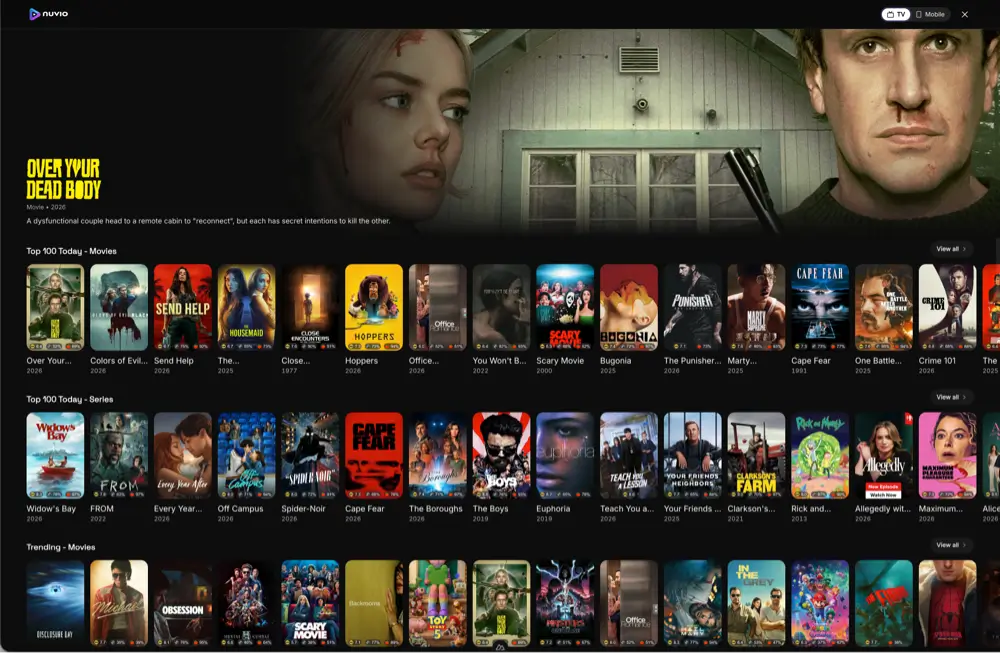
Xperience Nuvio Addon Features You Should Know About
Xperience Catalogs: 1,000+ Ready-Made Rows
Instead of building catalogs from raw filters, you browse more than 1,000 rows that are already set up, grouped by theme: trending, streaming services, genres, anime, awards, studios, networks, decades, and people. Each row can be renamed, sorted (popularity, top rated, newest, oldest, or recently added), shuffled daily or weekly, and filtered by genre, language, quality, or year. You can also paste a public Trakt or MDBList list, or import catalogs from another addon.
Xperience Collections, Cover Sets and Home Layout
Collections are the headline Nuvio feature. A collection is a home screen section with styled folders inside it, like a Movies collection with Award Winners and Hidden Gems folders. Xperience includes more than 60 cover sets for those folder tiles, so your home screen can look like a proper streaming service instead of a wall of plain rows. The Arrange home tool lets you drag rows and collections into order and pin a collection to the top.
Push Xperience to Nuvio in One Click
Once you link your Nuvio account, Xperience can install the addon and your collections to a Nuvio profile with one click. You never have to type a URL with a TV remote. Copying the link, scanning a QR code, or downloading a collections file still work too.
What We Like and What We Don’t Like About Xperience
What We Like
- Builds a good-looking Nuvio home screen with little effort
- 1,000+ catalogs ready to use, no filter building
- One-click push to Nuvio, no typing on a TV remote
- Collections with cover art, plus badges and avatars for Nuvio
- Multiple profiles for different people in the house
What We Don’t Like
- You need an account and two API keys before you can start
- It’s a hosted service, so you can’t self-host it
- Free profiles are capped at 50 home rows
What You Need Before You Install the Xperience Nuvio Addon
Before you start, have these ready:
- Nuvio installed on your device. If you haven’t done that yet, follow our Nuvio install guide for Firestick and Android TV.
- An email address. Xperience signs you in with a 6-digit code instead of a password.
- A free MDBList API key. Create one at mdblist.com/preferences. It powers the title lists behind your rows.
- A free TMDB key. It supplies posters, descriptions, and ratings. See below for which TMDB key to copy.
- A phone or computer with a web browser. You’ll build your setup there, not on your TV.
Which TMDB Key Does Xperience Need?
Copying the wrong key here is an easy mistake. On themoviedb.org, go to Settings, then API, and copy the API Read Access Token, which is the long value that starts with “eyJ”. Don’t copy the shorter API Key shown below it. If Step 1 won’t verify your TMDB key, you almost certainly pasted the short one.
Is the Xperience Nuvio Addon Safe to Use?
Xperience only handles your catalog setup: rows, artwork, and lists. It never finds or plays video. The main thing to protect is your install link, because anyone who has it can read your configuration. Treat it like a password, and if it ever leaks, use Revoke & regenerate on Step 4 to kill the old link.
If you turn on the optional AI rows, your watch history and list names are sent to the AI provider you choose, but only after you actually add an AI row. You can also delete your Xperience account and all its data whenever you like.
The stream addons you pair Xperience with are where privacy really matters, since they pull links from third-party sources. Click here to view the #1 VPN for streaming.
Learn how to install and configure your VPN here.
How Do You Stay Protected While Using Nuvio?
Sign up for a premium VPN and access the internet unrestricted. We offer exclusive discounts for IPVanish and NordVPN, the highest respected VPNs in the streaming community. Both of these VPNs have some great features for users:
- Apps for Android, iOS, Mac, Linux & more
- Zero Logs
- Unlimited bandwidth
- Tier 1 hardware (no speed slowdown)
- Access to hundreds of VPN servers


How to Install the Xperience Nuvio Addon on Firestick or Android TV
These steps work on Firestick, Fire TV, Android TV, and Google TV. Steps 1 to 6 happen in a web browser on your phone or computer. Steps 7 to 9 happen in Nuvio on your TV. If you’d rather skip the typing, use the Push to Nuvio method right after these steps.
This guide will show you how to install the Xperience Nuvio addon on Firestick, Android TV, or Google TV.
Total Time: 5 minutes
Sign In to Xperience
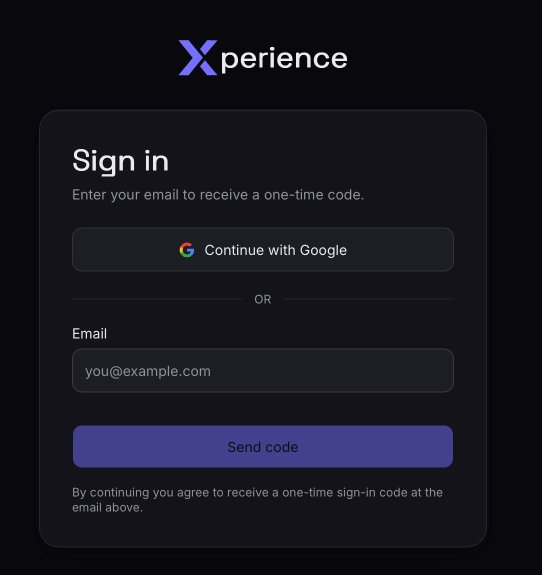
On your phone or computer, go to xperience-app.com, click “Build Your Setup”, enter your email, and type in the 6-digit code Xperience sends you.
[Screenshot: the Xperience sign-in screen]Create a New Profile
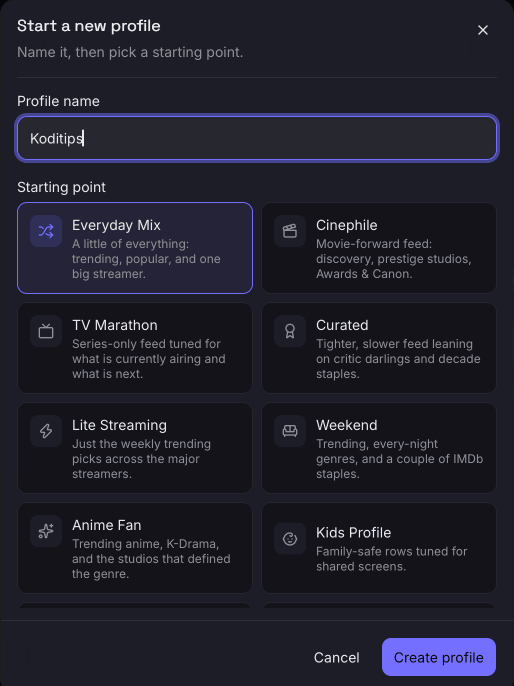
On the Profiles page, click New profile, name it, and start from a preset (or from scratch). The setup wizard opens on Step 1.
[Screenshot: the Profiles page with New profile highlighted]Add and Verify Your Keys
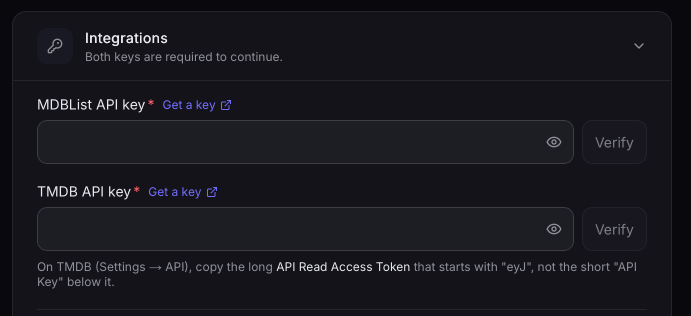
On Step 1, paste your MDBList API key and your TMDB API Read Access Token, then click Verify on each. You can’t continue until both are verified.
[Screenshot: Step 1 with both keys verified (keys blurred out)]Pick Your Home Rows
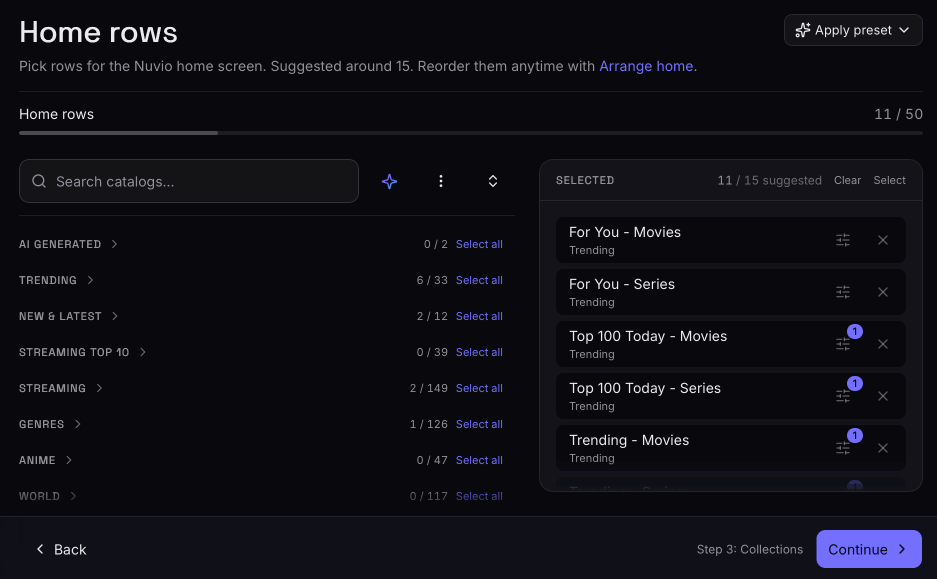
On Step 2, browse the catalog picker and add the rows you want. They collect in your rows rail on the right, where you can drag them into order.
[Screenshot: Step 2 with the catalog picker and rows rail]Build Collections (Optional)
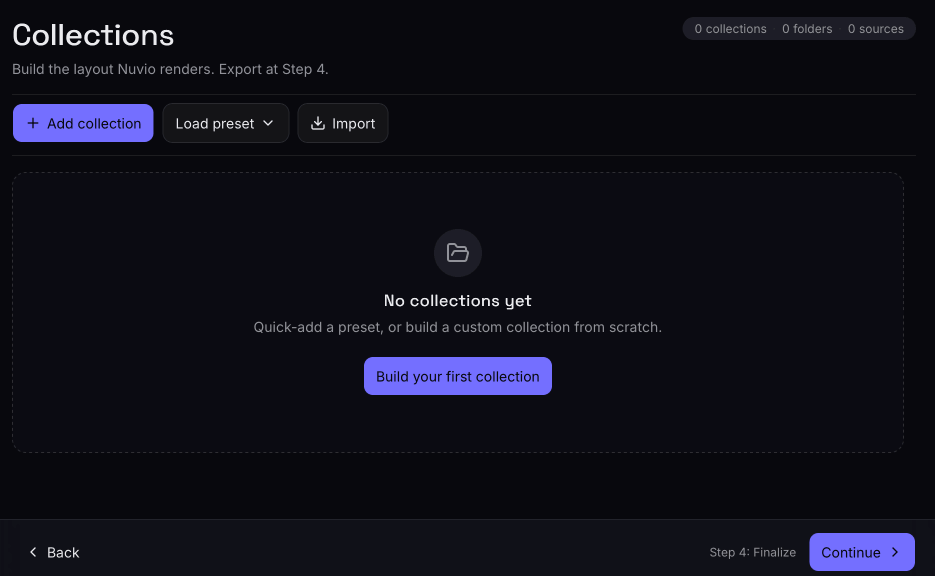
On Step 3, add collections and folders, apply a cover set, and use Arrange home to set the order of everything on your home screen. You can skip this step and come back later.
[Screenshot: Step 3 with a collection and its folders]Copy Your Install Link
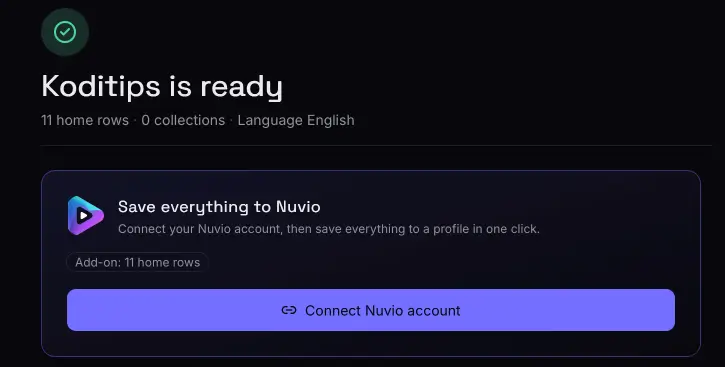
On Step 4, copy your install URL. This is your personal Xperience Nuvio addon link, so keep it private.
[Screenshot: Step 4 showing the install URL and QR code (URL blurred out)]Open Addons in Nuvio
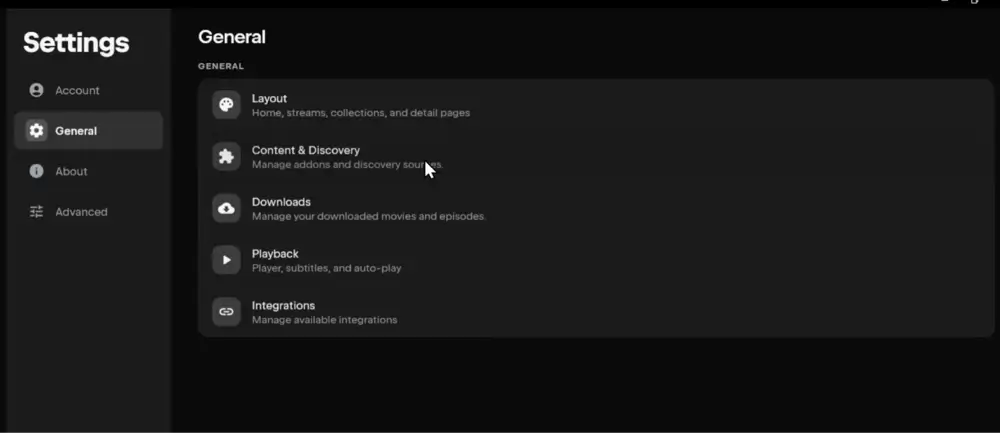
Launch Nuvio on your TV and open Addons from the side menu. You can also get there through Settings, then Content & Discovery, then Addons.
Paste the URL and Click Install
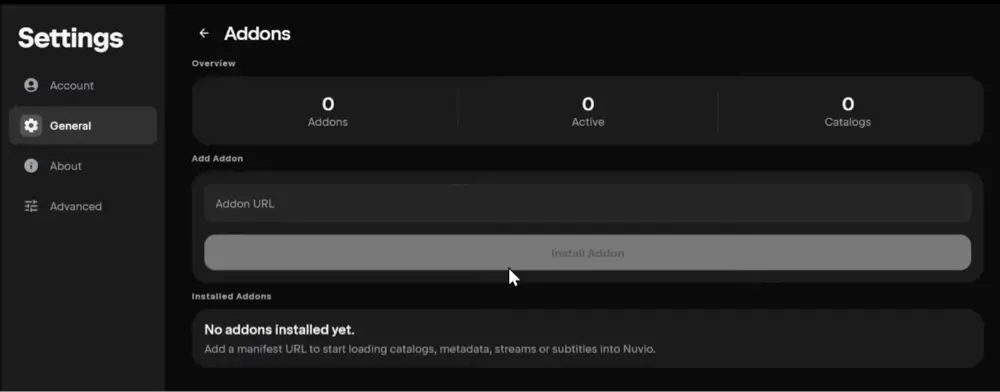
Select the Install addon field, enter your Xperience URL, and select Install. Xperience appears in your Installed list.
Check Your Home Screen
Go back to the Nuvio home screen. Your Xperience rows should now be there.
[Screenshot: the Nuvio home screen with Xperience rows]
That’s it. The Xperience Nuvio addon is now installed. If you use more than one Nuvio profile, repeat step 7 onward on each profile, unless that profile is set to Use Primary Addons.
How to Push Xperience to Nuvio From Your Account
This is the easiest method, and it’s the only one that sends your collections and home layout along with the addon:
- In Xperience, open Settings and link your Nuvio account under Integration accounts.
- On Step 4 of your profile, choose Push to Nuvio and pick the Nuvio profile to install it on.
- Reopen Nuvio on your TV. The addon and your collections are already there.
Push again from Step 4 whenever you change your collections or home order, so every device picks up the new layout.
How to Add Xperience to Nuvio With a QR Code
Step 4 in Xperience also shows a QR code for your install link. Scan it on the device running Nuvio to open the link there. On a Fire TV, it’s usually easier to use Nuvio’s own phone shortcut instead:
- In Nuvio on your TV, open Addons and select Manage from phone.
- Scan the QR code with your phone’s camera.
- Paste your Xperience URL into Add addon by URL and add it.
- Back on the TV, select Confirm on the Confirm addon & catalog changes screen.
How to Add Xperience to Nuvio on Android or iPhone
In Nuvio Mobile, go to Settings, then Content & Discovery, then Addons. Paste your Xperience URL into the Addon URL field and tap Install Addon. If your phone and TV use the same Nuvio account and profile, Nuvio Sync pushes it to your TV too.
Xperience Nuvio Collections: Folders, Cover Sets and Home Layout
Collections only exist in Nuvio. Stremio has no folders, so if you also use Stremio, each catalog inside a collection just shows up there as its own row.
Building collections
On Step 3, add a collection (like Movies), then add folders inside it (like Award Winners or Hidden Gems). Every folder needs at least one catalog source, and Xperience flags empty folders on Step 4 before you can finish. Choose Poster or Landscape tiles, and set a backdrop for the collection.
Cover sets
Select a folder and pick Apply cover set to choose from more than 60 designs. Some cover sets are dynamic, which means their tiles are rebuilt nightly from the titles currently in that folder, so your artwork never goes stale.
Arrange home and pinning
Arrange home puts your rows and collections in one list. Drag them into order and use the pin icon to lock a collection to the top of your home screen.
Fixing the row order in Nuvio
If your rows show up in a different order in Nuvio than in Xperience, it’s because Nuvio saved its own order the first time you rearranged anything, and that order now overrides Xperience. On Nuvio TV, open Manage Addons, select Reorder home catalogs, and turn on Follow addons order. On a phone or tablet, open Nuvio settings, then Home Layout, and tap Reset to Default on the Catalogs & Collections section. Your rows snap back to the Xperience order.
Xperience Nuvio Badges and Avatars
These two extras are built specifically for Nuvio, and they’re free.
Stream badges
Badges are the small labels Nuvio shows on a stream, like 4K, HDR, the source, or a rating. Xperience’s badge studio lets you pick a badge set, recolor and reorder badges, and preview them against a real release title. Click Publish to get a badge URL, then paste it into Nuvio. On Nuvio TV, go to Settings, then Layout, then Fusion badge URLs. On Nuvio Mobile, go to Settings, then Streams, then Badge URLs. Choose Import and Save.
Profile avatars
The avatar gallery has profile pictures for Nuvio. Tap one to copy its image URL and paste it into your Nuvio profile’s Custom avatar URL field, or use Assign to set it directly if your Nuvio account is linked.
Xperience Trakt, Simkl, AniList and Letterboxd Setup
You don’t need any of these. Trending, popular, and genre rows all work without connecting anything. Connect one only if you want your own lists on your home screen:
- Trakt adds your Favorites, Watchlist, and Collection rows, any custom Trakt lists, and unlocks Hide content I’ve already watched.
- Simkl adds your Plan to Watch row and feeds your history into AI recommendations.
- AniList adds your anime lists (Watching, Plan to Watch, Completed).
- TMDB account adds your TMDB Watchlist, Favorites, Rated titles, and lists.
- Letterboxd only needs your username, no login, to add your watchlist and lists.
Changes on Trakt, Simkl, AniList, or TMDB reach your Xperience rows within about half an hour, and MDBList list edits within about an hour.
Xperience AI Rows and AI Search
Add a free key from Gemini, Groq, or DeepSeek on Step 1 to unlock AI for you rows built from your history, catalogs you describe in plain words (like “feel-good sports underdog stories”), and AI search that understands descriptions instead of just titles. If the AI has a problem, search falls back to normal title search, so it never breaks.
How to Change Your Xperience Nuvio Settings
Most changes are instant. Edit your profile in Xperience, and your rows, filters, and artwork update as soon as you save. Nuvio picks them up the next time it loads the addon, and your install link stays the same.
Two things need an extra step. New collections or a new home order only reach devices when you push to Nuvio again from Step 4 (or remove and re-add the addon). And if you ever use Revoke & regenerate, every device on the old link has to install the new one.
You can also keep several profiles, like one for you and a kids’ version with a max rating, each with its own install link. Duplicate a profile to start a variation without rebuilding it.
Xperience Nuvio Addon Not Working? Troubleshooting
Xperience catalog is empty in Nuvio
Check that both keys are verified on Step 1, that at least one home row is switched on, and that you installed your latest URL.
TMDB key won’t verify
You probably copied the short API Key. Copy the long API Read Access Token that starts with “eyJ” instead.
Posters turned grey
You most likely hit RPDB’s daily request limit. It resets each day, or you can pick a different primary poster provider in Step 1.
Rows are in a different order in Nuvio
Turn on Follow addons order under Reorder home catalogs on Nuvio TV, or use Reset to Default under Home Layout on mobile (see the collections section above).
New episodes show up on the wrong day
Set your timezone in Step 1 under More filters. Rows like Airing Today use it to work out local airtimes.
Create with AI keeps failing
It’s almost always the AI key or the provider’s free daily quota. Check the key on Step 1, and wait if you’ve generated a lot today, since free quotas reset daily.
Is Xperience down?
Check the status page at xperience-app.com/status. If one of the providers Xperience depends on is having problems, your catalogs can look empty until it recovers.
No streams when you open a title
That’s expected. Xperience is a catalog addon, so you need a stream addon like AIOStreams or PenguPlay installed as well.
Xperience vs AIOMetadata: Which Nuvio Catalog Addon?
Xperience and AIOMetadata are the two catalog addons most Nuvio users end up choosing between, and they take different approaches.
Xperience vs AIOMetadata Setup and Catalogs
AIOMetadata is a configurable addon. You pick a lineup, adjust catalogs and settings, and save a configuration protected by a password. Xperience is a guided four-step builder with 1,000+ ready-made rows, collections with cover art, badges, avatars, and one-click push to Nuvio. AIOMetadata’s strength is metadata control and anime handling, and you can self-host it. Xperience’s strength is how little work it takes to get a great-looking home screen, but it’s a hosted service you can’t run yourself.
My take: if you want the nicest Nuvio home screen with the least effort, start with Xperience. If you care most about accurate metadata, anime season handling, or running your own instance, AIOMetadata is the better fit.
Using Xperience and AIOMetadata Together
You don’t have to pick one. Xperience can import AIOMetadata’s catalogs as sources for your rows, and it can turn an existing AIOMetadata manifest URL into an Xperience profile with Import config. Plenty of people use AIOMetadata for metadata and anime, and Xperience for the home screen layout.
Is Xperience Legal?
Xperience provides titles, artwork, and catalog lists from sources like TMDB, MDBList, and Trakt. It doesn’t host, link to, or stream any video, so it isn’t in the same category as stream addons.
The legal question comes from the stream addons you pair it with. Kodi Tips does not have the ability to confirm the legal status of those addons, and legality rules differ depending on what country you live in.
User Responsibility
You, as the end user, bear responsibility for all content accessed through Nuvio addons, making it crucial that you understand what is legal to view.
Legal Streaming Options
For those seeking legal and verified streaming options, check our list of legal Kodi addons with 100% legal content.
Xperience Nuvio Addon FAQ
Is Xperience Free?
Yes. Xperience is free, and so are the MDBList and TMDB keys it needs. An optional membership lifts the 50-row limit on profiles and adds extras like debrid streams, merged subtitles, and supporter cover art, but the catalog builder itself costs nothing.
Is Xperience a Nuvio Plugin or an Addon?
Xperience builds an addon. Install your Xperience link in Nuvio’s Addons screen, or push it from Xperience, not in the Plugins section, which is for scraper repositories.
Does Xperience Work With Stremio?
Yes. Step 4 gives you a Stremio install link with your home rows, or with your collections flattened into rows, since Stremio doesn’t support folders.
Is Xperience Open Source?
No, and there are no plans to open source it. Xperience is a hosted service with its own account database, nightly artwork pipelines, and hand-curated catalogs, so there’s no self-hosted version.
Do I Need a Trakt Account for Xperience?
No. Trending, popular, and genre rows all work without one. Connect Trakt only if you want your own lists and watchlist on your home screen.
Does Xperience Provide Streams?
Not on the free version. Xperience is a catalog addon, so pair it with a stream addon like AIOStreams or PenguPlay. Membership adds streams from your own debrid account.
Can I Use Xperience on Multiple Nuvio Profiles?
Yes. Create a separate Xperience profile for each person, each with its own install link, and push each one to the matching Nuvio profile.
Does the Xperience Nuvio Addon Work on iPhone?
Yes. Add your Xperience URL under Settings, Content & Discovery, Addons in Nuvio on your iPhone, or push it from Xperience to your Nuvio profile.
Disclaimer
We have no control over and do not host or upload any video, films, media file, or live streams. KodiTips is not responsible for the accuracy, compliance, copyright, legality, decency, or any other aspect of the content streamed from your device. If you have any legal issues please contact the appropriate media file owners or host sites.