
Nuvio not working on your Firestick, Android TV, or phone? This guide walks you through every common problem and the fix for each one, from “No streams found” to buffering, playback errors, and login trouble.
Most Nuvio problems aren’t bugs in the app. They come from the addons you installed, your debrid service, your network, or the profile you’re signed into. Nuvio’s error messages usually tell you which one, so the headings below use the exact wording you’ll see on screen.
Find your message or symptom, try the fix, and move to the next one only if it doesn’t help.
Nuvio Not Working? Quick Facts
| Latest Nuvio TV version | 1.1.0-beta.2 (September 25, 2026); 1.0.0 was the first stable release |
| Nuvio server | api.nuvio.tv |
| Most common cause | No stream addon installed or enabled on the current profile |
| Most common buffering cause | Your connection or your debrid service’s CDN, not Nuvio |
| Safe first step | Force stop and reopen Nuvio |
| Riskiest step | Clearing app data or reinstalling (back up first) |
| Works on | Firestick, Android TV, Google TV, Android, iPhone, and desktop (alpha) |
Nuvio Not Working? Try These 5 Quick Fixes First
These five checks solve a lot of problems and don’t change any of your settings. Do them in order.
- Force stop Nuvio and reopen it. On a Firestick, go to Settings, then Applications, then Manage Installed Applications, then Nuvio, and select Force stop. On Android TV and Google TV, the same option is under Settings, then Apps.
- Update Nuvio. Open Nuvio’s settings and select Check for updates. Nuvio has been releasing new builds every few days, and many fixes land quickly.
- Check whether Nuvio is down. If everyone is having the same problem at the same time, the fix is to wait (see the next section).
- Try another network. Switch to your phone’s hotspot for a minute. If Nuvio suddenly works, the problem is your home connection or your internet provider.
- Clear the cache, not the data. On Firestick and Android TV, open the app’s settings page (same path as step 1) and select Clear cache. Clear data is a bigger reset that signs you out and wipes local settings.
Make sure the addon you are trying is up and working. Install the best Nuvio addons for the best luck.
Is Nuvio Down? How to Check Nuvio’s Status Today
When Nuvio’s own servers have a problem, you’ll see it everywhere at once: sign-in fails, your addons won’t sync, and the home screen stays empty on every device.
The quickest check is to look at the Nuvio community before you change anything. Search Reddit for “is nuvio down” and sort by new, or use an unofficial status page such as NuvioSync’s. If other people are reporting the same thing in the last hour or two, it’s an outage and there’s nothing to fix on your end.
A status page only tests what its own monitor can reach, so a green light doesn’t prove every feature works. If the status looks fine but only you have the problem, keep going through this guide.
Nuvio Not Working on Wi-Fi but Working on Mobile Data
If Nuvio works on mobile data or a hotspot but not on your home Wi-Fi, something between your network and Nuvio’s server (api.nuvio.tv) is getting in the way. That can be your internet provider, a DNS filter on your router, or a network-wide ad blocker like Pi-hole.
Try these in order:
- Turn off any ad-blocking DNS or router filter and test again.
- Change your device or router DNS to a public resolver.
- Use a VPN. A VPN routes the connection around your provider’s filtering, which is why it often fixes this exact pattern (see the VPN section below).
Nuvio No Streams Found or No Streams Available
Nuvio doesn’t come with any streams built in. Everything you watch comes from the addons and plugins you install, so an empty stream list almost always points back to them. The exact wording of the message tells you where the problem is.
Nuvio “No Stream Addon Available”
The full message reads “Your installed addons do not provide streams for this type of title.” You have addons installed, but none of them supplies streams for movies or series. Catalog addons like Cinemeta or AIOMetadata only fill your home screen with titles. They don’t find anything to play.
Install at least one stream addon or plugin. For a free option, PenguPlay works without debrid. If you have Real-Debrid or TorBox, AIOStreams combines several stream sources into one addon.
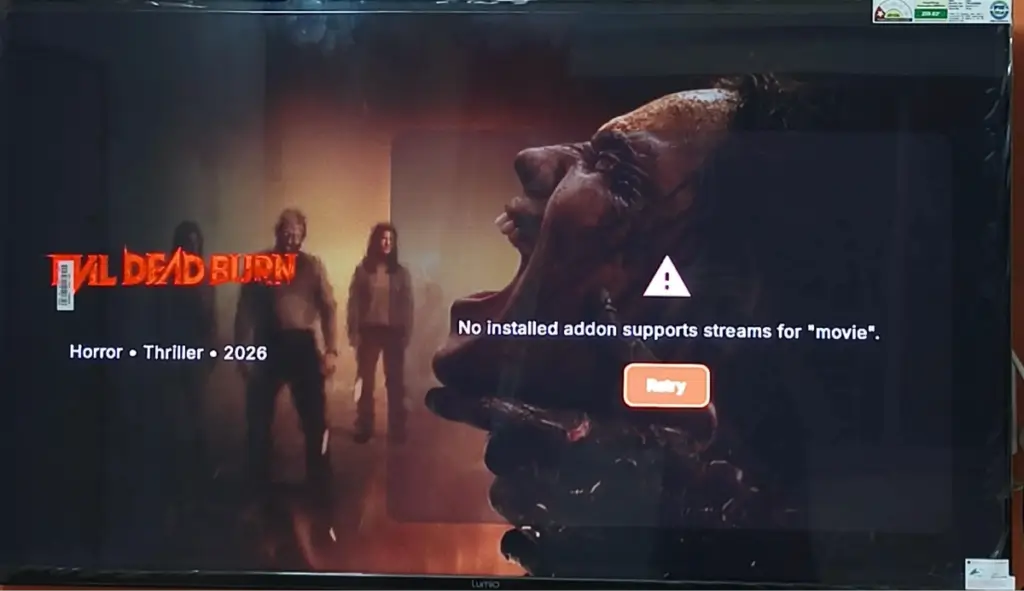
Nuvio “No Installed Addon Supports Streams” for Movies or Series
This one reads “No installed addon supports streams for” followed by the title’s type, and it means the same thing as the message above. You’ll often see it on a Firestick or Android TV right after setting up a new profile, because that profile doesn’t have your stream addon yet.
Open Addons on the profile you’re using and check that your stream addon is listed and turned on. If it’s missing, install it again or turn on Use primary profile’s addons for that profile.
Nuvio “No Streams Found”
The full message is “None of your installed addons returned streams for this title.” Your stream addon is working, but it came back empty for this specific movie or episode.
That points to one of three things:
- The title is too new. Recent cinema releases often have few or no good sources until the digital release.
- A filter in your stream addon is hiding every result, such as a 4K-only or single-language filter.
- Your debrid service no longer has the file cached. Real-Debrid’s content filter has made this much more common (see the Real-Debrid section below).
Try a popular older title. If that plays, your setup is fine and the problem is that one title.
Nuvio “Could Not Load Streams”
This is different from “No streams found.” The message says “The installed stream addons failed to return a valid stream response,” which means an addon errored out instead of answering. The addon’s server may be down, rate-limited, or slow.
Wait a few minutes and try again. If it keeps happening with one addon, open Addons and use Refresh Addons, or reinstall that addon from its manifest URL.
Nuvio “Playback Isn’t Available for This Title With Your Current Setup”
Nuvio shows this before it even searches. It means no stream addon or plugin on your current profile can handle this kind of title, so Nuvio doesn’t bother looking.
Check that a stream addon is installed and turned on for this profile. If the message only shows up on some titles, the catalog you opened them from may use a different ID type than your stream addons accept. Try the same title from search or from a different catalog row.
Nuvio “No Addon Provides Meta for This Content”
This is a metadata problem, not a streaming one. Nuvio couldn’t find a catalog addon that has details (poster, description, episode list) for this title, so the details page can’t load.
Make sure you still have a catalog addon installed, such as Cinemeta, and try opening the title from search. Titles from niche lists sometimes use IDs that only one specific catalog addon understands.
Nuvio Playback Error Fixes
These messages appear after you pick a stream and it fails to play. The stream list worked, so the problem is that one link or your device’s player.
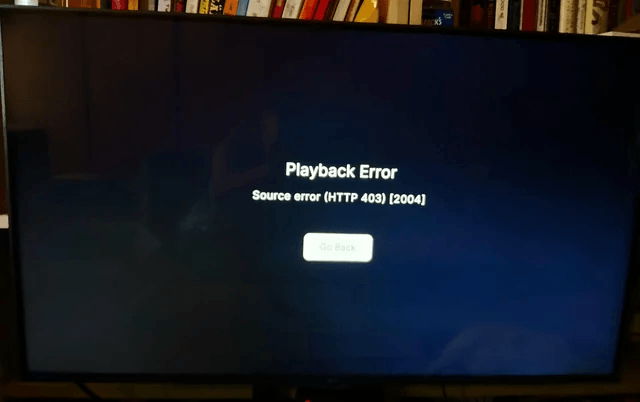
Nuvio Playback Error: “Source Error”
The full message starts with “Source error: The stream source returned invalid or unplayable content. The link may have expired or the server returned an error page instead of video.”
Go back and pick a different stream. Debrid and direct links expire, so this is especially common when you resume something from Continue Watching a day or two later. Starting the title fresh from its details page fetches new links.
Nuvio “The Stream Link Has Expired” or “Stream Server Is Currently Unavailable”
Nuvio has a few versions of this message: the link has expired, the link has expired or been removed, or the stream server is currently unavailable. They all end with “Try a different source,” and that’s the fix.
If you see “Too many requests to the stream source. Wait a moment and try again,” you’ve hit that source’s rate limit. Give it a minute before trying again.
Nuvio “The Stream Source Is Blocked or Restricted”
The server hosting that stream refused the connection. Pick another stream from the list. If every stream fails this way, check that your debrid subscription is still active, and try a VPN in case your network is blocking the host.
Nuvio “Decoder Error” or “Format Your Device May Not Support”
Your device can’t decode that video, which happens a lot with older Firesticks and high-bitrate files: 4K HDR, Dolby Vision, or HEVC 10-bit.
Pick a lower-resolution or different-codec version of the same title. If you want to keep the file, change Nuvio’s Internal Engine to Libmpv, or set Player to External and play it in VLC. A different player often handles a codec that ExoPlayer won’t.
Nuvio Stuck on “Starting Stream” or “Finding Stream Source”
If Nuvio sits on “Starting stream…” or “Finding stream source” and never plays, the stream is either very slow to respond or not responding at all.
Back out and choose a different stream. If it happens on every stream, run through the quick fixes above, then check the buffering section. The same network problems that cause buffering can stop a stream from starting at all.
Nuvio “This Stream Type Is Not Supported”
You tapped a raw torrent stream on a version of Nuvio that doesn’t play torrents directly, and you don’t have a debrid service connected to convert it. Connect Real-Debrid, TorBox, or another debrid service in Nuvio’s settings, or use a stream addon that already returns debrid or direct links.
Nuvio Buffering Fix: The Settings That Actually Help
When a stream buffers every few seconds, the problem is usually between your device and the server sending the video, not Nuvio itself. Start with the settings below, then check your debrid service’s CDN.
Nuvio Buffering Settings: Buffer & Network
On Firestick and Android TV, open Nuvio’s settings, then Playback, then Buffer & Network. These are the settings worth changing:
- Parallel Connections (Custom Network in some versions). Nuvio’s own description says to turn this on “when you experience buffering although your download speed is definitely more than sufficient.” It fetches the stream over several connections at once.
- Enable HTTP/2. Turn this on for faster connections to the stream server.
- ExoPlayer Native Memory. Turn this on if your device supports it.
- Custom Playback Buffers. Leave this alone unless you know what you’re changing. Setting a buffer bigger than your device’s memory can crash the app, and Nuvio warns you when a value goes past the safe limit.
Nuvio TorBox Buffering: Change Your CDN
If you use TorBox and buffering started suddenly, change your CDN. Run TorBox’s speed test on the same device and network, then set CDN Selection in your TorBox Integration Settings to the one it recommends, or to Auto.
Start the stream again after changing it. A link you already opened keeps the old CDN, so resuming the same stream won’t show the difference.
Nuvio Buffering on 4K and Remux Files
Big 4K remux files need far more bandwidth than a normal stream, so they’re where a weak connection shows up first.
- Use a wired Ethernet connection if your device has one, or move your router closer.
- Try Libmpv as the Internal Engine, or VLC as an external player.
- Pick a smaller encode of the same title. A smaller 4K file needs less bandwidth, so it buffers less on the same connection.
Nuvio Not Working With Real-Debrid or TorBox
Debrid services are where most of Nuvio’s good streams come from, so a debrid problem looks like a Nuvio problem.
Nuvio “Could Not Resolve This Debrid Stream”
Nuvio found the stream but your debrid service couldn’t turn it into a playable link. The file may no longer be cached, or your debrid account may have expired or lost its connection to Nuvio.
Pick another stream first. If none resolve, open your debrid settings in Nuvio and reconnect the account. Also check that your subscription is still active on the debrid service’s website. You might also see “Could not open this link,” which points to the same problem.
Nuvio Real-Debrid Showing Fewer Streams
This one usually isn’t Nuvio. Real-Debrid switched on a keyword-based content filter in May 2026, and many popular titles lost most of their cached files. Our Real-Debrid content filter guide explains what changed.
The practical fix is adding a second debrid service. Nuvio lets you connect more than one debrid account, and AIOStreams can search several at once, so a second service fills gaps the first one can’t. Our Real-Debrid alternatives guide compares the options.
Nuvio TorBox Integration Not Working: “Could Not Start Sign-In”
Nuvio connects to TorBox with a code you approve on another device. “Could not start sign-in” means Nuvio couldn’t get a code in the first place, which is usually a network hiccup or a TorBox outage. Try again after a minute.
If you see “This code expired. Try again,” you took too long to approve it. Start the sign-in again and approve the new code right away. If the code flow keeps failing, connect TorBox with your API key instead.
Nuvio Not Working on Firestick, Android TV or Mac
Some problems depend on the device you’re using.
Nuvio “App Not Installed” on Firestick or Android TV
This error during install usually means you downloaded the wrong version of the APK. Nuvio publishes separate 32-bit (armeabi-v7a) and 64-bit (arm64-v8a) builds. Every Fire TV Stick and most Google TV devices need the 32-bit build, while an Nvidia Shield TV Pro can use 64-bit.
If an older Nuvio from another source is already installed, uninstall it first, since Android won’t install over an app signed by someone else. Our Nuvio install guide has the correct download steps.
Nuvio Not Opening, Black Screen or Stuck on Loading
Note exactly where it stops: a black screen right away, the splash screen, or the loading screen after sign-in. That tells you where to look.
- Force stop and reopen Nuvio, then restart the device.
- Update to the latest build. Recent releases have fixed startup and sign-in bugs.
- Check your storage. A nearly full Firestick causes all kinds of loading problems.
- If it stops after sign-in, test on another network. That points to a connection problem rather than the app.
Only clear data or reinstall after these fail. Your addons, library, and progress sync back once you sign in to your Nuvio account, but local settings like player preferences won’t.
Nuvio Keeps Crashing
If Nuvio crashes during playback, it’s often the player running out of memory on a large file. Turn off Custom Playback Buffers if you changed them, keep Managed Memory Budget on, and try a smaller stream. If it crashes on launch, update or reinstall the latest build.
Nuvio Not Working on Mac or Desktop
Nuvio Desktop for Windows and Mac is still an alpha, so expect missing features and more bugs than the TV and phone apps. If macOS says the application “can’t be opened,” right-click the app, choose Open, and confirm. That’s usually macOS blocking an app from outside the App Store. For everything else, check you’re on the newest desktop build before troubleshooting further.
Nuvio Login and QR Code Not Working
Nuvio TV signs you in with a QR code instead of a password. Typing an email and password on a TV is turned off, so keep your phone nearby to finish signing in.
Nuvio QR Code Not Working: “QR Unavailable. Refresh to Retry.”
The QR code couldn’t load, which points to a network problem. Select Refresh QR. If it still won’t generate, check the date and time on your TV, since a wrong clock can break secure connections. Then try another network.
QR codes also expire. If yours scans but sign-in fails, look for the “Expires in” timer and refresh to get a new code. You can also skip the camera: go to the web address shown under the QR code and enter the short code manually.
Nuvio Keeps Signing Me Out
If you see “You have been signed out of Nuvio. Please sign in again,” your session ended and Nuvio needs you to log back in. Sign in again with the QR code. If it keeps happening, update Nuvio and make sure your device’s date and time are set automatically.
A separate message, “You have been signed out of Trakt. Please reconnect,” only affects Trakt. See the Trakt section below.
Nuvio Addons Not Working or Not Showing
Addons control almost everything you see in Nuvio, so a missing or broken addon changes the whole app.
Nuvio “No Catalog Addons Installed” or “No Home Content Available”
Your home screen is empty because you don’t have a catalog addon, or the ones you have don’t provide rows for the home screen. Install a catalog addon such as Cinemeta or AIOMetadata. If you already have one, open Addons and check that its catalogs are enabled on Home.
Nuvio Addons Not Syncing Across Profiles
Each Nuvio profile has its own addon list. If a profile says “Using primary profile’s addons and can’t be changed,” it’s sharing Profile 1’s addons, so switch to Profile 1 to make changes. To give a profile its own list, turn off Use primary profile’s addons for it.
If addons don’t sync between your phone and TV, make sure both are signed into the same Nuvio account and the same profile, then use Refresh Addons on the TV.
Nuvio Plugins Not Showing on TV: “Manifest Has No Providers”
Plugins are different from addons. “Manifest has no providers” means the plugin repository URL you added doesn’t contain any scrapers, usually because it’s a typo or the wrong link. Copy the repository URL again from its source. If plugins show on your phone but not your TV, check whether that TV profile uses the primary profile’s plugins.
Nuvio Search Not Working: “No Searchable Catalogs”
Nuvio searches through your catalog addons, and none of yours support search. Install a catalog addon that does, such as Cinemeta or AIOMetadata. If you see “No active addons,” all of your addons are turned off, so turn at least one back on.
Nuvio Trakt and Continue Watching Not Working
Nuvio can track what you watch through its own account, Trakt, or Simkl. Most problems here come from a disconnected account.
Nuvio Trakt Not Syncing: “Trakt Request Failed”
“Trakt request failed” means Nuvio couldn’t reach Trakt or Trakt refused the request. Trakt has had outages, and it has reportedly tightened what free accounts can do. Disconnect Trakt in Nuvio’s settings and reconnect it. If it keeps failing, our Trakt alternatives guide covers Simkl and other options.
Nuvio Continue Watching Not Working or Not Syncing
Continue Watching comes from whichever tracking provider you picked in Nuvio’s settings. If it’s empty or out of date, check that setting first. You may have Trakt selected while watching progress is only saved to your Nuvio account, or the other way around.
If the row shows the wrong titles or pictures, use Clear Continue Watching Cache. It only removes cached thumbnails and titles, not your watch history.
Nuvio Subtitles and Audio Not Working
Missing subtitle addons and your TV’s audio setup cause most of these.
Nuvio Subtitles Not Working or Not Showing
Nuvio only shows subtitles that are built into the file or that come from a subtitle addon. Install a subtitle addon such as OpenSubtitles V3, then set your Subtitle language in Nuvio’s settings.
If you turned on the option to only show subtitles in your preferred languages, titles without that language won’t show any subtitles at all. Turn it off to see every available track.
Nuvio Subtitles Out of Sync
Subtitles that come from an addon aren’t always made for your exact version of the file. Use Subtitle Delay in the player to shift them. If the gap keeps growing through the movie, that subtitle file was made for a different cut, so pick another one.
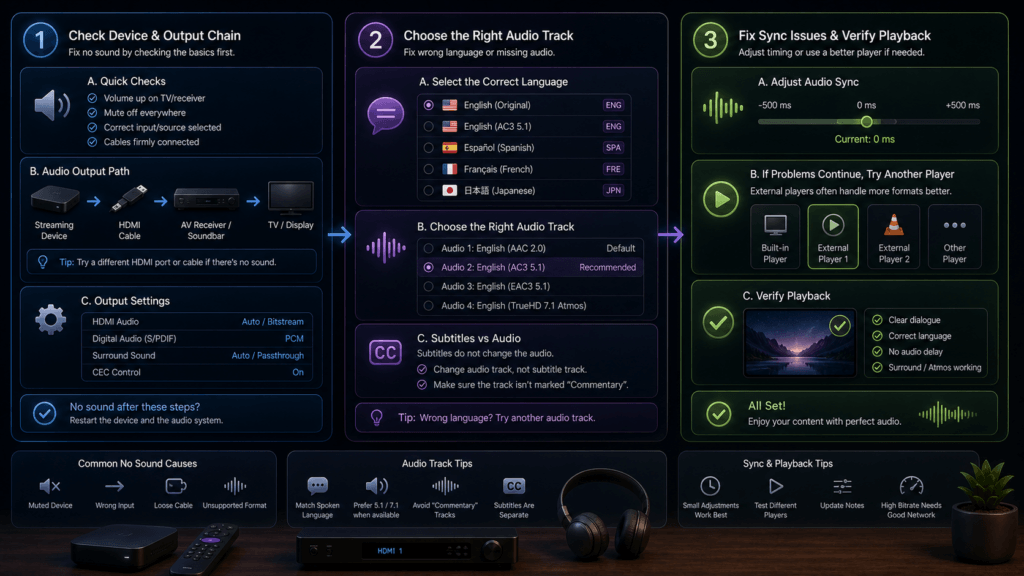
Nuvio Audio Out of Sync or No Sound
If the audio is out of sync, use Audio Delay in the player. Nuvio can remember the delay for each audio device. On Android TV, turning on Tunneled Playback can also fix sync problems on some devices.
If there’s no sound at all, the file probably has an audio format your setup can’t play. Nuvio passes lossless formats like TrueHD and DTS straight to a compatible receiver or soundbar. If you use an optical (SPDIF) connection, turn on Force AC-3 Transcoding so Nuvio converts it to Dolby Digital 5.1. You can also pick a different audio track or stream.
Here is a Nuvio addon directly from the official blog:
Does Nuvio Need a VPN?
Nuvio works without a VPN, but a VPN hides your streaming activity from your internet provider and can get around the network blocking described above. It matters most if you use torrent streams without debrid.
Sign up for a premium VPN and access the internet unrestricted. We offer exclusive discounts for IPVanish and NordVPN, the highest respected VPNs in the streaming community. Both of these VPNs have some great features for users:
- Apps for Android, iOS, Mac, Linux & more
- Zero Logs
- Unlimited bandwidth
- Tier 1 hardware (no speed slowdown)
- Access to hundreds of VPN servers

Is Nuvio Legal?
Nuvio itself is just a media player, but determining the legality of the addons and plugins you use with it is challenging without knowing if their sources have the proper licensing. Kodi Tips does not have the ability to confirm the legal status of these addons.
Plus, legality rules differ depending on what country you live in.
Copyright Concerns with Nuvio Addons
At first glance, many Nuvio addons appear to link to copyrighted works without the necessary consent, which raises the concern about their legality.
Public Domain Titles
Users can access titles in the public domain, which are not subject to copyright laws. This allows free download, streaming, and sharing without legal issues.
User Responsibility
You, as the end user, bear responsibility for all content accessed through Nuvio addons, making it crucial that you understand what is legal to view.
Legal Streaming Options
For those seeking legal and verified streaming options, check our list of legal Kodi addons with 100% legal content.
Nuvio Not Working FAQ
Is Nuvio Still Working?
Yes. Nuvio is actively developed and released new builds several times in September 2026. It was removed from the Google Play Store in September 2026, but it’s still available as an APK from its official GitHub.
Is Nuvio Shutting Down?
We haven’t seen any shutdown announcement. The Google Play removal followed a DMCA complaint, which is why some people assumed the app was closing. Nuvio still installs and updates from GitHub.
Why Is Nuvio Working on My Phone but Not My TV?
Your phone and TV may be on different profiles, have different addons, or be on different networks. Check that both use the same Nuvio account and profile, then compare the installed addons on each.
Does Nuvio Work Without Real-Debrid?
Yes. Free stream addons and plugins such as PenguPlay work without any debrid service. You’ll get fewer high-quality streams, and some streams will show “This stream type is not supported” without debrid.
Does Clearing Nuvio’s Cache Delete My Addons?
No. Clear cache only removes temporary files. Clear data signs you out and resets local settings, but your addons, library, and watch progress sync back when you sign in to your Nuvio account again.
How Do I Update Nuvio?
Open Nuvio’s settings and select Check for updates. You can choose a stable or beta update channel. The beta channel gets fixes sooner but may have new bugs.
Why Does Nuvio Say “Provider Authentication Failed”?
That message comes from AIOStreams’ Usenet support, not Nuvio. Your Usenet provider rejected the login saved in your AIOStreams configuration. Our AIOStreams troubleshooting section covers this and other AIOStreams errors.
Disclaimer
We have no control over and do not host or upload any video, films, media file, or live streams. KodiTips is not responsible for the accuracy, compliance, copyright, legality, decency, or any other aspect of the content streamed from your device. If you have any legal issues please contact the appropriate media file owners or host sites.