
The FireSend app is the room-based sharing tool that many Firestick owners use as a Downloader alternative. it’s no longer in the Amazon Appstore or Google Play, and a different app with the same name now sits in the Appstore. This guide covers what’s confirmed about the original, how people install it, the codes going around, and what to avoid.
The short answer: the original isn’t in the official stores, so installing it means sideloading, and every code I found for it is unverified. If you only want to send a file from your phone to your TV, the Appstore app that now carries the same name is a different, paid app. It’s covered near the end.
Check your stick first. The original is an Android app. The Fire TV Stick 4K Select and the newest sticks that run Vega OS can’t sideload, so the install route below won’t work on them. Open Settings, My Fire TV, About to see what you have, and read our Vega OS explainer for the model list.
Searching FireSend in the Appstore shows a different app. "FireSend: Send Files to Fire TV" by Vixapps is not the original. It has no rooms and no Downloader codes. Skip to the section on it below if that’s what you found.
FireSend Quick Facts
| Detail | Original FireSend |
|---|---|
| What it is | A file and app sharing service built around rooms, opened with a room code. It has a Fire TV app and a website. |
| Created by | Doc Squiffy. His video says he handed it to other developers. The site’s About page still points to him. |
| Price | Free quick share (24 hours, 500 MB per file). Lifetime rooms need a login and allow 1 GB per file. |
| Where to get it | Not in the Amazon Appstore or Google Play listings I could open. Sideload only. |
| Extras | Downloader codes accepted inside the app (per its developer), public rooms, points and raffles, and a Cloner tool |
| Works on | Android-based Fire sticks and Android TV. Not Vega OS. The website works in any browser. |
What Is the FireSend App? Rooms, Codes and Downloader Codes
You open the app, join or create a room, and download what’s inside. A room is opened with a short code, and people fill rooms with files and apps for others to grab. Doc Squiffy says Downloader codes can be entered inside the app too, which is why people compare it with the Downloader app.
It started as a file-sharing project with Fire TV support. The site’s About page lists a 2024 launch, a VIP tier with lifetime rooms, and points, daily rewards and raffles added in 2025. It also lists public rooms that anyone can browse.
FireSend Free vs Lifetime Rooms
- Quick Share: free, lasts 24 hours, 500 MB per file.
- Lifetime Room: never expires, 1 GB per file, and you have to log in to create one.
Treat a quick-share room as a short-term handoff, not a permanent link.
Who Runs FireSend Now? The Sources Disagree
In his video, Doc Squiffy says he built FireSend, handed it to other developers because costs got high, and no longer has anything to do with it. The About page on firesend.download tells a different story. It credits a “FireSend Team” as founder, then refers to the creator as “Doc.”
I wouldn’t assume anything about who is running it or what happens to your data.
Is the FireSend App Still Available? What Is and Isn’t Confirmed
Doc Squiffy’s video says FireSend was removed from both the Amazon Appstore and Google Play.
What I Could Confirm
- The old Amazon Appstore listing for the original app returns “page not found” on both amazon.com and amazon.de.
- The Google Play page for the original (package com.firesend.app) returns not found. Search results still list it, which looks like a leftover from before it went.
- Searching “FireSend” in the Amazon Appstore now leads to a different app by Vixapps.
- FireSend’s website still loads and still tells visitors to install the app from the Amazon Appstore or Google Play, so it hasn’t caught up with the listings.
- APK mirror sites still host copies of the app. One of them says it has chosen not to offer a direct download link.
What I Couldn’t Confirm
- Why or when the original was removed, or whether it will come back.
- Whether the app you get from a sideload page matches the original, or who is running it now.
- A blog that ranks for this keyword says FireSend returned to both stores after a brief removal earlier in the year. The listings I could open don’t back that up.
- Whether any of the Downloader codes that circulate open what their authors say they do.
My read: the original is gone from the official stores, and its name now points at a different app. That’s why a sideload route exists, and also why you should be careful about what you install through it.
How to Install the FireSend App on Firestick (Sideload Steps)
This is the route Doc Squiffy shows in his video. It uses Downloader and a code that opens his own downloads page. Check what loads before you install anything, and only use a stick that runs Fire OS.
Step 1: Turn On Install Unknown Apps
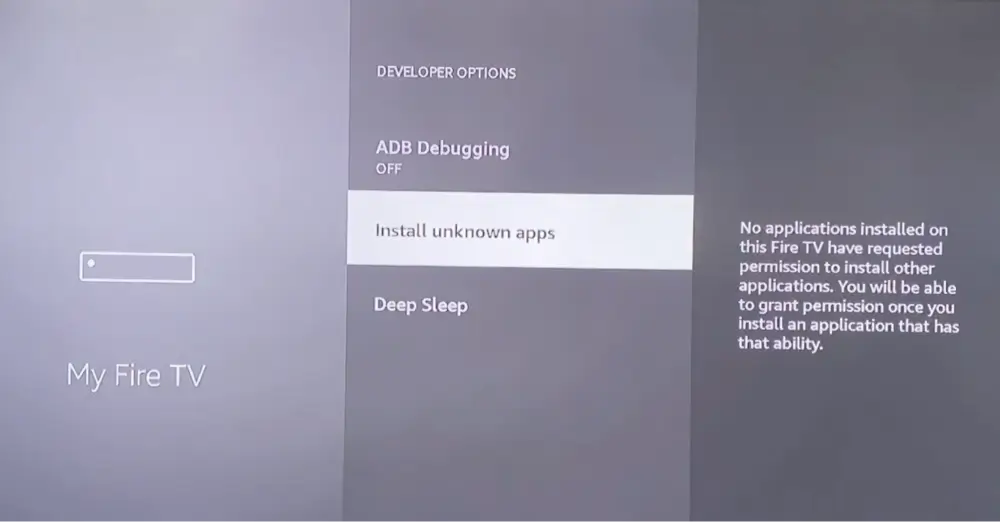
Go to Settings, My Fire TV, Developer Options, then Install Unknown Apps, and switch it on for Downloader. If you don’t see Developer Options, go to My Fire TV, About, highlight the name of your stick and press Select seven times. Our Firestick jailbreak guide shows every screen in order.
Step 2: Install Downloader
Search for Downloader in the Amazon Appstore and install it. If you can’t find it, the Downloader guide covers the fixes.
Step 3: Enter the FireSend Downloader Code
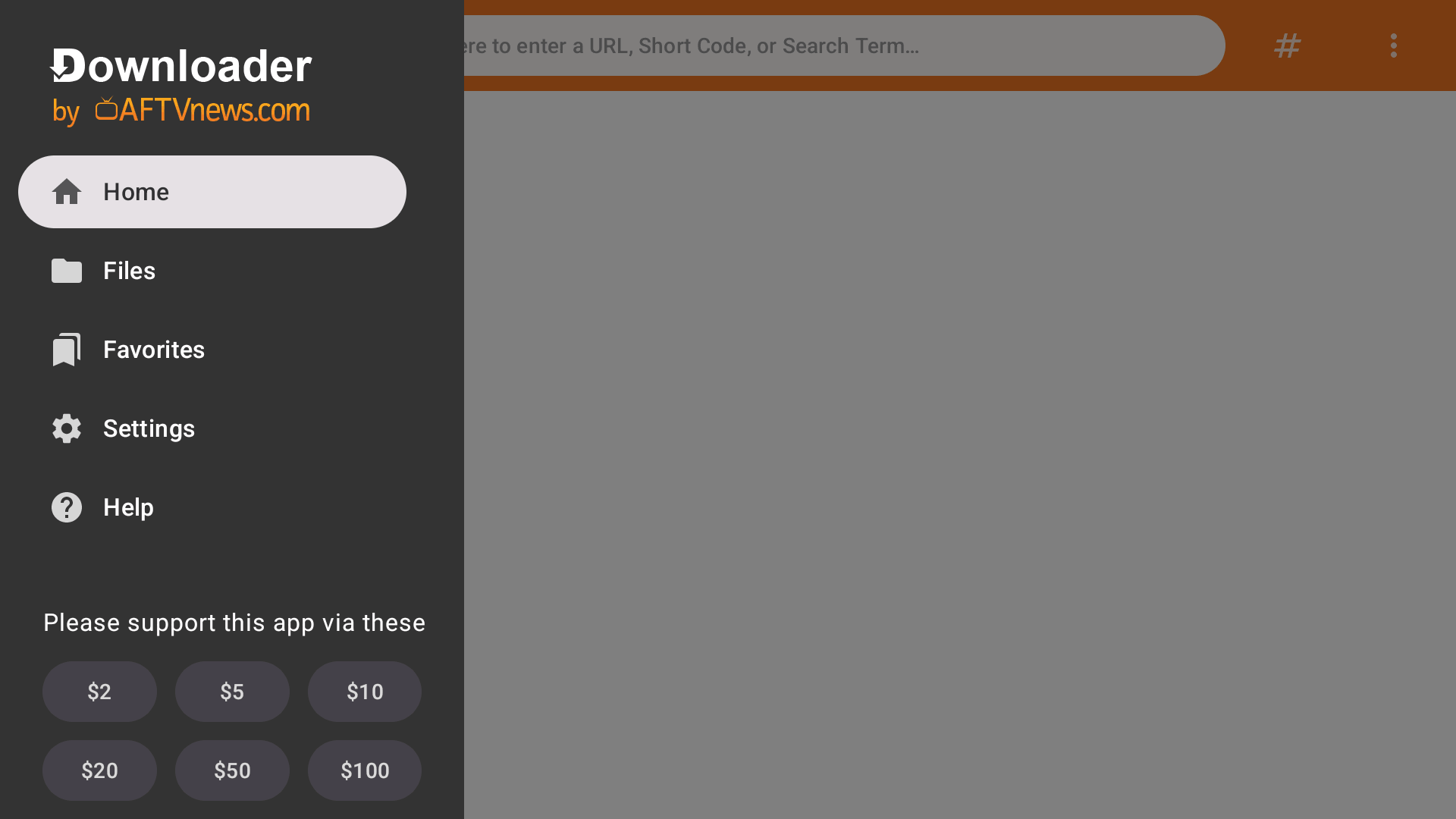
Open Downloader, select the address bar and type 629113, then select Go. This is the code Doc Squiffy gives in his video, and it opens his downloads page. If the page won’t open or you see a parse error, he says the stick is too old to run FireSend.
Step 4: Find FireSend and Install It
On that page, open the app downloads section, use its search and type “Fire Send.” Select it, download it and choose Install. If a pop-up warns you that you aren’t on a VPN, you can read it and continue. When Fire OS asks, allow installs for FireSend too.
Step 5: Open FireSend and Join a Room
Open the app and read the rules it shows on first launch. Enter a room code, or a Downloader code if you have one. The developer warns about ads, so don’t tap anything you didn’t expect.
FireSend Downloader Code: 629113, 75726 and Other Codes Going Around
Several codes circulate for FireSend, and they don’t all go in the same place. Some are typed into the Downloader app. Others are typed inside FireSend. None of them is verified.
| Code | Typed into | Where it comes from | What it’s said to open | My check |
|---|---|---|---|---|
| 629113 | Downloader | Doc Squiffy’s video | His downloads page, where you search for FireSend | Not verified |
| 75726 | Downloader | A Firestick blog guide | FireSend’s website, firesend.download | Not verified |
| 2247677 | Downloader, or the Tools room in FireSend | A post by Doc Squiffy on X | The FireSend Cloner | Not verified |
| 4053104 | Downloader | A third-party guide | The FireSend Cloner | Not verified |
| 730116 | Inside FireSend | A Firestick blog guide | A Downloader entry under Utility Apps | Not verified |
The codes disagree on what they open, and codes get reused, so one can open something different from what a list says. Treat any FireSend Downloader code as unverified until you see where it lands. Check the page that loads before you download anything. You can also skip the codes and type firesend.download into Downloader’s address bar to see FireSend’s own site. Our Nuvio Downloader code guide shows how a verified code should behave: it points to one official source.
FireSend Room Codes: Why Lists Go Stale
A FireSend Downloader code is not the same as a FireSend room code. A room code opens a room inside the app, and rooms are made by users. A quick-share room expires after 24 hours, so any list of “free FireSend room codes” is out of date quickly. I’m not publishing room codes because I can’t see what’s in a room, and nobody vets it.
FireSend Cloner: What It Claims to Do and What I Couldn’t Verify
The FireSend Cloner is a tool inside FireSend. Doc Squiffy announced it on X as a way to keep the Firestick from blocking apps, and he added that not every app will clone. You reach it from the Tools room in FireSend or with a Downloader code (see the table above).
I haven’t run it, and I can’t tell you whether it works on your stick. Amazon has said it blocks apps that give access to pirated content, including ones installed from outside its Appstore, so a tool aimed at getting around blocks carries more risk than a normal install. Anything it pulls in is an APK you can’t vet, so read the safety section below before you try it.
FireSend APK: Mirror Sites and What to Avoid
Searches for a FireSend APK mostly return APK mirror sites that host copies of the app, some labeled with old version numbers or years. I’d avoid them. You can’t tell whether a mirror’s file is the original, an old build or something that was changed, and the original has no official download page left in the stores.
- Use the developer’s route instead: his downloads page through Downloader as shown above, or FireSend’s own website, rather than a mirror.
- Skip any “mod” version. A modified APK is the easiest way to hide something you didn’t ask for.
- Never install a FireSend APK that someone sent you in a room unless you know exactly what it is. Rooms are made by strangers.
If you do sideload anything, you can scan the file before you install it.
FireSend vs Downloader: Which One Do You Need?
Some guides present FireSend as a replacement for Downloader, usually after Amazon pulled Downloader from the Appstore. Downloader was briefly pulled on March 28 and restored on March 30, and it’s available again. FireSend doesn’t replace it. They overlap, but they do different jobs.
| Downloader | FireSend (original) | |
|---|---|---|
| What it is | A browser and file downloader that takes a URL or a short code | A room-sharing app, with Downloader codes accepted inside it (per its developer) |
| Cost | Free | Free quick share, lifetime rooms need a login |
| Where to get it | Amazon Appstore | Sideload only |
| Where the files come from | A URL or code you choose | Rooms made by other people |
| Best for | Installing an APK from a trusted code or URL | Opening other people’s rooms |
If you just want to install an app, Downloader is still the simplest route, and it’s free. Our Downloader guide has the full story. The original FireSend is only worth the trouble if you specifically want what’s in someone’s room.
Is FireSend Safe? Rooms, Ads and the Legal Side
Rooms are created by anyone, nobody vets what’s inside, and Doc Squiffy himself warns about ads in the app. He also tells viewers to check the licensing rules in their own country before installing from his page. The app is also a sideload, which means it has no store review behind it.
Installing FireSend isn’t illegal on its own. What matters is what you download and watch through it. Streaming copyrighted shows and movies without the owner’s permission can break copyright law where you live, whatever app you use, and this isn’t legal advice. If you want free legal TV instead, our best IPTV services list covers licensed options.
Do You Need a VPN With FireSend?
A VPN hides your traffic from your internet provider, and some people want that on a stick with sideloaded apps. It doesn’t make an app licensed or a file safe. You’ll also see searches for a “FireSend VPN.” FireSend isn’t a VPN, and a VPN APK from a room is just another file you can’t vet. I’d install a VPN from the Appstore instead.
NordVPN is our top pick for Firestick and Android TV, and our VPN guide compares the alternatives.
FireSend App Not Working on Firestick? Fixes
Most problems fall into a few groups. Start with the one that matches what you see.
Can’t Find FireSend on Firestick or Not Showing in the Appstore
Search for the original in the Appstore and you’ll get a different app by Vixapps, or nothing. That’s expected, because the original’s listing is gone. Use the sideload steps above.
FireSend Untrusted Source or Won’t Install
This means Install Unknown Apps is off. Go to Settings, My Fire TV, Developer Options, Install Unknown Apps, and switch it on for the app doing the install: Downloader for the first install, and FireSend if it later installs APKs itself. If you don’t see Developer Options, press Select seven times on your stick’s name under About.
FireSend Not Loading or Down
I can’t see its live status. Open firesend.download on your phone’s browser. If it loads there, the problem is on your TV. If it doesn’t, wait and try again later. If a page opened by a Downloader code won’t load or shows a parse error, Doc Squiffy says the device is too old.
FireSend Room Code Not Working
A quick-share room lasts 24 hours, so a code from yesterday has probably expired. Check that you typed it exactly, and ask whoever shared it for a new one. Files in a quick-share room are limited to 500 MB each.
A FireSend Downloader Code Opens the Wrong Page
That’s likely with the codes in the table, because they disagree and none is verified. Back out, don’t download anything, and use the code from the original developer’s video or type firesend.download instead.
FireSend Doesn’t Work on a New Fire TV Stick
If your stick runs Vega OS, such as the Fire TV Stick 4K Select, you can’t sideload at all, so the original can’t be installed. The Vega OS explainer lists the affected models.
FireSend on iPhone, PC and Roku: What Works
The original is an Android app, so it doesn’t install on Roku. I didn’t find an official FireSend version for iPhone or Windows. What you can do is use the website: its About page says FireSend works in any browser on Windows, Mac, Linux, iOS and Android. Doc Squiffy says the original also runs on Android boxes, and Android TV and Google TV boxes can install Downloader from Google Play.
FireSend: Send Files to Fire TV (Vixapps) Is a Different App
If you searched “FireSend” in the Appstore, you probably found this one. It’s listed under the developer Vixapps, first appeared in early October, and costs a few dollars once (I saw about CA$2.78). I found nothing that connects it to the original, and the two work differently.
| Original FireSend | FireSend: Send Files to Fire TV | |
|---|---|---|
| Developer | Doc Squiffy or "FireSend Team" | Vixapps |
| How it works | Cloud rooms that expire | Sends files over your home Wi-Fi from a phone or computer browser, using a QR code on the TV |
| Cost | Free quick share, lifetime rooms need a login | One-time purchase |
| Rooms and Downloader codes | Yes | No |
| Installs APKs | Yes, from a room | Yes, one click through the system installer |
It’s useful if you already have an APK or a file on your phone or computer and want it on your TV without typing a code. It can’t help you find apps, because there’s nothing to browse. It’s also very new, with version 1.0.0 and only five ratings at 2.6 stars. To use it, install it from the Appstore, open it on the TV, scan the QR code with your phone on the same Wi-Fi, and upload your file. You can set an optional 4-digit access code, which matters on shared Wi-Fi where other people are on the same network as your TV.
Apps Like FireSend: Downloader, Unlinked and Other Code Libraries
If what you wanted was a way to install apps without hunting for files, these are the closest options:
- Downloader: free, in the Appstore, and the usual way to install an APK from a URL or code. See our Downloader guide.
- Unlinked: a free app that opens libraries of apps from short codes, which is the closest thing to FireSend’s rooms. Our Unlinked Firestick codes guide tests which codes still load.
- A launcher: if you’re tired of digging for apps, a launcher puts them on your home screen. We compare them in our best launcher for Firestick list.
FireSend FAQ
couWhat Is the FireSend App?
FireSend is a room-based file and app sharing service from Doc Squiffy. You join a room with a code and download what’s inside, and according to its developer it accepts Downloader codes. A different app named FireSend by Vixapps is also in the Amazon Appstore.
Is the FireSend App Still Available?
The original is not in the Amazon Appstore or Google Play listings I could open, and its old listing pages return not found. Searching FireSend in the Appstore now shows a different app by Vixapps. The original can still be sideloaded.
What Is the FireSend Downloader Code?
Several codes circulate. Doc Squiffy gives 629113 in his video, and a Firestick blog gives 75726. Other guides give codes for the FireSend Cloner. I couldn’t verify any of them, so check what the page shows before you download anything.
Is FireSend the Same as Downloader?
No. Downloader is a free browser and file downloader that takes a URL or a short code. FireSend shares files through rooms made by other people. FireSend doesn’t replace Downloader.
What Is FireSend Cloner?
It’s a tool inside FireSend that Doc Squiffy announced as a way to stop the Firestick blocking apps, and he says not every app will clone. I haven’t run it and can’t confirm it works.
Is the New FireSend in the Amazon Appstore the Same App?
No. FireSend: Send Files to Fire TV is by Vixapps, costs a one-time fee, and sends files over your home Wi-Fi with a QR code. It has no rooms or Downloader codes, and I found nothing linking it to the original.
Is FireSend Free?
The original has a free quick-share room that lasts 24 hours with a 500 MB limit per file, and lifetime rooms need a login and allow 1 GB per file. The Vixapps app is a one-time purchase of a few dollars.
Is FireSend Safe?
The original is a sideload with ads and rooms made by strangers, so only install what you trust and check each page before you download. This isn’t legal advice.
Is FireSend Down Today?
I can’t see live status. Open firesend.download in a browser on your phone. If it loads there, the issue is on your TV. If it doesn’t, try again later.
Does FireSend Work on the New Fire TV Stick (Vega OS)?
No. Fire TV sticks that run Vega OS, such as the Fire TV Stick 4K Select, can’t sideload apps, so the original can’t be installed on them. Our Vega OS explainer lists the affected models.
Can I Use FireSend on iPhone or PC?
I didn’t find an official FireSend version for iPhone or Windows. The website says it works in any browser, so you can open firesend.download on a phone or computer.
What Are FireSend Room Codes?
A room code opens a room inside the app, where other people have put files and apps. Quick-share rooms last 24 hours, so lists of room codes go stale fast. Rooms are made by strangers and nobody checks what’s in them.
Is FireSend a VPN?
No. FireSend is a file-sharing app, not a VPN. If you want a VPN, install one from the Appstore instead of from a room or a download page.
Final Thoughts: Is the FireSend App Worth Installing?
The original is hard to recommend. It’s gone from the official stores, the sideload route rests on its developer’s word, every code I found for it is unverified, and nobody vets what’s in the rooms. If you’re set on it, use the developer’s own route, check each page before you download, and keep your expectations low.
If all you want is to install an app, keep Downloader. It’s free and it’s still the simplest route. If all you want is a file from your phone on your TV, the Vixapps app is a separate option.
Disclaimer
We have no control over and do not host or upload any video, films, media file, or live streams. KodiTips is not responsible for the accuracy, compliance, copyright, legality, decency, or any other aspect of the content of streamed from your device. If you have any legal issues please contact the appropriate media file owners or host sites.