

Are you looking for a way to add an electronic program guide and TV scheduling information for your favorite content on Kodi? If so, I will teach you how to set up an EPG on Kodi using reliable IPTV addons.
Here’s a quick overview of what you’ll find in this article:
- What is EPG?
- Do you require an EPG to watch IPTV on Kodi?
- Best EPG addons for Kodi with installation guide
- Is iVue TV Guide for Kodi Dead?
- How Do You Stay Protected While Using These Addons?
- Frequently Asked Questions about EPG on Kodi
What is Kodi EPG?
An EPG, or Electronic Programming Guide, is a menu-based system that shows the schedule of currently playing and upcoming TV shows. EPGs are more commonly known as TV listings, TV Guides, or simply Guides.
Most TV service providers, like Xfinity TV and DIRECTV, offer a TV Guide with a detailed media content schedule for various channels. They help you know what each channel is showing so that you don’t have to manually go into each one.
Habitual TV streamers have come across EPGs without actually realizing that what they’re seeing, Here is one example:
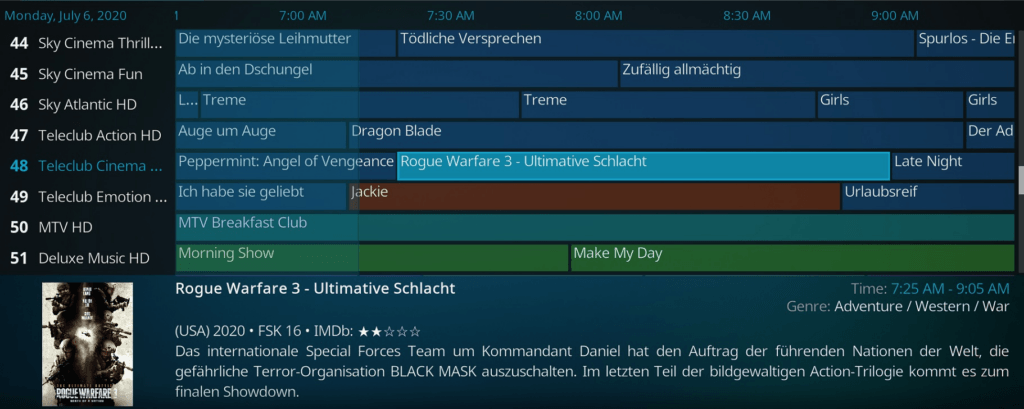
Adding an EPG on Kodi is not so direct, but there are ways to do it. Read on to find out how!
Do you require an IPTV add-on to add EPG on Kodi?
Yes, you require a free or paid IPTV add-on to add an EPG on Kodi. IPTV stands for Internet Protocol Television, which is basically a transfer protocol for television content delivery. Kodi addons that provide a listing of live channels are called IPTV addons.
IPTV is different from traditional TV in that traditional TV requires a signal transmission between broadcasters and your TV set. You can only watch what the station is broadcasting. But on IPTV, you can watch what you want by surfing the internet and selecting your favorite movie or show.
There are a variety of IPTV content formats such as Video on Demand (Netflix, Amazon Prime Video, and Hulu are the best examples) as well as time-shifted media to view live content later with playback control (BBC iPlayer offers time-shifted media). There is also live television for live content like sports and events (Fox Sports Go and CBS Sports are classic examples of live IPTV).
So by installing an IPTV addon, you can stream not only live TV and radio but can add an EPG menu to your Kodi. Read on to know the best IPTV addons for Kodi with the EPG setup procedure.
Must read: How to set up m3u playlist in Kodi?
Best EPG Addons for Kodi
In this section, I’ll walk you through three of our most recommended Kodi EPG addons that will help you get the TV guide on your Kodi setup.
Jet TV Guide

Jet TV Guide is currently the most actively recommended free EPG addon for Kodi, and it’s the one we’d start with. It installs from the Magnetic Repository, the same repository behind Mad Titan Sports, and its main menu covers EPG, Sporting Events, Sporting Stats, Search Channel Programs, and Favorites.
Two things to know before you install it: Jet TV Guide is still in Beta, and it’s confirmed to work on Kodi 20 Nexus and 21 Omega. It’s also a guide only: it shows you what’s on, but it doesn’t stream anything by itself. Pair it with a live TV or sports addon like Mad Titan Sports to actually watch what’s listed.
How to set up an EPG on Kodi with Jet TV Guide
- On the Kodi home screen, click the gear icon to open Settings, then go to System Settings > Add-ons and turn on Unknown sources.
- Go to Settings > File Manager > Add source, double-click None, and enter https://magnetic.website/repo/ as the path. Name the source magnetic and click OK.
- Return to the Kodi home screen, click Add-ons, then click the package icon in the top-left corner to open the Add-on browser.
- Select Install from zip file > magnetic, then choose the repository.magnetic zip file and wait for the “Add-on installed” notification.
- Select Install from repository > Magnetic Repository > Video Add-ons > Jet TV Guide > Install.
- Once it’s installed, open it from Add-ons > My add-ons > Video add-ons > Jet TV Guide.
Like Mad Titan Sports and most other Magnetic Repository addons, Jet TV Guide is a third-party, unofficial addon, so see the safety section below before you dive in.
PVR IPTV Simple Client

PVR IPTV Simple Client is a Kodi add-on to stream IPTV live TV, radio, and add EPG to Kodi. This add-on supports live TV and an EPG menu in many countries, including those formerly of the USSR.
Note: PVR IPTV is not yet stable, and you may face issues with streaming and EPG menu timings.
How to set up an EPG on Kodi with PVR IPTV Simple Client?
Before you get started with the procedure, you need to have the Global Search add-on installed. By default, it comes installed on Kodi, but if for some reason that is not the case, you might have to install it manually.
- Launch Kodi on your PC and select Add-ons on the left pane
- Click on the Search option and type in PVR IPTV Simple Client in the search box. Hit OK.
- Select the PVR IPTV Simple Client result and hit Install in the next window
- Wait until the installation is complete and go back to Add-ons to find the installed PVR clients.
- Now, select PVR IPTV Simple Client and click on Configure
The Configure window will open up next with three Settings to change:
- General
- EPG Settings
- Channel Logos
Under General settings,
set Location to Local Path (include Local network) if you have the M3U8 playlist on the local network, or to Remote Path (Internet address) if you have the M3U8 and EPG URLs from the IPTV provider. Paste the M3U8 URL in the specified field and turn the toggle on for Cache m3u at local storage.
Set the Numbering channels starts at to 1.
Under the EPG Settings,
set Location to Local Path (include Local Network) if you already have an XMLTV EPG file on your local drive or network. Make sure you set the XMLTV path the same as the EPG path on your local network. Set location as Remote Path (Internet address) if you have an EPG URL, which would most likely be similar to the M3U playlist URL.
Do not touch the other settings and hit OK.
Restart Kodi on your PC and go to TV. You will see a message reading PVR manager is starting up
Once the PVR Manager is set up, select your favorite channel from the EPG and enjoy streaming
TV Guide (Official Kodi Repository)
Quick heads-up before you install this one: TV Guide is still listed in Kodi’s own official Program Add-ons repository, but it hasn’t been meaningfully updated in years. Its listing on the official Kodi Wiki hasn’t changed since the Kodi 18 “Leia” era. It may still install and work depending on your Kodi version, but Jet TV Guide above is the actively maintained pick if you want something more current.
With TV Guide, you can view what’s on-air right now. You can add any EPG to the TV Guide addon by acquiring an XMLTV file.
Having an XMLTV file or URL handy makes it easy to retrieve EPG data. If you don’t have the XMLTV file, you can get it from the GitHub page by going to Code > Download ZIP.
Once you have your XMLTV URL or file from another source, follow the below steps to install TV Guide on Kodi.
How to set up an EPG on Kodi with TV Guide
- On Kodi home screen, click on Add-ons
- Next, click on Download
- Under Download, select Program Add-ons
- In the list of Program Add-ons, select TV Guide
- Finally, click on the Install button and wait for the installation to complete
- Return to the home page and head to Add-ons > My add-ons > Program add-ons > TV Guide and click Open
If you haven’t loaded it yet, you will be prompted to show the location of the XMLTV file containing your EPG information.
That’s it! You’ll now be able to view the EPG menu.
Is iVue TV Guide for Kodi Dead?
iVue EPG TV Guide used to be one of the most popular free EPG addons for Kodi, and it’s part of why we originally recommended it here. As of this update, the exact install link this guide (and most others) used, http://ivuetvguide.com/install, returns a 403 Forbidden error and can’t be reached.
The project doesn’t look fully abandoned: the official site at ivuetvguide.com is still online and shows the addon under newer “iVue 2” branding. But the specific install source this article and others have pointed to for years is no longer reachable, and we couldn’t find a current, working repository URL to replace it with. Until that changes, use Jet TV Guide or PVR IPTV Simple Client above instead.
How Do You Stay Protected While Using These Addons?
Jet TV Guide and the other addons in this guide are third-party, unofficial Kodi addons, which means Kodi will flag the standard warning about addons accessing personal data the first time you install one. That’s normal and not unique to any single addon here, but it’s worth using a Kodi VPN while you stream so your connection stays private.
We recommend NordVPN as the #1 Kodi VPN service. We also offer an exclusive discount for IPVanish. Both are well-respected in the Kodi community and offer:
- Apps for Android, iOS, Mac, Linux & more
- Zero Logs
- Unlimited bandwidth
- Tier 1 hardware (no speed slowdown)
- Access to hundreds of VPN servers


Frequently Asked Questions about EPG on Kodi
Is IPTV legal?
Yes, IPTV is legal in the US as long as your ISP has appropriate licenses for the purchased content you are streaming and is not infringing on any copyright laws.
What is an XMLTV Guide?
XMLTV is an XML-based file format with TV listings that helps you manage your TV viewing. Most IPTV providers use XMLTV as the reference template in their systems. You can install the XMLTV zip file from here.
What format is EPG?
EPG TV program supports the following file formats:
XMLTV
JTV
DRE-EPG TV program
Where can I get XMLTV from?
Mentioned below are the most popular XMLTV data sources in different locations.
XMLTV.org (most European countries)
Schedules Direct (Canada, The USA)
IceTV (Australia)
NZ XMLTV (New Zealand)
Can I Get a More Reliable, Paid XMLTV Source?
Yes. Free XMLTV sources can be inconsistent or go down without warning. If reliability matters, a paid grabber service like Schedules Direct (around $25/year, covering the US and Canada) pulls listings from a maintained backend instead of a free public feed.
Final Thoughts
Adding an EPG TV Guide to Kodi still isn’t a one-click process, but there are still solid ways to do it in 2026. Jet TV Guide is currently the most actively maintained free option, though it’s still in Beta and needs a companion addon like Mad Titan Sports to actually stream what it lists. PVR IPTV Simple Client remains a dependable choice if you already have an M3U playlist and XMLTV EPG URL from your IPTV provider.
The official TV Guide addon is still technically available through Kodi’s own repository, but treat it as a fallback rather than a first choice since it hasn’t been updated in years. iVue, unfortunately, no longer has a working install source as of this update.
We hope this guide to set up an EPG on Kodi helped you. Which method worked for you? Please let us know in the comments section below.