
Check out our wired Fire TV Stick ethernet connection guide below and get less buffer while you stream on Kodi today with a hardwired internet cable.
The number one reason users buffer on Kodi is because they don’t have a wired internet connection. Luckily, you can even get a wired Fire TV Stick ethernet connection even though the device has no ethernet port! Follow our guide below and get better use out of your Amazon Fire TV Stick.
The amount of latency on a wireless internet connection is 10x worse than a wired connection (60ms vs 750ms during our testing). This means that no matter how fast your internet connection is, Kodi will buffer in order to “catch up” its stream. Add in the Amazon Fire TV Stick, which only has 1 GB of RAM and this means your Stick has to work extra hard to load a stream in to memory.
Luckily, the 2nd generation Fire TV Stick has a micro-USB port and there is a solution to use this port to add a wired Fire TV Stick ethernet connection to your device!
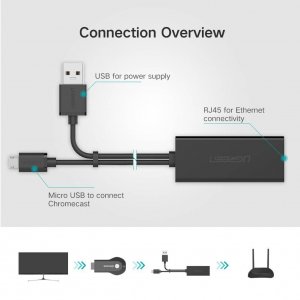
First off, check out this UGREEN Ethernet Adapter cable on Amazon. It converts micro-USB back to USB and also comes with an ethernet port right on the cable. Even better, this cable IS SUPPORTED by the Amazon Fire TV Stick and can be used to get hardwired internet to your Stick.
After you have the cable in hand, use our guide below to setup your wired Fire TV Stick ethernet connection.
How to Setup Wired Fire TV Stick Ethernet Connection Tutorial
- Disconnect your Fire TV Stick from the TV and unplug its micro-USB power cable.
- Connect your UGREEN Ethernet Adapter. If you are confused, the micro-USB male end on the adapter plugs into the female plug on the Fire TV Stick and the male USB plug on the adapter plugs into the female slot on the Fire TV Stick power supply. Plugging your power back in to the wall and the Fire TV Stick into the TV should leave you with the center ethernet adapter open.
- Turn on your Fire TV Stick. When it’s powered on and at the main menu, plug your ethernet cable into the ethernet slot on the adapter. Your Fire TV Stick should recognize your new wired ethernet connection with a prompt in the corner and should connect automatically because wired connections take precedence over wireless!
- If you want to verify that you are on your home wired connection, head into the Network Settings, hover on the Configure Network option and verify on the right hand side that it says Wired (Connected).
And that’s it! With a cheap ethernet adapter off the internet, you can remove one of the biggest limitations with the Amazon Fire Stick and get a wired Fire TV Stick ethernet connection. This will give you faster speeds and less buffer in Kodi.
Let us know on Twitter or Facebook if we can help you out!
PROTECT YOURSELF ON THE INTERNET
Sign up for a premium Kodi VPN and access the internet unrestricted. We offer exclusive discounts for IPVanish and NordVPN, the highest respected VPNs in the Kodi community. Both of these VPNs have some great features for users:
Apps for Android, iOS, Mac, Linux & more
Zero Logs
Unlimited bandwidth
Tier 1 hardware (no speed slowdown)
Access to servers hundreds of VPN servers


International gambling laws require licensed operators to verify
player identities. The procedure prevents unauthorized access to gaming accounts and blocks attempts at fraudulent
activity. Document verification may be requested before the first withdrawal to prevent unauthorized
access and ensure compliance with gambling regulations.
The account creation process at Sky crown casino
eliminates unnecessary complications. Fast loading speeds
between sections keep players engaged while exploring.
Friday is the day to look forward to if you’re after a match deposit bonus.
You’ll also have to remember to use the bonus code while depositing.
If you win more than that, the superseding amount will be debited
from your account before a withdrawal can be requested. There are
no complicated rules for this bonus, as all you have to do is deposit using cryptocurrency throughout the week.
While crypto users aren’t eligible for some bonuses,
they get to claim a 10% cashback every single week, and the
maximum you can get is $1,000 USDT. The bonuses come with a wagering requirement, and this is set to
40x the bonus amount you get.
“This whole setup is one massive bait-and-switch and I feel genuinely stupid for falling for it. I thought I was signing up with a reputable, established casino brand that I had seen in ads and on… See more Suddenly there are “security checks” and “system errors” every time. Everything looks like the real casino until you try to withdraw. The casino seemed promising, but within a few minutes I realized that it was poorly designed. The site looks almost the same, which makes it easy to fall for, but once you deposit — your money is gone.
References:
https://blackcoin.co/evospin-casino/
Leider haben in der heutigen Zeit viele Casinos
ein maximales Auszahlungslimit, so auch das Platincasino.
Danach gibst du einfach den gewünschten Auszahlungsbetrag an und bestätigst die Auszahlungsanfrage.
Nutze dabei immer die Option, die du bereits für eine erfolgreiche Einzahlung im Platincasino vorgenommen hast und die ebenfalls
vollumfänglich verifiziert wurde. Deine Gewinne kannst du auch jederzeit im Platincasino zur Auszahlung bringen.
Für Vielspieler lohnt ein Blick auf monatliche Caps und Sonderaktionen. Der Pokerbereich
bietet Cash-Tables und Turniere je nach Verfügbarkeit.
Für Vielspieler bieten Favoritenlisten und Benachrichtigungen Struktur.
Im Laufe der vergangenen Jahre konnte der Glücksspielanbieter viele Kunden für sich gewinnen und machte
auch immer wieder durch ansprechende und vielversprechende Bonusangebote auf sich aufmerksam.
Aufgrund der Lizenzausstellung der Malta Gaming Authority (damals noch unter
dem Namen LGA bekannt) ging das Casino dann erst ein Jahr später,
im Jahr 2013, online. Die Anfänge machte das Platincasino im Jahr 2012 und wurde durch die Red Rhino Limited in Malta gegründet.
In unseren Platincasino Erfahrungen verraten wir dir zudem, welche Zahlungsmethoden angeboten und wie schnell deine
Gewinne ausgezahlt werden.
References:
https://online-spielhallen.de/n1bet-casino-auszahlung-ihr-umfassender-leitfaden/
Doesn’t work for me, either. My Fire tv stick still connected to wifi. The ethernet adapter works well for my chromecast.
“Luckily, the 2nd generation Fire TV Stick has a micro-USB port”. Reading that and seeing that my stick had a micro usb port I figured my stick must be 2nd generation. Turns out that the 1st gen also has 1 and that is why I cannot get a wired connection. Slightly confusing statement by koditips
Doesn’t work. Not transmitting any data or info. Fire stick still connected to wifi
Followed the instructions but nothing happens when I connect the ethernet cable, any ideas? Cable was previously connected to a Youview box and worked fine
Thank you for your responses.
I have done this. I would rather use the 802.11acas it is faster than using a USB Ethernet.
1 – Ditch the stick. It’s horrible, outdated tech. You can get a Mi Box from Walmart for $69. https://tinyurl.com/gwd6rn6
2 – For some people, hard-wiring to the router just isn’t possible due to placement issues. Consider a powerline kit, which uses in-home wiring to create an ethernet connection. There are cheaper options, but I chose these based on the features and functionality: https://tinyurl.com/y8226cd4
No. It says this ” : The ethernet adapter is designed for use only with Chromecast devices. Use with other devices may damage the device, your router, and/or your Ethernet Adapter.”
Sophie, there is an ethernet connection on your box and on your router. Get a long enough ethernet cable to run from a to b, then go into your settings and change from wifi connection to ethernet.
Ethernet cable from your box to the router.
How would you do this if you have an android box? As you can tell by my question I’m not that tech savvy. Please let me know. Thank you.