

This guide shows you how to watch UFC on Kodi and the best free UFC Kodi addons that stream all live events on Paramount+ (formerly PPV). Alternatively I’ll show you how to install the official Paramount+ addon on Kodi and use your official account to watch UFC Kodi events.
There are two ways to watch UFC on Kodi 2026. The official way is Paramount+, which now streams every UFC event in the US, pay-per-view cards included, and runs on Kodi through the SlyGuy addon or as a normal app on Firestick. The unofficial way is a third-party live sports addon, which pull free streams from around the web.
This guide covers both. You’ll find the next event’s start times, the best UFC Kodi addons that still work, how to set up Paramount+ on Kodi, Firestick, Roku and smart TVs, and fixes for the errors that tend to show up right as the main card starts.
Next UFC Event on Kodi & Firestick: UFC 332, Date and Start Times
| Event | UFC 332: Silva vs. Wang (Women’s Flyweight Title) |
| Date | Saturday, October 3, 2026 |
| Venue | Delta Center, Salt Lake City, Utah |
| Early prelims | 4pm ET / 1pm PT on Paramount+ |
| Prelims | 6pm ET / 3pm PT on Paramount+ |
| Main card | 8pm ET / 5pm PT on Paramount+ and CBS |
| UK and Ireland | TNT Sports (prelims), TNT Sports Box Office (main card) |
| Canada | Sportsnet+ and Citytv |
| Australia | Main Event on Kayo or Foxtel (main card), Paramount+ (prelims) |
UFC 332 is the first numbered card with its whole main card on regular CBS, so anyone in the US with an antenna can watch Natália Silva vs. Wang Cong for free. The co-main event is Deiveson Figueiredo vs. Payton Talbott. We update this box before every card.
Is UFC Still PPV in 2026? No, Every Numbered Event Is on Paramount+
UFC no longer sells pay-per-view in the US. Since January 1, 2026, every numbered event and every Fight Night streams live on Paramount+ at no extra cost.
That changes the math for Kodi PPV fans. A numbered card used to cost $79.99 on its own. Now a Paramount+ Essential plan at $8.99 a month covers every event that month, and select main cards also air free on CBS.
Pay-per-view hasn’t disappeared everywhere. In the UK, Canada and Australia, numbered main cards are still sold as PPV (see the country section below).

How to Watch UFC on Kodi: Official vs Unofficial Addons
Kodi doesn’t come with UFC built in. You add it through an addon, and the UFC Kodi addon you pick decides how reliable your fight night is.
| Paramount+ Kodi addon (official) | Unofficial UFC Kodi addons | |
| Cost | $8.99/month (Essential) or $13.99/month (Premium) | Free |
| UFC coverage | Every US card, early prelims to main event | Whatever links are live that night |
| Stream quality | Up to HD, stable | Varies a lot, often SD during big cards |
| Reliability | High | Links drop, addons disappear |
| Legal status | Fully licensed | Unlicensed streams, check your local laws |
| Needs a VPN? | Only when traveling outside the US | Strongly recommended |
If you just want the fight to work, the official route is the safer bet. If you want free options or already use Kodi sports addons, the list below covers the ones still working.
Best UFC and MMA Kodi Addons for Live Fights and PPV Events
These are the best Kodi addons for UFC PPV and Fight Night streams right now. All of them are unofficial third-party addons that scrape links from the public internet. Kodi Tips doesn’t host any of these streams, and links can come and go on fight night. Use a VPN with every one of them.
The Loop Kodi Addon: Fight Zone for Live UFC Cards

The Loop is the most dependable live sports addon on Kodi right now and the first one we’d open on a UFC night. Its Fight Zone section collects live streams for UFC, boxing, MMA and wrestling events, and the rest of the addon covers the NFL, NBA, MLB, NHL, golf and 24/7 channels.
The Loop needs no account or debrid service. It installs from The Loop repository at https://loopaddon.uk/theloop/ and runs on Kodi 20 Nexus and Kodi 21 Omega.
Click here to install The Loop.
Mad Titan Sports Kodi Addon: Live Events and Fight Nights
Mad Titan Sports is the other big live sports addon to have installed. It has sections for Live Sports, Replay Zone, Sports Networks and Live TV, and its live events list picks up UFC cards alongside everything else on the night’s schedule. The Replay Zone is the part to remember the morning after a card, once the live links from the night before are gone.
The Mad Titan Sports Kodi addon lives in the Magnetic repository (https://magnetic.website/repo/) and was still getting updates in September 2026. Our full walkthrough covers every step.
Click here to install Mad Titan Sports.

Fights On Demand Kodi Addon: UFC PPV and Fight Night Replays
Fights On Demand (FOD) is built only for combat sports. It has sections for UFC PPV, UFC Fight Nights, the latest UFC and MMA replays, Bellator, ONE Championship, BKFC and boxing replays, with both free and Real-Debrid links. Without a Real-Debrid account, stick to the free sections, since the debrid ones won’t play.
FOD installs from the Lost Soul repository. That repo was offline when we last checked it, so if it won’t load for you, use The Loop’s Fight Zone for live cards instead.
For boxing replays, FightTube and Knock Out are also worth a look.
The Crew Kodi Addon: UFC / MMA Sports Section

The Crew is best known as an all-in-one movie and TV addon, but its sports menu has a dedicated UFC / MMA section, plus boxing, WWE and a sports replays area. If you already use The Crew for movies, it’s the easiest way to add UFC without installing anything new.
It installs from The Crew repository at https://team-crew.github.io/.
Click here to install The Crew.
Full Match TV Kodi Addon: MMA Fight Replays
Full Match TV is a replay addon, not a live one. Its MMA section is handy for catching up on a card you missed the next morning, and it also covers the NFL, NBA, MLB, NHL, motorsports and WWE. Because it’s replay-only, it won’t help while a card is live, so pair it with The Loop or Mad Titan Sports for fight night.
Full Match TV is in the Diggz repository at http://diggz1.me/diggzrepo/.
Planet MMA Kodi Addon: UFC Fight Library
Planet MMA (formerly UFC Finest) is a UFC and MMA addon that mixes live links with one of the deepest fight archives on Kodi, from full events to fighter content. It now lives in the Supremacy repository.
Click here to read our Planet MMA guide.

Retired and Unreliable UFC Kodi Addons: SportsDevil, Sport HD, DaddyLive and Rising Tides
A lot of UFC Kodi guides still recommend addons that no longer work. These are the ones to skip or treat with caution:
- SportsDevil: dead for years. Many older sports addons were built on it, and they went down with it.
- Sport HD: removed from the Bugatsinho repository. Community reports in 2026 claimed a copy of it carried malicious code. That hasn’t been confirmed, but we’d uninstall it rather than take the chance.
- DaddyLive: reported dead on January 2026.
- Rising Tides: hit and miss. Some lists still include it, but users reported it offline in 2026. Its links only appear a few minutes before an event starts, so it can look broken when it isn’t. Our Rising Tides guide has the install steps if you want to try it.
How to Install a UFC Kodi Addon on Firestick
Every addon above installs the same way. You add its repository as a source, install the repository zip, then install the addon from inside the repository.
- Open Kodi and go to Settings > System > Add-ons. Turn on Unknown sources and select Yes on the warning.
- Go back to Settings > File manager > Add source. Select <None>, enter the repository URL (for example https://loopaddon.uk/theloop/), and give it a short name like loop.
- Go to Add-ons > Install from zip file, open the source you just named, and select the repository zip.
- Wait for the “Add-on installed” message, then open Install from repository.
- Open the repository, go to Video add-ons, select the addon and choose Install.
One catch if you’re buying new hardware: Amazon’s newest Fire TV Stick HD and 4K Select run Vega OS, which can’t sideload Kodi at all.
Our jailbreak Firestick guide lists which models still work.
Best Kodi Build for Live Sports: Why an Addon Is Better
Kodi builds for sports promise everything preinstalled, but they bundle dozens of addons you don’t need, slow down a Firestick and break when one of their sources dies. For UFC, install The Loop and Mad Titan Sports on a clean copy of Kodi instead. You get the same streams with less buffering.
We explain more in 5 reasons you shouldn’t install a Kodi build.
Kodi VPN for UFC Addons
Live sports links are some of the most watched streams on the internet, and free UFC streams can come from sources you can’t vet. A VPN hides what you’re streaming from your internet provider and lets you reach addons that are blocked in your region.
We recommend NordVPN. It’s fast enough for HD live streams on a Firestick, has a native Fire TV app, and our link gets you the current discount. Surfshark is a good cheaper pick that allows unlimited devices. See our best VPN for Kodi guide for the full comparison.

Paramount Plus Kodi Addon: Watch UFC on Kodi With Your Subscription
Yes, you can get Paramount+ on Kodi.
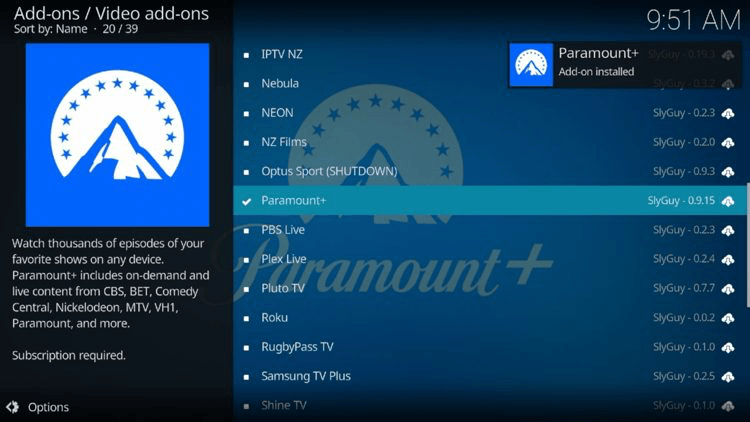
The SlyGuy repository has a Paramount Plus Kodi addon that signs in with your existing Paramount+ account and plays the same live and on-demand content as the app, UFC cards included.
If Kodi is already your main app, this gets you official, stable streams without leaving the interface you use every day. You still need a paid Paramount+ subscription, and the addon works in the US.
How to Install the Paramount Plus Kodi Addon From the SlyGuy Repo
- Turn on Unknown sources under Settings > System > Add-ons.
- Go to Settings > File manager > Add source, enter https://slyguy.uk and name it slyguy.
- Go to Add-ons > Install from zip file > slyguy > repository.slyguy.zip.
- Open Install from repository > SlyGuy Repository > Video add-ons > Paramount+ and choose Install.
- Open the addon, sign in with your Paramount+ email and password, and look for UFC under Live or Sports.
SlyGuy addons get fixed quickly when a streaming service changes something. If the player shows a black screen, update the addon and its InputStream Adaptive dependency first.
UFC Fight Pass on Kodi and Firestick: The UFC Fight Library
UFC Fight Pass is UFC’s own streaming service. In the US it isn’t the home of the big events anymore, but it still has the full UFC fight library and replays, and it streams live cards in countries without a local broadcaster.
On Firestick, UFC Fight Pass is available as the official UFC app in the Amazon Appstore. Search for UFC, install it and sign in. We haven’t found a maintained UFC Fight Pass Kodi addon, so on Kodi your options are the Paramount+ addon or the unofficial addons above.
How to Watch UFC on Firestick: Paramount+ App Setup
The easiest way to watch UFC on Firestick is the official Paramount+ app. It’s in the Amazon Appstore, it carries every US card from early prelims to the main event, and setup takes about two minutes.
How to Install Paramount+ on Firestick
- From the Fire TV home screen, go to Find > Search and type Paramount+.
- Select the Paramount+ app and choose Get or Download.
- Open the app and choose Sign In, or Sign Up if you’re new.
- Sign in with your email and password, or use the on-screen code option from your phone.
- Open the UFC hub from the menu or search for UFC to find live and upcoming cards.
Best App to Watch UFC on Firestick
For US viewers, Paramount+ is the best app to watch UFC on Firestick. It’s the only app with every card live. Use the UFC app (Fight Pass) for the fight library, and Kodi with The Loop or Mad Titan Sports if you want free streams.
Can You Watch UFC on a Jailbroken Firestick?
Yes. A “jailbroken” or “fully loaded” Firestick is just a Firestick with Kodi and third-party addons sideloaded onto it, so it can run the UFC Kodi addons listed above. Streams on those addons are unofficial, can buffer during big cards and aren’t legal in every country, so use a VPN. For a stable stream, the Paramount+ app works on the same stick.
Is UFC on Paramount+ Essential or Premium? UFC Price and Plans
UFC is on both Paramount+ plans. Neither plan charges extra for numbered events.
| Plan | Price | UFC included? | Ads |
| Paramount+ Essential | $8.99/month or $89.99/year | Yes, every event | Yes, in the app’s on-demand content |
| Paramount+ Premium | $13.99/month or $139.99/year | Yes, every event | No ads on on-demand content, plus your local CBS station live |
Live TV, UFC included, keeps its commercial breaks on both plans. Premium is worth it mainly if you want your live local CBS feed in the app or ad-free movies and shows.
How to Watch UFC on Roku, Google TV and Smart TVs
Paramount+ runs on nearly every streaming device, so UFC works almost anywhere.
How to Watch UFC on Roku
Go to the Roku home screen, open Search, type Paramount+, and add the channel. Sign in and open the UFC hub. The UFC app (Fight Pass) is also on Roku for the library. UFC isn’t free on Roku, but some Roku users get a 7-day Paramount+ trial when they add it as a Roku channel add-on.
How to Watch UFC on Google TV and Android TV
Open the Google Play Store on your Google TV or Android TV box, install Paramount+, and sign in. Android TV boxes can also run Kodi, so every Kodi option in this guide works there too.
UFC App on Samsung, LG and Other Smart TVs
Samsung and LG smart TVs both have the Paramount+ app in their app stores, along with Vizio, Hisense and TCL models on Roku or Google TV. If your TV is too old for the app, plug in a Firestick or Chromecast instead.
How to Watch UFC for Free: CBS Simulcasts and Free Trials
There are a few legit ways to watch UFC for free in the US:
- CBS simulcasts: select numbered main cards air live on CBS. UFC 332 on October 3 is the first, and a digital antenna gets it free.
- Walmart+: new Walmart+ members get a 30-day Paramount+ Essential trial through the Video Streaming Choice perk.
- Prime Video Channels and Roku: eligible users can get a 7-day Paramount+ trial as an add-on channel.
Paramount+ dropped its standard 7-day free trial for direct sign-ups in early 2026, so partner trials like these are the main free options now. They change often, so check the offer before you sign up. The unofficial Kodi addons above are free too, but they don’t come with any guarantee of a working stream.
Can You Watch UFC on YouTube TV, Hulu, Prime Video or Netflix?
- YouTube TV: you can watch UFC cards that air on CBS through YouTube TV’s local CBS channel. Everything else needs Paramount+.
- Amazon Prime Video: UFC isn’t included with Prime, but you can add Paramount+ as a Prime Video Channel and watch UFC inside the Prime Video app.
- Hulu, Netflix and Peacock: none of them carry live UFC events.
How to Watch UFC Replays on Kodi and Firestick
- Paramount+: full event replays and a large UFC library are on demand in the app, on Firestick and in the Kodi addon.
- UFC Fight Pass: the deepest fight library, going back to the early UFC events.
- Kodi: Fights On Demand and Full Match TV have UFC replay sections, and The Loop has replays alongside its live Fight Zone.
- YouTube: UFC posts free highlights and select full fights on its official channel, which you can watch through the YouTube Kodi addon.
How to Watch UFC Outside the US
Paramount+ holds the US rights. Other countries have their own broadcasters, and several still sell main cards as pay-per-view.
How to Watch UFC in the UK: TNT Sports
TNT Sports shows UFC Fight Nights and the prelims of numbered events in the UK and Ireland. Numbered main cards are sold as pay-per-view on TNT Sports Box Office. TNT Sports streams through the HBO Max app in the UK, which works on Firestick.
How to Watch UFC in Canada: Sportsnet+
In Canada, UFC airs on Sportsnet+, Citytv and TVA Sports. Fight Nights and prelims are included with Sportsnet+, while numbered main cards are generally sold as PPV. UFC isn’t on Paramount+ in Canada.
How to Watch UFC in Australia: Paramount+ and Kayo
Australian Paramount+ carries UFC Fight Nights and the prelims of numbered events, and Network 10 shows some prelims free-to-air. Numbered main cards are pay-per-view through Main Event on Kayo Sports or Foxtel.
Paramount+ UFC With a VPN: Does It Work?
If you’re a US Paramount+ subscriber traveling abroad, a VPN connected to a US server lets you keep watching your UFC events on Paramount+. Paramount+ does try to block VPN traffic, so pick a VPN with good streaming support. NordVPN works well for this. Keep in mind that using a VPN to get around regional licensing can break a streaming service’s terms of use.
UFC Kodi Addon or Paramount+ Not Working? Fixes for Buffering, Black Screen and Errors
Kodi Sports Addons Not Working: The Loop, Mad Titan Sports and No Stream Available
If The Loop or Mad Titan Sports won’t open or shows empty lists, update the addon first (long-press it and choose Update, or check the repository for a new version). Then clear Kodi’s cache and restart Kodi. On fight night, many links only appear shortly before a segment starts, so an empty event can simply be too early.
If you see the error “stream not available” in Kodi while using this addon, it means that the addon was unable to retrieve results for your query. Kodi addons are simply search engines into the public internet and do not host any content of their own. When you select a title or stream in Kodi, it searches the internet for media streams matching the title you’ve select. If it cannot find anything, you get the “stream not available” error. Most likely, you will have to try a different addon.
For persistent buffering in Kodi, see our guide to stop buffering in Kodi.
UFC Kodi Live Stream Basic Tips
For Kodi live streaming, there are some basic tips you need to follow in order to have the best possible experience:
- Make sure your Kodi box is hardwired into your internet via an ethernet connection. Wi-fi connections add a lot of latency, which can make live streaming impossible.
- Use a recently updated addon, rather than one that hasn’t been updated. Live IPTV links are volatile and require effort to upkeep. The longer an addon has gone without an update, the more likely it is that links inside of it are dead.
- Use acestream links whenever possible. Popular events have a lot of people trying to use the same live links, which cause heavy buffering. Acestream links shoulder the bandwidth amongst users, making a heavy link actually more effective. Acestream’s will leave your connection exposed to your ISP and other users, so put yourself behind a VPN.
Paramount+ UFC Buffering
Big UFC cards put a lot of load on Paramount+. If the stream keeps buffering, lower the quality in the player settings, restart your Firestick, and switch to a wired ethernet adapter if you can. Close other apps and devices streaming on the same network. If buffering only happens on big cards, it’s usually on Paramount+’s end and clears within a few minutes.
Paramount+ Black Screen on Firestick
A black screen with sound, or a black screen with a spinning wheel, is usually an app or cache problem. Go to Settings > Applications > Manage Installed Applications > Paramount+, choose Force Stop and Clear Cache, then reopen the app. If it keeps happening, uninstall and reinstall Paramount+ and check for a Fire TV system update under Settings > My Fire TV > About.
Paramount+ Error Code 6000 and 6015 on Fire Stick
Error codes 6000 and 6015 point to a connection or ad blocker problem. Restart your router and Firestick, then clear the Paramount+ cache as above. If you’re using a VPN, disconnect it or switch servers. Paramount+ blocks many VPN servers, and that can show up as a 6000-series error too.
Paramount+ Ad Blocker Error on Firestick
If Paramount+ says an ad blocker was detected, turn off any ad-blocking app on your Firestick (like Blokada), any ad-blocking DNS such as a Pi-hole, and ad blocking in your router settings. Then relaunch the app.
UFC Fight Pass vs Paramount+: Which Do You Need?
For live UFC events in the US, you need Paramount+. It has every card. UFC Fight Pass is an add-on for hardcore fans who want the full historical library and other promotions’ events. Outside the US it’s the opposite in some countries: Fight Pass streams live UFC events wherever there’s no local broadcaster.
Frequently Asked Questions About Watching UFC on Kodi
Can you watch UFC on Kodi for free?
Yes, with unofficial live sports addons like The Loop and Mad Titan Sports, which scrape free streams from the web. Quality and reliability vary, the streams aren’t licensed, and a VPN is recommended. The official Paramount+ Kodi addon needs a paid subscription.
What is the best Kodi addon for UFC PPV?
The Loop is the most reliable free option, thanks to its Fight Zone section. For a guaranteed stream, the Paramount+ Kodi addon from the SlyGuy repository carries every US card, including the numbered events that used to be pay-per-view.
Does Paramount+ have UFC replays?
Yes. Full event replays and a large library of past UFC fights are on demand in Paramount+ after each card.
Does Paramount+ Essential have ads during UFC?
Live UFC broadcasts include their normal commercial breaks on both plans. Essential also shows ads on on-demand content, while Premium removes them.
Can you watch UFC early prelims on Paramount+?
Yes. In the US, the early prelims, prelims and main card all stream on Paramount+.
Does UFC Fight Pass include PPV?
Not in the US anymore, because there is no US pay-per-view. Numbered events stream on Paramount+. In some countries without a local broadcaster, Fight Pass streams live events.
Is UFC free on Roku?
No. You need a Paramount+ subscription in the Paramount+ channel, though some Roku users can get a 7-day trial through the Roku channel add-on.
Does Paramount+ UFC work in Canada?
No. Paramount+ Canada doesn’t carry UFC. Canadian fans watch on Sportsnet+, Citytv and TVA Sports.
Can you watch UFC without Paramount+?
In the US, only the main cards that simulcast on CBS, which you can watch with an antenna, cable or a live TV service like YouTube TV. Everything else is on Paramount+.
Is UFC on Amazon Prime?
Not with a standard Prime membership. You can add Paramount+ as a Prime Video Channel and watch UFC in the Prime Video app.
Disclaimer
We don’t host any links or support any content. The Kodi addon below don’t host any links. They are nothing more than search engines that search the public internet. Kodi is nothing more than a media center and stores no content, legal or otherwise. KodiTips does not support software piracy, and bears no responsibility for what you decide to do with the contents of this article.
The intent of this post is to help users find content that they are already legally entitled to view but can’t for some reason and need an alternative. For more information, please see our full disclaimer here.