
The Spotify Kodi addon is an unofficial add-on that plays your Spotify Premium account inside Kodi. It still works on Kodi 21 Omega, but only the glk1001 version does, and it no longer uses a username and password login.
Before you install it, know the catch: the add-on doesn’t run on Android 10 or newer, which rules out the newer Fire TV Sticks.
- Quick facts
- Does it still work in 2026?
- Which devices work with Spotify on Kodi
- How to install it
- How to log in with Kodi Spotify Connect
- Fixes for common problems
- Other ways to play Spotify
Related: Best Kodi Music Addon: Youtube Music
Spotify Kodi Addon Quick Facts
| Add-on | Spotify (unofficial, plugin.audio.spotify) |
| Maintainer | glk1001, forked from Marcelveldt’s original |
| Source URL | https://glk1001.github.io/ |
| Latest version | 1.3.14 (February 2025) |
| Kodi version | Kodi 21 Omega |
| Spotify account | Premium |
| Login method | Zeroconf pairing through the official Spotify app on the same network |
| Not supported | Android 10 and newer |
| Tested by the developer | Windows 11, Ubuntu 24.04, Android 9 (Fire TV Cube), some Arm devices |
| Last checked | October 2026 |
Is There a Spotify Kodi Addon That Still Works in 2026?
Yes, but it’s an unofficial one. The original add-on came from Marcelveldt. It was last updated in 2021 and its GitHub page now asks for new maintainers, so treat it as abandoned.
The version that works today is glk1001’s fork, built for Kodi 21 Omega. In August 2024 Spotify removed password sign-in for this kind of add-on, so version 1.3.10 replaced it with a pairing method called zeroconf. Only 1.3.10 or newer can log in, and the latest is 1.3.14 from February 2025. Spotify has changed its login once already, so another change could break the add-on until the developer ships a fix.
Spotify Kodi Addon GitHub Repository: Which Fork Works?
Several copies of the Spotify add-on sit on GitHub, and most are out of date. Use glk1001/plugin.audio.spotify, installed through the glk1001.github.io repository page. Older guides point to the ldsz zip, a Kodi 19 build last updated in 2021, or to the Marcelveldt repository. Skip both.
Spotify Premium Kodi: What You Need Before You Install
To use the add-on you need:
- A Spotify Premium account. The add-on’s description says it works with a Premium account, and we found no documented way to use it with a free one.
- Kodi 21 Omega. The developer built it for Omega and hasn’t said it works on Kodi 22.
- A supported device. Check the next section first, because the Android version decides everything.
- The official Spotify app on a phone or computer on the same network. You only need it once, to log in.
- Unknown sources switched on in Kodi. The add-on comes from outside Kodi’s own add-on list.
Does Spotify on Kodi Work on Firestick, Android TV and Other Devices?
The developer tested the add-on on Windows 11, Ubuntu 24.04, Android 9 on a Fire TV Cube, and some Arm devices. It was not tested on Mac. The main limit is in the README: it won’t work on Android 10 or newer, because Google changed permissions in a way that makes it very hard for apps to run the program the add-on bundles.
Fire TV devices run Amazon’s Fire OS, so what matters is which Android version your stick is built on. This table uses Amazon’s own device table.
| Fire TV device | Fire OS and Android version | Spotify Kodi addon |
| Fire TV Stick 4K Max (2nd gen, 2023), Fire TV Stick 4K (2nd gen, 2023), Fire TV Stick 4K Plus (2025) | Fire OS 8, Android 11 | Not supported (Android 10 and newer) |
| Fire TV Cube (3rd gen, 2022) | Fire OS 7, Android 9 | Matches the developer’s test (a Fire TV Cube on Android 9) |
| Fire TV Stick 4K Max (1st gen, 2021), Fire TV Stick (3rd gen, 2020), Fire TV Stick Lite (2020), Fire TV Cube (2nd gen, 2019) | Fire OS 7, Android 9 | Same Android level, but the developer doesn’t name these devices |
| Fire TV Stick 4K (1st gen, 2018), Fire TV Cube (1st gen, 2018) | Fire OS 6, Android 7.1 | Older than anything the developer tested, so unconfirmed |
| Fire TV Stick 4K (3rd gen, 2026), Fire TV Stick HD (2026), Fire TV Stick 4K Select (2025) | Vega OS | Kodi can’t be installed at all |
The newest sticks run Amazon’s Vega OS, which can’t sideload apps. Our Vega OS explainer lists the affected devices. If you’re shopping for hardware that can run Kodi add-ons, see our Android TV box buying guide. On an Android TV or Google TV box, the Android version is shown in the device’s About screen.
How to Get Spotify on Kodi: Install the Spotify Kodi Addon (Step by Step)
These steps follow the developer’s instructions for Kodi 21 Omega. The Spotify zip is about 18 MB, so the install can take a few minutes.
How to install the Spotify Kodi addon on Kodi 21 Omega from the glk1001 repository.
Total Time: 5 minutes
Turn On Unknown Sources
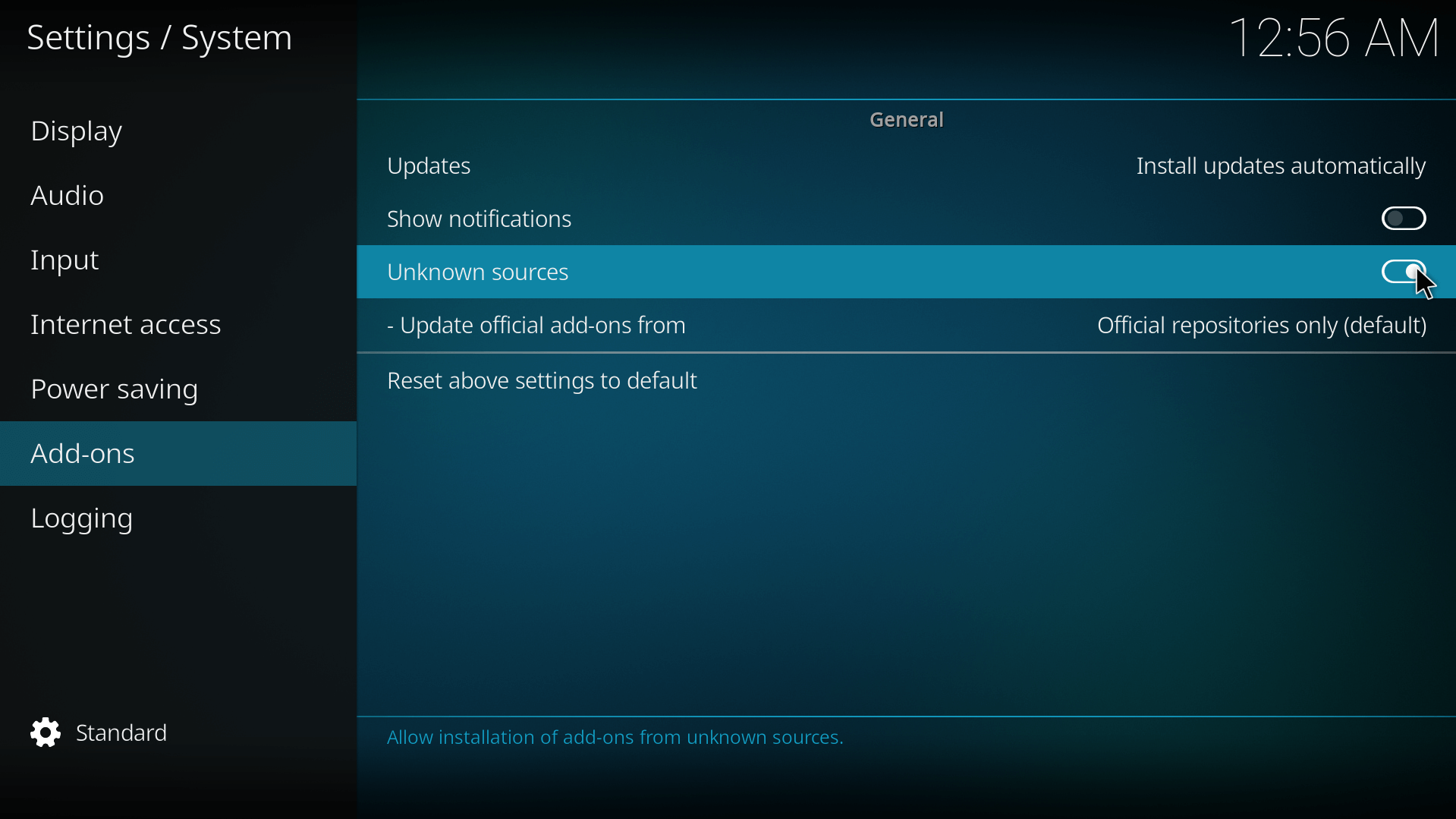
From the Kodi home screen, open Settings (the gear icon), go to System > Add-ons and switch on Unknown sources. Select Yes on the warning.
Open the File Manager
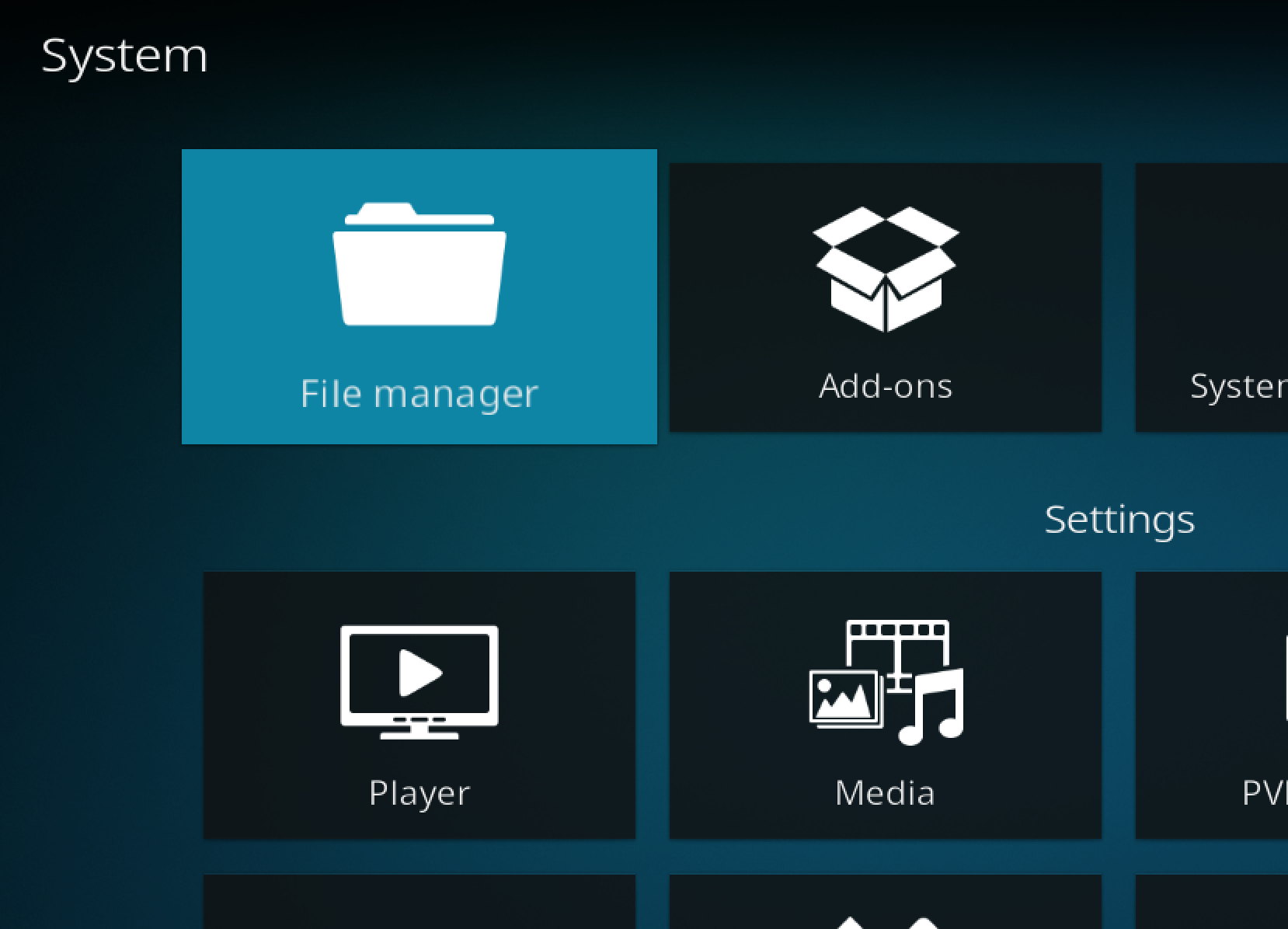
Go back to Settings, open File manager and select Add source.
Add the glk1001 Source

Select None, type https://glk1001.github.io/ and select OK. Name the source glk1001 (or anything you will recognize) and select OK again.
Select Install From Zip File
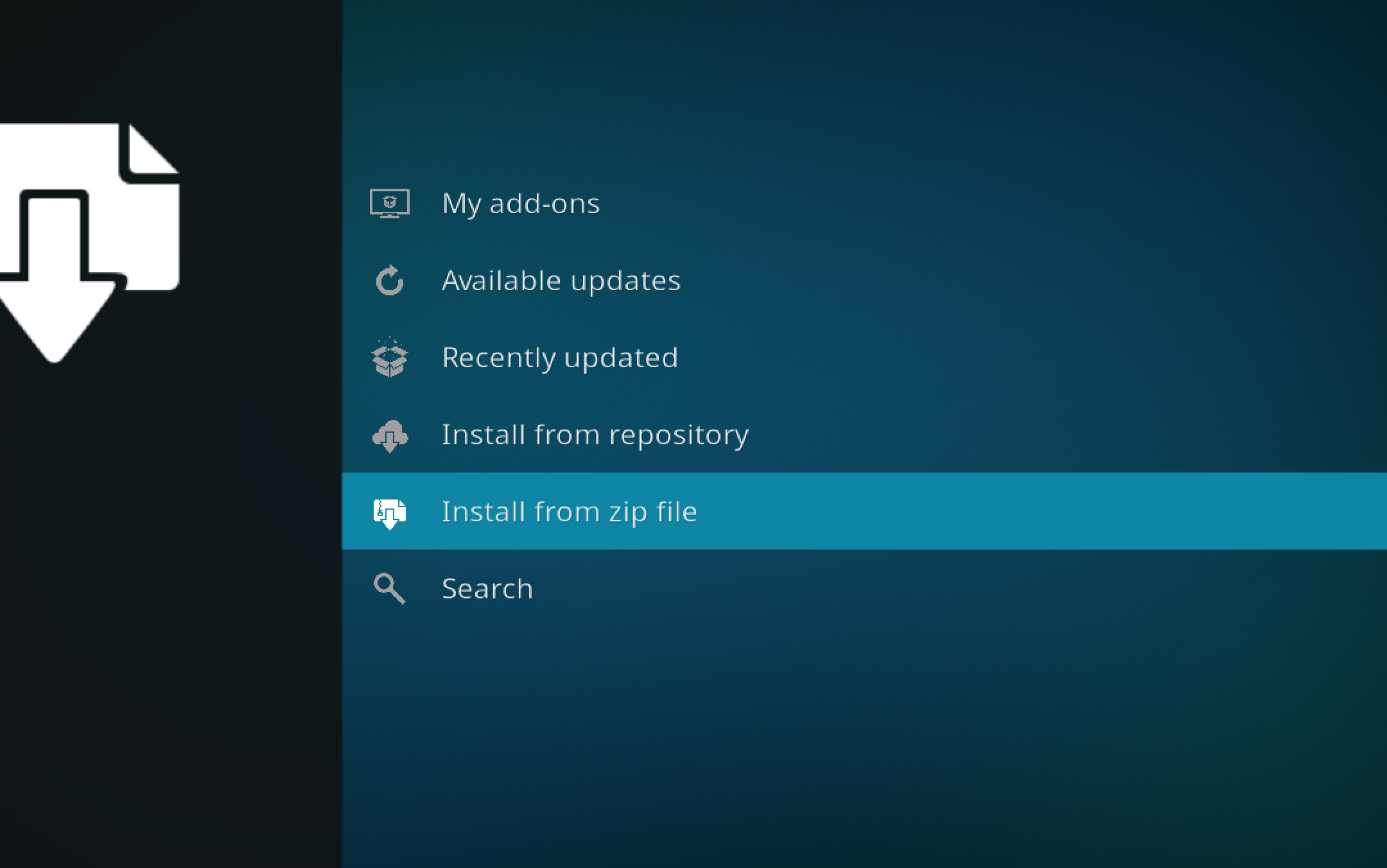
Go back to Settings, open Add-ons and select Install from zip file. Select Yes if Kodi asks about unknown sources.
Install the Spotify Zip
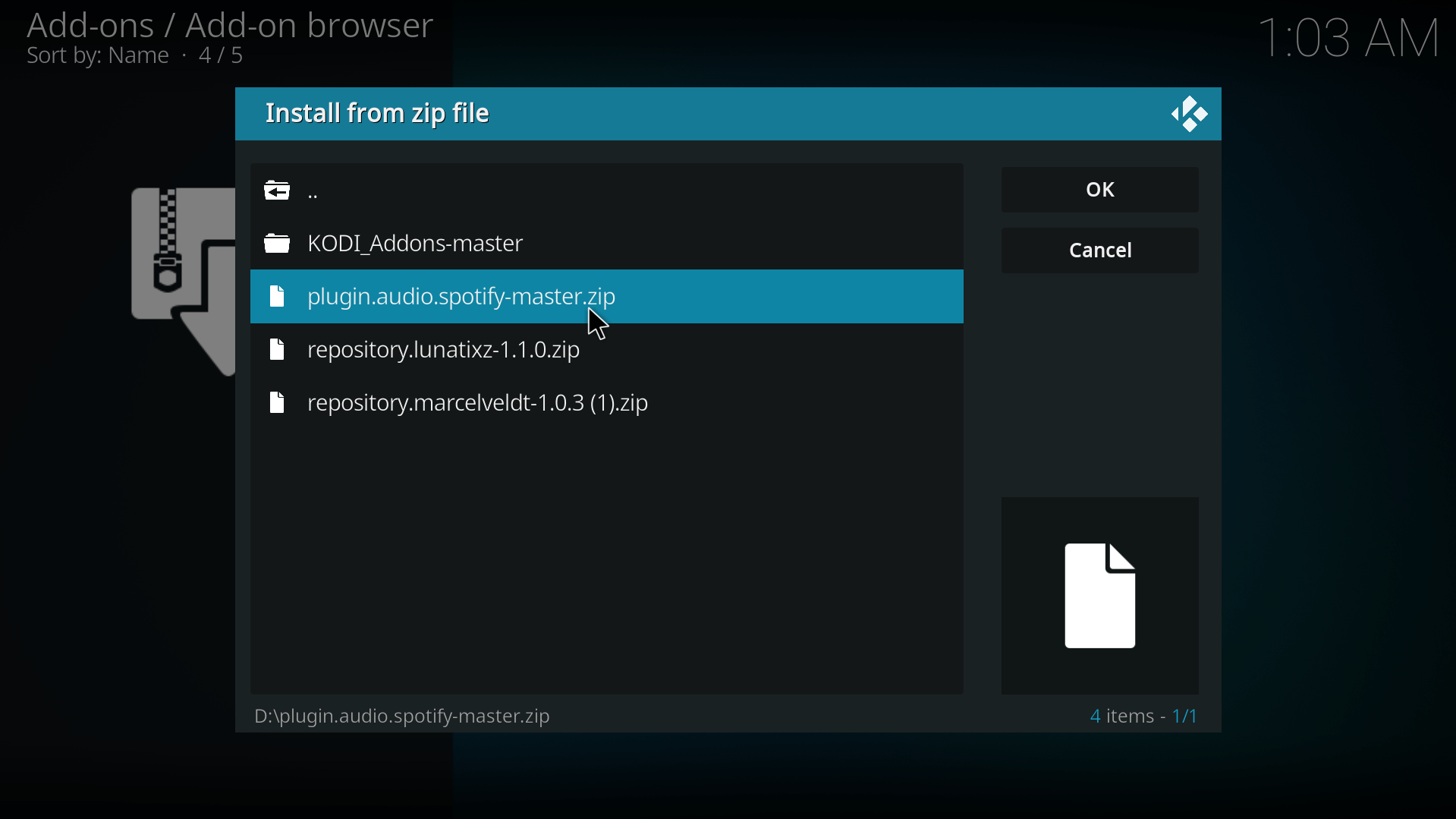
Select the glk1001 source (it may also appear as GLK Kodi Spotify and Goom++ Add-on Repository), then choose the newest plugin.audio.spotify zip, not the Goom++ files. That is 1.3.14 at the time of writing, and it must never be older than 1.3.10. Wait for the Spotify add-on installed message.
Open the Spotify Add-on
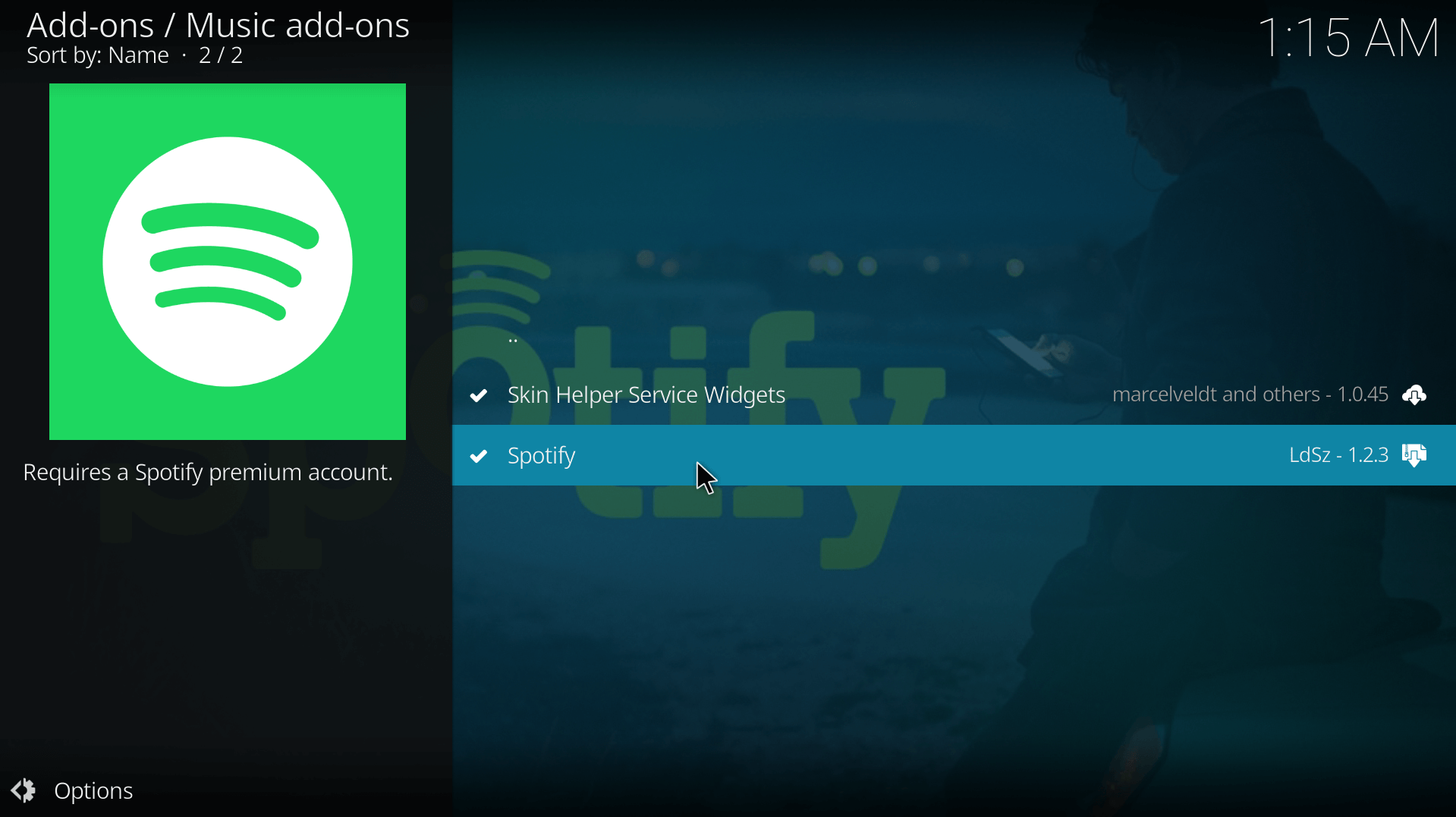
From the Kodi home screen, go to Add-ons > Music add-ons and select Spotify. Then log in using the steps in the next section.
Also read: How to Install The Jukebox Kodi Addon: Music Playlists, Concerts
Kodi Spotify Connect: How to Log In to the Spotify Kodi Addon
The old username and password screen is gone. The add-on now logs in by pairing with the official Spotify app, the same way you pick a speaker from Spotify’s device list. Both devices must be on the same network, and you may need to allow the connection through your firewall.
- Open the Spotify add-on in Kodi and choose Authenticate the plugin on the first menu.
- On a phone or computer on the same network, open the official Spotify app and play any track.
- Choose Connect to device in the Spotify app and select Kodi-Spotty.
- Close the Spotify app, go back to Kodi and press OK on the dialog.
- Wait for the success message. The add-on is now linked to your account.
If you had an older Spotify add-on installed and see errors or menu problems, run Clear the plugin cache from the first Spotify page, then restart Kodi.
Spotify on Kodi Raspberry Pi and LibreELEC
The developer lists other Arm devices among the tested platforms and added a Raspberry Pi workaround in version 1.3.12, but the README doesn’t name LibreELEC or a specific Pi model. Treat both as likely but unconfirmed. If songs skip or stutter on a Pi, open the add-on settings and turn on problem_with_terminate_streaming, the option added in 1.3.12 for Raspberry Pi users.
What We Like and Don’t Like About the Spotify Kodi Addon
What We Like
- Browse your playlists, albums and artists from inside Kodi
- Updated for Kodi 21 Omega, Spotify’s current login and Python 3.13
- Tested by the developer on Windows 11 and Ubuntu 24.04
- The code is public on GitHub
What We Don’t Like
- Needs Spotify Premium
- Doesn’t run on Android 10 or newer, which excludes most current Fire TV Sticks
- Unofficial, and releases are rare: the last was February 2025 and five GitHub issues are open
- Logging in needs a second device running the official Spotify app
- Some users report songs skipping, with an issue open since February 2024
Is the Spotify Kodi Addon Safe to Use?
It’s unofficial. The add-on’s own description says it uses the Spotify Web API but isn’t endorsed, certified or approved by Spotify. The code is public on GitHub, and the only download we’d use is the one on the developer’s page linked above. We haven’t scanned the zip ourselves.
Two security reports are open on GitHub as of October 2026. Both were filed on September 23 by an outside contributor, and the maintainer hasn’t answered either yet. One says the add-on writes Spotify access tokens to the Kodi log when debug logging is on. The other says it passes part of a plugin address to Python’s eval() function, which could let another add-on or a remote-control request run code. The current source still contains that eval() call.
You can limit the risk. Leave debug logging off, and remove any token lines before you post a log anywhere (our Kodi log file guide shows where logs live). Leave Allow remote control via HTTP under Settings > Services > Control switched off unless you use it.
Spotify Kodi Addon Not Working? Fixes for Login, Skipping and Old Versions
Spotify Won’t Authenticate in Kodi
Check the version first. Open the add-on’s information page and confirm it’s 1.3.10 or newer, because older versions can’t log in with Spotify’s current rules. Then check the pairing: both devices must be on the same network, the Spotify app must be playing a track when you choose Connect to device, and a firewall can block this step. If Kodi-Spotty still doesn’t appear, run Clear the plugin cache from the first Spotify page and restart Kodi.
Spotify Kodi Addon Not Working on Android 10 or Fire OS 8
There is no fix for this one. The add-on can’t run on Android 10 or newer, and Fire OS 8 is built on Android 11. That covers the Fire TV Stick 4K Max (2nd gen), Fire TV Stick 4K (2nd gen) and Fire TV Stick 4K Plus. Use Spotify’s own app or play from your phone instead, as covered below.
Spotify Kodi Songs Keep Skipping
Tracks that jump to the next song soon after starting are reported in an open GitHub issue from February 2024, and the maintainer asked for logs. On a Raspberry Pi, turn on problem_with_terminate_streaming in the add-on settings. If skipping continues, attaching a log to that GitHub issue is the best way to help the developer track it down.
Old Marcelveldt Spotify Add-on Stopped Working
That add-on’s username and password login no longer works, and the project hasn’t been updated since 2021. Uninstall it, install the glk1001 version using the steps above, and run Clear the plugin cache if you see menu errors.
Spotify Add-on Broken on Ubuntu 22.04
The README warns that the add-on is broken on older Ubuntu 22.04 installs. If you have Python 3.10.6 or newer it should be fine.
Can You Cast Spotify to Kodi Without the Addon? Other Ways to Listen
If your device can’t run the add-on, the simplest route is to leave Kodi out of it. Spotify Music is listed on the Amazon Appstore, and Spotify’s TV page tells people to look for Spotify in their TV’s app store. We couldn’t confirm it is available on the newest Vega OS sticks, so check your device’s app store.
You can also play from the Spotify app on your phone to a speaker or TV that supports Spotify Connect. The Kodi add-on doesn’t work as a Connect speaker today: it uses Connect pairing only to log in, and a feature request for casting to it is still open on GitHub, so don’t expect to cast from the Spotify app to Kodi.
The pages ranking for this topic mostly push Spotify-to-MP3 downloaders as the other way to get Spotify on Kodi. We don’t recommend them. They work by taking tracks out of Spotify’s app, which its user agreement doesn’t expressly permit.
Spotify on Kodi FAQ
Does Kodi Have Spotify?
Not built in. You need an unofficial add-on, and glk1001’s version works on Kodi 21 Omega with a Spotify Premium account. The older Marcelveldt version is abandoned and its username and password login no longer works.
Do You Need Spotify Premium for the Spotify Kodi Addon?
The add-on’s description says it works with a Premium account, and we found no documented way to use it with a free one.
Does the Spotify Kodi Addon Work on Firestick?
Only on devices older than Android 10. It won’t work on the Fire TV Stick 4K Max (2nd gen), Fire TV Stick 4K (2nd gen) or Fire TV Stick 4K Plus, which run Android 11. The developer’s only named Fire TV test is a Fire TV Cube on Android 9. The 2026 Fire TV Stick 4K (3rd gen) and Fire TV Stick HD run Vega OS and can’t run Kodi at all.
Why Can’t I Log In to Spotify on Kodi With a Username and Password?
Spotify removed that sign-in method, and version 1.3.10 of the add-on replaced it with pairing through the official Spotify app. Choose Authenticate the plugin, play a track in the Spotify app, pick Connect to device and select Kodi-Spotty.
Does the Spotify Add-on for Kodi Support Spotify Connect?
It uses Spotify Connect pairing to log in, but we found no support for casting from the Spotify app to Kodi as a speaker. A feature request for that is open on GitHub.
Is It Safe to Use Spotify on Kodi?
It’s unofficial and not approved by Spotify, and two security reports about it are open on GitHub. Leave debug logging off and install it only from the developer’s page.
Suggested read: MP3 Streams Kodi Addon: Listen to Music
The Spotify Kodi addon is a good fit if you run Kodi 21 on Windows, Linux or an older Android 9 device and pay for Premium. If you’re on a newer Fire TV Stick, Spotify’s own app is the better route. Last checked October 2026.