
In this tutorial guide, I’ll show you exactly how to install the Prism Kodi addon on your Android TV box or Amazon Firestick. I’ll also cover the unique features that set Prism apart, plus the extra setup it needs before it can actually stream anything.
Prism is a movies, TV, and anime addon for Kodi. It’s an actively maintained fork of the Seren addon, built and hosted in the Prism Repository.
Plus, is the Prism Kodi addon safe to install and legal to use? I’ll touch on those below, along with the debrid setup you’ll need to get streams working.
Prism Kodi Quick Facts
| Addon Name | Prism |
| Developer | Goldenfreddy0703 |
| Repository | Prism Repository |
| Repository URL | https://goldenfreddy0703.github.io/repository.prism/ |
| Kodi Version Compatibility | Kodi 21 Omega |
| Requires | a4kScrapers provider package, plus Real Debrid or Premiumize |
What is the Prism Kodi Addon?
Prism is a fork of Seren, the addon built by Nixgates that popularized a lot of the Netflix-like features Kodi users expect today. When Seren’s original repository went quiet, Prism picked up the same codebase and kept it updated, so if you’ve used Seren before, the layout and menus will feel familiar.
The biggest difference: Prism uses Simkl for watchlists and watch progress instead of Trakt, and it adds a dedicated Anime section that Seren never had. Like Seren, Prism needs a debrid service and a separate provider package to actually find playable links. More on that in the setup section below.
Prism Kodi Addon Features You Should Know About
Simkl Integration Instead of Trakt
Prism tracks what you’ve watched and syncs your watchlist through Simkl rather than Trakt. If you’re coming from Seren or another Trakt-based addon, this is the main adjustment: you’ll authorize a Simkl account in Prism’s settings instead.
A Dedicated Anime Section
Prism adds a standalone Anime section to the Movies and TV Shows layout Seren originally shipped with, so anime fans don’t have to dig through a general TV Shows menu to find what they want.
An Actively Maintained Seren Fork
The original Seren repository has gone quiet, and Prism is one of the forks that picked up active development, so bug fixes and provider updates are still shipping.
What We Like and What We Don’t Like About Prism
What We Like
- Familiar Seren-style layout if you’ve used Seren or Incursion before
- Actively maintained, unlike the original Seren repository
- Dedicated Anime section
- Simkl integration for watchlist and progress tracking
What We Don’t Like
- Needs a paid debrid account (Real Debrid or Premiumize) for reliable streams
- Requires installing the a4kScrapers provider package as a separate step
- No native Trakt support if you’re already using Trakt with other addons
Is the Prism Kodi Addon Safe to Use?
Prism isn’t in Kodi’s official repository, so like any third-party addon, you’ll see Kodi’s standard permissions warning the first time you install it.
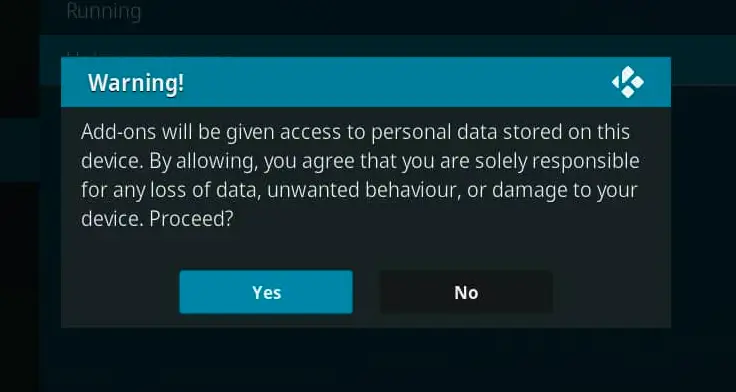
This warning tells you that addons can access personal files on your Android TV box. That’s normal for any unofficial Kodi addon and isn’t unique to Prism. Still, protecting your connection with a good Kodi VPN service is a smart idea before you start streaming.
A Kodi VPN will give you an anonymous connection while streaming or downloading media from third-party Kodi addons. Click here to view the #1 Kodi VPN service.
Learn how to install and configure your Kodi VPN here.
How Do You Stay Protected While Using Kodi?
Sign up for a premium Kodi VPN and access the internet unrestricted. We offer exclusive discounts for IPVanish and NordVPN, the highest respected VPNs in the Kodi community. Both of these VPNs have some great features for users:
- Apps for Android, iOS, Mac, Linux & more
- Zero Logs
- Unlimited bandwidth
- Tier 1 hardware (no speed slowdown)
- Access to hundreds of VPN servers


How to Install the Prism Kodi Addon on Android TV or Firestick
This guide will show you how to install the Prism Kodi addon.
Total Time: 5 minutes
Access SYSTEM Page
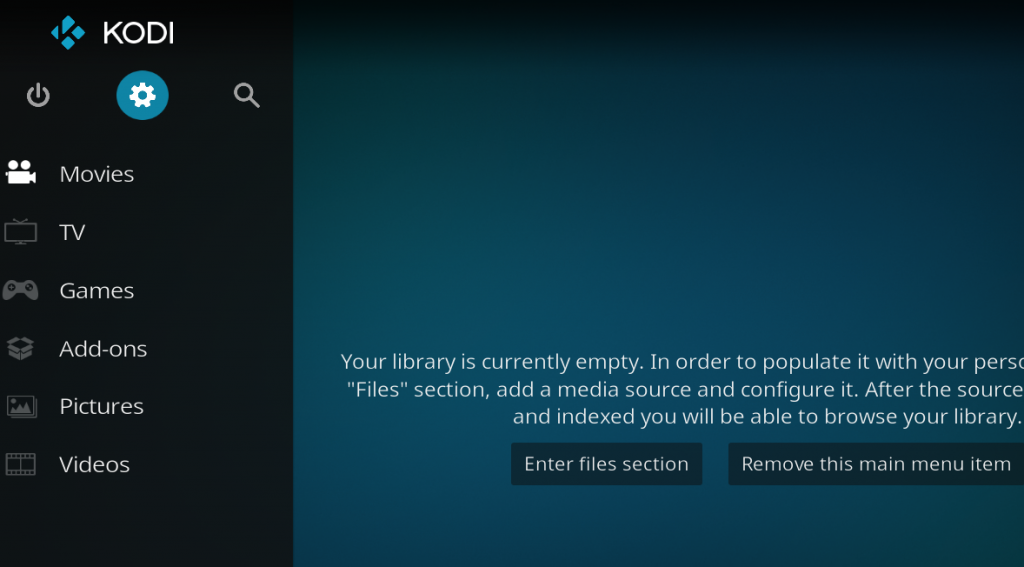
Access the Kodi SYSTEM screen by clicking on the gear icon on the Kodi main menu.
Click on File Manager
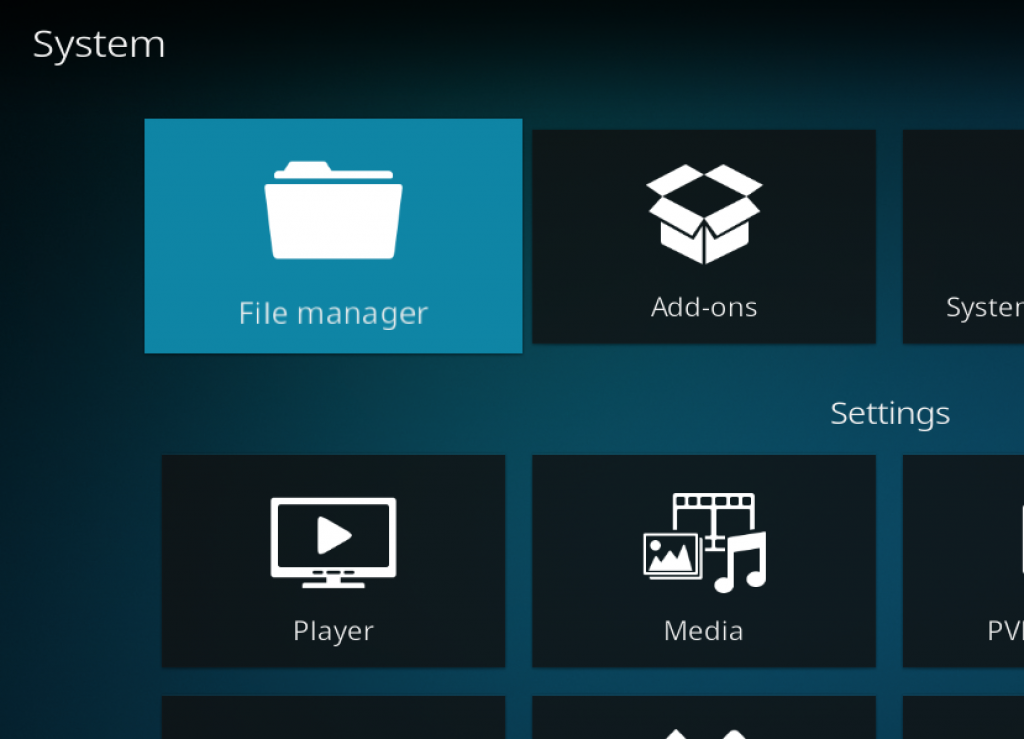
Click on the File Manager tile.
Select Add Source
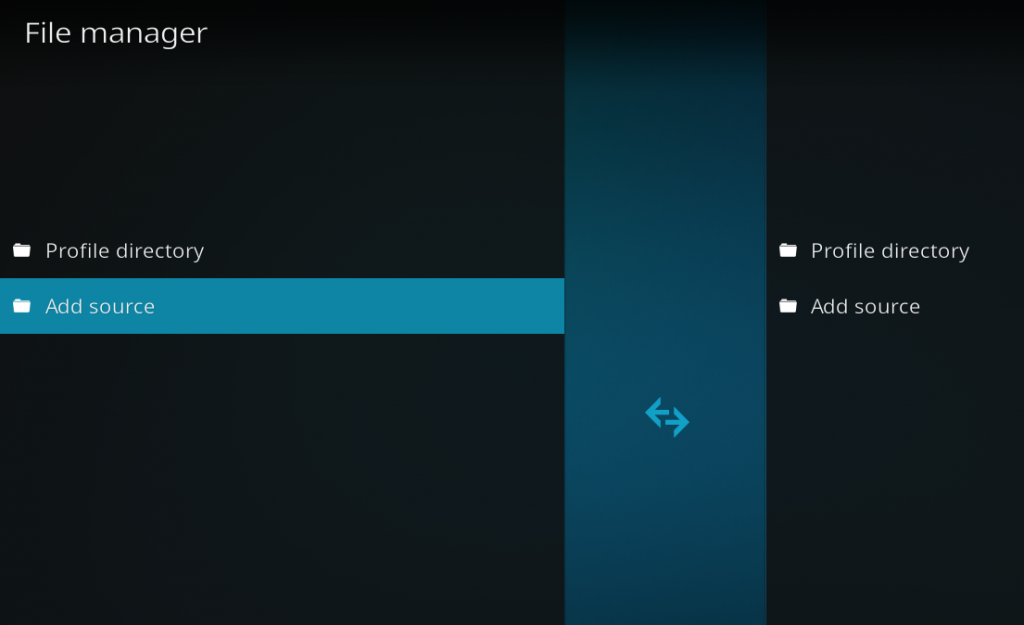
Click on Add Source at the bottom of the left side pane.
Add File Source
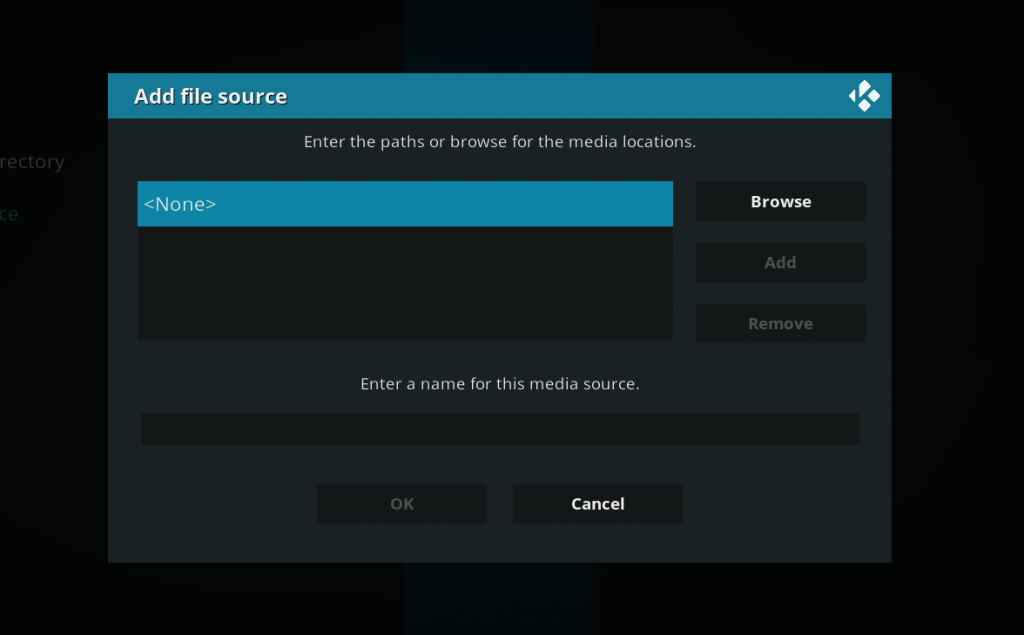
First, click on None and enter in https://goldenfreddy0703.github.io/repository.prism/ and then select Done.
Click on the empty box underneath “Enter a name for this media source” and name it .prism and then click OK.
Access Kodi Addons Screen
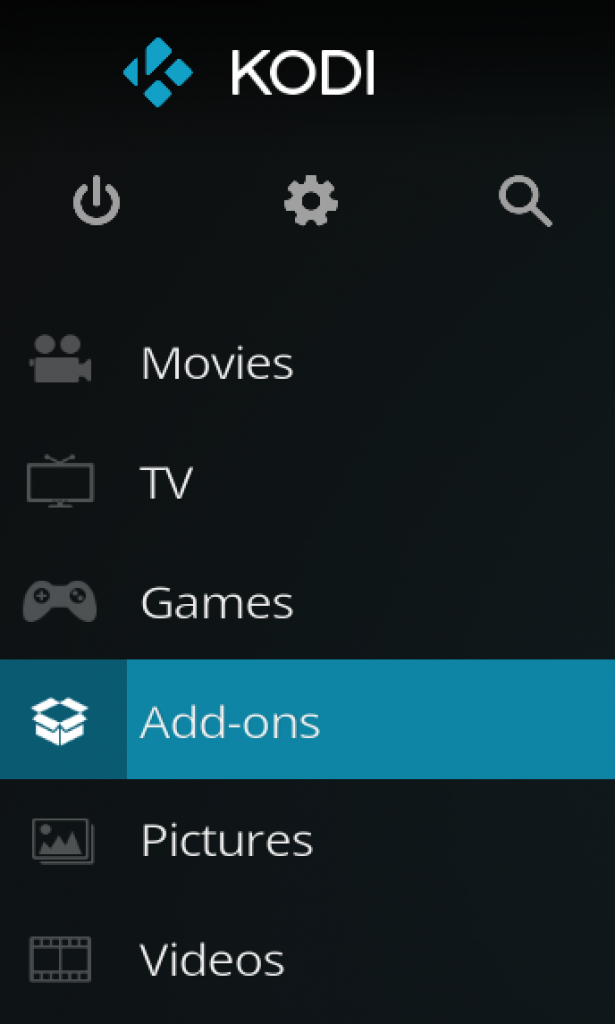
Go back to the Kodi home screen and then click on the Addons button.
Select the Addon Browser
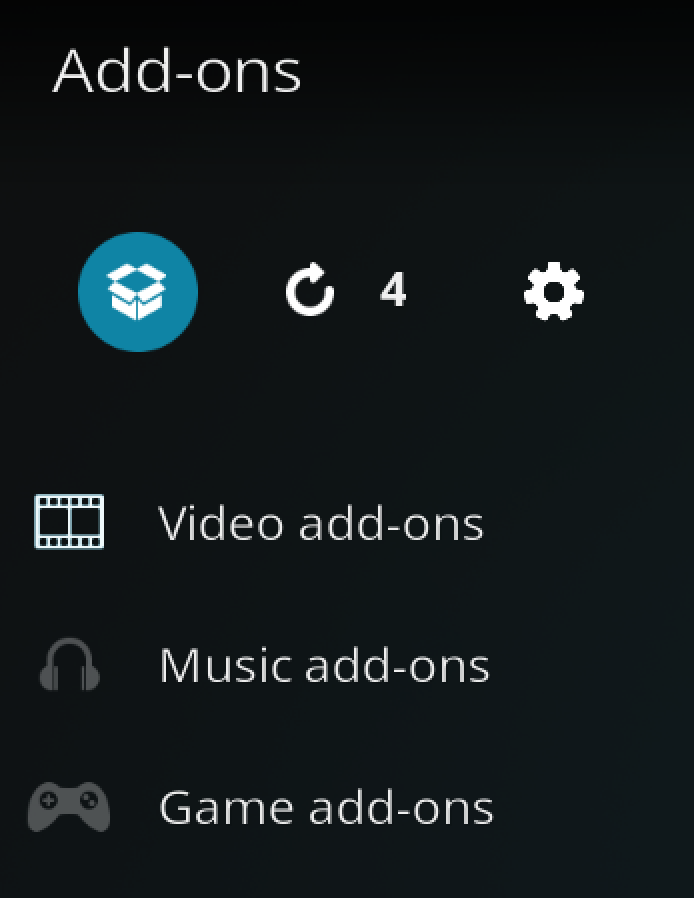
Access the Kodi Add-on Browser by clicking on the package icon in the upper-left corner of this screen.
Install the Prism Repository
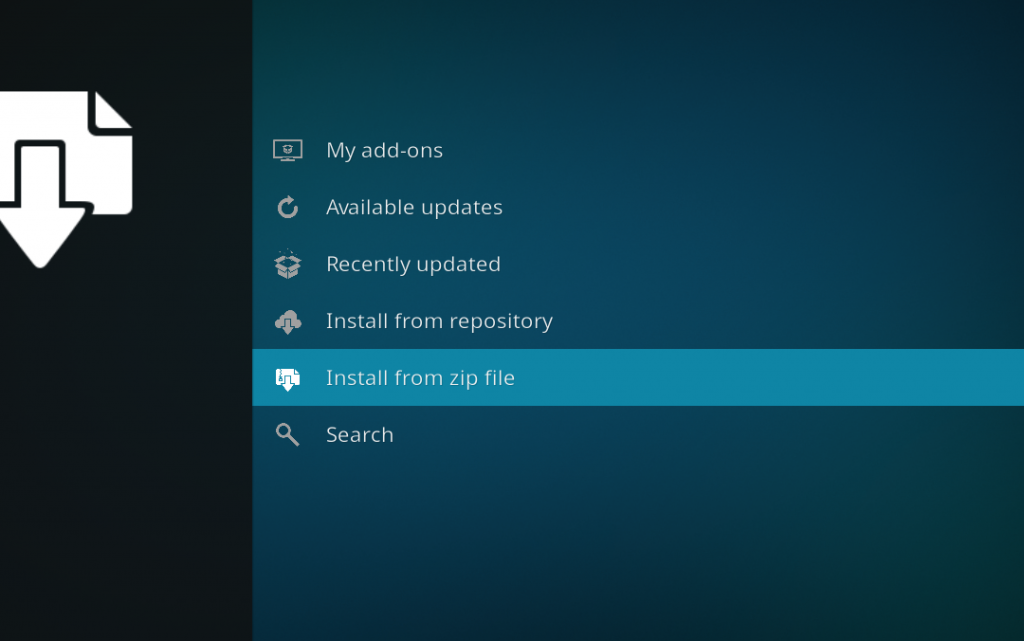
Install the Prism repository by clicking on Install from Zip File then .prism then repository.prism.zip and waiting for the repository installed icon to appear in the top right corner.
Install the Prism Kodi Addon
Next, select Install From Repository then Prism Repository then Video Add-ons then Prism. Click on Install and wait for the Add-on Enabled Notification.
The Prism Kodi addon will now be in your Video Add-ons section. It won’t show any streams yet though, that’s what the next section is for.
Additional Setup: Installing a4kScrapers and a Debrid Provider
Prism won’t show any streams until you add a provider package and a debrid service. This isn’t unique to Prism, Seren and its other forks all work the same way. Here’s how to set both up.
Install the a4kScrapers Provider Package
- Launch the Prism Kodi addon.
- Navigate to Tools > Open Settings Menu.
- Go to the Providers tab and click on Install From Web URL.
- Type in http://bit.ly/a4kScrapers and click OK.
- A prompt will ask if you’d like to install the scrapers. Press Install, then press OK once they’re done.
Add a Debrid Provider (Real Debrid or Premiumize)
Prism needs Real Debrid or Premiumize to reliably find working streams. Here’s how to connect Real Debrid, the steps for Premiumize follow the same pattern in the Accounts tab.
- In Prism, go to Tools > Open Settings Menu.
- Go to the Accounts tab and click on Enable Real Debrid.
- Select Authorize Real-Debrid.
- A window will prompt you to visit a URL in your web browser and enter a code. Follow those instructions.
- Once linked, Prism will display “Real Debrid Authentication is Completed.”
Full walkthrough with screenshots: Authorize Real Debrid Kodi Addon Guide.
Prism Kodi Addon Troubleshooting
Sometimes, you may get a message telling you to check your Kodi error log. If you see this error while streaming video, it can mean that your cache is full. If it appears while navigating menus in the addon, it means the link you’re trying to access doesn’t exist anymore, select another stream. If you want to learn how to actually check your log and diagnose your issues, click here.
Repository Won’t Install
Double check the repo URL is typed exactly as https://goldenfreddy0703.github.io/repository.prism/ with no typos, and make sure Unknown Sources is enabled in Kodi’s System settings.
“No Providers Available” Error
This means you haven’t installed a4kScrapers yet. Follow the Additional Setup steps above, Prism can’t find any streams until a provider package is installed.
No Streams or Empty Results
Usually means your debrid account isn’t linked yet, or the scrapers are temporarily down. Confirm Real Debrid or Premiumize is authorized in the Accounts tab before assuming the addon is broken.
Addon Crashes or Freezes Kodi
Clear Prism’s cache from the addon’s Tools menu, or reinstall the a4kScrapers package if the crash happens specifically when searching for streams.
Is Prism Kodi Addon Legal?
Determining the legality of the Prism Kodi Addon is challenging without knowing if it possesses the proper licensing. Kodi Tips does not have the ability to confirm the legal status of these addons.
Plus, legality rules differ depending on what country you live in.
Copyright Concerns with Kodi Addon
At first glance, the addon appears to distribute copyrighted works without the necessary consent, which raises the concern about its legality.
Public Domain Titles
Users can access titles in the public domain, which are not subject to copyright laws. This allows free download, streaming, and sharing without legal issues.
User Responsibility
You, as the end user, bear responsibility for all content accessed through Kodi addons, making it crucial that you understand what is legal to view.
Legal Streaming Options
For those seeking legal and verified streaming options, check our list of legal Kodi addons with 100% legal content.
Frequently Asked Questions About the Prism Kodi Addon
How Do You Install the Prism Kodi Addon?
To install the Prism Kodi Addon, which is not included in Kodi’s official repository, follow the detailed instructions in this guide. These instructions involve installing the addon repository, installing the addon itself, then adding a provider package and a debrid service so it can actually find streams.
Is Using the Prism Kodi Addon Legal?
The Prism Kodi Addon itself is legal to use. However, not all content it can access is legally permissible depending on the source. Ensure you access only content that is within the public domain or that you have the right to stream.
What Are the Differences Between a Kodi Addon and a Kodi Build?
A Kodi addon is a single feature or streaming service addition, while a Kodi build combines multiple addons, wizards, and settings into one package for a comprehensive streaming experience.
Should I Use a VPN When Using the Prism Kodi Addon?
A quality VPN with a strict no-logging policy is highly recommended when using the Prism Kodi Addon or any other unverified streaming app or addon. A VPN protects your IP address and encrypts your internet connection, keeping your online activity private.
Do I Need a Debrid Service to Use Prism?
Yes. Prism relies on Real Debrid or Premiumize to reliably find working streams. Without a debrid account linked, most links will fail to play or won’t show up at all.
Disclaimer
We have no control over and do not host or upload any video, films, media file, or live streams. KodiTips is not responsible for the accuracy, compliance, copyright, legality, decency, or any other aspect of the content streamed from your device. If you have any legal issues please contact the appropriate media file owners or host sites.