
Unlinked firestick codes are short codes that open a library of apps inside the free Unlinked app. Unlinked is a library browser: you type a code, it opens that library, and you install whatever the library’s owner put in it. This guide gives you the official install code, the steps, and a list of codes I entered on Unlinked’s own web app to see which ones still load.
You’ll also find what most code lists skip: Unlinked goes down from time to time, Amazon blocks some apps on Fire TV, and nobody vets the apps inside a library. Fixes for the usual problems are in there too.
Check your stick first. Unlinked is an Android app, so it only installs on devices that can sideload. The Fire TV Stick 4K Select and the newest sticks that run Vega OS can’t sideload at all, and no code changes that. Open Settings, My Fire TV, About to see what you have, and read our Vega OS explainer for the model list.
Unlinked App Quick Facts
| Detail | What I found |
|---|---|
| App | Unlinked |
| Official site | unlinked.link |
| Developer | Not named on the official site |
| Price | Free (the site has a Donate page) |
| How you install it | APK download from the official site, using Downloader and code 234753 |
| Download size | About 4 MB |
| Works on | Fire TV Sticks and Cubes that run Fire OS, Android TV and Google TV devices. A web app lets you browse libraries in any browser. |
| Does not work on | Fire TV sticks that run Vega OS, Roku, iPhone, iPad, Samsung smart TVs |
| In the Amazon Appstore | No |
What Is Unlinked on Firestick? (And What Is an Unlinked Code?)
Unlinked is a free app that opens libraries of apps, videos and pictures. Anyone can build a library on Unlinked’s website and give it a code. Type that code into the Unlinked app on your Firestick and it opens the library and shows what’s inside, sorted into categories. Each entry has a Download button.
The library’s owner decides what goes in it. Unlinked’s own terms say the service is provided as is, without any guarantee, and they say nothing about checking what libraries contain. Think of a code as a bookmark to someone else’s app store.
Unlinked works the way FileLinked used to. FileLinked shut down in 2021, and Unlinked is one of the apps people moved to. Because it’s the same idea, unlinked firestick codes carry the same trade-off: easy installs, but no promise about what you’re installing.
Unlinked Codes vs Downloader Codes: What Is the Difference?
A Downloader code is a short number you type into the Downloader app. It points to one file or web page, and Downloader fetches it. An Unlinked code is different: you type it into Unlinked, and it opens a whole library of apps.
You use one of each. A Downloader code (234753) installs Unlinked, and Unlinked codes then open libraries inside it.
Unlinked Downloader Code: 234753 (Official) Plus Two Other Codes That Work
The official Unlinked Downloader code is 234753. It’s printed on Unlinked’s home page, and it ends at the developer’s own download. Two older codes that circulate end at the same file.
| Downloader Code | Where It Goes |
|---|---|
| 234753 | Unlinked’s own download link, which sends you to the APK on the developer’s GitHub account (the code on the official home page) |
| 40869 | The same APK on GitHub, directly |
| 10381 | Unlinked’s own download link |
A code is only as safe as where it leads. Anyone can register a Downloader code and point it anywhere, and one popular install guide lists a code that isn’t a Downloader code at all. If you don’t have Downloader yet, our Downloader install guide walks through it first.
How to Install Unlinked on Firestick (5 Steps)
These steps work on any Firestick or Fire TV Cube that runs Fire OS. Step 1 is a one-time setting, so you won’t repeat it for other APKs.
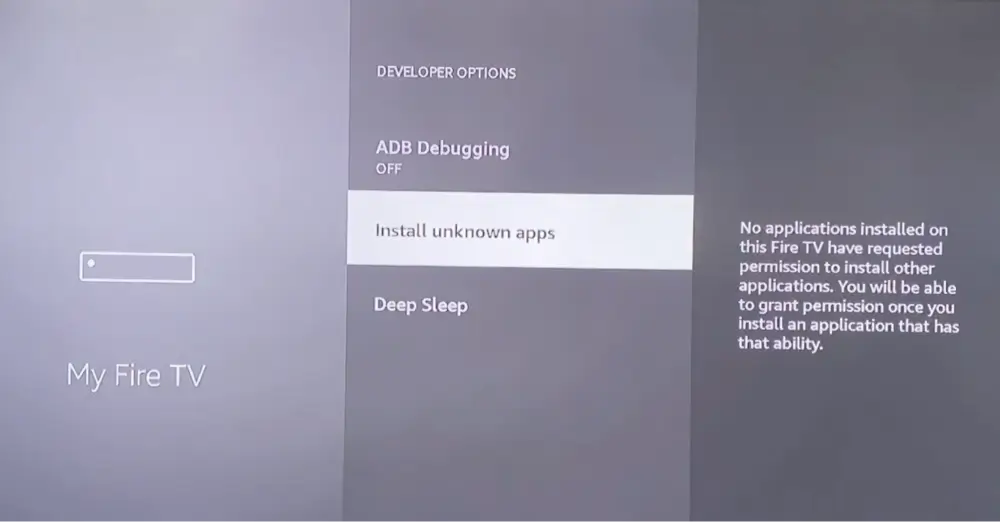
- Turn on Apps from Unknown Sources (Firestick and Fire TV only). Go to Settings, My Fire TV, Developer Options, and switch on Apps from Unknown Sources. On some Fire OS releases the setting is listed per app, so turn it on for Downloader. If you have an Android TV box, skip to the next section.
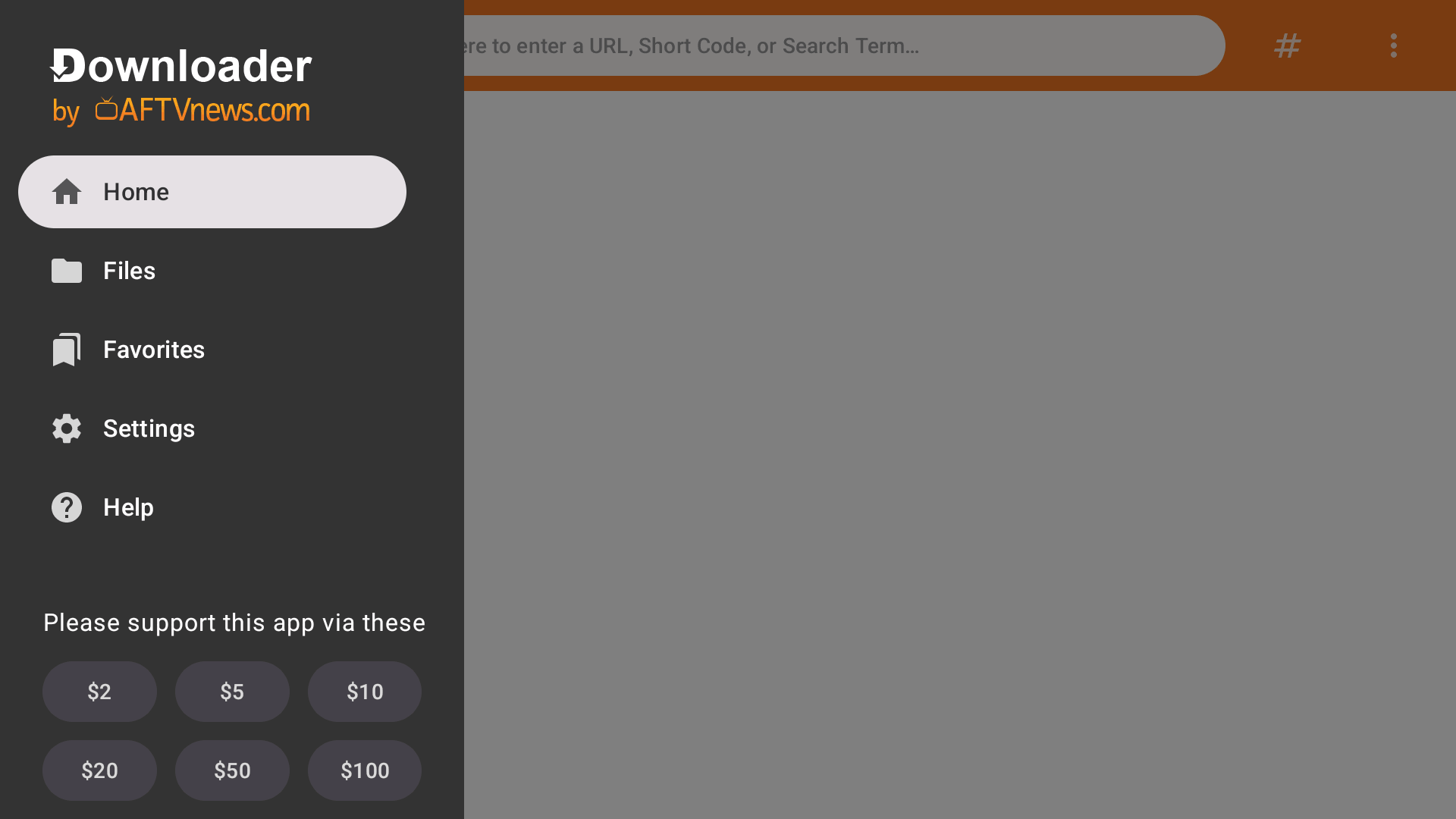
- Install Downloader. Search for Downloader in the Amazon Appstore and install it. Our Downloader guide above has the screens.
- Type the Unlinked code in Downloader. Open Downloader, select the address bar, type 234753 and select Go.
- Install Unlinked. When the download finishes, select Install, then Open.
- Delete the installer. Downloader offers to delete the APK once Unlinked is installed. Select Delete to free up space.
Unlinked now shows up in your apps list. Move it to the front row if you plan to use it often.
How to Install Unlinked on Android TV, Google TV, Onn Box and Nvidia Shield
The steps are the same except for step 1. Android TV and Google TV don’t use the Fire TV setting. When you open the downloaded file, the device asks you to allow Downloader to install unknown apps. Turn that on, go back and finish the install. If you’ve sideloaded an APK on the device before, you’ve already done it.
The menu names depend on the maker and the Android release, so I haven’t put a screenshot here. Use Downloader from the Google Play Store, then follow steps 3 to 5. Onn boxes and sticks, Chromecast with Google TV and the Nvidia Shield all work this way because Unlinked is built for Android TV.
How to Install Unlinked Without Downloader
Downloader is the easy route because you only type a short code. You can also copy the APK to the device another way, such as from a computer over ADB or by sending the file from your phone with a file-transfer app. Both take more steps, and I haven’t tried them with Unlinked, so I can’t give you a tested walkthrough. Whichever way you do it, get the file from the official site.
Unlinked on Roku, iPhone, iPad, Samsung TV and PC: Which Devices Work?
Unlinked’s official download is an Android APK, so it only installs on Android-based devices. That rules out most of the devices below.
How to Get Unlinked on Roku
You can’t. Roku doesn’t run Android APKs, so there’s no way to put Unlinked on a Roku stick, box or TV. You can browse a library on a phone or computer with the web app, but you can’t install anything from it onto the Roku.
How to Get Unlinked on iPhone and iPad
The official site offers an Android download and nothing for iPhone or iPad, and iOS doesn’t run APKs. The web app opens in any browser, so you can look at a library on an iPhone or iPad, and that’s all.
How to Get Unlinked on Samsung TV
Samsung smart TVs run Tizen, not Android, so the APK can’t run on them. If you want Unlinked on that TV, plug in a Fire TV Stick or an Android TV box.
How to Install Unlinked on PC and Windows (the Web App)
Open unlinked.link/browse/library in a browser, type a code and the library opens. That’s the web app, and it’s the safest way to look at a library before you add it on your TV. You can’t install Fire TV apps from it. The official site doesn’t list a Windows download, so I’d skip the ones other sites offer.
How to Use Unlinked Codes: Add a Library in 4 Steps
- Open Unlinked from your apps list.
- Select Add a new library. Some screens show a plus button instead.
- Type the code exactly as shown with the on-screen keyboard and select Next. Some codes are words, not numbers.
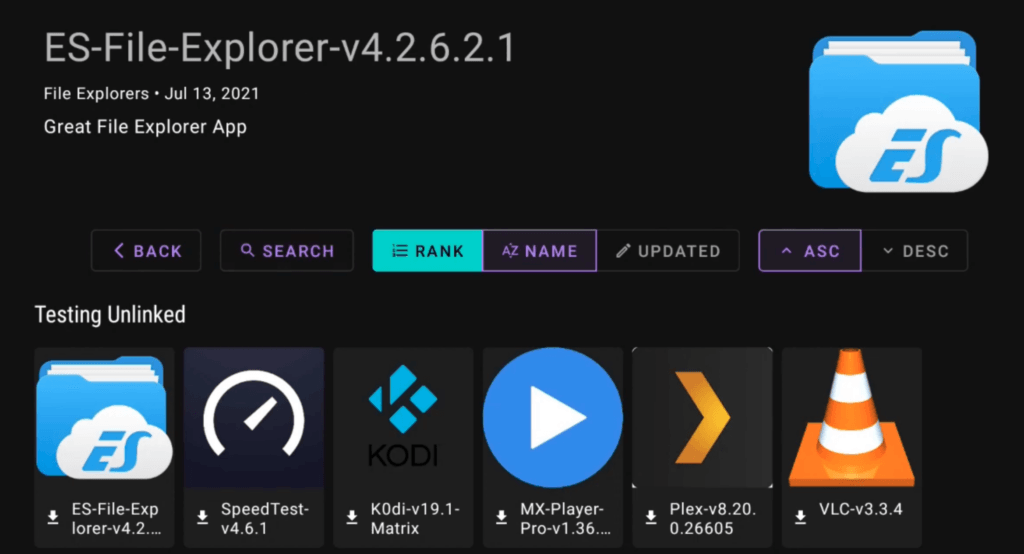
- Wait for the library to load, then select Enter. Browse the categories, pick an app and use its Download button.
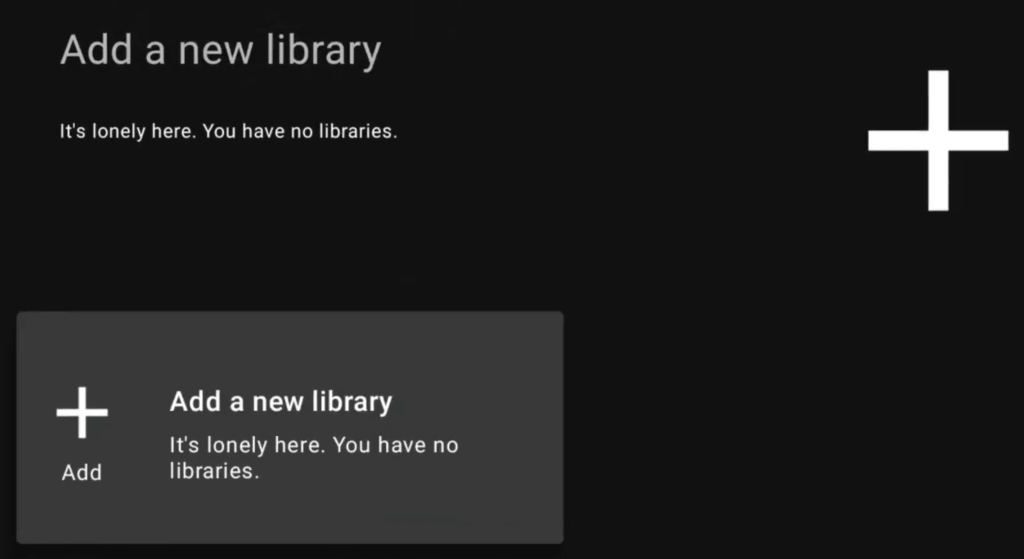
How to Add a Library to Unlinked
Repeat the same steps for each code. Unlinked remembers the libraries you add and lists them on its home screen, so you only enter a code once.
How to Delete or Remove a Library From Unlinked
Unlinked’s feature list says you can remove libraries that are unavailable or that you no longer want. I haven’t confirmed the exact menu path on a TV, so look for a remove option on the library’s tile or in the app’s menu.
Unlinked Code PIN: Why Some Libraries Ask for a Password
A library owner can password-protect a library. If you enter a code and see “This library is password protected,” the owner set a PIN. Two of the codes I tried, 96960000 and 7CD6A4F1, did this. Some code lists publish a PIN for them. I didn’t try any, and I’m not listing PINs, because a PIN from a random list tells you nothing about what’s inside.
How to Make an Unlinked Library of Your Own
Unlinked’s site has Register and Login pages. Once you’re signed in you can create a library, add files and categories, and pick your own code. The site also lets you add a password.
The site says libraries are end-to-end encrypted. That is the developer’s claim, and it’s about protecting a library’s contents, not about whether the files inside are safe. A library of your own is a good way to install the apps you already trust, like your launcher and a few tools, with one code on every new device.
Working Unlinked Firestick Codes: What Loaded When I Tested Each One
Most lists call every code on them “working.” I wanted to know what that means, so I entered each code on Unlinked’s own web app and wrote down what opened. For each library I noted its name today, how many files it holds, when the library was last updated and the date of its newest file.
A library that opens but hasn’t had a new file in years is working the way a stopped clock is. I didn’t type any PIN and I didn’t install anything from these libraries. Last checked October 2026.
| Code | Library Name Today | Files | Library Updated | Newest File | Notes |
|---|---|---|---|---|---|
| FIRESTICK | Newtech Store | 68 | Oct 2026 | Oct 2026 | Live TV, movies and TV shows, sports and tools. Says its newest files are posted on its own website. |
| EMDYOUTUBE | EMD Secret App Store | 54 | Oct 2026 | Oct 2026 | Description is mostly a VPN offer. |
| FIREMEDIA | The Fire Vault | 56 | Oct 2026 | Oct 2026 | VPN offer in the description, which also says the library hosts no streams itself. |
| 12341234 | BongoStreams | 88 | Sep 2026 | Oct 2026 | Has a paid apps section and an adult apps section. |
| FIRETVGURU | Fire TV Guru | 206 | Mar 2026 | Sep 2026 | The largest of the active libraries. VPN offer in the description. |
| EVERYTHING | Androitweaks | 80 | Aug 2026 | Aug 2026 | Has VPN and IPTV offers in its listings and an adult section. |
| EB2E4A4C | Seenys APK Store | 80 | Jan 2025 | Aug 2025 | The owner’s note says an update is coming. |
EMD Unlinked Code (EMDYOUTUBE)
EMDYOUTUBE opens a library called EMD Secret App Store, with 54 files and a newest file from October 2026. Its description is mostly a VPN offer and tells you to turn on a VPN before opening its apps. Treat that as an ad, not as a safety check.
Fire TV Guru Unlinked Code (FIRETVGURU)
FIRETVGURU opens Fire TV Guru, the biggest active library I tested at 206 files, with a newest file from September 2026. The description is also a VPN offer. A bigger library means more apps to sort through and more you haven’t heard of, so be pickier here, not less.
Newtech Unlinked Code (FIRESTICK)
The code is just the word FIRESTICK. It opens Newtech Store, with 68 files sorted into Live TV, Movies and TV Shows, Sports, Media Players and Tools. It opened without a password when I typed it in lowercase. One code list shows a PIN for it, so you may be asked for one.
The library says its newest files are posted on the owner’s own website, so what you see inside Unlinked may lag behind the website.
Unlinked Code Everything (Androitweaks Library)
EVERYTHING opens a library called Androitweaks, with 80 files, last updated in August 2026. It carries VPN and IPTV offers among its listings, and it has an adult section. Names change under the same code: one popular list still calls this one Zino App Store.
Other Unlinked Codes That Load: FIREMEDIA, 12341234 and EB2E4A4C
FIREMEDIA opens The Fire Vault, with 56 files. Its description is a VPN offer and says the library hosts no streams directly. 12341234 opens BongoStreams, with 88 files. Its description says it is based in Toronto, that most apps are for Android TV and that you should report dead links. It has a section of paid apps and an adult section. Older lists call this code “IPTV Super Store.”
EB2E4A4C opens Seenys APK Store, with 80 files, mostly tools plus live TV and film apps. The owner’s note says an update is coming, and the newest file is from 2025. A few entries are Australian broadcaster apps that need an Australian connection, so outside Australia they won’t play.
Unlinked Codes That Load but Are Years Out of Date
67664537 (Stream It All) has 250 files, the library was last updated in 2022 and its newest file is from 2023. Many entries are labeled MOD or Premium, which usually means someone altered a paid app. 33627466 (Stream Doctor) has 75 files and nothing newer than 2023. 90D311FE (Oztech3000) has just 4 files, the newest from 2023, even though the library page shows a 2026 date.
Plenty of lists still put these near the top. They load, but I’d skip all three.
Unlinked Codes I Left Out: StreamKings, Password Libraries and 710AB04D
7919e0d4 (StreamKings) opens a library whose description is a sales pitch for lifetime IPTV subscriptions, with prices and a messaging link, and several lists rank it as a top code. I left it out. 96960000 and 7CD6A4F1 ask for a password, so I couldn’t see inside. 710AB04D returned nothing after 10 seconds, so it may be gone. I didn’t test Superapps.
Unlinked Codes for Sports, Live TV and Movies: What Libraries Hold
People search for codes by use, but a code opens a whole library, not one category. The active libraries above sort their files into groups like Live TV, Sports, and Movies and TV Shows. Open the library and use its category list or search box instead of hunting for a separate code for each.
Whether an app in one of those groups has the rights to what it shows is a separate question. See the legal section below.
Unlinked Codes for Adults: Why I Do Not List Any
Several libraries have an adult apps section, and 12341234 and EVERYTHING are two of them. I don’t list or review any of it. If kids use your Fire TV, turn on Fire TV’s parental controls with a PIN so apps can’t be opened without it.
Unlinked Codes for Kodi and Kodi Forks
Some libraries carry Kodi and builds based on it. If Kodi is what you want, install it from Kodi’s own site rather than from a library copy, so you know where the file came from.
Is Unlinked Safe to Use on a Firestick?
There are three things to separate. The Unlinked app is a small download from a developer who isn’t named, and its terms promise nothing. If you want to check it yourself, download it on a computer and run it through VirusTotal first.
The libraries are made by anyone, and a code can change hands. That is why two of the codes I tested had a different name from the one older lists give them. The libraries I opened included VPN offers, an IPTV seller’s pitch and a section of paid apps. Treat a library like a stranger’s flash drive.
The apps inside carry most of the risk, because nobody checks them. Files labeled MOD or Premium are modified versions of paid apps, and a modified APK can contain anything. Install only apps you recognize from a publisher you know, and read the permissions each one asks for.
Is Unlinked Legal?
Installing Unlinked isn’t illegal on its own, because it opens lists. What matters is what the apps in a library let you watch. Streaming copyrighted shows and movies without the owner’s permission can break copyright law where you live, whatever app you use, and this isn’t legal advice.
FileLinked, the app Unlinked took over from, went offline in 2021 and the Alliance for Creativity and Entertainment later confirmed it had taken the service down. Amazon has also said it blocks apps that give access to pirated content, including ones installed from outside its Appstore. If you want free legal TV instead, our best IPTV services list covers licensed options, and free apps like Tubi and Pluto TV are in the Appstore.
Do You Need a VPN With Unlinked?
A VPN hides your traffic from your internet provider, and some people want that on a stick with sideloaded apps. It doesn’t make an app licensed or a file safe, and it doesn’t undo Amazon’s blocks. You’ll also see searches for an “Unlinked VPN code.” A VPN in a library is just another APK, so I’d install a VPN from the Appstore instead.
NordVPN is our top pick for Firestick and Android TV, and our VPN guide compares the alternatives.
Unlinked Not Working on Firestick? Fixes for Codes, Downloads and Outages
Most problems fall into four groups. Start with the one that matches what you’re seeing.
Unlinked Codes Not Working
Type the code exactly as shown, because some are words. Then try the same code on the web app at unlinked.link/browse/library from your phone or computer. If it opens there, the problem is on your TV. If it doesn’t, the library is gone or the service is down. If it says the library is password protected, the owner set a PIN.
Codes also change hands, so a code from an old list can open a different library than the list says. Check the library name when it loads.
Can’t Download Unlinked on Firestick
If Downloader can’t fetch the file, or the install ends with “App not installed,” check these in order: Apps from Unknown Sources is on (step 1, and for Downloader specifically on some Fire OS releases), the stick has free space, and you typed 234753 correctly. One wrong digit opens a different download. If the code won’t resolve, try 40869, which goes straight to the same file.
If nothing works on a recent stick, it may run Vega OS, which blocks sideloading completely. Our Vega OS explainer lists the models.
Unlinked has had outages before. People have filed “Unlinked is down” reports on its GitHub page in 2023, 2024, 2025 and 2026, including two recent ones that were still open when I looked. When the service is down, every code stops loading at once. You see a black or blank screen, a “libraries unavailable” message or an error 522, which is Cloudflare’s way of saying the site’s server didn’t answer in time.
The quick test is the web app. Open unlinked.link/browse/library and enter a code. If the page doesn’t load, or every code returns nothing, it’s an outage, and reinstalling the app won’t fix it. Wait and try again later. I can’t tell you whether it is down right now.
“This App Has Been Blocked” on Fire TV
Amazon has been blocking apps it says give access to unlicensed content, including ones installed from outside its Appstore, and newer systems stop the install itself with the message “This app has been blocked because it provides access to unlicensed content.” Amazon says it makes no exceptions, and some libraries advertise tools meant to get around it. Don’t build your setup on one.
As far as I could find, no report says Unlinked itself is blocked, but Amazon doesn’t publish its list. If one app is blocked, look for a licensed alternative.
Unlinked APK Download: Latest Version, Old Version and How to Update
Download Unlinked from the official site or with the Downloader code in this guide. The file is small, around 4 MB, so storage isn’t a worry even on a stick that’s nearly full. Pages that offer a “latest version” or an “old version” APK give version numbers I couldn’t match to anything the developer publishes, so I don’t repeat them. Old copies from other sites are a bad idea, because you can’t see who changed them.
Unlinked’s site says the app prompts you when an update is available and updates itself. If you never see a prompt, I haven’t found a manual update button to point you to.
Apps Like Unlinked: AppLinked vs Unlinked and FileLinked vs Unlinked
Unlinked isn’t the only way to open lists of apps. Our FileLinked alternatives guide compares AppLinked, Aptoide TV, Downloader and others in more detail. AppLinked and FileLinked are the two names you’ll see most.
AppLinked vs Unlinked
AppLinked is built on the same idea: you type a code and it opens someone’s store. The same advice applies to both. The codes are made by strangers, and neither app checks what’s in them. Our alternatives guide covers what users report about AppLinked.
FileLinked vs Unlinked: Is FileLinked Still Working?
No. FileLinked went offline in 2021, and the Alliance for Creativity and Entertainment later confirmed it had taken the service down. FileLinked codes don’t open anything now, so any list still offering them is out of date. Unlinked does the same job, and it is still a tool whose risks depend on what’s in the libraries you open.
Unlinked Firestick Codes on Reddit: Where to Find New Codes and How to Check Them
Unlinked’s home page links to its own Reddit community and Discord, and plenty of people search for unlinked firestick codes on Reddit hoping for fresher ones. I haven’t read either community, so I can’t tell you what’s in them. Whatever the source, check a new code the same way before you add it to your TV:
- Open it on the web app first.
- Check the library’s updated date and the dates on its newest files.
- Read the description and the file names. If it’s mostly sales pitches or MOD files, skip it.
- Never type a PIN or pay for anything someone posts.
- Remove the library from the app if it stops loading.
Frequently Asked Questions
What Is the Downloader Code for Unlinked?
The official Downloader code for Unlinked is 234753. It’s printed on Unlinked’s home page and leads to the developer’s own download on GitHub. Two older codes, 40869 and 10381, lead to the same file.
What Are the Best Unlinked Codes for Firestick?
There’s no single best code, because a code opens a whole library. The ones that loaded with the newest files when I checked were EMDYOUTUBE, FIREMEDIA, 12341234 and FIRESTICK, all with a file from October 2026. Treat them as starting points and check each one on the web app first.
Do Unlinked Firestick Codes Still Work?
Some do. Of 14 popular unlinked firestick codes I entered, 11 opened, 2 asked for a password and 1 returned nothing. Only 6 of the 11 had a recent new file. Codes stop working when a library’s owner deletes it or when Unlinked is down, so test a code on the web app before you rely on it.
Is Unlinked Safe?
The app is a small download from a developer who isn’t named, its terms promise nothing, and I haven’t scanned it. The bigger risk is the apps inside libraries, which nobody checks. Install only apps you recognize.
Is Unlinked Legal?
Installing Unlinked isn’t illegal on its own, but watching copyrighted content without permission can be, depending on where you live. Amazon also blocks apps it says provide access to unlicensed content. This isn’t legal advice.
Is Unlinked Down Today?
I can’t see today’s status, but you can check. Open unlinked.link/browse/library, enter a code and see whether a library loads. If nothing loads, wait and try later. Users have reported outages several times on the app’s GitHub page.
Is Unlinked Free?
Yes. The app and the web app are free, and the site has a Donate page. Some libraries contain paid apps or sales pitches, so don’t pay anyone you meet inside a library.
Does Unlinked Work on the New Fire TV Stick (Vega OS)?
No. Fire TV sticks that run Vega OS, such as the Fire TV Stick 4K Select, can’t sideload apps, so Unlinked can’t be installed on them. Our Vega OS explainer lists which models are affected.
Does Unlinked Work on Onn, Google TV and Nvidia Shield?
Yes. Those devices run Android TV or Google TV, and Unlinked is built for Android TV. Install Downloader from the Google Play Store, type 234753 and allow unknown apps when the device asks.
Can You Get Unlinked on Roku, iPhone or iPad?
No. Unlinked’s download is an Android APK, and Roku and Apple devices can’t run it. You can browse libraries in a web browser on any device, but you can’t install apps from there.
Is Unlinked the Same as Jailbreaking a Firestick?
Unlinked is often sold as part of a Firestick jailbreak, but nothing is being broken. It’s a sideloaded app, and sideloading is a setting Amazon includes. Our jailbreak guide explains what the word means and what it doesn’t.
Does Unlinked Give You Free Netflix?
No. Unlinked opens libraries made by strangers, and no library can legally hand you a paid Netflix account. Pages that promise free Netflix through a code are bait.
Is FileLinked Still Working?
No. FileLinked went offline in 2021, and the Alliance for Creativity and Entertainment later confirmed it had taken the service down. FileLinked codes no longer open anything.
How Do I Unlink a Firestick From My Amazon Account?
That’s a different kind of unlinking. On the Fire TV, go to Settings, My Account, select your Amazon account and choose Deregister. Menu names vary a little between Fire OS releases, and it has nothing to do with the Unlinked app.
Final Thoughts: Is Unlinked Worth Using?
Unlinked is easy to install and easy to use: Downloader, code 234753, then add a library. The catch is what’s behind the codes. Libraries go stale, names change under the same code, the service goes down, and nobody checks the apps inside. Of the unlinked firestick codes I tested, only a handful had anything new in the last few months.
It’s worth using if you already know the apps you want and trust where they come from. A library of your own is the best use of it. If you’re after a code that just works, expect stale libraries, ads and the occasional outage, and start with the ones that loaded with recent files in the table above.