
Are you looking to install the LiveNet Kodi addon for unlimited entertainment? I’ll guide you on how to install it and also teach you all about LiveNet Kodi addon.
Here’s a quick overview of the contents of this article.
If you have any questions about LiveNet addon for Kodi, feel free to leave them in the comments section down below.
Also read: How to Quickly Install the ESPN Kodi Addon [2022]
What is LiveNet Kodi Addon?
LiveNet addon for Kodi, from LooNatics Asylum Repository, is an international entertainment Kodi addon that includes more than 800 live TV channels under 9 major categories as follows:
- sports
- news
- music
- kids
- cooking
- movies
- documentary
- religious
- entertainment
LiveNet is one of the top free IPTV sources on the internet today. It has live channels from all around the world.
LiveNet Kodi Addon Requirements
LiveNet is absolutely free to use and doesn’t require a signup or subscription. New channels and links are regularly added to the addon. To start streaming on LiveNet, you simply need to install the addon from the LooNatics Asylum Repository and navigate to your favorite channel.
You can view the channels based on your location or interests. Also, you can choose between SD and HD quality depending on your internet connection. So if you have a high bandwidth internet connection, there’s no stopping you to have an amazing streaming experience with LiveNet Kodi addon.
Note: LiveNet is not the same as Live Net TV. However, most of the content on LiveNet is the same as LiveNet TV.
Must-read: How to Quickly install the Fox Sports Kodi Addon? [2022]
How to Install the LiveNet Kodi Addon
To install the LiveNet Kodi addon, you need to install the LooNatics Asylum repository. Addon repositories like LooNatics and Slyguy contain a lot of individual addons for different purposes. For instance, on Slyguy addon repository, you can get ESPN, Fox Sports, Hulu, and a lot more addons worth installing on your Kodi app.
LooNatics also offers other great addons like
- CuriosityStream
- Disney+
- DStv Now
- ESPN
- Fox Sports
- Foxtel Go
- HBO Max
- Hulu
- Kayo Sports
- LiveRugby.net
- Nebula Neon
- Optus Sport
- Paramount+
- PBS Live
- Plex Live
- Pluto TV
- RugbyPass
- Samsung Tv Plus
- Sky Go
How to Install the LiveNet Kodi Addon
Total Time: 5 minutes
Go to the File Source page
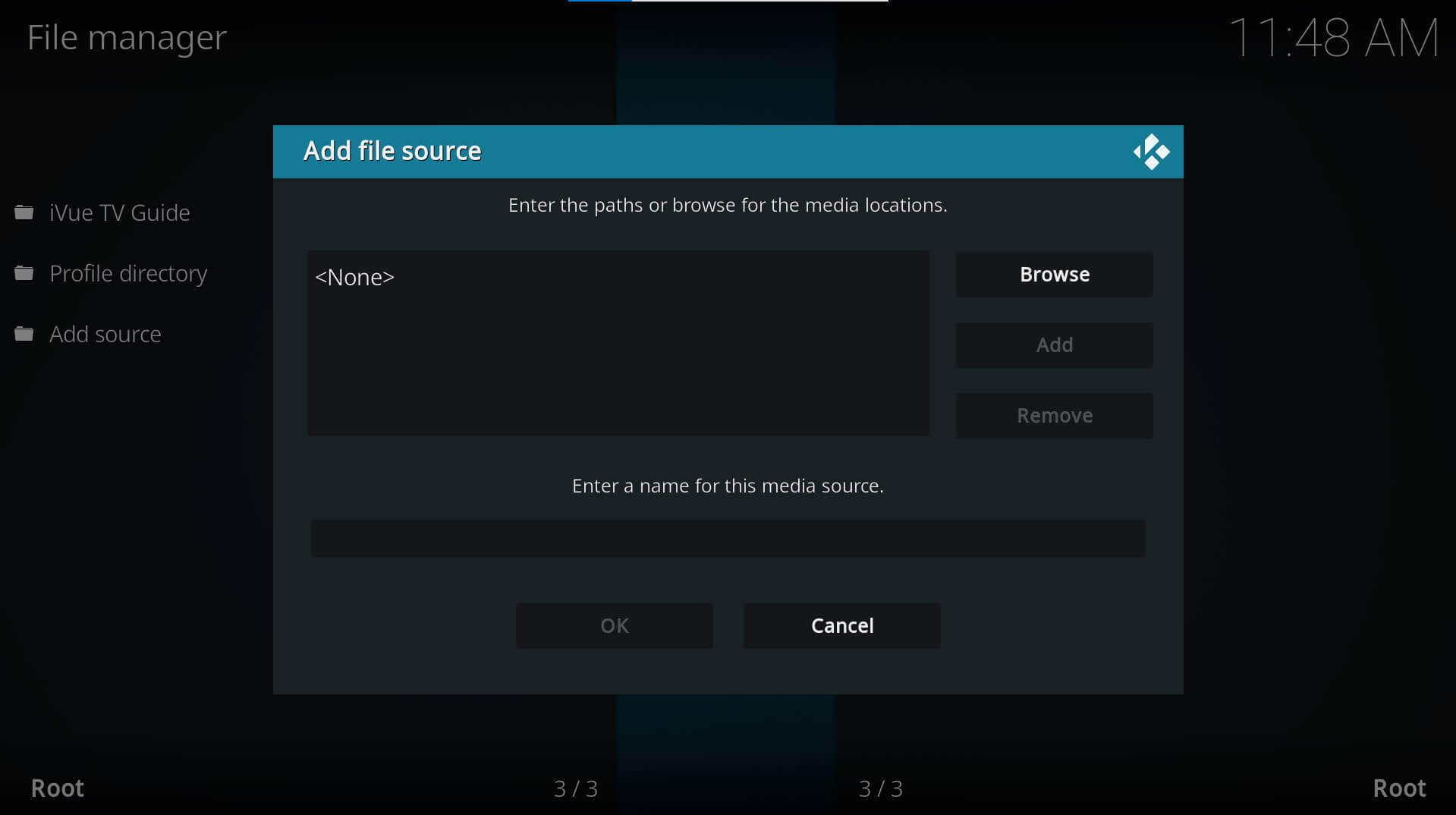
On the Kodi main menu, navigate to SYSTEM > File Manager > Add Source > None
Enter the LooNatics repository address
Type the following as is and hit OK. Next, give a name to the source file, LooNatics or similar, so you remember it easily.
Go to Add-ons
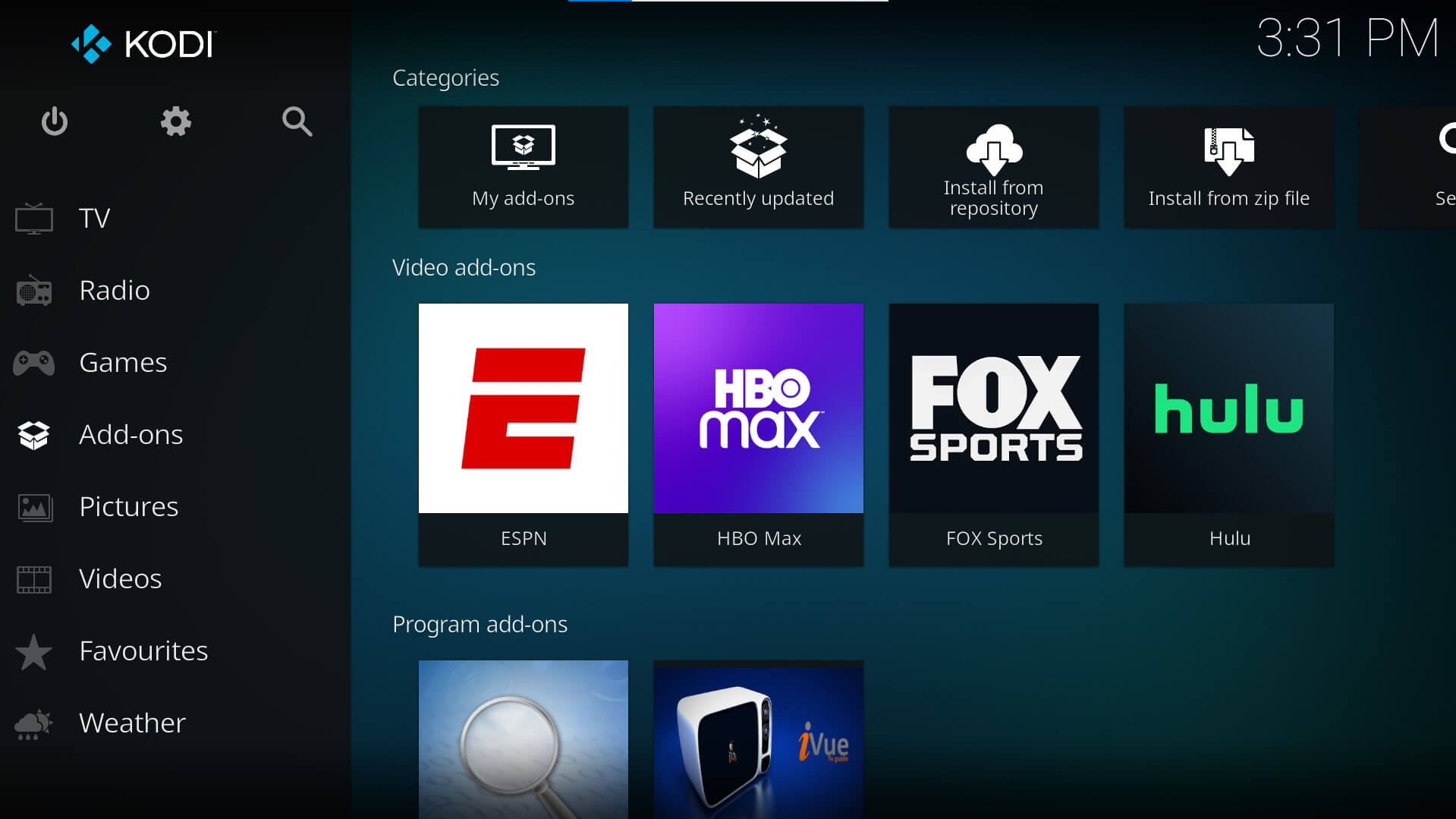
Now, on the Kodi main menu, go to Add-ons
Choose LooNatics
Under Add-ons, select Install from zip file and choose LooNatics from the list
Install LooNatics
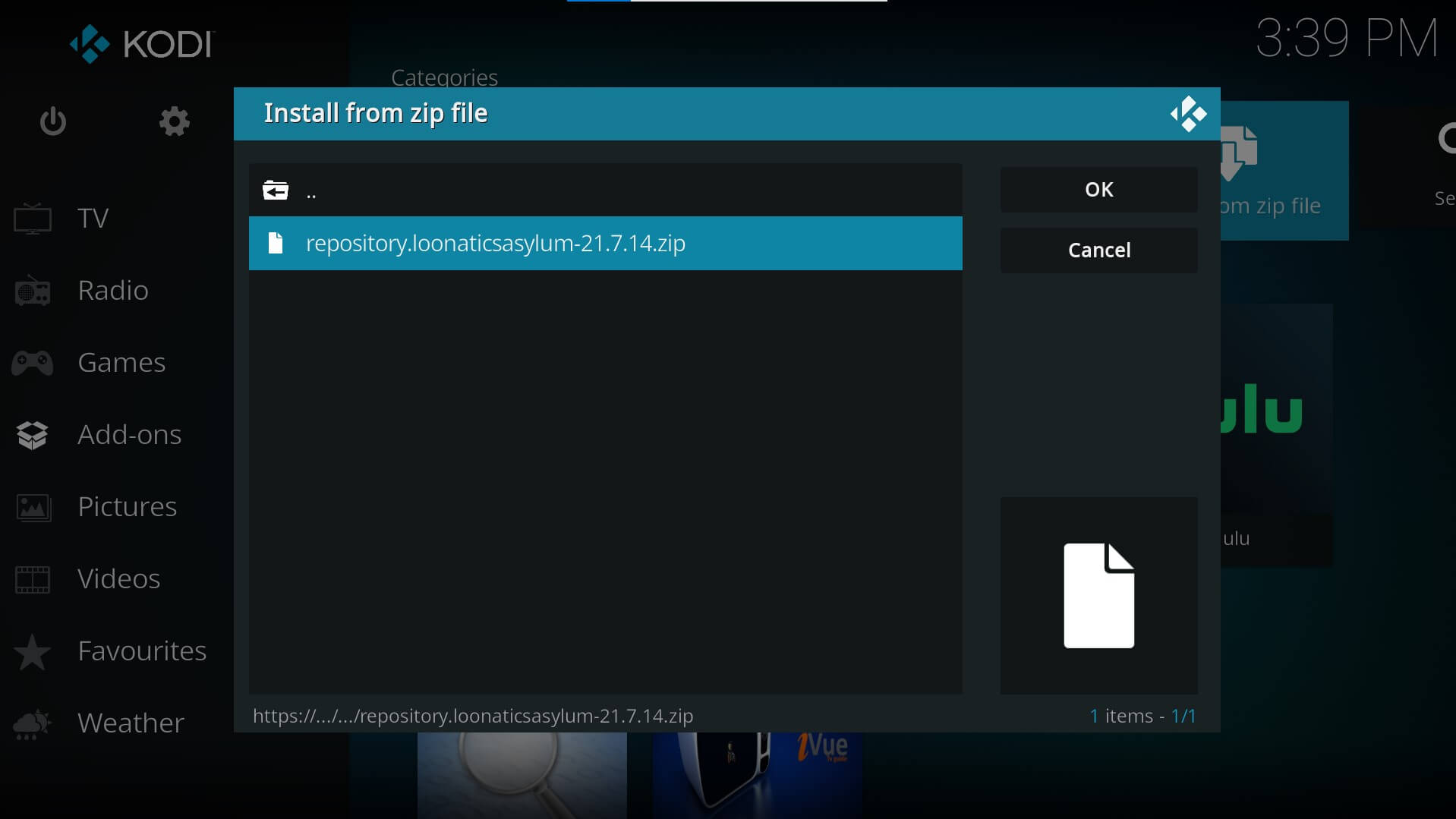
Once you click on LooNatics, select the repository file repository.loonatics.asylum-xx-x-xx.zip and hit OK. Wait for the Add-on enabled notification to be displayed.
Navigate to My Addons
Navigate to the Kodi main menu and go to Add-ons > My Add-ons
Select Install From Repository
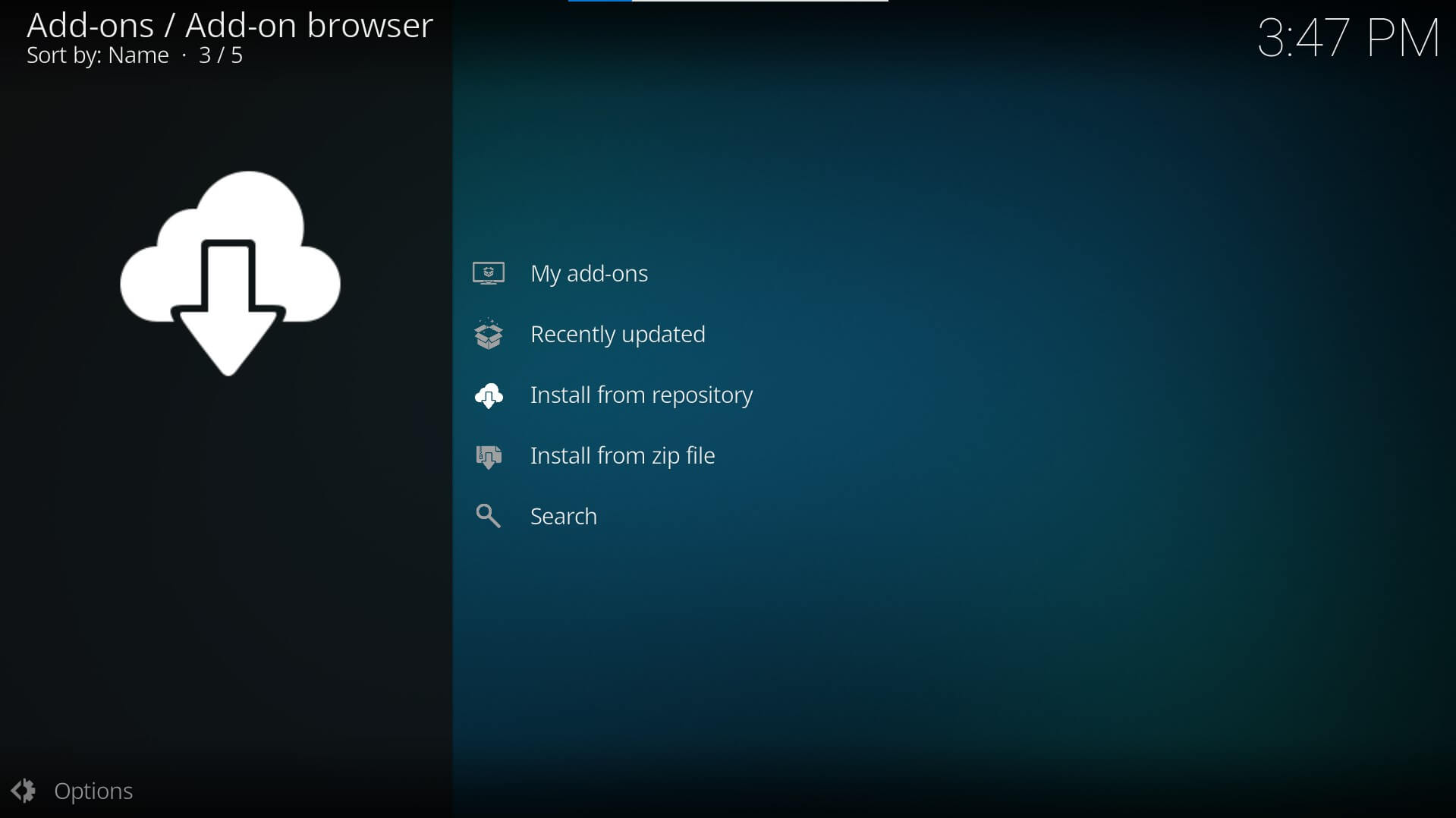
Select “..” from the list followed by Install from repository
Install Live Net Kodi Addon
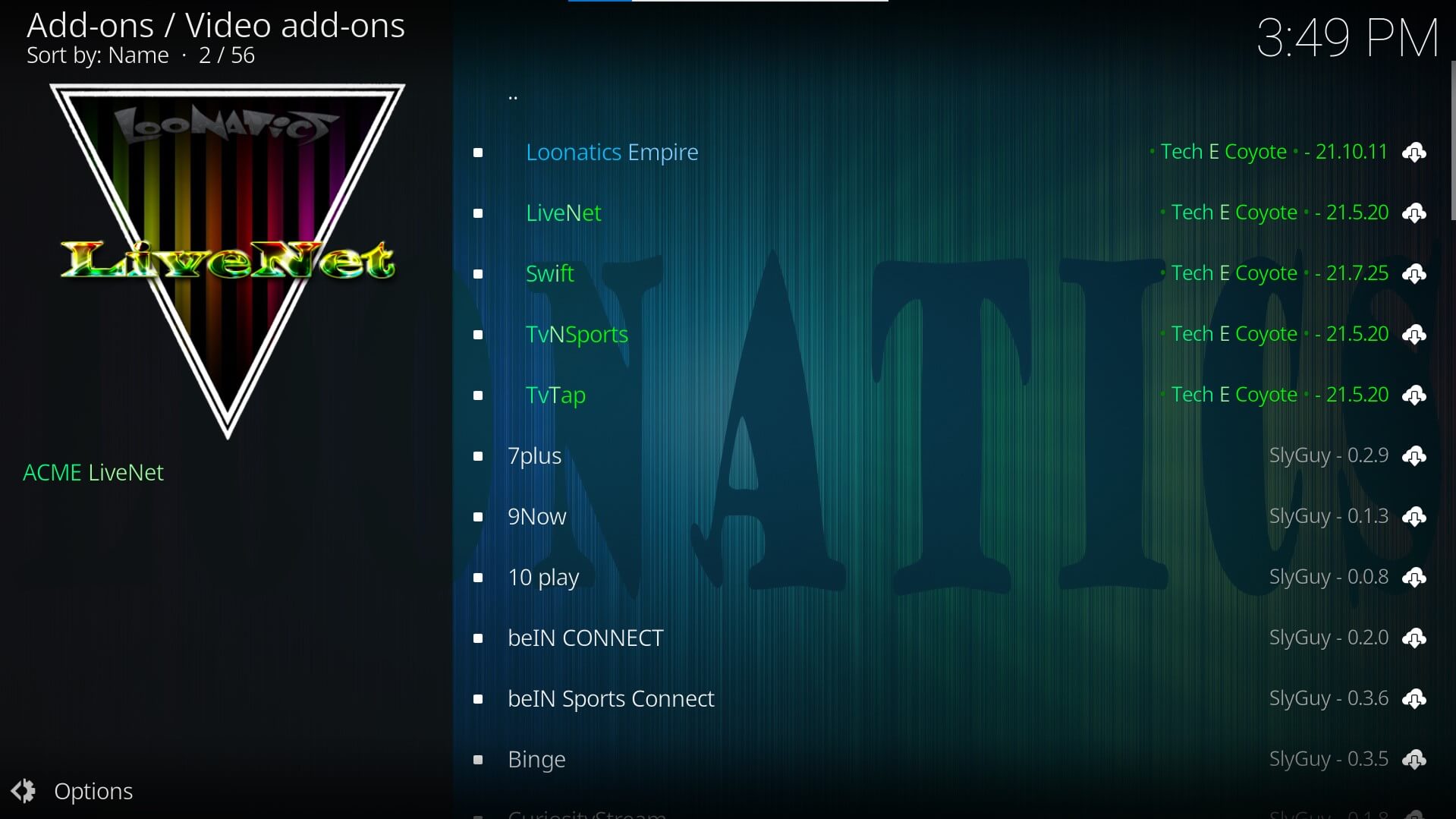
Select the LooNatics repository and go to Video add-ons > LiveNet. Click on Install and wait for the LiveNet add-on to download and install on your Kodi
Enjoy Streaming on LiveNet
Navigate to your favorite channel on LiveNet and enjoy streaming!
Related: How to Quickly Install the Hulu Kodi Addon? [2022]
Watch Live TV On LiveNet
LiveNet Kodi addon lets you watch live TV channels of different categories including music, shows, movies, entertainment, kids, cooking, religious, and more. Not just this, you can also watch live sports channels on LiveNet so you don’t have to install any sports Kodi addon as far as it is not there on LooNatics.
Install the LooNatics Asylum Repository right away and enjoy streaming live TV on Kodi. Have any questions about the LiveNet Kodi addon? Leave them down in the comments section below.
Looking for some action and decided to try phslots. Gotta say, the selection is pretty solid. Hoping to score some big wins. Anyone else playing here? phslots for the win!
Just signed up at phlove1. Loving the vibes already! The games are smooth and the bonuses seem pretty sweet. Hope this is my new favorite spot! Check it out phlove1.
Alright, alright, alright! Found phlaro11 and giving it a whirl. Seems legit so far. Maybe I’ll hit the jackpot. Fingers crossed phlaro11!
9096combet, not the flashiest site, but it gets the job done. Solid betting options and I haven’t had any issues with withdrawals. Worth a try if you like no-frills gambling. Check it out! 9096combet
Ja, der Eintritt ins Casino Bad Oeynhausen kostet 5 €.
Es gibt allerdings komplett spielfreie Tage, und zwar am Karfreitag, Allerheiligen,
Volkstrauertag, Totensonntag, Heiligabend und am ersten Weihnachtsfeiertag.
Wichtig ist in jedem Fall geschlossenes Schuhwerk.
Outfits mit Anzug sind gern gesehen, Jeans sind aber
in der richtigen Kombination auch akzeptabel. Während Sie bei den Spielautomaten mit gepflegter Freizeitbekleidung davon kommen, sollten Herren beim
Klassischen Spiel auf Oberhemd oder Polohemd zurückgreifen.
Bitte haben Sie Verständnis dafür, dass wir Ihnen den Zutritt bei offensichtlich verschmutzter Kleidung
oder in Bademode aus hygienischen Gründen verwehren müssen. Wir verwahren diese gerne in unserer Garderobe für Sie.
Lediglich Jacken und Kopfbedeckungen sind vor Betreten der Spielbereiche abzugeben. Alltagskleidung ist ebenso gern gesehen wie schicke Abendgarderobe.
Kleiden Sie sich für Ihren Besuch so, wie es zu Ihnen passt und wie Sie sich wohlfühlen. Für den Besuch einer MERKUR SPIELBANK
gibt es keinen fest vorgeschriebenen Dresscode.
Mitreißende Shows, große Gewinne und echte Eventmomente in den MERKUR SPIELBANKEN.
Bleib auf dem Laufenden und plane deinen nächsten Besuch.
Hier findest du aktuelle Events, spannende Neuheiten und alles rund um unser exklusives Spielangebot.
Also, die Karten zücken, Finger kreuzen…und mit etwas Glück die gezogenen Zahlen auf der eigenen Bingo-Karte abstreichen und viele Sondergewinne abräumen.
References:
https://online-spielhallen.de/bigg-casino-deutschland-ihr-umfassender-leitfaden/
GA6789Bet, you’re a bit of a hidden gem! Found you through a friend. The sports betting section is surprisingly comprehensive. Customer service is responsive. If you’re looking for variety in betting platforms, check them out: ga6789bet
Yo, just checked out hubet8811, and it’s pretty decent! The interface is smooth, and they got a good selection. Worth a look if you’re bored. Check it out here: hubet8811