
In this tutorial guide, I’ll show you exactly how to install the Torrentio Nuvio addon on your Firestick, Android TV, or Google TV device, plus how to add it from your phone and how to connect Real-Debrid or TorBox.
Torrentio is one of the most widely used stream addons for Stremio and Nuvio. It searches 25 torrent sites for every movie and episode, and it works either free over peer-to-peer or through a debrid service for fast, cached streams.
You’ll set Torrentio up on its website, copy your personal link, and add that link to Nuvio. I’ll also cover where to find your Torrentio URL, why Torrentio sometimes blocks VPN users, and what to do when it stops showing streams.
This article originated on Koditips.com (koditips . com)!
Torrentio Nuvio Addon Quick Facts
| Addon Name | Torrentio |
| Addon Type | Torrent stream addon (sources only, no catalogs) |
| Current Version | 0.0.15 |
| Cost | Free |
| Debrid Required | No, but recommended |
| Debrid Support | Real-Debrid, TorBox, Premiumize, AllDebrid, DebridLink, EasyDebrid, Offcloud, Put.io, HighWay |
| Providers | 25 torrent sites, including anime and foreign-language sources |
| Account Needed | No |
| Works With | Nuvio TV (Firestick, Android TV, Google TV), Nuvio Mobile, and Stremio |
What Is the Torrentio Nuvio Addon?
Torrentio is a stream addon. When you pick a movie or episode in Nuvio, it searches torrent sites like YTS, EZTV, 1337x, and ThePirateBay, then lists every matching release with its quality, size, and seeder count.
Does Nuvio support Torrentio? Yes. Nuvio uses the same addon system as Stremio, so the Torrentio Nuvio addon installs from a normal addon URL and works on Nuvio TV and Nuvio Mobile.
Like AIOStreams and PenguPlay, Torrentio only supplies streams. It doesn’t add movie or TV rows to your home screen, so you’ll still want a catalog addon or Nuvio’s built-in catalog for browsing.
Torrentio Nuvio Addon Features You Should Know About
25 Torrentio Providers, Including Anime and Foreign-Language Sites
Torrentio searches 25 torrent sites at once. Along with the big general sites, it includes anime trackers (NyaaSi, TokyoTosho, AniDex, HorribleSubs, and nekoBT) and 11 foreign-language sites, such as Rutracker for Russian, Torrent9 for French, and MejorTorrent for Spanish. You can turn any of them off, which is handy if you never watch foreign-language releases and want a shorter list.
Torrentio Real-Debrid, TorBox and 7 Other Debrid Services
Torrentio works with 9 debrid services: Real-Debrid, TorBox, Premiumize, AllDebrid, DebridLink, EasyDebrid, Offcloud, Put.io, and HighWay. When you add a debrid key, Torrentio renames itself in Nuvio (Torrentio RD for Real-Debrid, Torrentio TB for TorBox) and marks which results are already cached, meaning they’ll play instantly from the debrid server instead of a torrent swarm.
Torrentio Sorting, Language and Resolution Filters
You can sort results by quality then seeders, quality then size, seeders, or size, and set a priority language so dubbed releases in that language rise to the top. You can also hide resolutions you don’t want (Cam and Screener copies, 4K, or 3D, for example) and set a size limit. A size limit matters more on a Firestick than on a PC, since huge 4K remux files can stutter on a streaming stick.
What We Like and What We Don’t Like About Torrentio
What We Like
- The biggest pool of sources of any single Nuvio addon
- Free to use, with or without debrid
- Works with 9 debrid services
- Strong anime and foreign-language coverage
- No account or sign-in needed
What We Don’t Like
- Torrentio blocks some VPN servers, so you may need to switch servers
- Free P2P streaming is slow for older or less popular titles
- Changing your settings means installing a new URL
What You Need Before You Install the Torrentio Nuvio Addon
Before you start, have these ready:
- Nuvio installed on your device. If you haven’t done that yet, follow our Nuvio install guide for Firestick and Android TV.
- A phone or computer with a web browser. You’ll set up Torrentio there, not on your TV.
- A debrid API key (optional). Real-Debrid or TorBox makes Torrentio much faster, but it works without one.
Is the Torrentio Nuvio Addon Safe to Use?
Torrentio doesn’t need an account and never sees your Nuvio login. If you add a debrid key, it’s saved inside your personal Torrentio URL rather than on an account, so treat that URL like a password and don’t share it.
Does Torrentio Need a VPN?
It depends on how you use it. Without debrid, Torrentio streams peer to peer, which means your device connects to other people sharing the same file and your IP address is visible to all of them. That’s the setup where a VPN matters most. With debrid, your device streams from the debrid company’s server instead of the torrent swarm, but a VPN still keeps your streaming private from your internet provider.
Does Torrentio Block VPNs?
Sometimes, yes. Torrentio sits behind Cloudflare’s protection, and users on some VPN servers (Proton VPN and Cloudflare WARP come up most often) get a “blocked” or 403 error instead of the configure page or streams. The block applies to specific server IPs, so another server from the same VPN will often work. If it happens to you, switch to a different VPN server or location, or use your VPN’s split tunneling to exclude Nuvio.
A VPN will give you an anonymous connection while streaming through Nuvio addons. Click here to view the #1 VPN for streaming.
Learn how to install and configure your VPN here.
How Do You Stay Protected While Using Nuvio?
Sign up for a premium VPN and access the internet unrestricted. We offer exclusive discounts for IPVanish and NordVPN, the highest respected VPNs in the streaming community. Both of these VPNs have some great features for users:
- Apps for Android, iOS, Mac, Linux & more
- Zero Logs
- Unlimited bandwidth
- Tier 1 hardware (no speed slowdown)
- Access to hundreds of VPN servers


How to Install the Torrentio Nuvio Addon on Firestick or Android TV
These steps work on Firestick, Fire TV, Android TV, and Google TV. Steps 1 to 6 happen in a web browser on your phone or computer. Steps 7 to 11 happen in Nuvio on your TV.
This guide will show you how to install the Torrentio Nuvio addon on Firestick, Android TV, or Google TV.
Total Time: 5 minutes
Open the Torrentio Configure Page
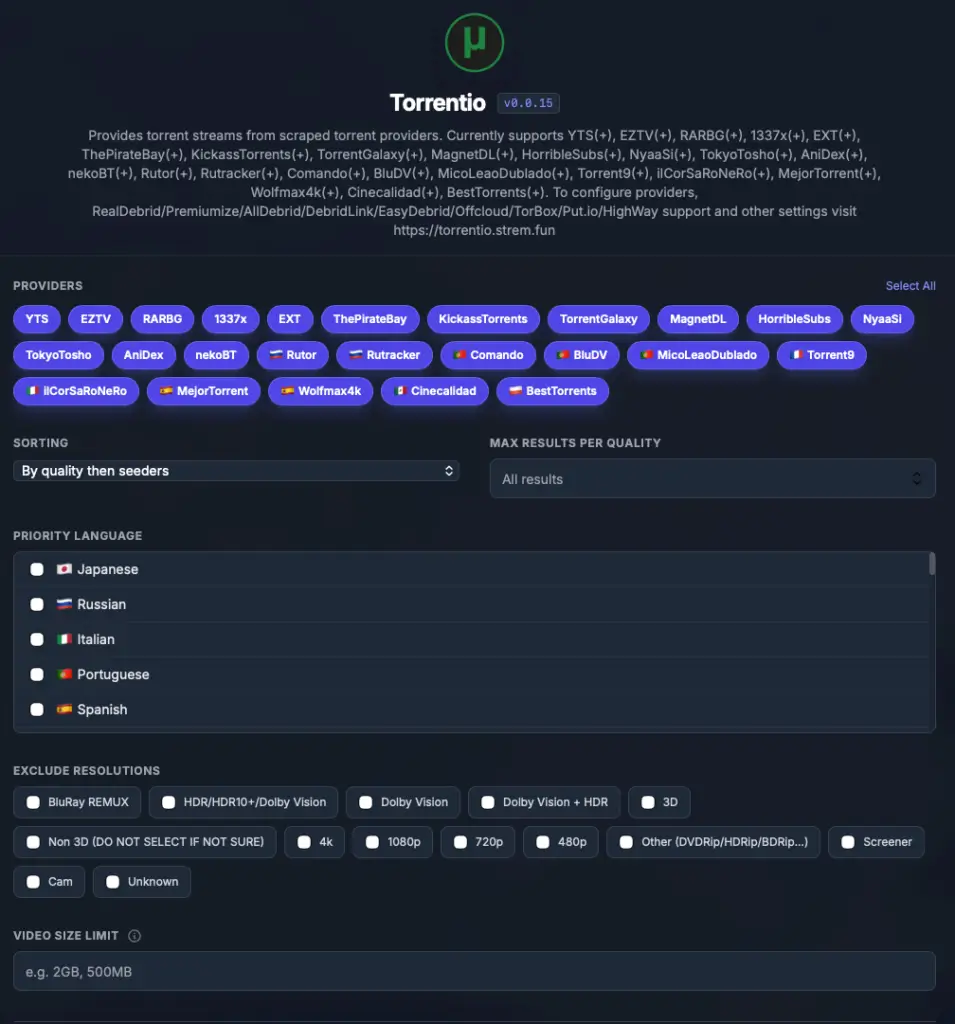
On your phone or computer, open a web browser and go to torrentio.strem.fun/configure.
Choose Your Providers

Under Providers, keep the defaults or uncheck any sites you don’t want. If you only watch English releases, unchecking the foreign-language sites shortens your results.
Set Sorting and Priority Language
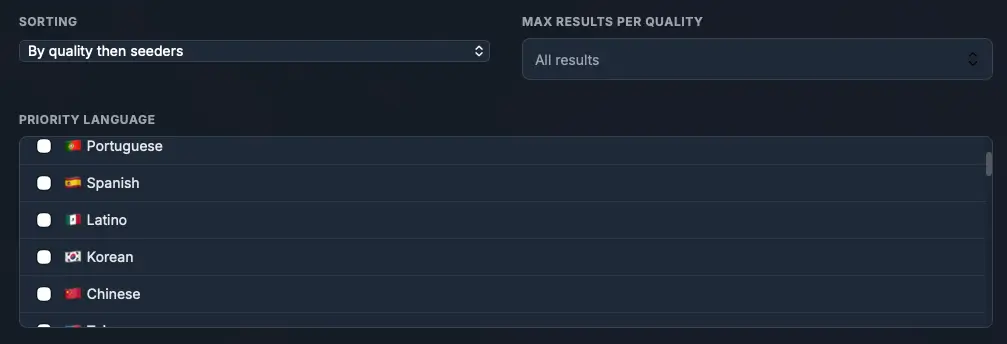
Under Sorting, choose By quality then seeders (or By quality then size if you use debrid). Pick a Priority Language if you want dubbed releases shown first.
Exclude Resolutions You Don’t Want

Under Exclude Resolutions, check Cam, Screener, and 3D at minimum. You can also set a Video Size Limit here.
Add Your Debrid Service (Optional)
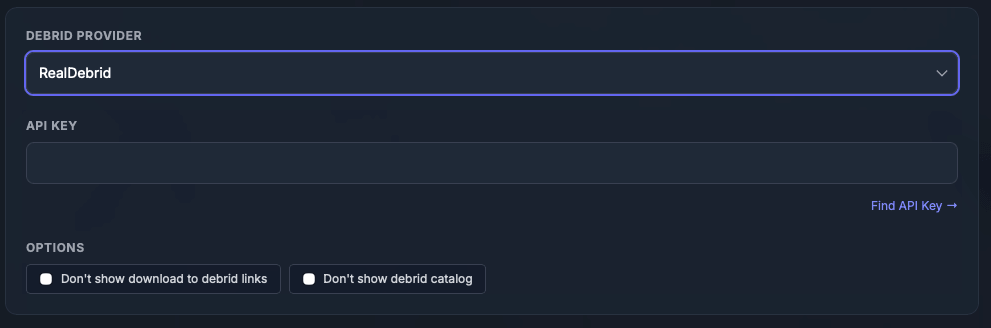
Under Debrid Provider, choose RealDebrid, TorBox, or your service, then paste your key into the API Key field. Skip this step to use Torrentio free.
Copy Your Torrentio Link
Click Copy Link at the bottom of the page. This is your personal Torrentio Nuvio addon URL, and it includes your settings and debrid key.
Open Addons in Nuvio
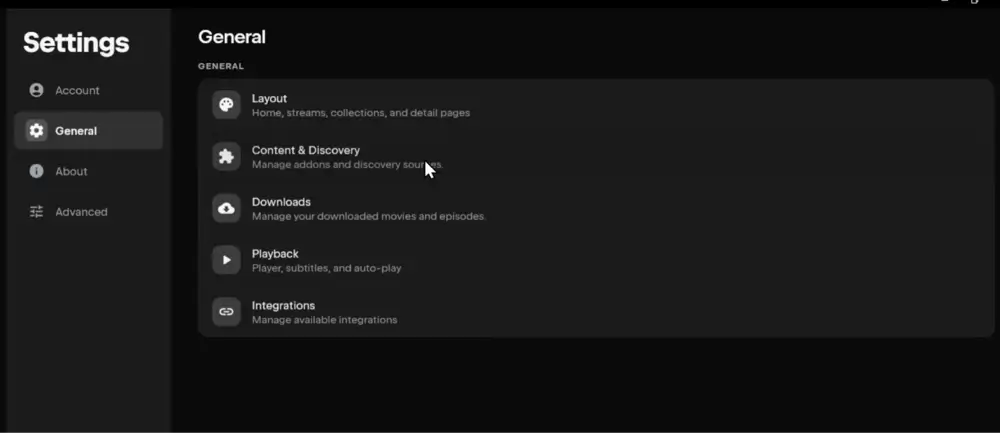
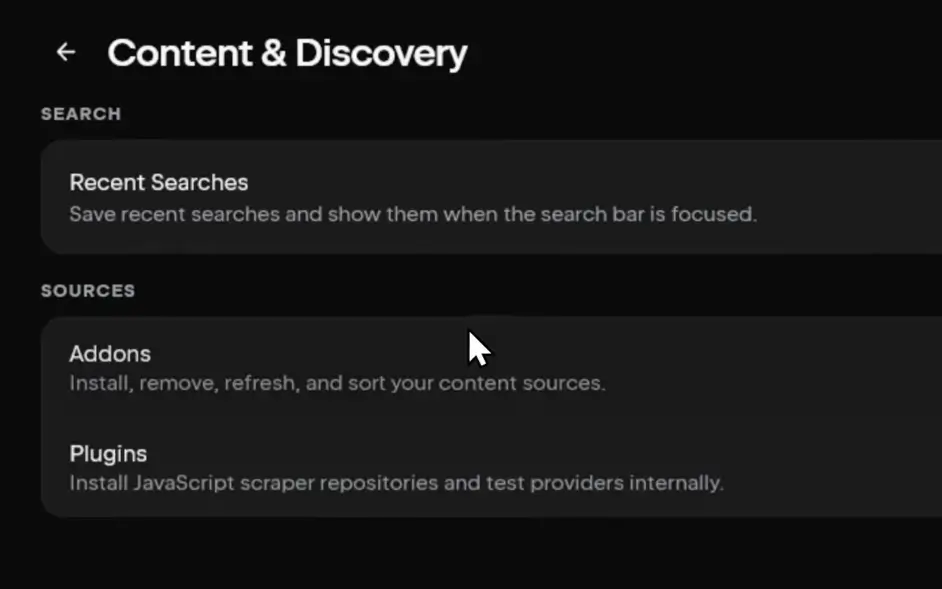
Launch Nuvio on your TV and open Addons from the side menu. You can also get there through Settings, then Content & Discovery, then Addons.
Select Install Addon
Select the Install addon field at the top of the Addons screen.
[Screenshot: the Nuvio TV Addons screen showing the Install addon field]Paste the URL and Click Install
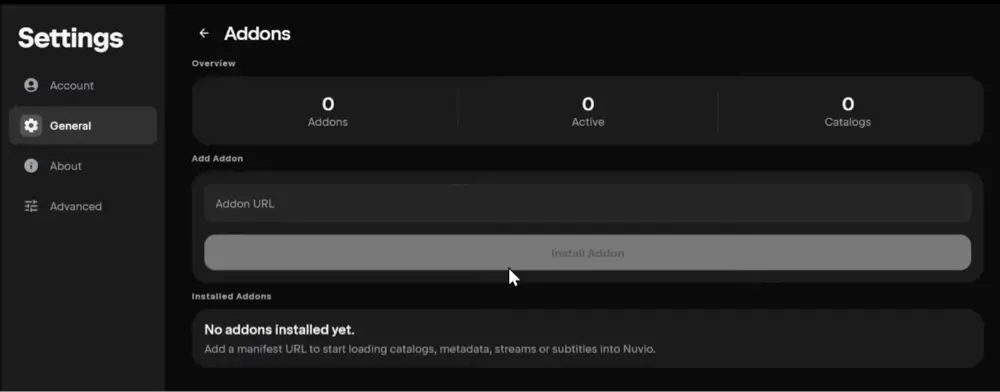
Enter your Torrentio URL and select Install. Typing it with a remote is slow, so the QR code method below is easier on a Firestick.
[Screenshot: the Torrentio URL entered in the Install addon field]Confirm Torrentio Is Installed
Nuvio shows a short Installed confirmation, and Torrentio (or Torrentio RD or TB with debrid) appears in your Installed list.
[Screenshot: the Installed list showing Torrentio RD]Test a Movie or Episode
Open any movie or episode and check the source list. You should see Torrentio results with quality, size, and seeders.
[Screenshot: a Nuvio source list showing Torrentio results]
That’s it. The Torrentio Nuvio addon is now installed. If you use more than one Nuvio profile, repeat step 7 onward on each profile, unless that profile is set to Use Primary Addons.
How to Add Torrentio to Nuvio From Your Phone (QR Code)
Typing a long Torrentio URL with a Fire TV remote is slow, and Nuvio TV has a built-in way around it:
- In Nuvio on your TV, open Addons and select Manage from phone.
- Scan the QR code with your phone’s camera.
- On the page that opens on your phone, paste your Torrentio URL into Add addon by URL and add it.
- Back on the TV, Nuvio shows Confirm addon & catalog changes with Torrentio listed under Added. Select Confirm.
How to Add Torrentio to Nuvio on Android or iPhone
If you use Nuvio Mobile, you can install Torrentio right from the app:
- Open Nuvio and go to Settings, then Content & Discovery, then Addons.
- Paste your Torrentio URL into the Addon URL field.
- Tap Install Addon. Nuvio checks the manifest, then shows Addon Installed.
If your phone and TV are signed in to the same Nuvio account and profile, Nuvio Sync pushes Torrentio to your TV too. Reopen Nuvio on the TV or wait about a minute.
Torrentio Nuvio Addon URL: Where to Get Your Torrentio Link for Nuvio
There are two kinds of Torrentio URL, and which one you install decides whether debrid works.
The default Torrentio URL
https://torrentio.strem.fun/manifest.json works in Nuvio as-is. It uses Torrentio’s default settings and no debrid service, so every result streams peer to peer.
Your personal Torrentio URL
This is the link you get from Copy Link on the configure page. It has your providers, filters, and debrid key built into the address itself, which is why it’s much longer than the default URL. Use this one if you have debrid or changed any settings.
Never paste a Torrentio link you found on Reddit or a forum. A personal link can contain someone else’s debrid key, and copied links often break once that key is changed. The same URL also works in Stremio if you use both apps.
Torrentio Real-Debrid Nuvio Setup (Torrentio RD)
Torrentio with Real-Debrid is the most common setup, and it’s what people mean when they search for Torrentio RD. Here’s how to set it up:
- Sign in to Real-Debrid and copy your API token from its API token page. The Find API Key link on Torrentio’s configure page takes you there.
- On torrentio.strem.fun/configure, set Debrid Provider to RealDebrid and paste the token into API Key.
- Click Copy Link and install that URL in Nuvio.
Once it’s installed, the addon shows up in Nuvio as Torrentio RD. Cached results play instantly from Real-Debrid’s servers. Torrentio also adds a RealDebrid catalog so you can browse files already in your Real-Debrid account.
Two options appear once you pick a debrid service:
- Don’t show download to debrid links hides results that aren’t cached yet. Turn it on if you only want links that play right away.
- Don’t show debrid catalog removes the RealDebrid catalog row if you don’t use it.
Torrentio TorBox Nuvio Setup (Torrentio TB)
The TorBox setup works the same way. Choose TorBox under Debrid Provider, paste your TorBox API key from your TorBox account settings, and copy the new link. In Nuvio, the addon shows up as Torrentio TB. Our TorBox guide covers the plans, and our Real-Debrid alternatives guide compares every debrid service Torrentio supports.
Can You Use the Torrentio Nuvio Addon Without Debrid?
Yes. Leave Debrid Provider set to None and the Torrentio Nuvio addon streams straight from the torrent swarm, for free.
It works well for new and popular releases, which have lots of seeders. Older or niche titles with only a handful of seeders can be slow to start or buffer, and some won’t play at all. Your device also uploads pieces of the file to other peers while you watch, which is how P2P works and why a VPN matters most in this mode.
If free streaming is the goal and you’d rather avoid torrents entirely, PenguPlay is the other popular free Nuvio addon. It uses direct web links instead of P2P.
Best Torrentio Settings for Nuvio (Providers, Sorting & Language)
The defaults are fine, but these changes make Torrentio cleaner in Nuvio:
- Exclude Cam and Screener. These are low-quality copies recorded in theaters, and they clutter results for new releases.
- Sort by quality then size with debrid, or quality then seeders without it. Seeders don’t matter for cached debrid links, but they decide whether a free P2P stream will play smoothly.
- Set a Video Size Limit on a Firestick. Very large files can stutter on streaming sticks, so capping the size keeps playback smooth.
- For anime, keep NyaaSi, TokyoTosho, AniDex, HorribleSubs, and nekoBT checked. They’re the anime-focused providers, and Torrentio searches them by default.
- Set a Priority Language if you watch dubbed releases. Torrentio pushes releases in that language to the top of your list.
- Uncheck foreign-language providers you never use. Fewer providers means a shorter, easier source list.
How to Change Your Torrentio Nuvio Settings (Why You Need a New URL)
Unlike AIOStreams or PenguPlay, Torrentio has no account. Your settings live inside the URL itself, so there’s nothing to sign in to and save. To change anything:
- Open torrentio.strem.fun/configure and set everything up again the way you want it.
- Click Copy Link to get the new URL.
- In Nuvio, install the new URL, then remove the old Torrentio entry so you don’t get duplicate results.
Torrentio Nuvio Addon Not Working? Troubleshooting
Is Torrentio down?
Open torrentio.strem.fun/configure in a browser. If it loads normally but Nuvio shows no Torrentio results, the problem is your setup. If it doesn’t load on your home connection but loads on mobile data, you’re being blocked rather than Torrentio being down.
Blocked or 403 error with a VPN
Torrentio blocks some VPN server IPs. Switch to a different server or location, or exclude Nuvio from your VPN with split tunneling.
No Torrentio streams for a title
Check that you haven’t excluded too many resolutions or set a tiny size limit. If you turned on Don’t show download to debrid links, uncached titles won’t show at all, so turn it off to see everything.
Torrentio RD is still loading
Torrentio is waiting on Real-Debrid. Give it a few seconds, and confirm your API token is still valid, since a changed or expired token breaks every result.
Playback error or Torrentio stream not playing
Without debrid, the torrent may not have enough seeders. Pick a result with more seeders, or a cached debrid result if you have one.
Torrentio missing from Nuvio
Make sure you’re on the same profile you installed it on. If the profile uses Use Primary Addons, switch to Profile 1 to add Torrentio.
Torrentio Nuvio Alternatives
Here’s how Torrentio compares with the other popular source addons for Nuvio.
Torrentio vs AIOStreams in Nuvio
AIOStreams bundles several source addons into one list, with one debrid key for all of them. It’s the better choice if you use debrid and want deduplicated, filtered results. Keep in mind that the ElfHosted public AIOStreams instance doesn’t include Torrentio, so many people run both.
Torrentio vs Comet
Comet is built mainly for debrid users. With debrid, it’s a solid second source next to Torrentio. Without debrid, Torrentio is the more useful of the two.
Torrentio vs PenguPlay
Both are free, but they work differently. Torrentio uses torrents, and PenguPlay uses direct web links, so PenguPlay avoids P2P entirely. Torrentio usually has more releases to choose from.
Is Torrentio Legal?
Determining the legality of Torrentio is challenging without knowing if the sources it pulls from have the proper licensing. Kodi Tips does not have the ability to confirm the legal status of these addons.
Plus, legality rules differ depending on what country you live in.
Copyright Concerns with Nuvio Addons
At first glance, the addon appears to link to copyrighted works without the necessary consent, which raises the concern about its legality.
Public Domain Titles
Users can access titles in the public domain, which are not subject to copyright laws. This allows free download, streaming, and sharing without legal issues.
User Responsibility
You, as the end user, bear responsibility for all content accessed through Nuvio addons, making it crucial that you understand what is legal to view.
Legal Streaming Options
For those seeking legal and verified streaming options, check our list of legal Kodi addons with 100% legal content.
Torrentio Nuvio Addon FAQ
Does Nuvio Support Torrentio?
Yes. Nuvio uses the same addon system as Stremio, so you can install Torrentio with the default URL or your personal link from Torrentio’s configure page.
Is Torrentio a Nuvio Plugin or an Addon?
Torrentio is an addon. Add it in Nuvio’s Addons screen with its URL, not in the Plugins section, which is for scraper repositories.
Is Torrentio Free?
Yes. Torrentio is free to use. A debrid service like Real-Debrid or TorBox is optional and costs extra, but it makes streams faster and more reliable.
What Is Torrentio Lite?
Torrentio Lite is a lighter version that searches only the 14 main providers and skips the 11 foreign-language sites. Its default URL is torrentio.strem.fun/lite/manifest.json.
Can You Add Torrentio to AIOStreams in Nuvio?
Yes on community AIOStreams instances, but not on the ElfHosted public instance, which disables Torrentio. Otherwise, install Torrentio as its own addon alongside AIOStreams.
Can Nuvio’s Own TorBox Connection Play Torrentio Links?
Nuvio has an experimental Connected Services setting for TorBox and Premiumize that can resolve playable links for results that need it. It’s still marked experimental, so the more reliable route is putting your debrid key into Torrentio itself.
Does the Torrentio Nuvio Addon Work on iPhone?
Yes. Install Nuvio on your iPhone, then add your Torrentio URL under Settings, Content & Discovery, Addons. It works the same way as on Android.
Should I Use a VPN With the Torrentio Nuvio Addon?
Yes, especially without debrid, since P2P streaming shares your IP address with other peers. If Torrentio blocks your VPN server, switch to a different server. We recommend NordVPN.
Disclaimer
We have no control over and do not host or upload any video, films, media file, or live streams. KodiTips is not responsible for the accuracy, compliance, copyright, legality, decency, or any other aspect of the content streamed from your device. If you have any legal issues please contact the appropriate media file owners or host sites.