
In this tutorial, I’ll show you exactly how to install Nuvio on your Android TV box, Google TV, or Amazon Firestick. I’ll also cover the account setup it needs after installing, plus the features that make it one of the fastest-growing free streaming apps right now.
Nuvio is a free, open-source media hub app for movies, TV shows, and anime, built for Android TV and Firestick with a remote-friendly interface. It’s still in Beta, so expect some rough edges alongside frequent updates.
Plus, is Nuvio safe to install and legal to use? I’ll touch on those below, along with the account setup you’ll need to actually start streaming.
Heads up if you have a newer Fire TV Stick: the 2025 Fire TV Stick 4K Select and 2026 Fire TV Stick HD run Amazon’s new Vega OS, which blocks sideloading entirely. There’s currently no way to install Nuvio or any other sideloaded app on those specific models. Older and other current Fire TV devices (Fire TV Stick 4K Max, Fire TV Stick 4K Plus, Fire TV Cube) and Android TV/Google TV boxes are not affected.
Nuvio Quick Facts
| App Name | Nuvio |
| Developer | Nuvio Media (open-source community project) |
| Price | Free |
| Content Type | Addon/plugin-based media hub (Stremio-style) |
| Compatible Devices | Android, Android TV, Google TV, Fire TV/Firestick (sideload), iOS (Beta) |
| Requires | Free Nuvio account for cross-device sync, plus community plugins added after install |
What is Nuvio?
Nuvio is a free, open-source media hub in the same style as Stremio, but built with a more modern interface and a remote-friendly layout aimed at Android TV and Firestick. It pulls streams through community-maintained plugins rather than shipping its own content.
Unlike some all-in-one apps, Nuvio has no built-in content at all until you add plugins yourself, and it doesn’t require a debrid account to work, though connecting one (Nuvio natively supports TorBox and Premiumize) gets you faster, higher-quality streams.
Nuvio Features You Should Know About
Native Debrid Integration
Nuvio has built-in support for TorBox and Premiumize under Settings > Integrations, so you sign in once instead of pasting API keys into every plugin’s config page. Real-Debrid and AllDebrid also work, but only through individual plugin configuration rather than this native login.
Community Plugin Ecosystem
Nuvio connects to hundreds of community-built plugins and providers covering movies, TV shows, anime, and live content in multiple languages. Since it ships empty, the plugins you add determine what you can actually watch.
Cross-Device Profile Sync
A free Nuvio account syncs your profile, plugin list, and watch progress across every device you install it on, and it integrates with Trakt for tracking what you’ve watched.
What We Like and What We Don’t Like About Nuvio
What We Like
- Completely free and open-source, no subscription tiers
- Native TorBox and Premiumize login, fewer broken configs than addon-only integrations
- Remote-friendly TV interface built specifically for Android TV and Firestick
- Active development with frequent updates
What We Don’t Like
- Still in Beta, so occasional bugs and instability are expected
- Ships with zero content until you find and add plugins yourself
- Requires an account and a device-pairing step before you can use it, unlike apps that just open and work
Is Nuvio Safe to Use?
Nuvio isn’t on the Amazon Appstore, so on Firestick you’re sideloading the APK directly rather than installing through a curated store. Because it’s an actively-maintained open-source project on GitHub with public source code, it’s easier to vet than a lot of closed-source APKs, but you’re still trusting Android’s standard “install unknown apps” permission the first time you sideload it.
That permission screen just means Android is letting an app install from outside its usual app store, which is normal for any sideloaded app and isn’t unique to Nuvio. Still, protecting your connection with a good VPN service is a smart idea before you start streaming.
A quality VPN will give you an anonymous connection while streaming or downloading media through Nuvio’s plugins. Click here to view the #1 VPN service for streaming.
Learn how to install and configure your streaming VPN here.
How Do You Stay Protected While Using Nuvio?
Sign up for a premium VPN and access the internet unrestricted. We offer exclusive discounts for IPVanish and NordVPN, the highest respected VPNs in the streaming community. Both of these VPNs have some great features for users:
- Apps for Android, iOS, Mac, Linux & more
- Zero Logs
- Unlimited bandwidth
- Tier 1 hardware (no speed slowdown)
- Access to hundreds of VPN servers

Click here to learn more about VPN protection for streaming.
How to Install Nuvio on Firestick or Android TV
This guide will show you how to sideload the Nuvio APK on Firestick or Android TV.
Total Time: 10 minutes
Enable Unknown Sources (Firestick / Fire TV Only)
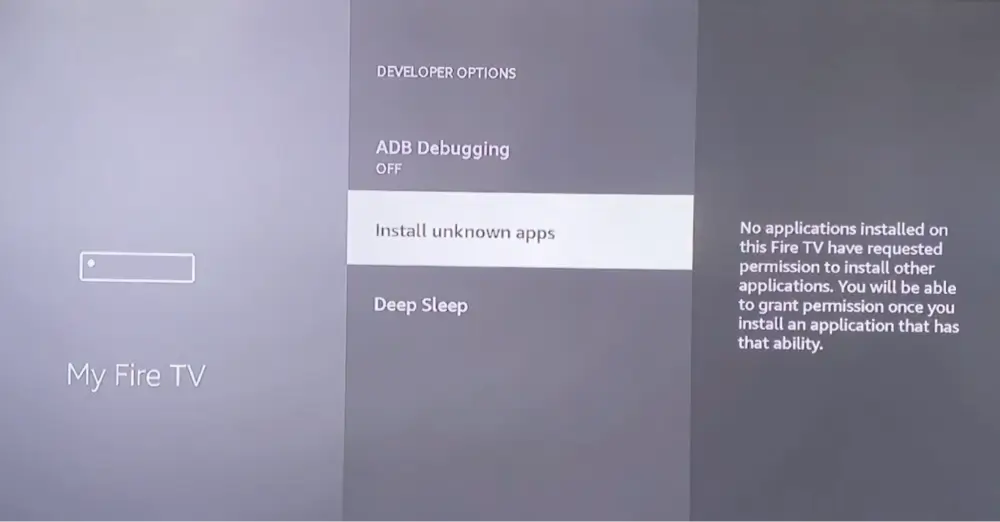
Go to Settings > My Fire TV > Developer Options and turn on Apps from Unknown Sources. You’ll confirm this again for the Downloader app specifically the first time you install something through it.
If you have an Android TV box, you don’t need to do this step.
Enable Unknown Sources (Android TV / Google TV Only)
Menu names vary by device, but look under Settings > Apps (or Security & Restrictions) for an option to allow installs from unknown sources, then enable it for the Downloader app once it’s installed.
This step is only required if you’ve never done this for any other APK installation before.
Search for the Downloader App
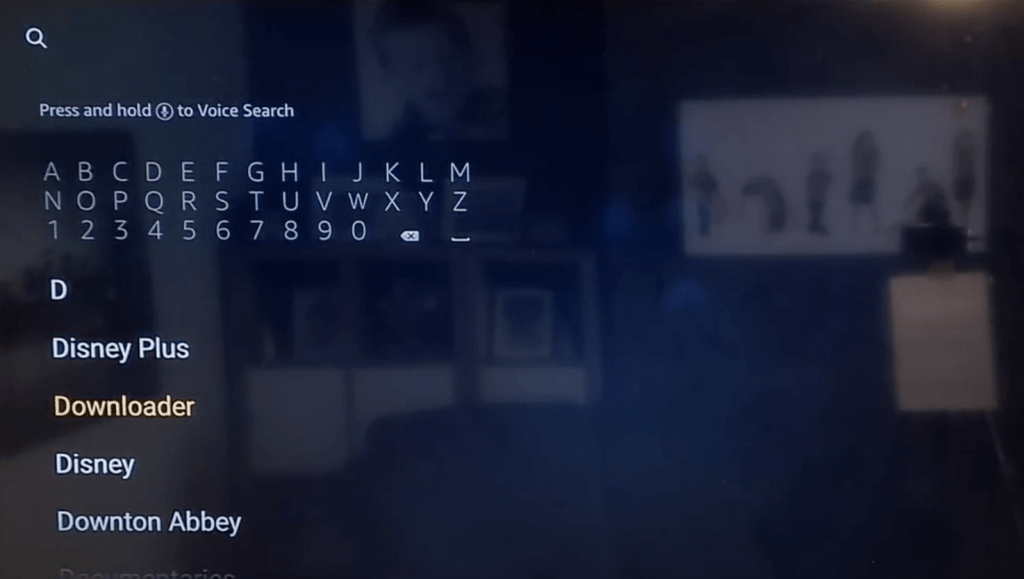
From your device’s home screen, search for Downloader in the Amazon Appstore (Firestick) or Google Play Store (Android TV/Google TV).
Select Downloader From the Results
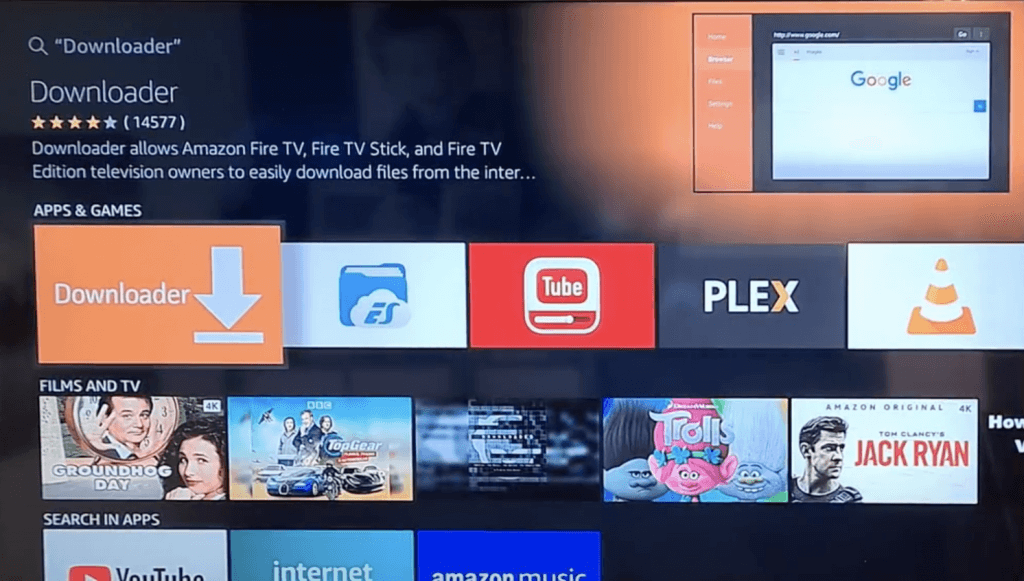
Select the official Downloader app (by AFTVnews) from the search results.
Install the Downloader App
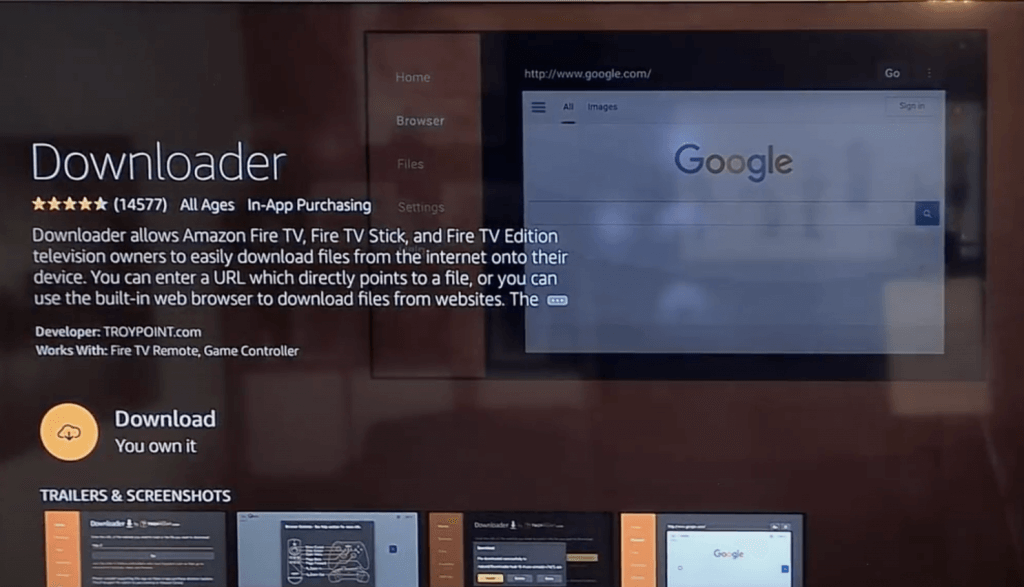
Select Download or Get and wait for Downloader to install, then open it.
Open Downloader
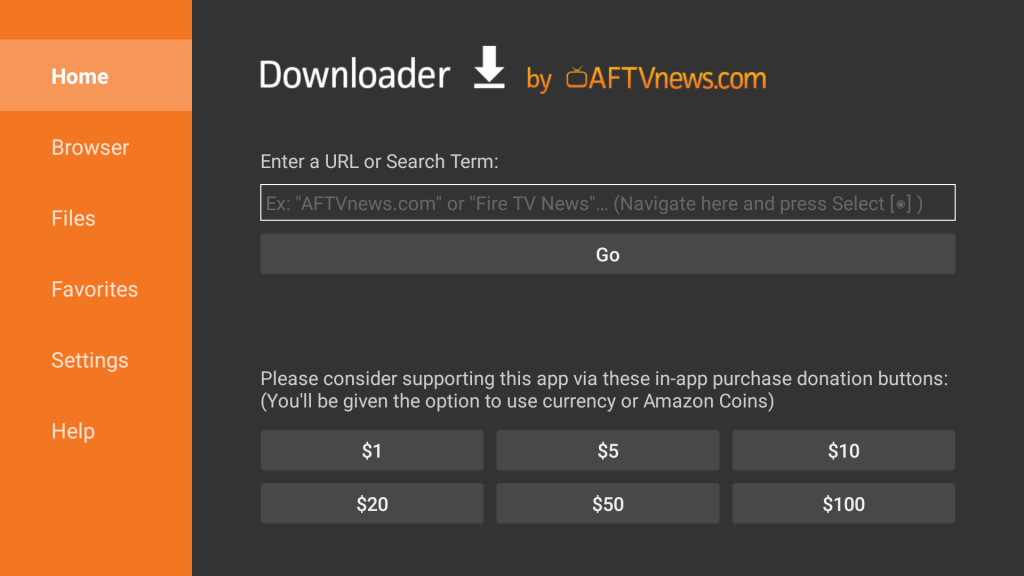
Launch Downloader from your Apps & Channels screen. You’ll see a URL entry field on the main screen.
Enter Nuvio’s Download URL
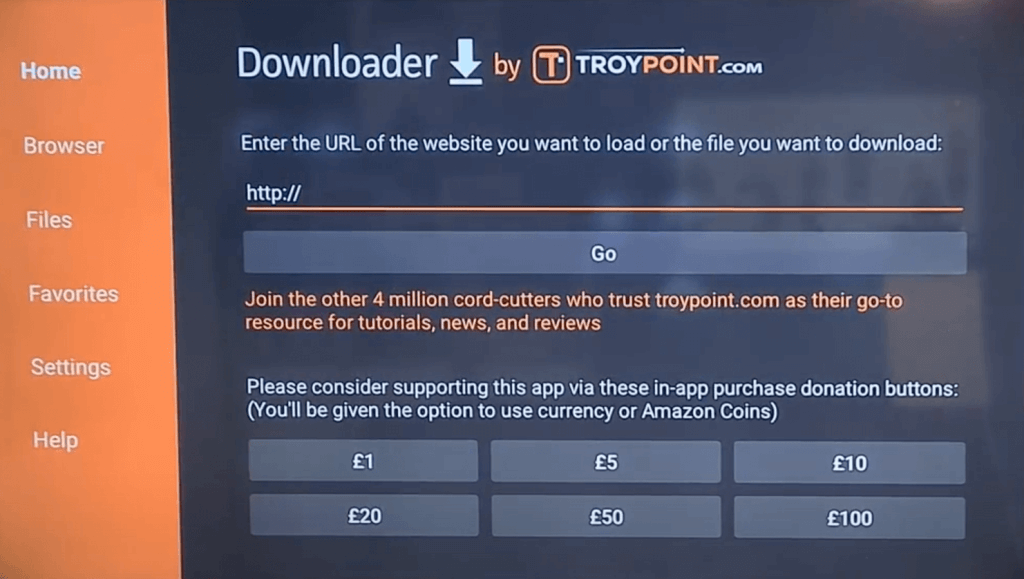
Select the URL field and enter github.com/NuvioMedia/NuvioTV/releases, then select Go and choose the latest release’s APK file for Android TV/Fire TV.
Download and Install the APK
Once the download finishes, the install screen will appear automatically. Select Install, wait for it to finish, then select Open to launch Nuvio.
Nuvio will now open to an empty library. That’s expected, the next section covers the account and plugin setup you need before you’ll see any content.
Nuvio Setup After Installation
Nuvio needs a free account and at least one plugin before it’ll show any content. Here’s the setup, step by step.
Create a Free Nuvio Account
- On your phone or a computer, go to Nuvio’s sign-up page and create a free account.
- Open Nuvio on your Firestick or Android TV and select Sign In.
- A pairing code or QR code will appear on the TV screen.
- Scan the QR code with your phone (or enter the code on the sign-up page) and confirm.
- Your TV app will automatically sign in once the pairing is confirmed.
Add Plugins (and Optionally a Debrid Service)
- Go to Settings > Addons > Add Addon.
- Paste a plugin’s manifest URL (from the plugin’s own setup page) and select Install.
- Repeat for any additional plugins you want.
- Optional: go to Settings > Integrations > Connected Services and sign in to TorBox or Premiumize for native debrid support, no API keys needed.
Nuvio Troubleshooting
Install Blocked or “App Not Installed” Error
Double check Unknown Sources is actually enabled for Downloader specifically, not just toggled at the system level on some Android TV/Google TV devices. Also confirm there’s enough free storage, and if it still fails, delete the partial download in Downloader and try again.
Pairing Code or QR Code Won’t Work
Pairing codes expire after a few minutes. Back out to the Sign In screen to generate a fresh code, and make sure you’re signed into the same Nuvio account on both the phone and the TV app.
No Content Showing / Empty Library
This is expected right after install, Nuvio ships with zero built-in content. Confirm you’ve actually added at least one plugin under Settings > Addons before assuming something’s broken.
App Crashes or Freezes
Since Nuvio is still in Beta, occasional bugs are expected. Clear the app’s cache/data from your device’s app settings, or reinstall the latest APK from the GitHub releases page if a crash persists.
Is Nuvio Legal?
Determining the legality of Nuvio is challenging without knowing whether every community plugin it connects to has the proper licensing. KodiTips does not have the ability to confirm the legal status of these plugins.
Plus, legality rules differ depending on what country you live in.
Copyright Concerns
At first glance, some plugins appear to distribute copyrighted works without the necessary consent, which raises concerns about their legality.
Public Domain Titles
Users can access titles in the public domain, which are not subject to copyright laws. This allows free download, streaming, and sharing without legal issues.
User Responsibility
You, as the end user, bear responsibility for all content accessed through Nuvio’s plugins, making it crucial that you understand what is legal to view.
Legal Streaming Options
For those seeking legal and verified streaming options, check our list of legal Kodi addons with 100% legal content.
Frequently Asked Questions About Nuvio
How Do You Install Nuvio on Firestick or Android TV?
Since Nuvio isn’t available on the Amazon Appstore, you’ll sideload it using the Downloader app. Follow the detailed instructions in this guide, then complete the account and plugin setup covered in the Setup After Installation section so it actually has content to show.
Is Using Nuvio Legal?
Nuvio itself is legal to use, it’s an open-source media hub with no content built in. However, not all content accessible through its community plugins is legally permissible depending on the source. Ensure you access only content that is within the public domain or that you have the right to stream.
Is Nuvio Safe to Use?
Nuvio is an actively-maintained, open-source project with public source code on GitHub, which makes it easier to vet than closed-source APKs. As with any sideloaded app, only download it from Nuvio’s official GitHub releases page rather than third-party mirror sites.
Should I Use a VPN When Using Nuvio?
A quality VPN with a strict no-logging policy is highly recommended when using Nuvio or any other sideloaded streaming app. A VPN protects your IP address and encrypts your internet connection, keeping your online activity private.
Does Nuvio Work on the New Fire TV Stick (Vega OS)?
No. The 2025 Fire TV Stick 4K Select and 2026 Fire TV Stick HD run Amazon’s Vega OS, which blocks sideloading entirely, so Nuvio can’t be installed on those specific models. Other current Fire TV devices and Android TV/Google TV boxes are unaffected.
Disclaimer
We have no control over and do not host or upload any video, films, media file, or live streams. KodiTips is not responsible for the accuracy, compliance, copyright, legality, decency, or any other aspect of the content streamed from your device. If you have any legal issues please contact the appropriate media file owners or host sites.