

If you want to install the Vavoo Kodi addon, here is the short version: it is not in Kodi’s official repository, the version being updated right now comes from the Michaz Repository, and this guide shows you how to install it on a Firestick or Android TV box and what to do when it stops working.
The Vavoo Kodi addon (listed in Kodi as VAVOO.TO) is an unofficial live TV, movie and series addon. It pulls live channels from Vavoo’s channel list, plus two other sources, and it is installed from the third-party Michaz Repository.
The sections below go through all the latest details, which older Vavoo repository is a dead end, and one setting to change before you start.
Does the Vavoo Kodi Addon Still Work? What We Checked
Yes, the repository and the addon are live and still being updated. Here is exactly what we confirmed, and where the limits are.
- The Michaz Repository at https://michaz1988.github.io/repo/ loads and lists the latest version of the VAVOO.TO addon.
- The developer fixes Vavoo problems quickly. Three bug reports from the last few months (empty channel lists, a crash when Vavoo moved its server, and a Python error) were each answered with a new version, and the issue tracker has no open reports.
- There are few United States or Canada local channels in the addon.
Vavoo Eagle, Aguila Vavoo and Black Arrow: Is That Repository Still Up?
Several older guides send you to a different addon called Vavoo Eagle (Águila Vavoo in Spanish) from a repository they call Arrow Negra or Black Arrow. We could not confirm a working source for it. The address those guides use, arrownegra.github.io, returned a 404 page when we checked, and the GitHub account with that name lists no public repositories.
If you already have an Eagle repository that works, it is a separate addon from the one in this guide. If you are starting fresh, use the Michaz Repository below, because it is the one we could verify.
Vavoo Kodi Addon Quick Facts
| Addon Name | VAVOO.TO (the Vavoo Kodi addon) |
| Addon ID | plugin.video.vavooto |
| Developers | kasi and Michaz |
| Repository | Michaz Repository |
| Repository URL | https://michaz1988.github.io/repo/ |
| Repository Zip | repository.michaz-5.1.zip |
| Latest Addon Version | 2026.11.02.5 |
| Kodi Version Compatibility | Kodi 21 Omega (the addon needs Kodi’s Python API 3.0.1) |
| What It Offers | Live TV from three sources (Vavoo, Stalker, LiteTV), movies and series |
| Menu Language | German (Live, Filme, Serien) |
| Debrid Required? | No |
| Cost | Free |
What Is the Vavoo Kodi Addon?
The Vavoo Kodi addon is a single video addon that opens a German-language menu with three entries: Live, Filme (movies) and Serien (series). Live TV is the main reason people install it. It lists channels from Vavoo, from IPTV portals called Stalker portals, and from a third source called LiteTV, and it tries the next source automatically when one drops.
Two individual developers maintain it, not Kodi or Vavoo, and it depends on third-party websites to work, which is why it breaks whenever one of those sites changes.
Vavoo App vs Vavoo Kodi Addon: What’s the Difference?
Vavoo is also a standalone app, and most searches for Vavoo are for the app or its APK. This guide is only about the Vavoo Kodi addon. The addon does not install or need the Vavoo app: it asks Vavoo’s channel list for channels itself. We don’t link to any Vavoo APK files. Only install apps from sources you trust.
Vavoo Kodi Addon Features You Should Know About
Vavoo Kodi Live TV From Three Sources
Under Live you get Favoriten (favorites), Alle (all channels), A bis Z and Gruppen (country groups). Each channel can come from several sources, and the title shows which one you are on, for example VOX (1/12 VAVOO) means source 1 of 12 and it is a Vavoo stream. If a stream drops, the addon can reconnect or move to the next source by itself.
Vavoo Kodi Movies and Series
The Filme and Serien menus have popular, trending, genres and search. When you pick a title the addon shows a list of hosting mirrors, labelled 1080p or 720p where it can tell, and plays them through the ResolveURL helper addon. It does not need Real-Debrid. The code asks for German-language, Austria-region listings, so don’t be surprised if titles show up in German.
Vavoo Kodi Reconnect Proxy and Stream Tests
The settings include a Vavoo HLS proxy that gives steadier playback, a prefetch option that loads video segments ahead of time to cover short drops, and a test that checks a stream before it plays. All three are on by default. Leave them on unless one of them causes a problem.
Vavoo Kodi Addon Review: What We Like and What We Don’t Like
What We Like About the Vavoo Kodi Addon
- Updated often, with fixes landing within days of a bug report
- Free, and no debrid service needed
- Three live sources with automatic fallback
- A very large channel list, including UK, French, Spanish and Italian groups
- Ready-made M3U playlist and EPG for the IPTV Simple Client
- Source code is public on GitHub
What We Don’t Like About the Vavoo Kodi Addon
- Menus and settings are in German only
- No United States or Canada channels in Vavoo’s list
- The Stalker source uses other people’s IPTV portal logins, covered in the safety section
- It depends on third-party servers that change without notice
- Maintained by two individual developers, with no company behind it
- Vavoo’s main domain was named in a French court blocking order
Is the Vavoo Kodi Addon Safe to Use?
The Vavoo Kodi addon is not in Kodi’s official repository, so when you install it Kodi shows its standard warning about third-party addons.
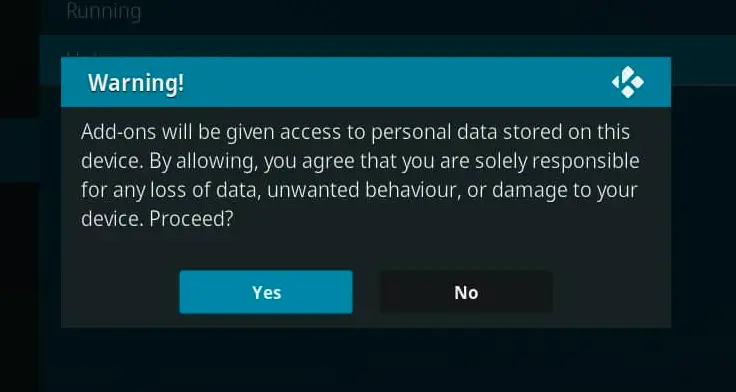
That warning shows up for any unofficial addon, and this one has a few things worth knowing. The code is public and maintained by named developers, which is a point in its favor. It also runs a small helper on your own device to handle streams, it bundles its own Python libraries, and it pulls channels from websites that nobody vouches for. We have not audited all of the code, so we can’t vouch for it.
Vavoo itself has legal baggage. A Paris court order from the 2025/2026 football season told Google’s DNS service to block 19 domains, and vavoo.to was named as one of the sites streaming exclusive sports without permission. That order covers France only, but it tells you how rights holders see the service. The reporting is in heise’s coverage of the ruling.
Vavoo Kodi Stalker Source: Turn It Off
The Stalker source is the part we would switch off. Going by the code and the changelog, it downloads a list of MAC addresses published by the developer and tries them against third-party IPTV portals until one logs in. Those logins are not yours, and nothing in the addon says the portal owners agreed to it.
To turn it off, open the addon, go to Settings, open the STALKER tab and switch off Stalkerportal verwenden. The Vavoo and LiteTV sources keep working without it.
Use the Vavoo Kodi addon on a device you don’t mind experimenting on, never enter personal or payment details into anything it shows you, and check the repository URL character by character before you add it, because look-alike repositories with similar names are a common way to spread adware. A VPN is also worth using, which is covered next. Our Kodi VPN guide explains how to set one up.
How Do You Stay Protected While Using the Vavoo Kodi Addon?
Sign up for a premium Kodi VPN and access the internet unrestricted. We offer exclusive discounts for IPVanish and NordVPN, the highest respected VPNs in the Kodi community. Both of these VPNs have some great features for users:
- Apps for Android, iOS, Mac, Linux & more
- Zero Logs
- Unlimited bandwidth
- Tier 1 hardware (no speed slowdown)
- Access to hundreds of VPN servers


How to Install the Vavoo Kodi Addon on Firestick or Android TV
These steps are the same on a Firestick, Fire TV Cube, Android TV box, or Kodi on a computer. If you haven’t already, turn on Unknown Sources in Kodi first, or the repository zip won’t install. This is how to start installing the Vavoo Kodi addon:
This guide will show you how to install the Vavoo Kodi addon (VAVOO.TO).
Total Time: 5 minutes
Access SYSTEM Page
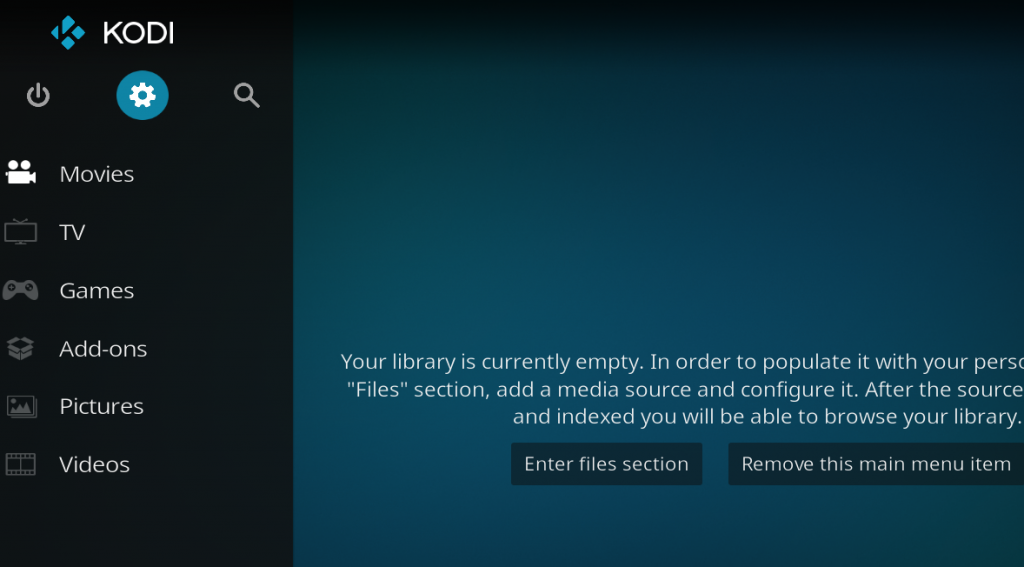
Access the Kodi SYSTEM screen by clicking on the gear icon on the Kodi main menu.
Click on File Manager
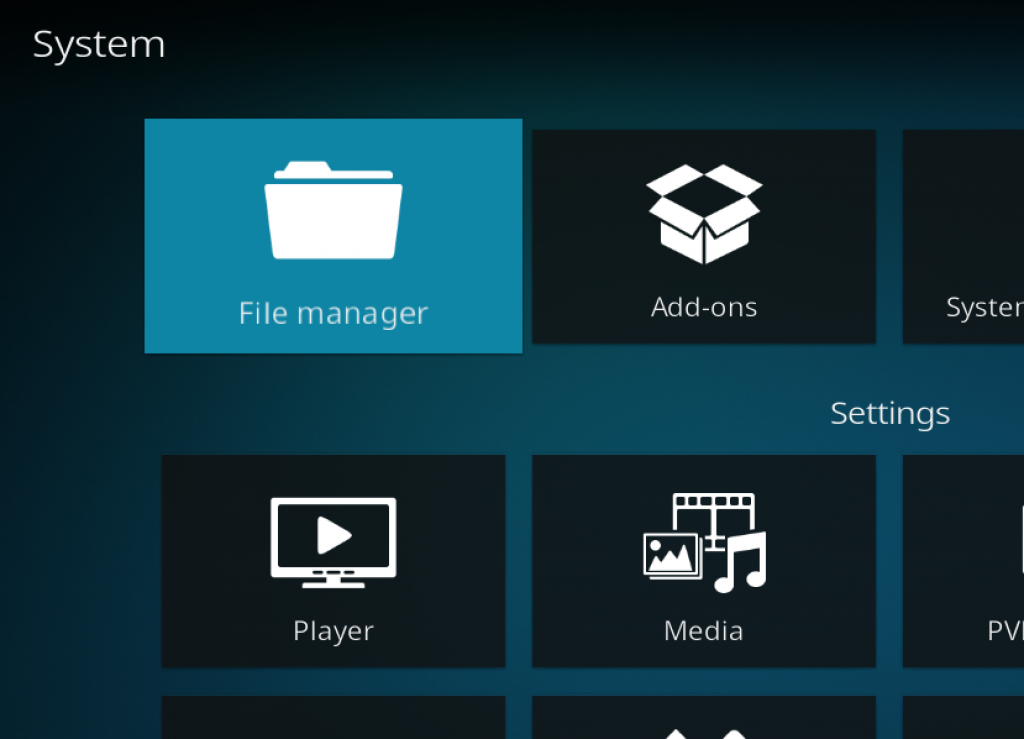
Click on the File Manager tile.
Select Add Source
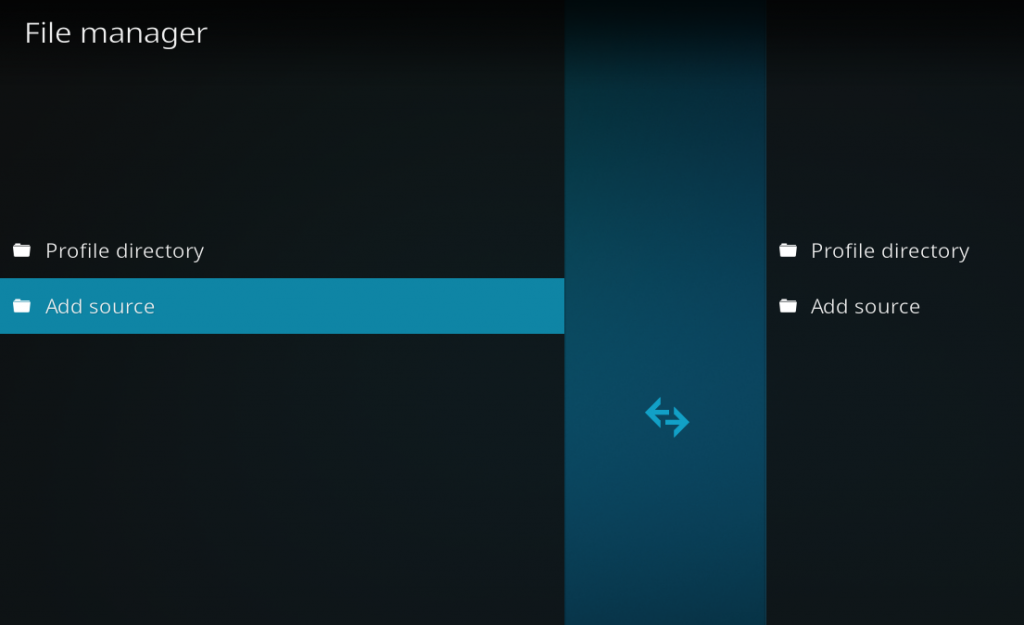
Click on Add Source at the bottom of the left side pane.
Add File Source
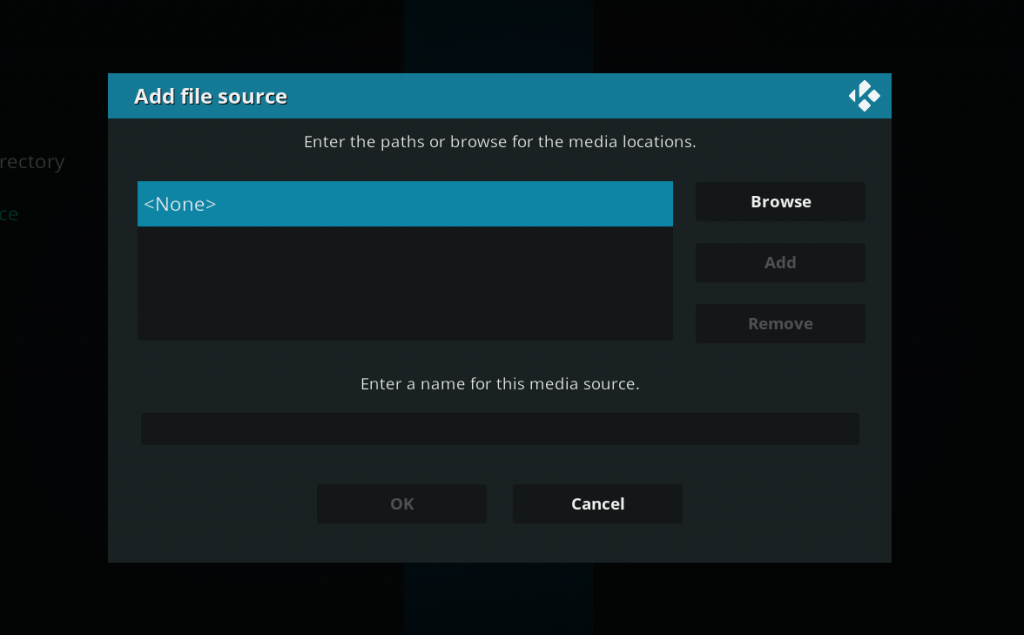
First, click on None and enter in https://michaz1988.github.io/repo/ and then select Done.
Click on the empty box underneath the media source name field and name it michaz and then click OK.
Access Kodi Addons Screen
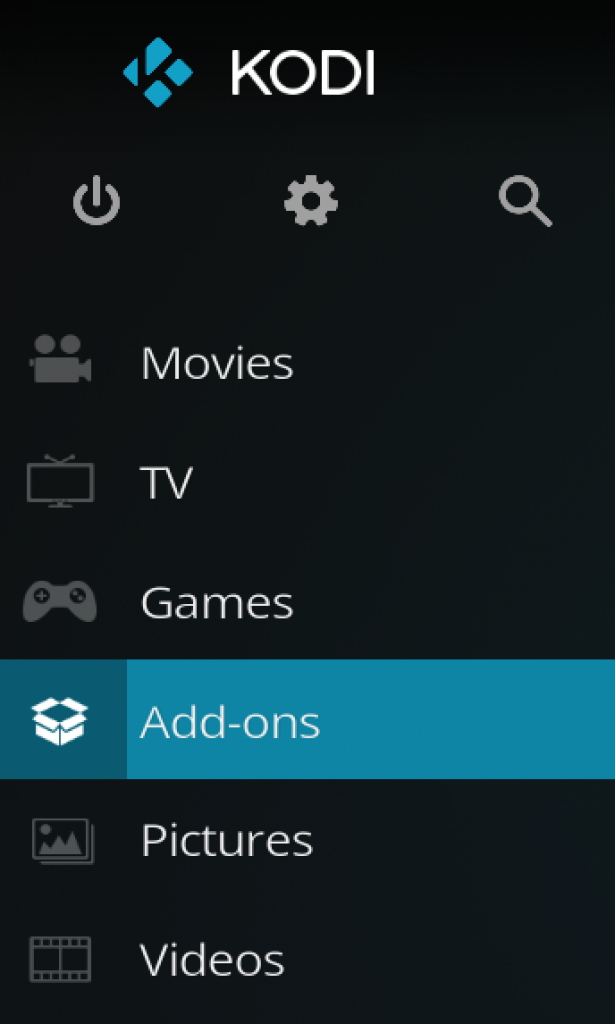
Go back to the Kodi home screen and then click on the Addons button.
Select the Addon Browser
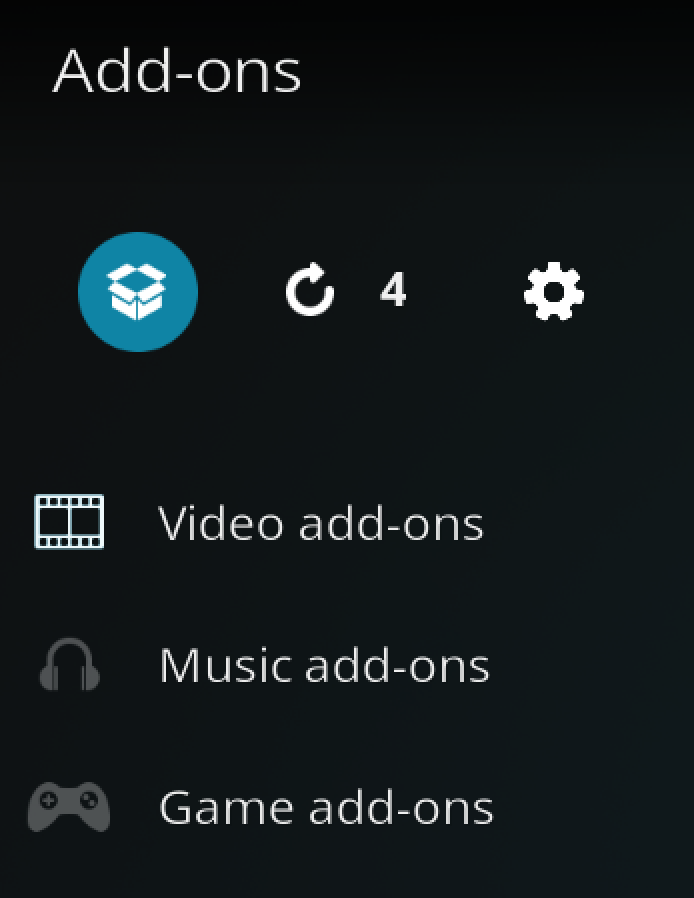
Access the Kodi Add-on Browser by clicking on the package icon in the upper-left corner of this screen.
Install the Michaz Repository
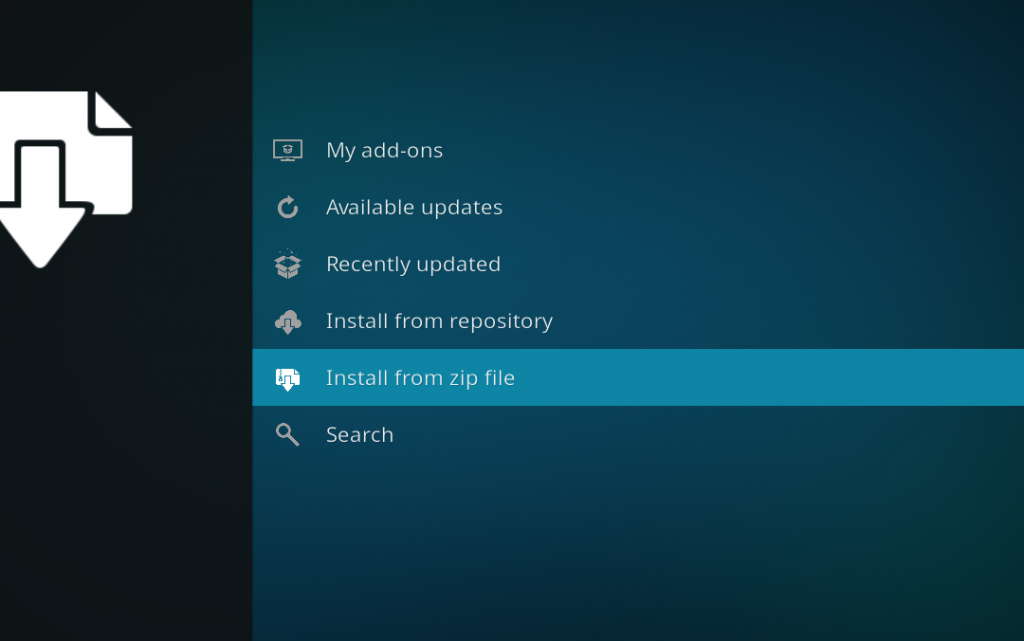
Install the repository by clicking on Install from Zip File then michaz then repository.michaz then repository.michaz-5.1.zip and waiting for the repository installed icon to appear in the top right corner.
Install the Vavoo Kodi Addon
Next, select Install From Repository then Michaz Repository then Video Add-ons then VAVOO.TO. Click on Install, click OK when Kodi lists the extra addons VAVOO.TO needs, and wait for the Add-on Enabled notification.
Vavoo Kodi Repository: Michaz Repository URL, Zip and Latest Version
The Vavoo Kodi repository is the Michaz Repository. Its address is https://michaz1988.github.io/repo/, and that page is a plain file listing, which is what Kodi needs when you add it as a source. The developer’s own instructions use the shorter address https://michaz1988.github.io/ instead, and both work as a source.
The repository zip sits in the repository.michaz folder. Two versions are there, 5.0 and 5.1, so pick repository.michaz-5.1.zip. The addon itself is installed from inside Kodi in the last step, so you never download the VAVOO.TO zip by hand. The latest version we saw was 2026.11.02.5, and you can check the current one on the repository page or on the addon’s information screen in Kodi.
Vavoo Kodi Menus Are in German: Live, Filme, Serien
Nothing about the addon is translated, so here is what you will see:
- Live: live TV channels
- Filme: movies
- Serien: series
- Suche: search
- Favoriten: favorites
- Gruppen: groups, which means countries for live TV
- Einstellungen: settings
How to Update the Vavoo Kodi Addon
Most Vavoo problems are fixed by an update, so do this first whenever something stops working. From the Kodi home screen go to Add-ons, then My add-ons, then Video add-ons, select VAVOO.TO and choose Update. If Update is greyed out you are already on the newest version. Make sure Auto-update is on in the same screen so you get fixes without doing anything.
How to Install the Vavoo Kodi Addon on Windows, Mac and Other Devices
The same steps work on Kodi for Windows, Mac, Linux and Android phones and tablets. Roku, Samsung and LG TVs don’t run Kodi, and Apple TV only does with a sideloaded build, so you can’t install the addon there.
How to Use the Vavoo Kodi Addon: Live TV, Groups and Settings
A few settings make the difference between an empty list and a working one:
- Pick your channel groups first. Open the addon, go to Settings, open the VAVOO tab and choose VAVOO Kanalgruppen Auswahl. Tick the countries you want. If the Live list is empty, this is the usual reason.
- Set the source order. On the TV tab, Quellen-Vorrang (Priorität) sets which source is tried first. Six orders are available, such as VAVOO > Stalker > LiteTV.
- Choose how streams start. IPTV Autoplay can be Auto, Countdown or Manuell (manual), which lets you pick a source yourself.
- Keep the reconnect option on. Live-TV bei Streamabbruch automatisch neu verbinden retries a dropped stream before it gives up.
Then open Live, then Gruppen, pick a country and a channel. Add favorites from the channel menu so they show up under Live, Favoriten.
Vavoo Kodi Addon Not Working? Fixes by Error Message
Update the addon first (see the update steps above), then find your error below. These fixes come from the developer’s own bug reports and changelog, plus the usual Kodi causes.
Vavoo Kodi Channels Don’t Load or the Live List Is Empty
Update to the latest version, then open Settings, the VAVOO tab, and run VAVOO Kanalgruppen Auswahl to choose at least one country. An empty group selection was the cause of the empty channel lists reported in August, and the developer’s answer to the follow-up was to go to settings and choose groups.
Vavoo Kodi Live Section Crashes With a JSONDecodeError
If you see JSONDecodeError: Expecting value, your addon is older than version 2026.09.01.1. Vavoo stopped answering on its www2 server at the start of September and the addon was changed to use vavoo.to instead. Update the repository and the addon and the crash goes away.
Vavoo Kodi TypeError: ‘type’ object is not subscriptable
This error, which could take Kodi down with it, came from Python libraries inside the addon that were built for the wrong Python version. It is fixed in version 2026.10.29 and later, so update the addon. If you still see it after updating, the developer asks that you report it on the issue tracker.
Vavoo Kodi Error Check the Log for More Information
This is Kodi’s generic failure message, so the log is the only place that names the real cause. Our guide on how to check log files in Kodi shows how to turn on debug logging and read the result. The addon also has its own Debug Logging switch on the DEBUG tab.
Vavoo Kodi Playback Failed, Stream 456 or No Stream Found
A single channel failing is normal, because Vavoo lists many duplicates and some are dead. Try another version of the same channel, or set IPTV Autoplay to Manuell so you can pick a different source. If every channel fails, the developer’s changelog describes a stream error 456 and an empty channel list as a portal, location or IP problem, not a bug in the addon. Try a VPN server in the country the channel belongs to.
Vavoo Kodi Failed to Install a Dependency
VAVOO.TO needs several helper addons, including ResolveURL, inputstream.adaptive and inputstream.ffmpegdirect. Kodi installs them when you click Install. If one fails, make sure Unknown Sources is on, check that your internet connection is stable, restart Kodi and install the addon again. On a Firestick, clear Kodi’s cache from Amazon’s app settings if the dependency screen keeps looping.
Vavoo Kodi Buffering or Freezing
Keep the Vavoo HLS proxy and prefetch options switched on in the VAVOO settings. Pick a lower quality channel version, close other apps on the Firestick, and use a wired or 5 GHz connection if you can. If only one channel buffers, it is probably the stream and not your setup.
Vavoo Kodi Not Working With or Without a VPN
Both happen. Some streams only play from certain countries, so a VPN can fix a failing channel. Other times a VPN server is already blocked by the stream provider, and turning it off fixes things. Switch servers, then switch the VPN off, and keep whichever works.
Vavoo Kodi Not Working After a Kodi Update or Reinstall
A new Kodi install does not keep your repositories or addons. Run the install steps again, in the same order, then re-pick your channel groups in the settings. If you updated to a newer Kodi major version, check that VAVOO.TO shows an update, because an old addon version can break on a new Kodi.
Vavoo Kodi Repository Couldn’t Connect or Won’t Install
Check the source address character by character: https://michaz1988.github.io/repo/, with https and the trailing slash. A typo gives a could not connect error. If the address is right and the zip still fails, check that Unknown Sources is on and try the shorter source address from the developer’s instructions. Look-alike repositories exist, so never use an address from a comment or a video description without comparing it to this one.
Vavoo Kodi IPTV: M3U Playlist and EPG for IPTV Simple Client
The developer also publishes a ready-made M3U playlist at https://michaz1988.github.io/tv.m3u and a matching EPG guide as an XML file on the same project’s GitHub releases. The playlist has 107 channels in one group called Standard, and it leans German, with channels like 13th Street, 3sat, Animal Planet and Anixe.
Every playlist entry is a link into the addon, so the Vavoo Kodi addon has to be installed for the playlist to play anything. It is meant for people who want Vavoo channels in Kodi’s normal TV guide through the IPTV Simple Client instead of the addon’s own menus. We did not test it. Our guides on setting up an M3U playlist in Kodi and setting up an EPG on Kodi cover the IPTV Simple Client side.
Vavoo Kodi Addon Alternatives That Still Work
If the Vavoo Kodi addon stops working or the German menus are a dealbreaker, these are the closest options we cover.
Vavoo Kodi vs Daddy Live Kodi
Daddy Live is built around live sports and a schedule, while Vavoo is built around a long list of regular TV channels. If you mostly want sports, our Daddy Live Kodi addon guide is the better fit, and it has the same install pattern.
Vavoo Kodi vs UK Turk Playlists
UK Turk Playlists is a live TV addon with a strong UK focus. Vavoo’s United Kingdom group has 633 entries, but UK Turks is the more natural pick if British channels are all you want. For one addon that bundles several sources, see our list of all in one Kodi addons.
Legal Ways to Watch Live TV Instead of the Vavoo Kodi Addon
The reliable option is a licensed live TV service, which doesn’t break when a website changes. Our IPTV guide covers the options, and our list of legal Kodi addons has free ones with 100% legal content.
Is the Vavoo Kodi Addon Legal?
Determining the legality of the Vavoo Kodi Addon is challenging without knowing if it possesses the proper licensing. Kodi Tips does not have the ability to confirm the legal status of these addons.
Plus, legality rules differ depending on what country you live in.
Copyright Concerns with Kodi Addon
At first glance, the addon appears to distribute copyrighted works without the necessary consent, which raises the concern about its legality.
Public Domain Titles
Users can access titles in the public domain, which are not subject to copyright laws. This allows free download, streaming, and sharing without legal issues.
User Responsibility
You, as the end user, bear responsibility for all content accessed through Kodi addons, making it crucial that you understand what is legal to view.
Legal Streaming Options
For those seeking legal and verified streaming options, check our list of legal Kodi addons with 100% legal content.
Vavoo Kodi Addon FAQ
How Do You Install the Vavoo Kodi Addon?
Add https://michaz1988.github.io/repo/ as a source in Kodi’s File Manager, install repository.michaz-5.1.zip from Install from Zip File, then go to Install from Repository, Michaz Repository, Video Add-ons, VAVOO.TO and click Install. Turn on Unknown Sources first.
Is the Vavoo Kodi Addon Still Working?
The repository and the addon are live, and the addon was updated to version 2026.11.02.5. We did not stream channels to test playback, and which channels play depends on Vavoo’s servers, your provider and your location.
What Is the Michaz Repository URL for Vavoo on Kodi?
The repository address is https://michaz1988.github.io/repo/ and the zip to install is repository.michaz-5.1.zip, inside the repository.michaz folder. The developer’s own instructions use https://michaz1988.github.io/ as the source, which also works.
Why Is the Vavoo Kodi Addon Not Working?
The usual causes are an old addon version, no channel groups selected in the settings, a blocked or geo-restricted stream, or a failed dependency. Update the addon first, pick your channel groups, then try a VPN and check the Kodi log.
Is Using the Vavoo Kodi Addon Legal?
The addon is just software, but much of the content it can reach is not licensed, and vavoo.to was named in a French court blocking order. We can’t confirm its legal status, and you are responsible for what you stream in your country.
Is the Vavoo Kodi Addon Free? Do You Need Real-Debrid?
It is free to install and use, and it does not need Real-Debrid or any other debrid service. Movies and series play through the ResolveURL helper addon, which Kodi installs for you.
Does the Vavoo Kodi Addon Work on Firestick?
Yes, it installs the same way on a Firestick as on any Android TV box, because it is a normal Kodi video addon. Newer Fire TV Sticks that run Vega OS instead of Fire OS can’t run Kodi at all.
What Is the Difference Between the Vavoo App and the Vavoo Kodi Addon?
The Vavoo app is a separate standalone app. The Vavoo Kodi addon runs inside Kodi, asks Vavoo’s channel list for channels itself and does not need the app installed.
Should I Use a VPN With the Vavoo Kodi Addon?
Yes. The addon streams from third-party websites, and a VPN keeps your connection private from your internet provider. It can also fix a stream that is blocked in your country, though some streams stop working when a VPN is on.
What Are the Differences Between a Kodi Addon and a Kodi Build?
A Kodi addon adds one feature or content source, like VAVOO.TO. A Kodi build is a full pre-configured Kodi setup with a custom skin and many addons bundled in. Builds are heavier and easier to break, so we recommend installing addons yourself.
Disclaimer
We have no control over and do not host or upload any video, films, media file, or live streams. KodiTips is not responsible for the accuracy, compliance, copyright, legality, decency, or any other aspect of the content streamed from your device. If you have any legal issues please contact the appropriate media file owners or host sites.