
In this tutorial guide, I’ll show you how to add plugins to Nuvio on Nuvio TV (Firestick, Android TV and Google TV) and in the Nuvio app for Android and iPhone. I’ll also share six plugin repository URLs I checked are working, and the fixes for when plugins won’t show up.
The short version: plugins only work in the sideloaded version of Nuvio. Open Settings, then Content & Discovery, then Plugins, paste a repository URL, and make sure the plugin providers are enabled.
If you want Stremio-style addons instead, see our guide on how to add addons to Nuvio. Plugins and addons use different URLs and different screens.
How to Add Plugins to Nuvio: Quick Facts
| Where on Nuvio TV | Settings, then Content & Discovery, then Plugins |
| Where on Android and iPhone | Settings, then Content & Discovery, then Plugins |
| What you paste | A plugin repository URL (usually a manifest.json link on GitHub) |
| Which Nuvio versions | Sideloaded builds only; store versions have plugins turned off |
| Short codes | Nuvio TV only (the field reads URL or short code) |
| Phone shortcut for TV | Plugins, then Manage from phone (scan a QR code) |
| Also possible | Add them from your Nuvio account dashboard on nuvio.tv |
| Cost | Free; plugins don’t need a debrid service |
- How to Add Plugins to Nuvio: Quick Facts
- What Are Nuvio Plugins?
- Which Nuvio Version Supports Plugins?
- Nuvio Repository URLs: 6 Working Plugin Repos
- How to Add Plugins to Nuvio TV (Firestick, Android TV & Google TV)
- How to Add Plugins to Nuvio on Android and iPhone
- How to Add Plugins to Nuvio From the Account Dashboard
- How to Use Plugins in Nuvio: Enable, Test and Group Providers
- Can You Use CloudStream Plugins in Nuvio?
- Nuvio Plugins and Profiles: Use Primary Profile's Plugins
- Nuvio Plugins Not Showing? How to Fix Common Errors
- Are Nuvio Plugins Safe?
- How Do You Stay Protected While Using Nuvio?
- Is Using Nuvio Plugins Legal?
- How to Add Plugins to Nuvio: FAQ
- Disclaimer
What Are Nuvio Plugins?
A Nuvio plugin is a small JavaScript scraper. When you open a movie or episode, each enabled plugin provider runs on your device, searches a streaming website for that title, and hands Nuvio a list of playable links. Nuvio then shows those links in the same source list as your addon results.
Plugins come in repositories. One repository URL can install dozens of providers at once, and you can switch individual providers on or off afterwards. They’re made by community developers, not by Nuvio’s team, and they only find streams. They don’t add catalogs, posters or subtitles.
Nuvio Plugins vs Addons: Which URL Goes Where?
| Addons | Plugins | |
|---|---|---|
| What it is | A web service in the Stremio addon format | A bundle of JavaScript scrapers |
| What you paste | An addon manifest URL | A plugin repository URL |
| Where it goes | Content & Discovery, then Addons | Content & Discovery, then Plugins |
| What it adds | Catalogs, metadata, streams or subtitles | Streams only |
| Where it runs | On the addon’s server | On your device |
| Works in store versions | Yes | No |
Both kinds of links often end in manifest.json, which is why people mix them up. If a URL fails in one screen, try it in the other before assuming it’s broken.
Which Nuvio Version Supports Plugins?
Only the sideloaded builds. Nuvio’s code ships two versions of each app: a full build (the APK from Nuvio’s GitHub releases, and sideloaded iPhone builds) and a store build for the Play Store and App Store. The store build has plugins switched off completely, and trying to add one shows Plugins are not available in this build.
So if you installed Nuvio from the Google Play Store before it was pulled, or from the App Store, you won’t be able to add plugins until you switch to the GitHub version. Our Nuvio install guide for Firestick and Android TV walks through installing the full APK. Your addons and settings come back when you sign in to the same Nuvio account.
Nuvio Repository URLs: 6 Working Plugin Repos
These are the six repositories most Nuvio users start with:
| Repository | Providers | Best For | Repository URL |
|---|---|---|---|
| All-in-One (D3adlyRocket) | 66 | The broadest mix: movies, TV and anime in many languages | https://raw.githubusercontent.com/D3adlyRocket/All-in-One-Nuvio/refs/heads/main/manifest.json |
| Phisher’s Repo | 51 (44 on by default) | English sources with a lot of anime | https://raw.githubusercontent.com/phisher98/phisher-nuvio-providers/refs/heads/main/manifest.json |
| Michat88 Repo | 30 | English and Indonesian sources | https://raw.githubusercontent.com/michat88/nuvio-providers/refs/heads/main/manifest.json |
| Yoru’s Repo | 29 (28 on by default) | Multi-language movies and TV, including 4K sources | https://raw.githubusercontent.com/yoruix/nuvio-providers/refs/heads/main/manifest.json |
| MoonCrown | 18 (17 on by default) | Turkish movies and TV | https://raw.githubusercontent.com/mooncrown04/nuviotr/refs/heads/main/manifest.json |
| Spidey’s Providers | 10 | Tamil, Telugu and other Indian sources, plus Korean dramas and anime | https://raw.githubusercontent.com/Abinanthankv/NuvioRepo/refs/heads/master/manifest.json |
If you only add one, All-in-One covers the most ground. Adding all six gives you over 200 providers, but every enabled provider is another website Nuvio waits on before showing sources, so it’s worth turning off the ones in languages you don’t watch.
These repositories are unofficial and change often. Providers break when a website changes, and repository owners add or remove them without notice, so a count that’s right today may shift next week.
A website like Nuvio Plugins consolidates plugins into one single spot so that you can install them all quickly.
Yoru, Spidey and All-in-One Nuvio Repos Explained
- All-in-One: a combined repository with 66 providers across movies, TV and anime in more than a dozen languages. You may also see it linked under a NuvioPlugin GitHub account; it loads the same manifest.
- Yoru’s Repo: 29 providers for movies and TV, including 4K-focused sources like 4KHDHub and UHDMovies. One provider, VIDEASY, ships switched off, and Nuvio warns you if you turn it on (more on that below).
- Spidey’s Providers: a small, focused repository for Tamil, Telugu and other Indian-language sources, plus Korean dramas and anime. Add it if that’s what you watch; skip it if not.
How to Add Plugins to Nuvio TV (Firestick, Android TV & Google TV)
These steps work on every Nuvio TV device running the sideloaded build: Fire TV Stick, Fire TV Cube, Chromecast with Google TV, Nvidia Shield and other Android TV boxes.
This guide shows you how to add plugins to Nuvio on Firestick, Android TV, or Google TV.
Total Time: 5 minutes
Copy a Plugin Repository URL
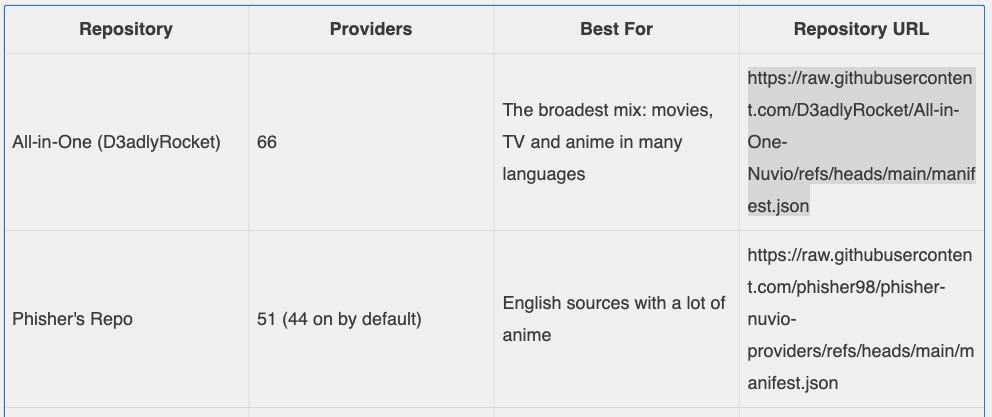
Pick a repository from the table above and copy its URL. If you’re entering it with a remote, keep it open on your phone so you can read it off, or use the phone method below.
Open Plugins in Nuvio
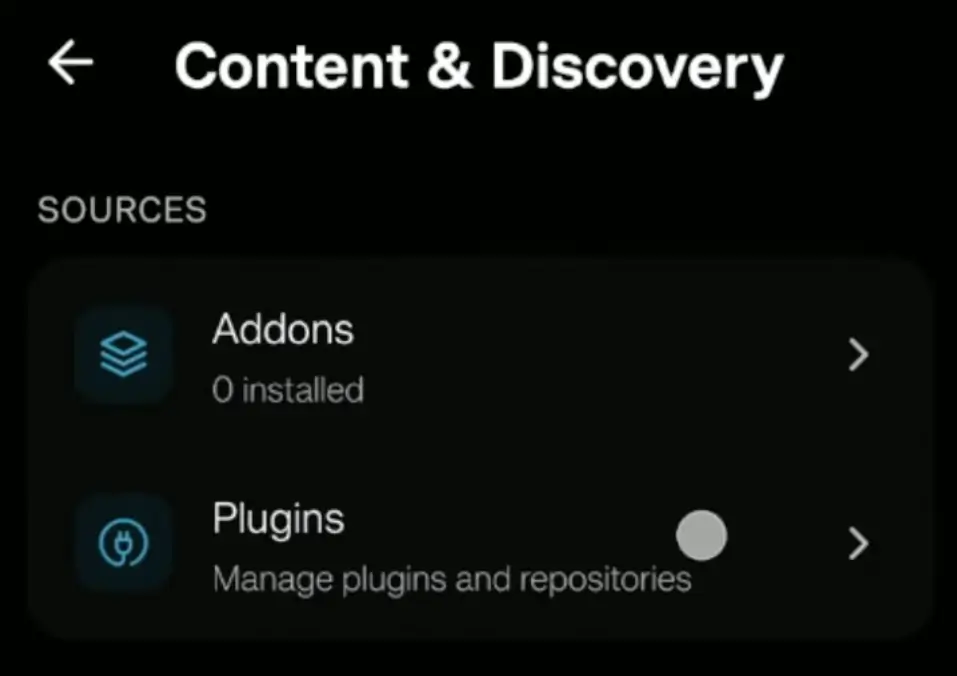
Launch Nuvio on your TV and open Settings, then Content & Discovery, then Plugins.
Enter the Repository URL and Select Add
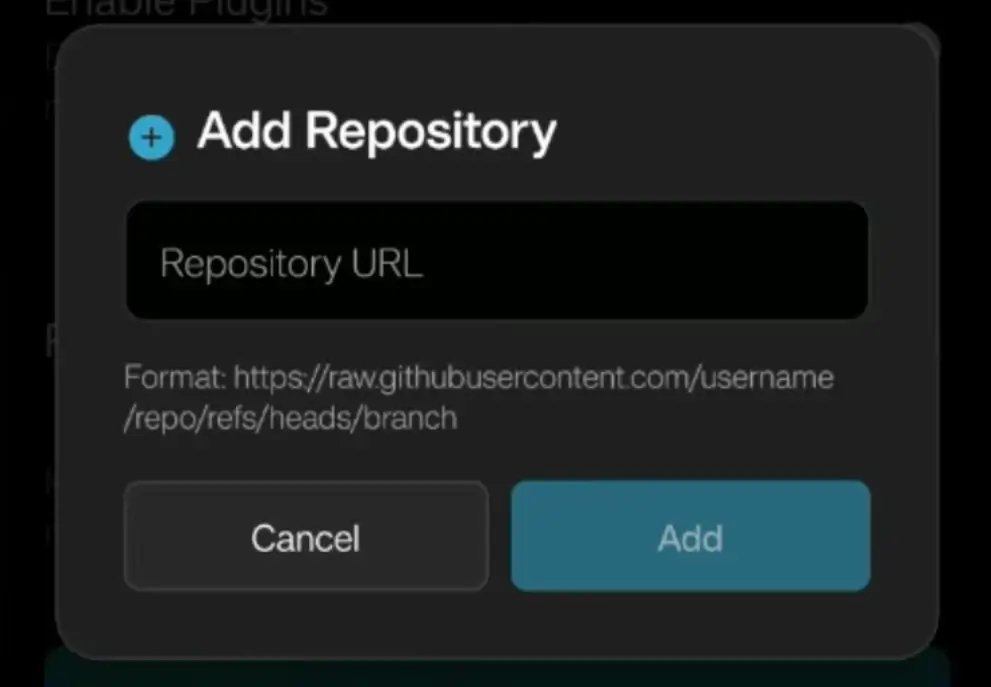
Select the Add repository field, enter the full URL (or a short code), and select Add. Nuvio shows a message confirming how many providers it added, and the repository appears under Repositories.
Turn On Plugin Providers
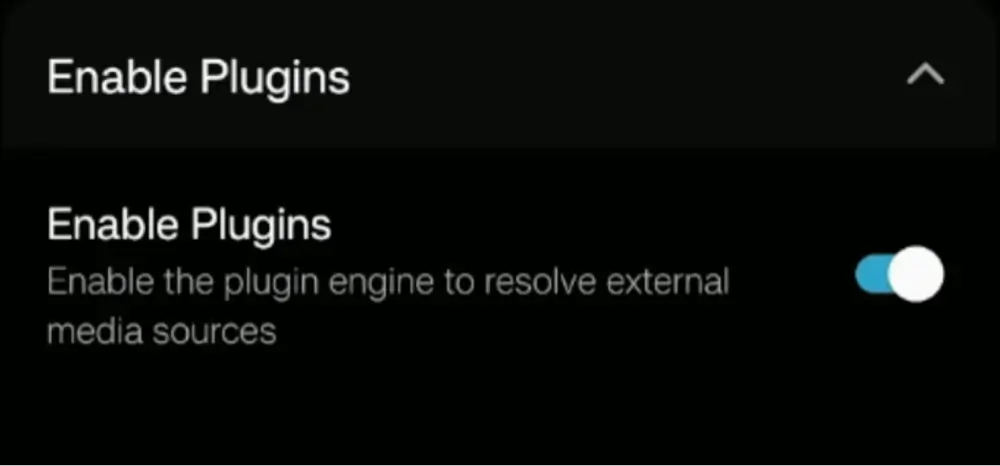
Make sure Enable plugin providers globally is switched on, then scroll to Providers and switch individual providers on or off.
Test a Movie or Episode
Open any title and check the source list. Plugin results appear alongside your addon results, labeled with the provider or repository name.
Typing a long GitHub URL with a remote is the slowest part of this, so the phone method below is worth using on a Firestick.
How to Add a Nuvio Repository From Your Phone (QR Code)
- On the Plugins screen in Nuvio TV, select Manage from phone.
- Scan the QR code with your phone’s camera. A Manage Repositories page opens in your phone’s browser.
- Paste the repository URL into the Add repository by URL field and tap Add. You can remove repositories from the same page.
- Back on the TV, Nuvio shows Confirm repository changes with what you added or removed. Select Confirm.
Nuvio Repository Short Codes: What They Are
The Add repository field on Nuvio TV reads URL or short code. A short code is a few letters or numbers that Nuvio turns into a full repository URL through the cutt.ly link service. These are the same short codes CloudStream users share. For example, entering cspr loads the official CloudStream extensions repository. On a TV remote, typing four characters beats typing a long GitHub link.
Short codes only work on Nuvio TV. The phone app needs the full repository URL.
How to Add Plugins to Nuvio on Android and iPhone
The phone app’s plugin screen works the same way, and it’s easier to paste a URL there:
- Open Nuvio and go to Settings.
- Tap Content & Discovery, then Plugins.
- Under Add Repository, paste the URL into the Plugin manifest URL field.
- Tap Install Plugin Repository. Nuvio shows an Installed message and lists the repository under Installed Repositories.
- Check that Enable plugin providers globally is on, then scroll to Providers to switch individual ones on or off.
On iPhone, this only works in a sideloaded build of Nuvio. The App Store version is a store build, so the Plugins screen won’t let you add a repository there.
How to Add Plugins to Nuvio From the Account Dashboard
If you sign in to Nuvio with an account, you can skip typing on the TV entirely and add plugins from a computer or phone browser:
- Go to nuvio.tv, log in, and open your Account.
- Select Plugins in the sidebar and choose Add Plugin.
- Enter a name for the repository and paste its URL, then save.
- Open Nuvio on your device while signed in to the same account. The repository syncs the next time the app connects.
This is the easiest way to add plugins to Nuvio across several devices, since one entry reaches every device on your account. Sync isn’t instant, so reopen the app if the repository doesn’t appear right away.
How to Use Plugins in Nuvio: Enable, Test and Group Providers
Adding a repository is only half of it. A few settings on the Plugins screen decide whether you actually see plugin results:
- Enable plugin providers globally: the master switch. If it’s off, no plugin results appear anywhere, even with repositories installed.
- Individual providers: each one shows Enabled or Disabled. Some repositories ship a few providers switched off, and a provider can show Disabled by repo when the repository owner turned it off.
- Test: select a provider and run Test (Test Provider on the phone app) to see whether it returns streams right now. It’s the quickest way to find a dead provider without hunting through a movie’s source list.
- Group plugin providers by repository: shows one entry per repository in the source list instead of one per website, which keeps a long list readable.
If you use auto-play, check its source setting too. It can use installed addons only, enabled plugins only, or both.
Why Nuvio Warns About Some Providers
When you switch on certain providers, Nuvio asks Enable provider? and says the provider is known to cause crashes on some content. Right now that applies to VIDEASY, which ships switched off in Yoru’s repo for the same reason. You can still enable it, but if Nuvio starts crashing while loading sources, that provider is the first one to turn off.
Can You Use CloudStream Plugins in Nuvio?
Partly. Nuvio TV’s sideloaded build can load many CloudStream extension repositories alongside Nuvio’s own JavaScript plugins. Paste the CloudStream repository URL (usually a repo.json link) or its short code into the Add repository field, and Nuvio converts cloudstreamrepo:// links to a normal web address for you.
There are two catches. The phone app only supports Nuvio’s JavaScript plugins, not CloudStream extensions. And CloudStream extensions were built for a different app, so not every one works in Nuvio. Add the repository, then use Test on a few providers before relying on it.
Nuvio Plugins and Profiles: Use Primary Profile’s Plugins
Like addons, plugins belong to a profile. Profile 1 is the primary profile, and other profiles can use their own plugin list or share the primary profile’s. When a profile shares it, the Plugins screen says it’s using the primary profile’s plugins and can’t be changed, so switch to Profile 1 to add or remove repositories.
If you’re signed in to a Nuvio account, your plugin repositories also sync across your devices, the same way addons do. Nuvio’s option to copy settings between profiles doesn’t copy plugins.
Nuvio Plugins Not Showing? How to Fix Common Errors
Nuvio Plugins Not Showing on TV
Work through these in order. First, check you’re on the sideloaded build (see above), since the store build hides plugins. Second, make sure Enable plugin providers globally is on. Third, check the providers themselves are enabled. Last, confirm you’re on the right profile, since a profile sharing Profile 1’s plugins shows Profile 1’s list.
Plugins Are Not Available in This Build
You have the store version of Nuvio. There’s no setting that turns plugins on in that build. Install the full APK from Nuvio’s GitHub releases instead, then sign in to bring your addons and settings across.
Manifest Has No Providers or Unrecognized Format
Nuvio found the file but couldn’t read any providers from it. Usually the URL points at the wrong file, such as a GitHub page instead of the raw manifest, or it’s an addon manifest pasted into the Plugins screen. Use the raw.githubusercontent.com link, or try the URL in the Addons screen instead. If the URL is right, the repository owner may have broken or emptied it.
Nuvio Plugin Installed but No Streams Found
The repository installed, but its providers return nothing for the title you picked. Run Test on a few providers to see which are working, since websites change and providers go dead without warning. Also check the providers match what you watch: a Turkish or Tamil repository won’t find much for an English movie.
Nuvio Provider Authentication Failed or Unexpected Provider Response
These come from an individual provider, not Nuvio itself. The website the provider scrapes has changed, blocked the request or gone offline. Disable that provider and wait for the repository owner to update it, or refresh the repository later to pull any fix.
Are Nuvio Plugins Safe?
Plugins are community code, and Nuvio’s developers don’t review them. The code runs inside Nuvio on your device and is limited to fetching web pages and returning stream links, which keeps the risk lower than installing a random app. It still makes requests to unofficial streaming websites from your connection, and a repository owner can change what a provider does at any time.
Stick to well-known repositories like the six above, remove ones you don’t use, and be wary of repository links posted by accounts you don’t recognize.
Nuvio and its plugins also don’t hide your IP address from your internet provider or from the websites plugins connect to. A VPN will give you an anonymous connection while streaming through Nuvio plugins. Click here to view the #1 VPN for streaming.
Learn how to install and configure your VPN here.
How Do You Stay Protected While Using Nuvio?
Sign up for a premium VPN and access the internet unrestricted. We offer exclusive discounts for IPVanish and NordVPN, the highest respected VPNs in the streaming community. Both of these VPNs have some great features for users:
- Apps for Android, iOS, Mac, Linux & more
- Zero Logs
- Unlimited bandwidth
- Tier 1 hardware (no speed slowdown)
- Access to hundreds of VPN servers

Is Using Nuvio Plugins Legal?
Determining the legality of Nuvio plugins is challenging without knowing if the sources they pull from have the proper licensing. Kodi Tips does not have the ability to confirm the legal status of these plugins.
Plus, legality rules differ depending on what country you live in.
Copyright Concerns with Nuvio Plugins
At first glance, many plugins appear to link to copyrighted works without the necessary consent, which raises the concern about their legality.
Public Domain Titles
Users can access titles in the public domain, which are not subject to copyright laws. This allows free download, streaming, and sharing without legal issues.
User Responsibility
You, as the end user, bear responsibility for all content accessed through Nuvio plugins, making it crucial that you understand what is legal to view.
Legal Streaming Options
For those seeking legal and verified streaming options, check our list of legal Kodi addons with 100% legal content.
How to Add Plugins to Nuvio: FAQ
How Do I Add Plugins to Nuvio?
Use the sideloaded version of Nuvio, open Settings, then Content & Discovery, then Plugins, and paste a plugin repository URL. On Nuvio TV select Add; on the phone app tap Install Plugin Repository. Then make sure Enable plugin providers globally is on.
Do Nuvio Plugins Need Real-Debrid?
No. Plugins pull links directly from streaming websites, so they work without Real-Debrid or TorBox. Debrid services work with Nuvio addons like Torrentio and AIOStreams instead.
Can You Use Nuvio Plugins in Stremio?
No. Nuvio plugins are JavaScript scrapers made for Nuvio, and Stremio has no way to run them. Stremio only uses addons, which also work in Nuvio.
Why Can’t I Find Plugins in Nuvio?
You’re most likely on the Play Store or App Store version, which has plugins turned off. Install the full version from Nuvio’s GitHub releases to get the Plugins screen.
Should I Use a VPN With Nuvio Plugins?
Yes. Plugins connect to unofficial streaming websites from your internet connection, and neither Nuvio nor the plugins hide your IP address. We recommend NordVPN.
Disclaimer
We have no control over and do not host or upload any video, films, media file, or live streams. KodiTips is not responsible for the accuracy, compliance, copyright, legality, decency, or any other aspect of the content streamed from your device. If you have any legal issues please contact the appropriate media file owners or host sites.