
In this tutorial guide, I’ll show you exactly how to install the POV Kodi addon on your Android TV box or Amazon Firestick. I’ll also cover the unique features that make POV one of the addons people turned to after FEN shut down, plus the debrid setup it needs before it can actually stream anything.
POV is a movies and TV shows addon for Kodi, built as a fork of the discontinued FEN addon. It’s an unofficial third-party addon from the Kodifitzwell Repository.
Plus, is the POV Kodi addon safe to install and legal to use? I’ll touch on those below, along with the debrid setup you’ll need to get streams working.
POV Kodi Quick Facts
| Addon Name | POV |
| Developer | kodifitzwell |
| Repository | Kodifitzwell Repository |
| Repository URL | https://kodifitzwell.github.io/repo/ |
| Alternate Repository URL | https://kodiyashimaru.github.io/repo/ |
| Kodi Version Compatibility | Kodi 20 Nexus and 21 Omega |
| Requires | Real Debrid, Premiumize, AllDebrid, TorBox, Offcloud, or Easynews |
What is the POV Kodi Addon?
POV is a fork of the discontinued FEN addon, and it inherited a lot of FEN’s audience when that addon stopped being maintained. It shares a similar layout and navigation style, built around Movies, TV Shows, and Anime sections, with its own scraper layer stacked on top of whatever debrid service you connect.
POV doesn’t have a free-links mode, so you’ll need a premium debrid account to pull streams. Once that’s set up, it’s one of the fastest all-in-one addons available right now, and one of the more current alternatives to Umbrella if you want a second option running side by side.
POV Kodi Addon Features You Should Know About
Support for Multiple Debrid and Premium Services
POV works with Real Debrid, Premiumize, AllDebrid, TorBox, Offcloud, and Easynews, so you’re not locked into a single service. Whichever premium account you already use, there’s a good chance POV supports it.
Built-In Scraper Options Alongside Your Debrid Account
Beyond your linked debrid account, POV’s My Services menu also includes optional scraper integrations like Torrentio, MediaFusion, and Comet for a wider spread of sources. These live in the same settings area as your debrid authorization, so there’s no separate provider module to install like some other addons require.
Trakt, TMDB, and MDBList Integration
POV can sync with Trakt for watch history and custom lists, and pulls metadata and calendars from TMDB and MDBList. Auto-play settings let you choose between manually picking a source every time, auto-selecting one while still confirming each episode, or letting POV play straight through an entire season with no prompts at all.
What We Like and What We Don’t Like About POV
What We Like
- Fast, familiar layout for anyone who used FEN
- Support for six different debrid and premium services
- Built-in scraper options (Torrentio, MediaFusion, Comet) with no separate module to install
- Regularly updated with new features like AIOStreams integration and an MDBList calendar
What We Don’t Like
- No free-links mode, a paid debrid account is required
- The main repository has occasionally gone down, requiring the mirror URL
Is the POV Kodi Addon Safe to Use?
POV isn’t in Kodi’s official repository, so like any third-party addon, you’ll see Kodi’s standard permissions warning the first time you install it.
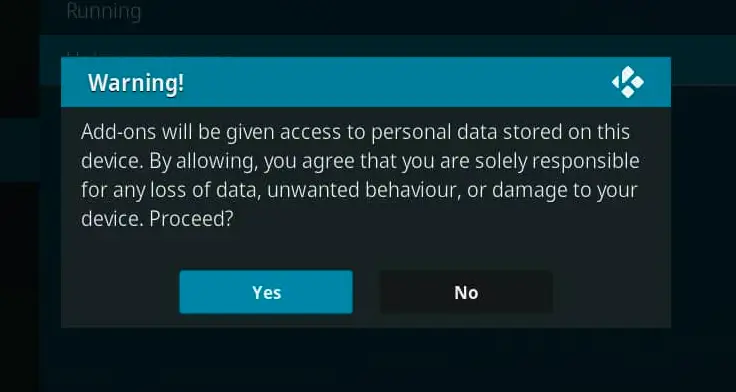
This warning tells you that addons can access personal files on your Android TV box. That’s normal for any unofficial Kodi addon and isn’t unique to POV. We ran the Kodifitzwell repository URL through VirusTotal before publishing this guide, and it came back clean across all 89 security vendors that scanned it. Still, protecting your connection with a good Kodi VPN service is a smart idea before you start streaming.
A Kodi VPN will give you an anonymous connection while streaming or downloading media from third-party Kodi addons. Click here to view the #1 Kodi VPN service.
Learn how to install and configure your Kodi VPN here.
How Do You Stay Protected While Using Kodi?
Sign up for a premium Kodi VPN and access the internet unrestricted. We offer exclusive discounts for IPVanish and NordVPN, the highest respected VPNs in the Kodi community. Both of these VPNs have some great features for users:
- Apps for Android, iOS, Mac, Linux & more
- Zero Logs
- Unlimited bandwidth
- Tier 1 hardware (no speed slowdown)
- Access to hundreds of VPN servers


How to Install the POV Kodi Addon on Android TV or Firestick
This guide will show you how to install the POV Kodi addon.
Total Time: 5 minutes
Access SYSTEM Page
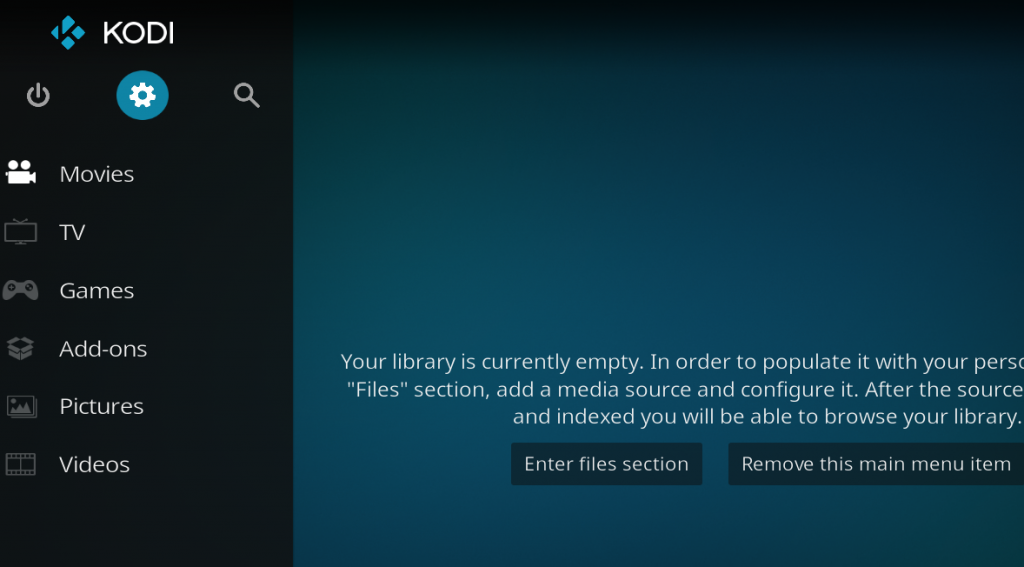
Access the Kodi SYSTEM screen by clicking on the gear icon on the Kodi main menu.
Click on File Manager
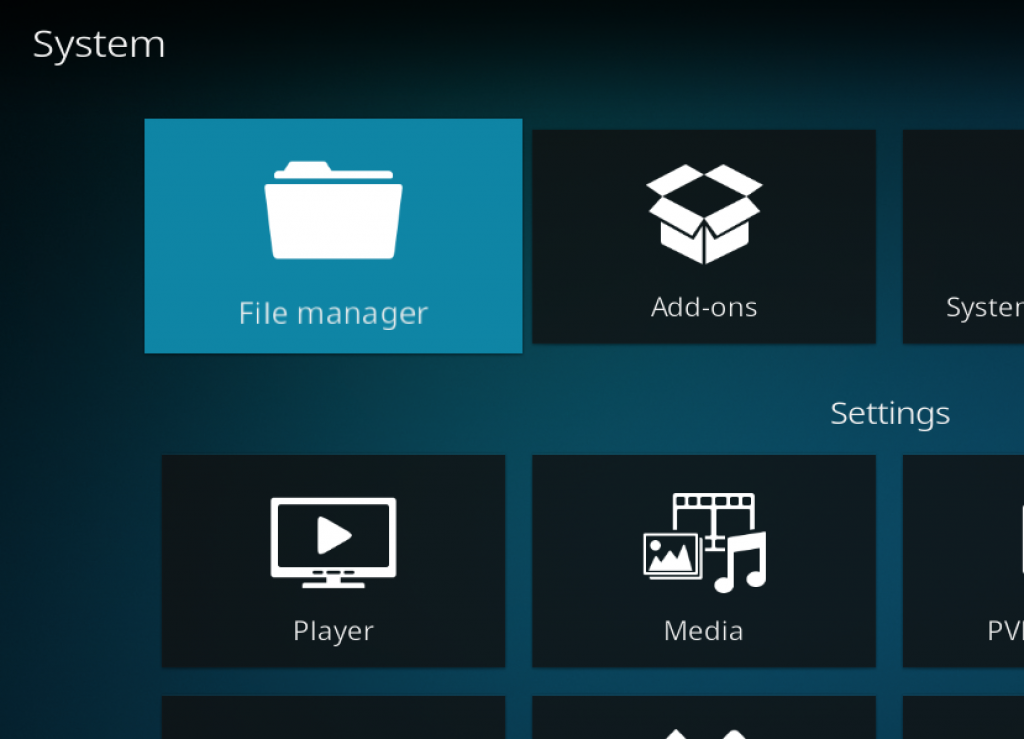
Click on the File Manager tile.
Select Add Source
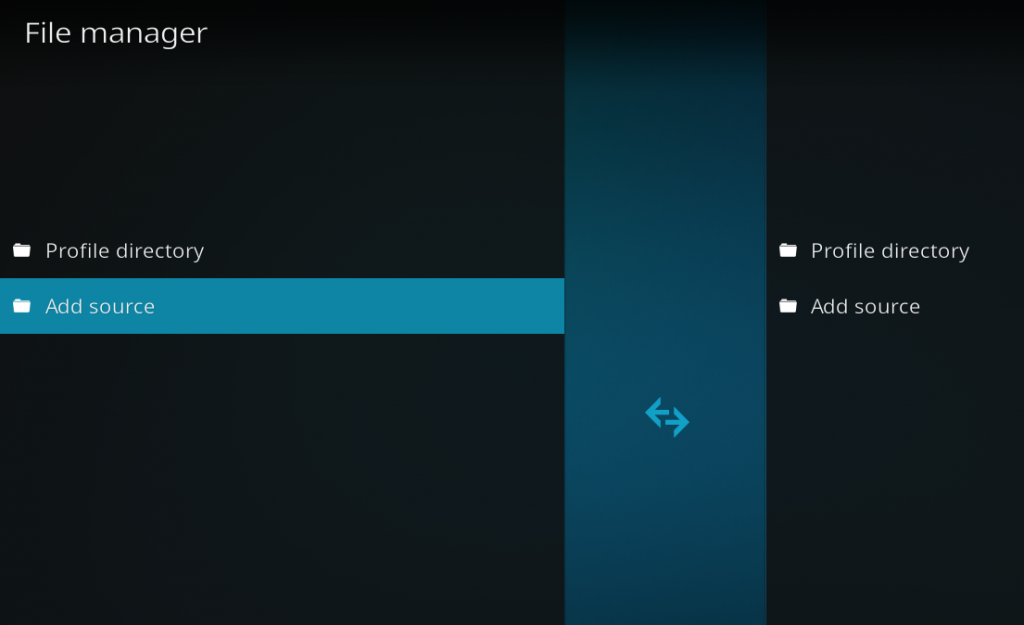
Click on Add Source at the bottom of the left side pane.
Add File Source
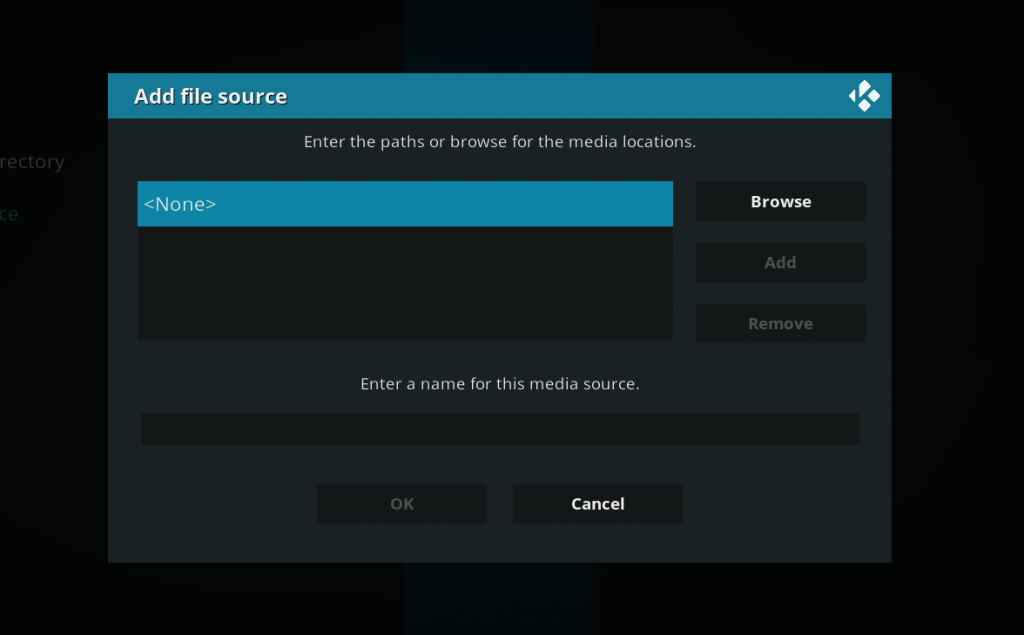
First, click on None and enter in https://kodifitzwell.github.io/repo/ and then select Done.
Click on the empty box underneath the media source name field and name it kodifitzwell and then click OK.
Access Kodi Addons Screen
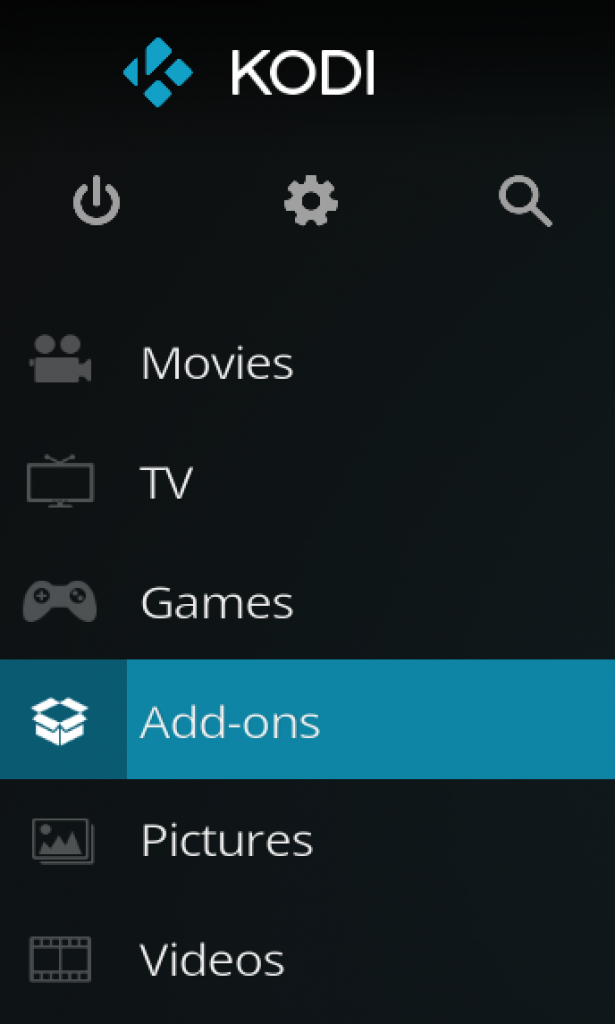
Go back to the Kodi home screen and then click on the Addons button.
Select the Addon Browser
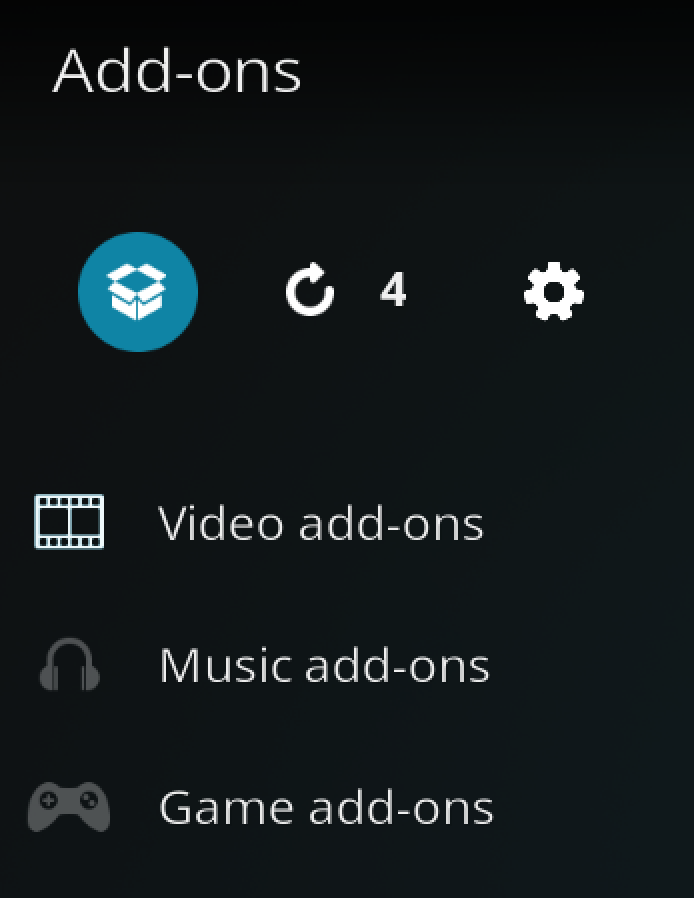
Access the Kodi Add-on Browser by clicking on the package icon in the upper-left corner of this screen.
Install the Kodifitzwell Repository
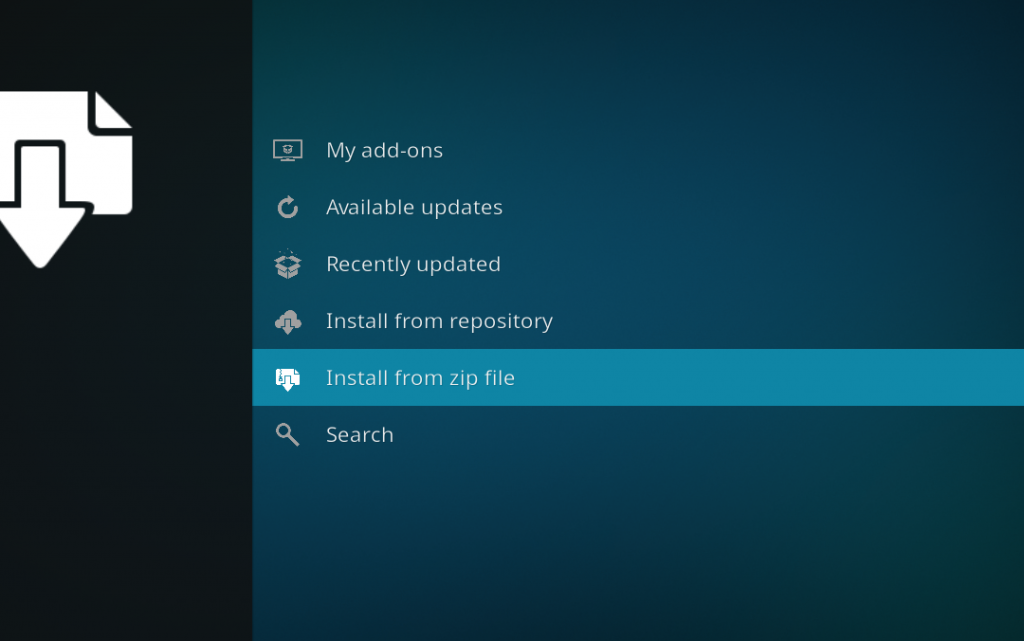
Install the Kodifitzwell repository by clicking on Install from Zip File then kodifitzwell then repository.kodifitzwell-x.x.x.zip and waiting for the repository installed icon to appear in the top right corner.
Install the POV Kodi Addon
Next, select Install From Repository then kodifitzwell Repository then Video Add-ons then POV. Click on Install and wait for the Add-on Enabled Notification.
The POV Kodi addon will now be in your Video Add-ons section. It won’t show any streams yet though, that’s what the next section is for.
Additional Setup: Linking a Debrid Provider to POV
POV won’t show any streams until you link a debrid or premium account. Here’s how to connect Real Debrid, the addon’s most popular option; the other supported services follow a similar pattern.
- Open POV and select Settings.
- Select Settings: My Services.
- Under Real Debrid, click Authorize.
- Note the PIN code shown on screen, or scan the QR code with your phone.
- On another device, visit real-debrid.com/device, enter the PIN code, and confirm.
- Return to POV to see the success confirmation.
Premiumize, AllDebrid, TorBox, Offcloud, and Easynews all authorize the same way, just select the matching service under My Services instead. Full walkthrough with screenshots: Authorize Real Debrid Kodi Addon Guide.
Optional: Adding Extra Scraper Sources
POV has a second My Services section further down the same settings menu for optional scraper integrations like Torrentio, MediaFusion, and Comet. These aren’t required, your linked debrid account is enough to start streaming, but turning one on can widen your source results. Scroll to the second My Services section and toggle on whichever scrapers you want to use.
POV Kodi Addon Troubleshooting
Sometimes, you may get a message telling you to check your Kodi error log. If you see this error while streaming video, it can mean that your cache is full. If it appears while navigating menus in the addon, it means the link you’re trying to access doesn’t exist anymore, select another stream. If you want to learn how to actually check your log and diagnose your issues, click here.
POV Repository Won’t Install or Connect
Double check the repo URL is typed exactly as https://kodifitzwell.github.io/repo/ with no typos, and make sure Unknown Sources is enabled in Kodi’s System settings. If it’s typed correctly and still won’t connect, the Kodifitzwell repository has gone down before; try the alternate mirror at https://kodiyashimaru.github.io/repo/ instead, or wait a few minutes and try again.
No My Services Option in Settings
If you don’t see Provider Accounts or My Services listed, POV’s settings level is probably set to a simplified view. Change the gear icon in POV’s settings from Basic to Standard and the My Services section will appear in the left-hand menu.
POV No Stream Available or No Results Despite a Linked Debrid Account
This is one of the more common POV issues, even when your subscription shows as active on the provider’s own website. Go back into My Services, remove the debrid account, and re-authorize it. The authorization token occasionally doesn’t fully take the first time.
“No External Scrapers Enabled” Message
This isn’t really an error, it just means no debrid account or scraper has been linked yet. Complete the My Services authorization steps above and it’ll clear.
Addon Won’t Auto-Update
If POV shows an installation failed message during its background auto-update but works fine otherwise, don’t wait on the auto-updater. Go to Add-ons > Install from zip file and reinstall the latest version manually the same way you did the first time.
Is POV Kodi Addon Legal?
Determining the legality of the POV Kodi Addon is challenging without knowing if it possesses the proper licensing. Kodi Tips does not have the ability to confirm the legal status of these addons.
Plus, legality rules differ depending on what country you live in.
Copyright Concerns with Kodi Addon
At first glance, the addon appears to distribute copyrighted works without the necessary consent, which raises the concern about its legality.
Public Domain Titles
Users can access titles in the public domain, which are not subject to copyright laws. This allows free download, streaming, and sharing without legal issues.
User Responsibility
You, as the end user, bear responsibility for all content accessed through Kodi addons, making it crucial that you understand what is legal to view.
Legal Streaming Options
For those seeking legal and verified streaming options, check our list of legal Kodi addons with 100% legal content.
Frequently Asked Questions About the POV Kodi Addon
How Do You Install the POV Kodi Addon?
To install the POV Kodi Addon, which is not included in Kodi’s official repository, follow the detailed instructions in this guide. These instructions involve installing the addon repository, installing the addon itself, then linking a debrid or premium account so it can actually find streams.
Is Using the POV Kodi Addon Legal?
The POV Kodi Addon itself is legal to use. However, not all content it can access is legally permissible depending on the source. Ensure you access only content that is within the public domain or that you have the right to stream.
What Debrid Services Work With POV?
POV supports Real Debrid, Premiumize, AllDebrid, TorBox, Offcloud, and Easynews. You only need to link one to start streaming.
Why Does POV Say No Results or No External Scrapers Enabled?
This almost always means no debrid or premium account is linked yet. Go to Settings: My Services and authorize one of POV’s supported providers. If you’ve already linked one and still get no results, try removing it and re-authorizing, the token sometimes doesn’t take on the first attempt.
Is POV Kodi Addon Still Updated?
Yes. POV receives regular version updates, including recent additions like AIOStreams integration and an MDBList-powered calendar. If the repository won’t connect, that’s usually a temporary outage rather than a sign the addon has been abandoned, try the alternate mirror repository or wait and try again.
POV vs. Umbrella: Which Kodi Addon Should You Use?
Both are strong current all-in-one addons and both require a debrid account. POV has a faster, FEN-style layout with a built-in scraper layer (Torrentio, MediaFusion, Comet) alongside your debrid account, while Umbrella leans on the external CocoScrapers module for extra sources. Neither is strictly better, many users run both and default to whichever turns up more working links for a given title.
Disclaimer
We have no control over and do not host or upload any video, films, media file, or live streams. KodiTips is not responsible for the accuracy, compliance, copyright, legality, decency, or any other aspect of the content streamed from your device. If you have any legal issues please contact the appropriate media file owners or host sites.