

In this guide I’ll show you exactly how to get a TiviMate Firestick setup running, from the official Downloader code to adding your first playlist. I’ll also cover Android TV, Google TV, Nvidia Shield and Onn boxes, since they install it a little differently.
TiviMate is an IPTV player, not an IPTV service. It gives you a clean channel list, a TV guide, recording and catch-up, but it has no channels of its own. You bring the playlist from a provider you trust. This guide is current for TiviMate 5.3.3.
Along the way I’ll answer the questions people actually search: what Premium costs, whether it’s safe, what the Companion app does, how to update and back it up, and what those error codes mean.
Heads up if you have a newer Fire TV Stick: the Fire TV Stick 4K Select and the 2026 Fire TV Stick HD run Amazon’s Vega OS, which blocks sideloading entirely. There is currently no way to install TiviMate or any other sideloaded app on those models. Fire OS models like the Fire TV Stick 4K Max, 4K Plus and Fire TV Cube, plus Android TV and Google TV boxes, are not affected. See which Fire TV Sticks still sideload.
TiviMate Firestick Quick Facts
| App Name | TiviMate IPTV Player |
| Developer | Armobsoft FZE |
| Price | Free to install, with an optional Premium upgrade (confirm the live price in the TiviMate Companion app) |
| Content Type | Player only, no channels included. You add your own playlist |
| Latest Version | 5.3.3 (Android TV) |
| Compatible Devices | Fire TV Sticks running Fire OS, Android TV, Google TV, Nvidia Shield, Onn boxes. Not Vega OS sticks |
| Official Download | tivimate.com/apk or Downloader code 272483 |
What Is TiviMate?
TiviMate is an IPTV player app built for Android TV devices. You add a playlist from your IPTV provider, and TiviMate turns it into a proper TV-style experience with a channel list, a program guide grid, favorites, search and a remote-friendly layout. The developer is Armobsoft FZE, and the app is listed on Google Play with more than 5 million downloads.
The part that trips people up is content. The official TiviMate site says the app is a media player only and does not provide any content. It also says a paid upgrade unlocks app features only, not channels. If you want channels, you need a playlist from a source you’re comfortable with. I cover the legal side below, and our IPTV guide explains how IPTV works in general.
Is TiviMate Pro the Same as TiviMate Premium?
Yes, in practice. You’ll see “TiviMate Pro” used as a casual name for the paid version, but the unlock is called TiviMate Premium. Nothing separate is hiding behind the word “Pro”.
TiviMate Features: EPG, Recording, Catch Up and Multiview
These are the features listed on the official site, and the ones I’d actually use day to day.
TiviMate EPG and Multiple Playlists
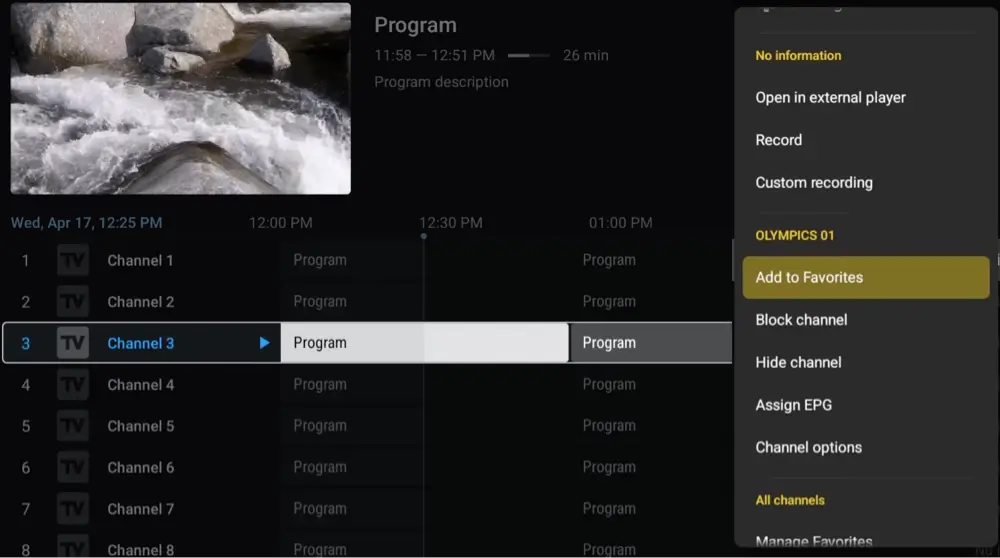
TiviMate shows the program guide as a fast grid, and it can hold more than one playlist so you can switch between them without re-entering anything. It supports M3U links, Xtream Codes logins and Stalker Portal, which covers nearly every provider.
TiviMate Recording and Catch Up
Recording lets you save a show to watch later, and catch-up lets you go back to a program that already aired. Both depend on your provider. Catch-up only works if your provider keeps past broadcasts and your guide data lines up with the channels.
TiviMate Multiview, Favorites and Parental Controls
Multiview shows several channels on one screen. Favorites let you pin the channels you watch most, and parental controls let you lock channels behind a PIN. Search finds channels and shows by name from anywhere in the app. Multiview is the feature to be careful with on an older stick, since the Firestick has limited memory and several live streams at once ask a lot of it.
TiviMate Free vs Premium: Price, Lifetime Subscription and Is It Worth It?
TiviMate works without paying, but most of the features people want sit behind Premium. The guides I checked group recording, catch-up, multiview and multiple playlists on the Premium side. Check the feature list in the Companion app before you buy, because the split can change between versions.
TiviMate Premium Price: How Much Does TiviMate Cost?
I can’t find an official price list on the TiviMate site. The figures quoted in third-party guides are roughly $10 a year, or a one-time lifetime purchase in the low to mid $30s. Prices vary by region and have changed over time, so treat those numbers as a ballpark. The live price is the one shown in the TiviMate Companion app when you upgrade.
TiviMate Lifetime Subscription vs Yearly Subscription
If you plan to keep using TiviMate for more than three years or so, the lifetime option usually comes out ahead. If you’re not sure you’ll stick with it, start with the yearly plan. Most guides say one Premium license covers up to five devices, which is handy if you have a Firestick in the living room and an Android TV box in the bedroom. Confirm the device limit in the Companion app before you count on it.
Is TiviMate Premium Worth It?
For a single TV and a basic channel list, the free version is enough to try the app. If you record shows, use catch-up, keep more than one playlist or want multiview, Premium is worth the price because that’s where TiviMate pulls ahead of most other IPTV players. My advice is to install the free version first, confirm your playlist loads and plays well, and only then pay.
TiviMate Premium APK and Mod: Why to Skip Them
Searches for “TiviMate Premium APK”, “TiviMate mod” and “free Premium account” are everywhere, and I’d stay away from all of them. A modified APK is a file you can’t trust on a device that’s logged into your Amazon account, and it can break the moment TiviMate updates. The cost of Premium is small next to that risk.
What We Like and What We Don’t Like About TiviMate
What We Like
- A clean, remote-friendly layout with a fast program guide
- Handles M3U, Xtream Codes and Stalker Portal playlists
- Recording, catch-up, multiview, favorites and parental controls
- Official direct download plus a Google Play version, with updates from the developer
What We Don’t Like
- It has no channels, so you need a playlist from somewhere else
- The best features sit behind a paid Premium upgrade
- Not in the Amazon Appstore, so a Firestick means sideloading
- Not built for phones or tablets, and not on Vega OS sticks
Is TiviMate Legal?
Determining the legality of TiviMate is simple on one side and hard on the other. The app itself is a player with no content, which is legal. What you load into it is where the risk sits, and KodiTips has no way to confirm the legal status of any playlist or provider you connect.
Plus, legality rules differ depending on what country you live in.
Copyright Concerns
Some playlists and providers you’ll find online carry copyrighted channels without permission, which raises concerns about their legality.
Public Domain Titles
Users can access titles in the public domain, which are not subject to copyright laws. This allows free download, streaming, and sharing without legal issues.
User Responsibility
You, as the end user, bear responsibility for all content accessed through TiviMate, making it crucial that you understand what is legal to view.
Legal Streaming Options
For those seeking legal and verified streaming options, check our list of legal Kodi addons with 100% legal content.
Is TiviMate Safe to Use?
TiviMate comes from a real developer, and the official site and the Google Play listing both give the same company name and the same product description. The Play listing reports that no data is shared with third parties. The risk sits in where you get the file.
On a Firestick you’re sideloading, because I didn’t find TiviMate in the Amazon Appstore. That makes the source of the APK the whole safety question, which is why the next sections use only the code and link published on tivimate.com. I haven’t run a VirusTotal scan on the APK for this guide, so scan the file yourself if you want a second opinion before installing.
A good VPN keeps your connection private while you stream. Click here to view the #1 VPN service for streaming. Learn how to install and configure your streaming VPN here.
Fake TiviMate Sites and Imposters
Search results are full of sites with TiviMate in the domain name that aren’t run by the developer. Some sell playlists, some push paid Premium “accounts” and some host their own copies of the app. If a page asks you to pay for a TiviMate account on a site other than the official one, or to sign in with a Google or Amazon password, close it. The official site is tivimate.com, and Premium is normally handled through the TiviMate Companion app.
How Do You Stay Protected While Using TiviMate?
Sign up for a premium VPN and access the internet unrestricted. We offer exclusive discounts for IPVanish and NordVPN, the highest respected VPNs in the streaming community. Both of these VPNs have some great features for users:
- Apps for Android, iOS, Mac, Linux & more
- Zero Logs
- Unlimited bandwidth
- Tier 1 hardware (no speed slowdown)
- Access to hundreds of VPN servers


Click here to learn more about VPN protection for streaming.
Which Fire TV Stick Can Run TiviMate? 4K Max, 4K Select, Cube and Vega OS
Because TiviMate isn’t in the Amazon Appstore, you need a device that still allows sideloading. Amazon’s newer Vega OS sticks block it. This is the current split, and our Vega OS explainer keeps the full list up to date.
| Device | Can It Sideload TiviMate? |
|---|---|
| Fire TV Stick 4K Max | Yes (Fire OS) |
| Fire TV Stick 4K Plus | Yes (Fire OS) |
| Fire TV Stick 4K (original) | Yes (Fire OS) |
| Fire TV Stick HD (2024) | Yes (Fire OS) |
| Fire TV Cube (3rd gen and newer) | Yes (Fire OS) |
| TVs with Fire TV built in | Yes (Fire OS) |
| Fire TV Stick 4K Select | No (Vega OS) |
| Fire TV Stick HD (2026) | No (Vega OS) |
If you’re still deciding which stick to buy, pick a Fire OS model like the 4K Max or 4K Plus. If you already own a Vega OS stick, the install steps below won’t work on it, and an Android TV or Google TV box is the alternative.
How to Install TiviMate on Firestick (Downloader Method)
This is the standard way to install TiviMate on a Firestick: turn on app installs from unknown sources, install the Downloader app, then enter TiviMate’s official code. It takes about ten minutes. If you’ve never used Downloader, our Downloader app guide covers it in more detail.
This guide shows you how to sideload TiviMate on a Firestick or Android TV with the Downloader app.
Total Time: 10 minutes
Enable Unknown Sources (Firestick / Fire TV Only)
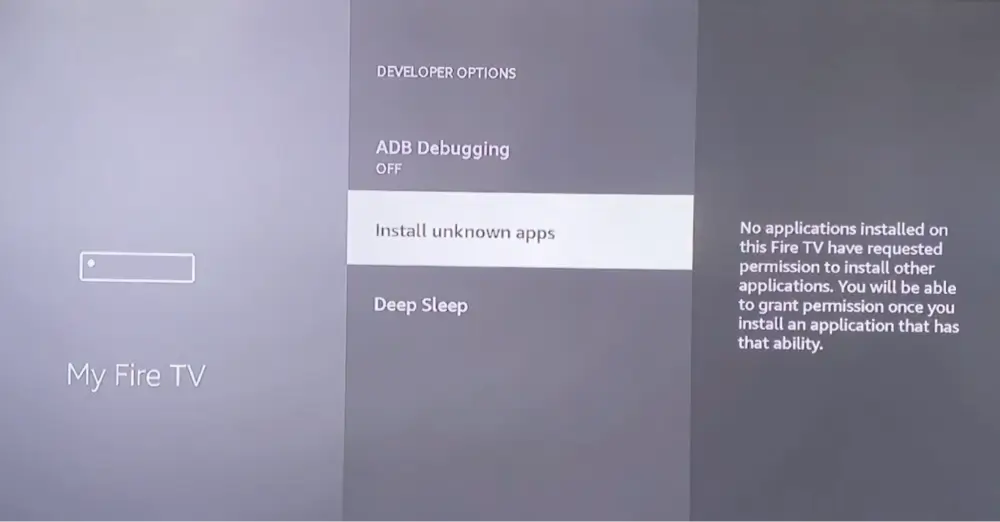
Go to Settings > My Fire TV > Developer Options and turn on Apps from Unknown Sources. You will confirm this again for the Downloader app the first time you install something through it. If you have an Android TV box, you don’t need to do this step.
Enable Unknown Sources (Android TV / Google TV Only)
Menu names vary by device, but look under Settings > Apps (or Security & Restrictions) for an option to allow installs from unknown sources, then enable it for the Downloader app once it’s installed. This step is only required if you’ve never done this for any other APK installation before.
Search for the Downloader App
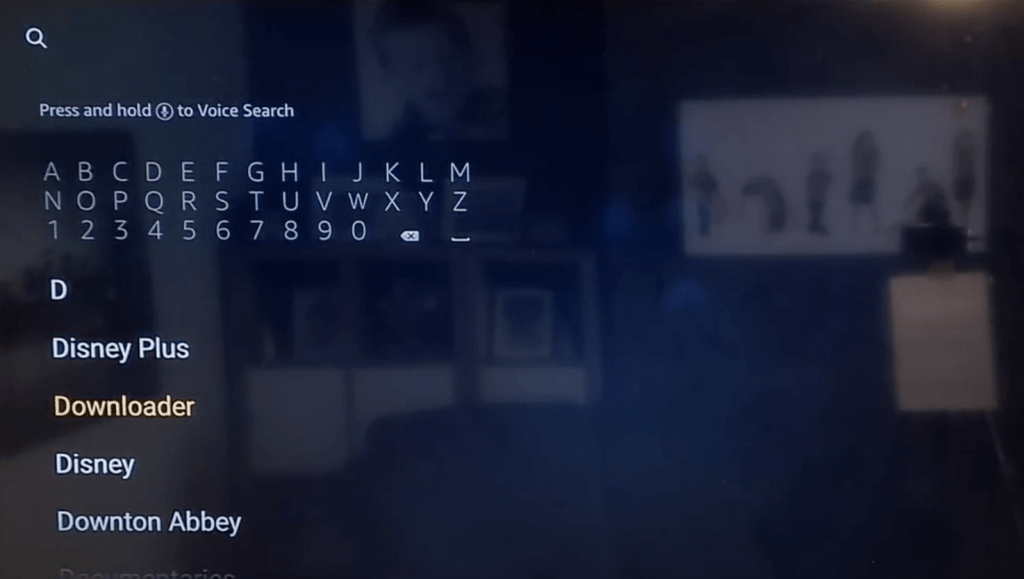
From your device’s home screen, search for Downloader in the Amazon Appstore (Firestick) or Google Play Store (Android TV and Google TV).
Select Downloader From the Results
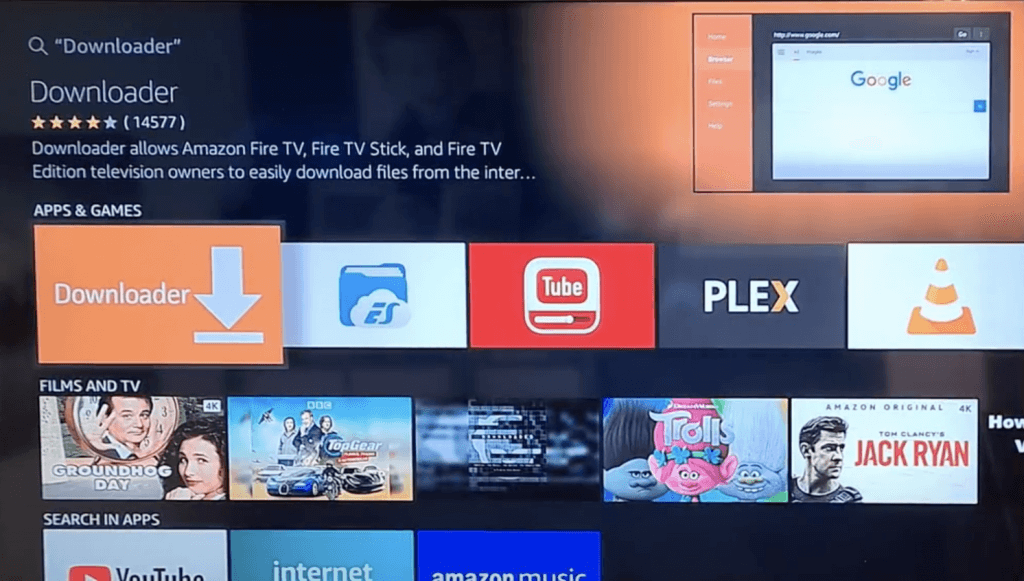
Select the official Downloader app (by AFTVnews) from the search results.
Install the Downloader App
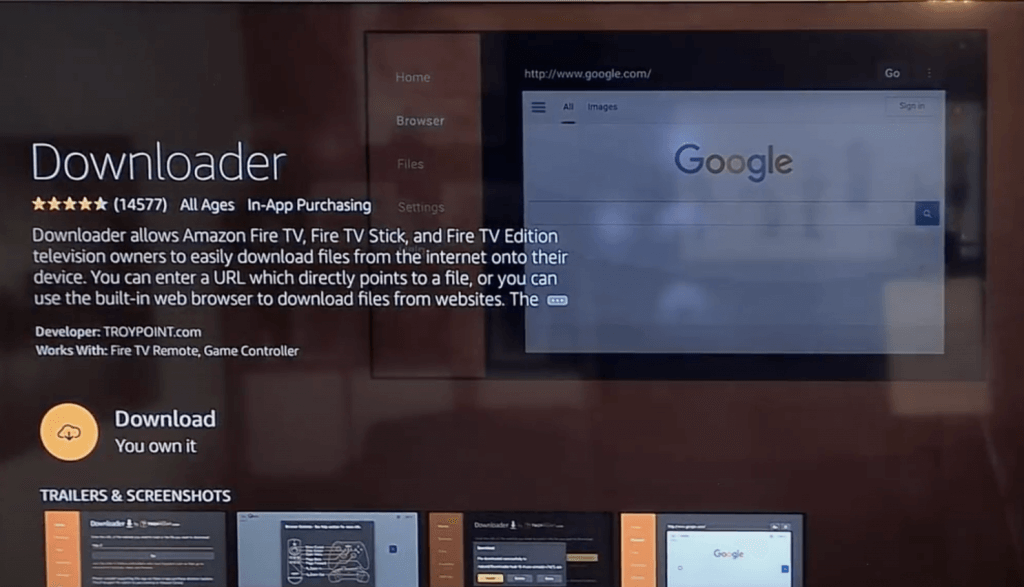
Select Download or Get and wait for Downloader to install, then open it.
Open Downloader
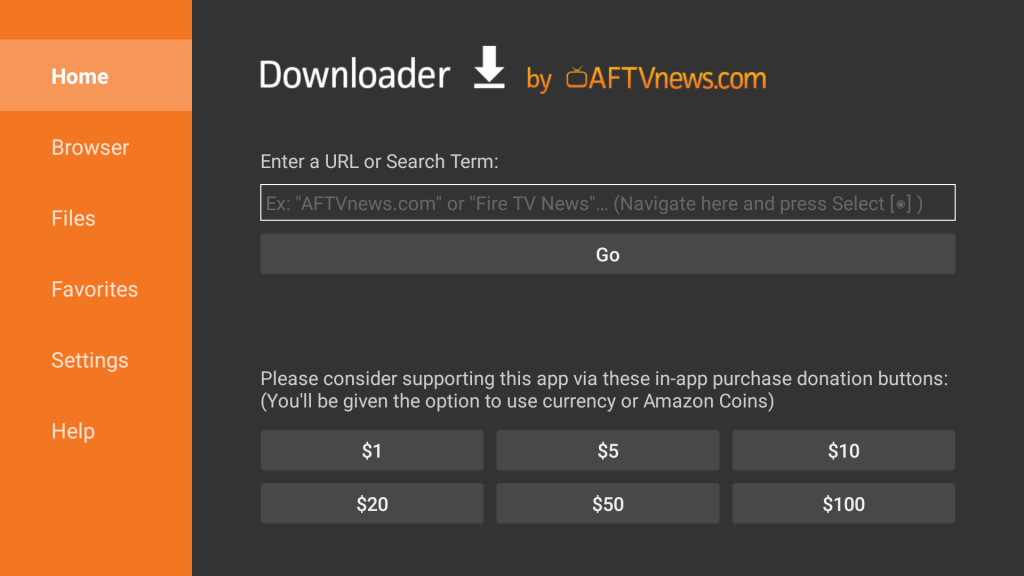
Launch Downloader from your Apps & Channels screen. You will see a URL entry field on the main screen.
Enter the TiviMate Downloader Code
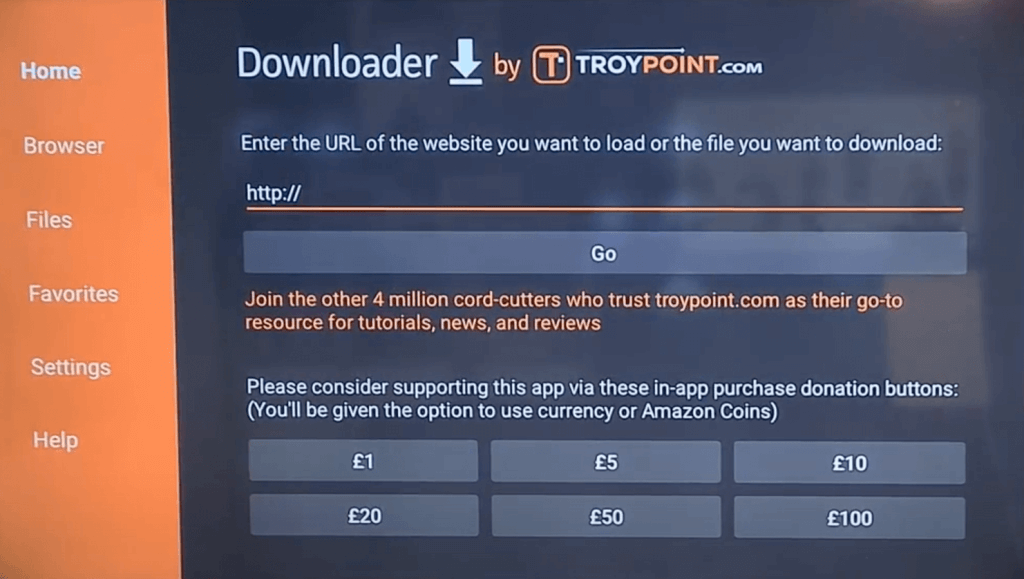
Select the URL field and enter the code 272483 (or the link tivimate.com/apk), then select Go. Both come from the official TiviMate site.
Install TiviMate and Open It
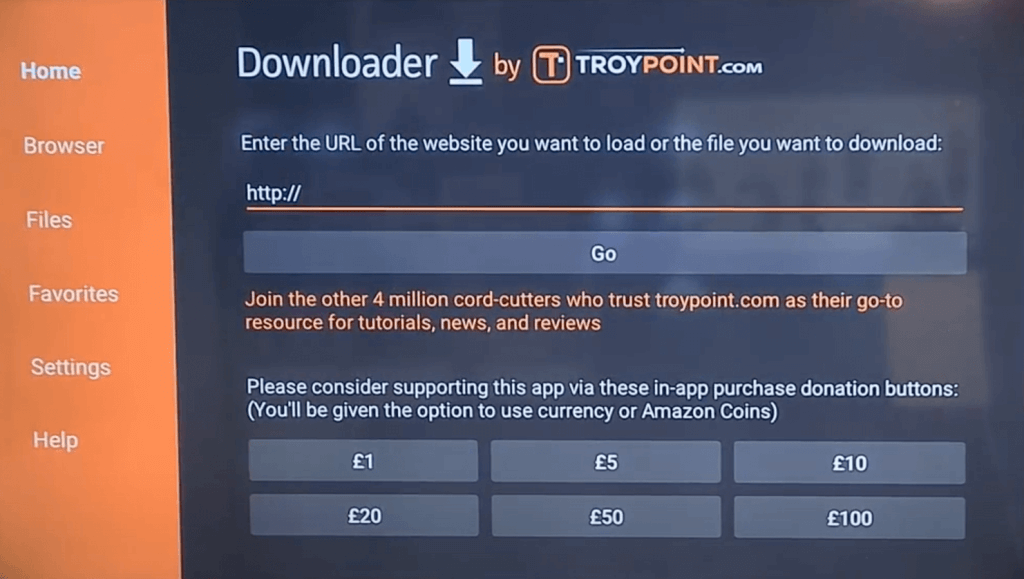
When the download finishes, the install screen appears. Select Install, wait for it to finish, then select Open to launch TiviMate.
TiviMate will open, but it has nothing to show yet. The next sections cover the code in more detail, then adding a playlist.
TiviMate Firestick Downloader Code: 272483 and tivimate.com/apk
The official TiviMate site publishes its own Downloader code and download link. As of this writing, the code is 272483, and the link is tivimate.com/apk. Both come straight from tivimate.com. The page also says this direct APK has fewer restrictions than the Google Play version and checks for updates.
That matters because “TiviMate downloader code” is one of the most searched phrases for this app, and many of the codes floating around forums and videos point to files nobody has verified. Use the code from the developer’s own page, and if it ever stops working, go to tivimate.com and read the current one there. Our Firestick jailbreak guide explains why only certain sources are worth trusting for sideloading.
TiviMate Downloader Code Not Working or Parse Error
If Downloader says the file can’t be parsed, or the code returns nothing, work through these in order. First, check the code again on tivimate.com in case it changed. Second, type the URL tivimate.com/apk into Downloader instead of the numeric code. Third, check that you have free storage on the stick, because a full device is a common cause of parse errors. Last, delete the partial download in Downloader and try once more.
How to Install TiviMate on Android TV, Google TV, Nvidia Shield and Onn
Android TV and Google TV are what TiviMate is designed for, so this is the easy path. Open the Google Play Store on your device, search for TiviMate IPTV Player, and select Install. This works on Google TV streamers, the Nvidia Shield and Onn boxes.
If the app doesn’t show up in the Play Store on your box, use the Downloader method from the section above. The only difference is the unknown sources setting, which on Android TV sits under Settings, then Apps or Security, and is enabled for the Downloader app specifically.
TiviMate on Android Phone or Tablet
The official site says TiviMate is intended for Android TV devices and is not optimized for phones and tablets. It will install on some, but the layout is built for a remote control, not a touchscreen. For a phone, a different IPTV player is a better fit.
TiviMate Firestick Setup: How to Add a Playlist
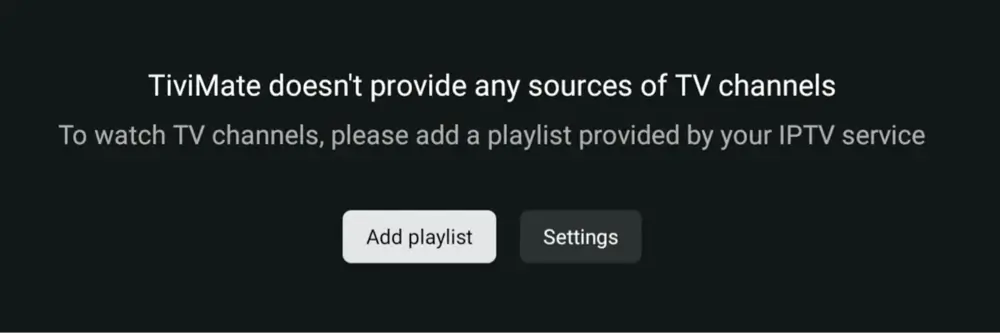
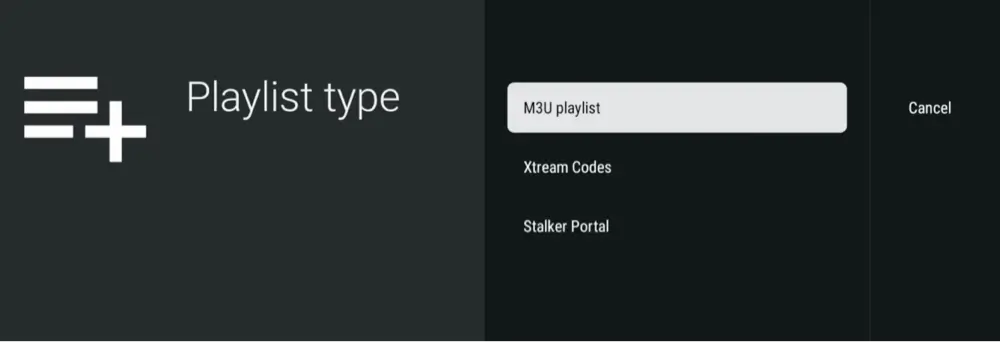
A fresh TiviMate install is empty until you add a playlist, and this is where most people get stuck. You need a playlist link or login from your IPTV provider. TiviMate accepts three types: an M3U link, Xtream Codes details, or a Stalker Portal address.
How to Add a Playlist to TiviMate on Firestick
- Open TiviMate and select Add playlist on the first screen.
- Choose the type your provider gave you: M3U playlist, Xtream Codes or Stalker portal.
- Enter the link or login details exactly as provided, then select Next.
- Give the playlist a name and select Done. TiviMate loads the channels and, if your provider supplies one, the guide.
If you ever need a second playlist, go to the TiviMate settings and add it there. Multiple playlists are one of the features tied to Premium.
TiviMate Xtream Codes Login and M3U Playlist URL
An Xtream Codes login has three parts: a server address, a username and a password. A M3U playlist URL is one long link, often ending in a file name or a set of parameters. Xtream Codes is usually easier because TiviMate pulls the guide data in automatically. For a closer look at M3U links, see our M3U playlist guide.
TiviMate EPG URL and Setting Up the Guide
The EPG is the program guide grid. With Xtream Codes it usually loads on its own. With an M3U link you may need to add an EPG URL (an XMLTV link) in the playlist settings. Your provider normally supplies one. If the guide shows “no information”, the usual cause is a missing or mismatched EPG link, so recheck that link first.
Best IPTV Provider for TiviMate
TiviMate doesn’t sell or recommend providers, and neither do I as a blanket rule. If you want a licensed, legitimate way to get live TV channels, start with our Best IPTV Services comparison, which ranks licensed services first. Whatever you choose, make sure the provider gives you an M3U or Xtream Codes login that TiviMate can read.
Free TiviMate Playlist on Reddit and GitHub: What to Know First
Free playlist links are all over Reddit threads and GitHub lists, and plenty of people go looking for them. There are two problems. The first is reliability: public lists go dead constantly, so you end up re-adding links every week. The second is legality, because many of those lists carry channels the uploader has no right to share. Public domain and officially free channels exist too, and those are the safe ones to load.
TiviMate Companion App: Login, Password and Activating Premium
The TiviMate Companion app is how you buy and manage Premium. According to the guides I checked, you create an account in Companion, pay there, and then activate Premium on each TV or stick that you want to unlock. On a Firestick you’ll run Companion on a phone or another Android device, then sign in on the TV.
- For login, use the same account on every device you want to unlock.
- For a password reset, use the reset link in the Companion app or on the account page at tivimate.com.
- If you see “already purchased for another account”, the license sits on a different login, so sign in with the account you bought with.
- Premium is usually described as covering up to five devices, and you can remove one in Companion to free up a slot.
TiviMate Best Settings for Firestick
A few settings make a real difference on a Firestick, which has less memory than a dedicated box. Menu names can shift between versions, so look for these in the settings or playback sections.
TiviMate Buffer Size and Best Settings for Less Buffering
If channels freeze, first test the problem with a wired Ethernet adapter, since Wi-Fi is the most common cause of buffering on a stick. Then try a larger buffer in the playback settings and lower the stream quality if your provider offers more than one. Our guide to stopping buffering covers the network side.
TiviMate Recording to USB or NAS
Recording needs Premium and a place to save the files. A Firestick has little free space, so plug in a USB drive through an OTG adapter, or point recordings at a network location if you have one. Set the recording folder in the settings before you schedule your first recording, so you don’t fill the stick’s own storage.
How to Update TiviMate on Firestick (Latest Version and Older Versions)
The latest Android TV version I found is TiviMate 5.3.3, uploaded in June 2026. The direct APK from the official site checks for updates by itself, so most of the time the app will prompt you when a new version is ready.
If it doesn’t, repeat the install from the Downloader section using tivimate.com/apk. Installing the new APK over the old one keeps your playlists and settings in the usual case, but back up first (next section) so you’re covered.
TiviMate Latest Version and Older Versions (5.3.3, 5.1.6)
You’ll see older version numbers like 5.1.6 and 2.1.5 in search results. I’d only stay on an older build if a new release breaks something for you, and I wouldn’t download older versions from random sites. Stick with the official APK.
How to Backup TiviMate on Firestick
Back up before you update, reset or move to a new stick. In TiviMate’s settings, look for the backup and restore option, which saves your playlists, favorites and settings to a file you can restore later. Save that file somewhere other than the stick itself, such as a USB drive or cloud storage, so it survives if the stick has to be wiped.
How to Clear Cache, Reset or Uninstall TiviMate on Firestick
For a stubborn problem, go to Settings, Applications, Manage Installed Applications, then TiviMate. From there you can Clear cache (safe, keeps your data), Clear data (resets the app and removes your playlists) or Uninstall. Clear the cache first. Only clear the data if you have a backup or don’t mind re-adding your playlist.
TiviMate Firestick Not Working? Fixes for Every Error
Most TiviMate problems come from the playlist or the provider, not from the app. The error numbers below are HTTP responses and are usually reported by your provider’s server. I’ve described what each one usually means, but no official list exists, so treat the meanings as likely, not certain.
TiviMate Error Code 401 and 403
These usually point at your login or plan. A 401 often means the username or password is rejected. A 403 often means the request is blocked, which is commonly an expired subscription or too many devices connected at once. Check your account with the provider, and make sure the playlist isn’t open on another TV.
TiviMate Error Code 404, 451, 456, 458 and 460
A 404 usually means the stream or link no longer exists on the server. A 451 can mean the content is blocked in your region or by your internet provider, and a VPN is the usual test. The 456, 458 and 460 codes are not standard web errors, so they’re specific to the provider or the app. Restarting the app, clearing the cache and updating TiviMate fixes some of them, and the rest need your provider’s help.
TiviMate Error 502, 503, 511 and 513
A 502 or 503 usually means the provider’s server is down or overloaded, so waiting and retrying is the fix. A 511 usually points at a network or login authorization problem, and a 513 is non-standard and provider-specific. If several channels fail at once with these codes, the issue is almost certainly on the provider’s side.
TiviMate HTTP Data Source Exception
This error means the app couldn’t pull the stream from the server. Check that your internet is working, try another channel to see if it’s just one, and test with a VPN switched off, then on, since some providers block or allow certain networks. If every channel fails, your playlist link has probably expired.
TiviMate Buffering on Firestick
Use Ethernet if you can, close other apps, increase the buffer in playback settings, and try a different channel quality. If buffering only happens at peak hours, your provider’s servers are the more likely cause. Our guide to Fire TV Ethernet walks through the wired setup.
TiviMate EPG Not Working or No Information
A guide that says “no information” almost always means the EPG link is missing, expired or doesn’t match your channel names. Re-enter the EPG URL from your provider in the playlist settings, then refresh the playlist. Give it a few minutes to download.
TiviMate Catch Up Not Working
Catch-up needs three things: Premium, a provider that stores past broadcasts, and a working EPG. If any one is missing, the catch-up icon won’t appear or won’t play. Check the EPG first, then ask your provider whether the channel supports catch-up.
TiviMate Playlist Not Updating or Not Loading
Check that the playlist link still works by opening it in a phone browser. If the link fails there, ask your provider for a fresh one. If it works, remove the playlist and add it again, or refresh it in the settings.
TiviMate Keeps Crashing or Has No Sound
For crashes, clear the cache, restart the stick, and update to the current version. For missing audio, switch to another channel to see if it’s the stream, then check the audio track setting in the player. A restart of the stick clears most one-off audio glitches.
Is TiviMate Down? Does TiviMate Still Work?
TiviMate itself is still being updated, with 5.3.3 uploaded in June 2026. When people say TiviMate is down, they almost always mean their playlist or provider stopped working. Try a different playlist, or open a different IPTV app with the same login. If those also fail, the problem is your provider, not the app.
TiviMate Alternatives and TiviMate vs Other IPTV Players
TiviMate is built for TV remotes and has the strongest guide and recording features in this group. The others win on platform support or price.
TiviMate vs IPTV Smarters Pro
IPTV Smarters Pro runs on many more platforms, including phones and iOS, and is free to use. TiviMate has the better TV layout and guide. If you only watch on a Firestick or Android TV, I’d pick TiviMate. If you also watch on a phone, Smarters is easier.
TiviMate vs IBO Player
IBO Player is also a playlist player across several platforms, and it uses a per-device activation approach. TiviMate keeps your account and settings under one Companion login, which is simpler to manage across several TVs.
TiviMate vs Kodi
Kodi can play IPTV through its PVR add-on, and it’s free, but it’s a heavier setup. TiviMate is purpose-built for live TV and takes minutes to set up. If you already use Kodi for other things, our Kodi on Firestick guide shows how to install it.
| Player | Where It Fits |
|---|---|
| OTT Navigator | Another IPTV player for Android TV and Fire TV. Worth trying if TiviMate’s layout isn’t for you. |
| Televizo | An IPTV player that also runs on Android phones and tablets. |
| Perfect Player | An older IPTV player for Android TV and Fire TV. See our Perfect Player guide. |
Does TiviMate Work on Roku, Samsung, LG, Apple TV, iPhone and Windows PC?
Short answer: not officially. The developer says TiviMate is intended for Android TV devices, so it needs an Android TV, Google TV or Fire TV operating system.
- Roku does not run Android apps, so TiviMate won’t install.
- Samsung and LG TVs run Tizen and webOS. Plug in a Firestick or Google TV streamer instead.
- There is no official Apple TV or iPhone version, so use a different IPTV app that supports iOS.
- There is no official Windows or Mac version. People use Android emulators, which the developer doesn’t support and I don’t recommend.
Final Thoughts on TiviMate on Firestick
TiviMate is the cleanest way I know to turn an IPTV playlist into something that feels like real TV. The install is quick when you use the official code, and most of the pain afterwards comes from the playlist, not the app. Use the Downloader code from tivimate.com, start on the free version, add a playlist you’re allowed to watch, and upgrade only if you need recording or catch-up.
TiviMate Firestick FAQ
Is TiviMate Free on Firestick?
TiviMate can be installed and used for free, but recording, catch-up, multiview and multiple playlists generally need Premium. Check the Companion app for the current feature list and price.
Does TiviMate Have a Free Trial?
Some third-party guides mention a short trial, but I couldn’t confirm one on the official site. Check the offer in the TiviMate Companion app before you pay.
How Many Devices Can I Use With TiviMate Premium?
Most guides say one Premium license covers up to five devices. You can usually free up a slot by removing a device in the Companion app. Confirm the limit there before you buy.
Is TiviMate Available on the Amazon Appstore?
I didn’t find TiviMate in the Amazon Appstore, so on a Firestick you install it with the Downloader app using the code or link from tivimate.com.
Does TiviMate Work on the New Fire TV Stick (Vega OS)?
No. The Fire TV Stick 4K Select and the 2026 Fire TV Stick HD run Amazon’s Vega OS, which blocks sideloading, so TiviMate can’t be installed on them. Fire OS models like the 4K Max, 4K Plus and Cube still work.
How Do I Update TiviMate on Firestick?
The direct APK from tivimate.com checks for updates itself. If you don’t get a prompt, run the Downloader install again using tivimate.com/apk, and back up your settings first.
Is TiviMate Legal and Safe to Use?
TiviMate is a player with no content, so the app itself is legal. What you load into it is your responsibility. Only download the app from tivimate.com or Google Play, and avoid modified APKs.
Do I Need a VPN With TiviMate?
A VPN isn’t required for the app to work, but many people use one for privacy and to keep their connection private from their internet provider. It can also help diagnose a blocked-stream error.
How Do I Contact TiviMate Support?
The official site lists [email protected]. TiviMate can help with the app itself, but it can’t fix a playlist or a provider problem.
Is TiviMate the Same as an IPTV Service?
No. TiviMate is a player only and does not provide channels. You need a playlist from a provider, and a TiviMate upgrade does not include any content.
Disclaimer
We have no control over and do not host or upload any video, films, media file, or live streams. KodiTips is not responsible for the accuracy, compliance, copyright, legality, decency, or any other aspect of the content streamed from your device. If you have any legal issues please contact the appropriate media file owners or host sites.