

In this tutorial guide, I’ll show you how to install the Jacktook Kodi addon on your Android TV box or Amazon Firestick, then set it up so it actually finds streams. If you searched for how to install Jacktook on Kodi, these steps work the same on a Fire TV Cube, Android TV, or Kodi on a computer.
Jacktook is a free, open-source meta-scraper addon for Kodi, built by the developer Sam-Max. It’s an unofficial third-party addon installed from the Jacktook Add-on Repository.
Plus, is the Jacktook Kodi addon safe, do you need Real-Debrid, and what do you do when you hit a “Jacktook not working” or Jacktook Burst error? I’ll cover all of that below.
Jacktook Kodi Addon Quick Facts
| Addon Name | Jacktook |
| Developer | Sam-Max |
| Latest Version | 1.21.0 |
| Repository | Jacktook Add-on Repository |
| Repository URL | https://sam-max.github.io/repository.jacktook |
| Repository Zip | repository.jacktook-0.0.5.zip |
| Source Code (GitHub) | github.com/Sam-Max/plugin.video.jacktook |
| Kodi Version Compatibility | Kodi 20 Nexus and newer (including Kodi 21 Omega) |
| Debrid Required? | No, but a debrid service or a torrent engine is needed to play anything |
| Jacktook SImilar Addons | Umbrella, POV, Prism |
- Jacktook Kodi Addon Quick Facts
- What Is the Jacktook Kodi Addon?
- How Do You Stay Protected While Using Jacktook?
- Jacktook Kodi Addon Features You Should Know About
- Jacktook Review: What We Like and What We Don’t Like
- Is the Jacktook Kodi Addon Safe to Use?
- How to Install the Jacktook Kodi Addon on Android TV or Firestick
- Jacktook Setup: How to Connect Debrid, Torrents and Scrapers
- Jacktook GitHub Repository, Version and Updates
- Jacktook Not Working? Troubleshooting Fixes
- Is the Jacktook Kodi Addon Legal?
- Jacktook Kodi Addon FAQ
- Disclaimer
What Is the Jacktook Kodi Addon?
Jacktook is a video addon that pulls streaming sources from several places into one search screen. Instead of picking a single scraper, you turn on the sources you want (Stremio addons, Jackett, Prowlarr, a debrid service or a torrent engine) and Jacktook lists every result together so you can pick the quality and size you want.
That makes it closer to Umbrella than to a simple one-site addon. It does nothing on its own until you connect at least one source, which is why the setup section below matters more than the install itself. Jacktook does not host any video, and a debrid service such as Real-Debrid gives the smoothest playback. If you’re comparing options first, see our list of the best Kodi addons.
How Do You Stay Protected While Using Jacktook?
Sign up for a premium Kodi VPN and access the internet unrestricted. We offer exclusive discounts for NordVPN and IPVanish, the highest respected VPNs in the Kodi community. Both of these VPNs have some great features for users:
- Apps for Android, iOS, Mac, Linux & more
- Zero Logs
- Unlimited bandwidth
- Tier 1 hardware (no speed slowdown)
- Access to hundreds of VPN servers


Jacktook Kodi Addon Features You Should Know About
Jacktook Sources: Stremio, Jackett, Prowlarr and Burst
Jacktook can search Stremio addons, Jackett, Prowlarr, its own Jacktook Burst scraper, Telegram through Jackgram, Usenet through EasyNews, and external scrapers such as CocoScrapers. You switch each one on or off in the addon’s settings, so you can keep the list short and fast.
Jacktook Debrid and Torrent Engine Support
Jacktook has built-in support for Real-Debrid, AllDebrid, Premiumize, OffCloud and TorBox. If you don’t use a debrid service, it can hand torrents to a torrent engine instead: Jacktorr, Torrest or Elementum. Debrid is the smoother route, because the file streams from the service’s servers instead of downloading through your own connection. If you haven’t picked a service yet, our Real-Debrid alternatives guide compares the others.
Jacktook Trakt, Simkl and Nuvio Sync
You can connect Trakt or Simkl for watch history and scrobbling, and recent versions also sync with a Nuvio account. It also adds skip intro and next episode prompts, subtitle downloads, and a backup and restore option for your settings. If you also use Nuvio, our Kodi vs Nuvio comparison explains how the two apps differ.
Jacktook Review: What We Like and What We Don’t Like
What We Like
- One search screen for many sources
- Works with five debrid services
- Has a torrent engine option if you don’t use debrid
- Installs from a repository, so it updates itself
- Open source, with the code public on GitHub
What We Don’t Like
- Plays nothing until you connect a source
- The settings menu has a lot of options
- Torrent engines add extra setup and use your own bandwidth
- Smaller community than the big-name addons, so fewer guides
Is the Jacktook Kodi Addon Safe to Use?
Jacktook isn’t in Kodi’s official repository, so like any third-party addon, you’ll see Kodi’s standard permissions warning the first time you install it.
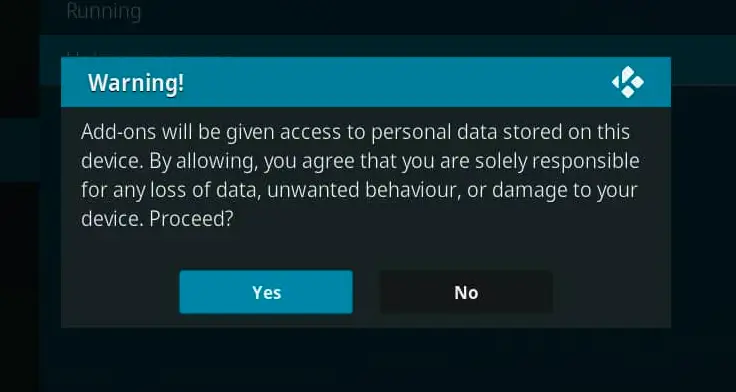
This warning tells you that addons can access personal files on your Android TV box. That’s normal for any unofficial Kodi addon and isn’t unique to Jacktook. The addon’s source code is public on GitHub under an open-source license, and the developer has kept it updated, which is a better sign than most unofficial addons can offer. Still, Jacktook only collects sources. What you play depends on the sources you connect, so stick to the links it shows inside Kodi and protect your connection with a good Kodi VPN service before you start streaming.
A Kodi VPN will give you an anonymous connection while streaming or downloading media from third-party Kodi addons. Click here to view the #1 Kodi VPN service.
Learn how to install and configure your Kodi VPN here.
How to Install the Jacktook Kodi Addon on Android TV or Firestick
These steps are the same on a Firestick, Fire TV Cube, Android TV box, or Kodi on a computer. If you don’t have Kodi yet, start with our Kodi on Firestick guide and the Downloader app guide. Then turn on Unknown Sources in Kodi, or the repository zip won’t install.
This guide will show you how to install the Jacktook Kodi addon.
Total Time: 5 minutes
Access SYSTEM Page
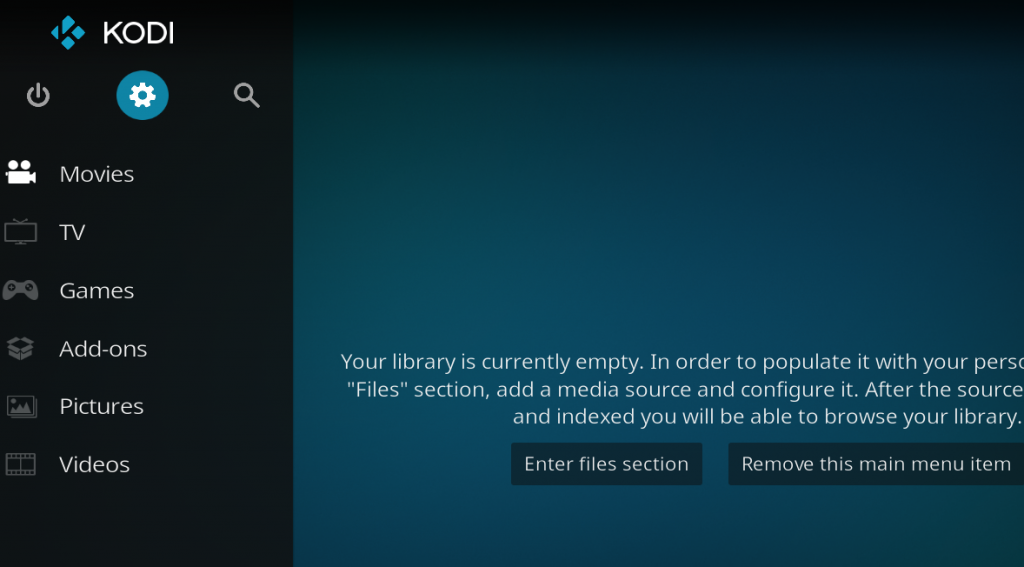
Access the Kodi SYSTEM screen by clicking on the gear icon on the Kodi main menu.
Click on File Manager
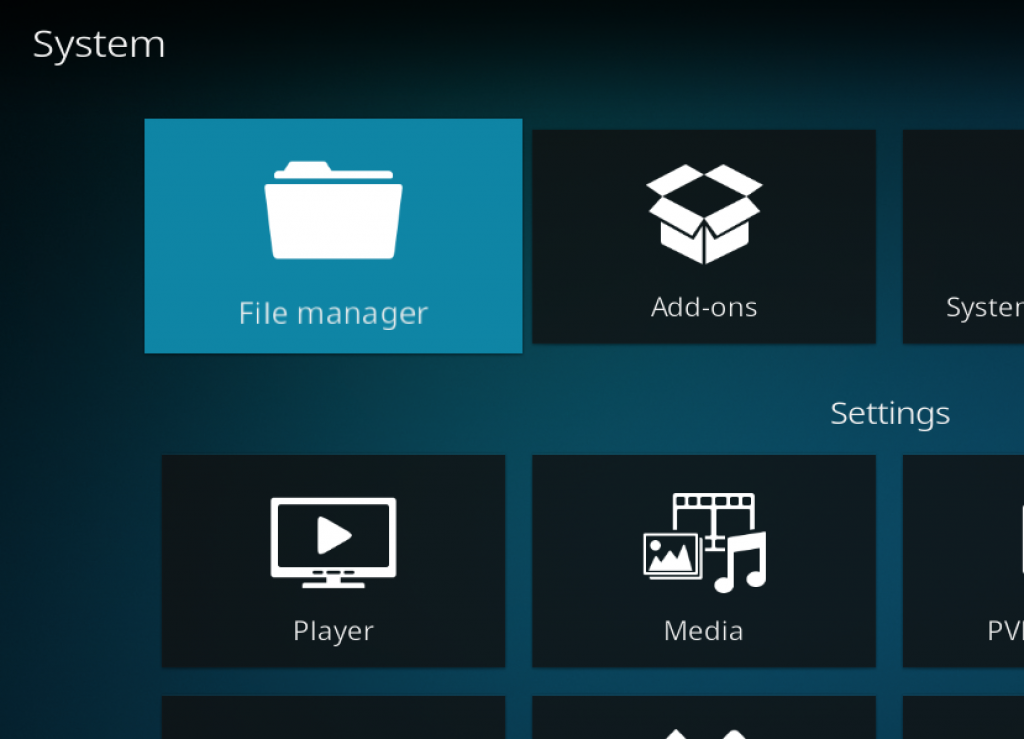
Click on the File Manager tile.
Select Add Source
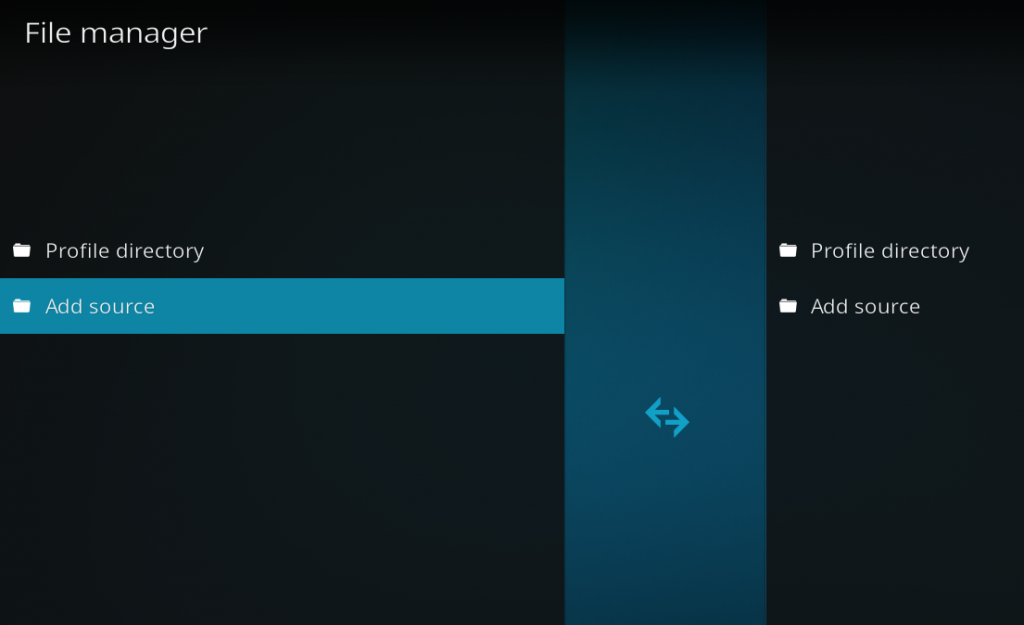
Click on Add Source at the bottom of the left side pane.
Add File Source
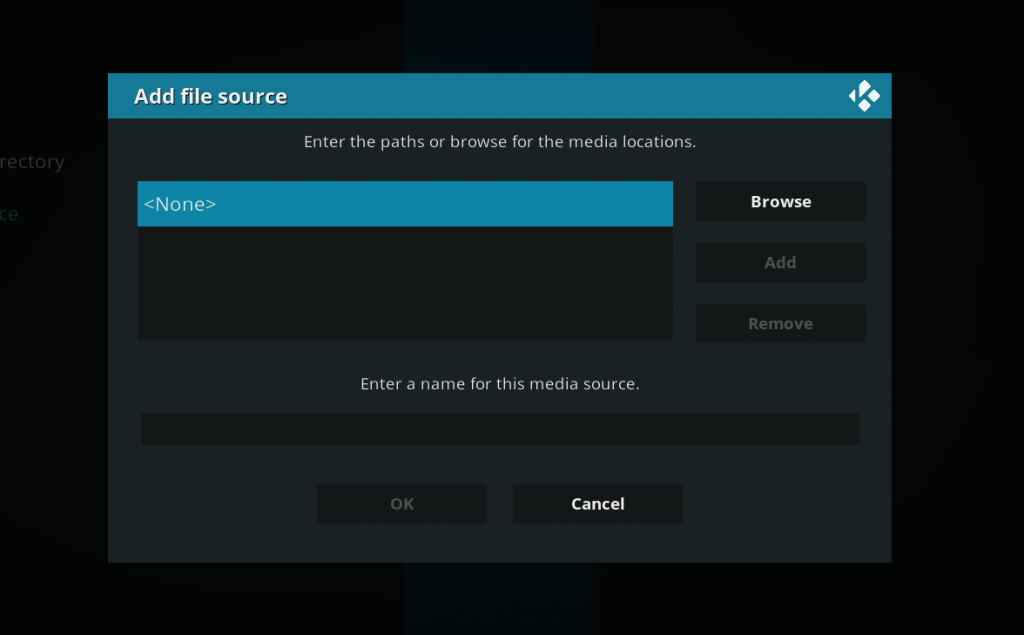
First, click on None and enter in https://sam-max.github.io/repository.jacktook and then select Done.
Click on the empty box underneath the media source name field and name it Jacktook and then click OK.
Access Kodi Addons Screen
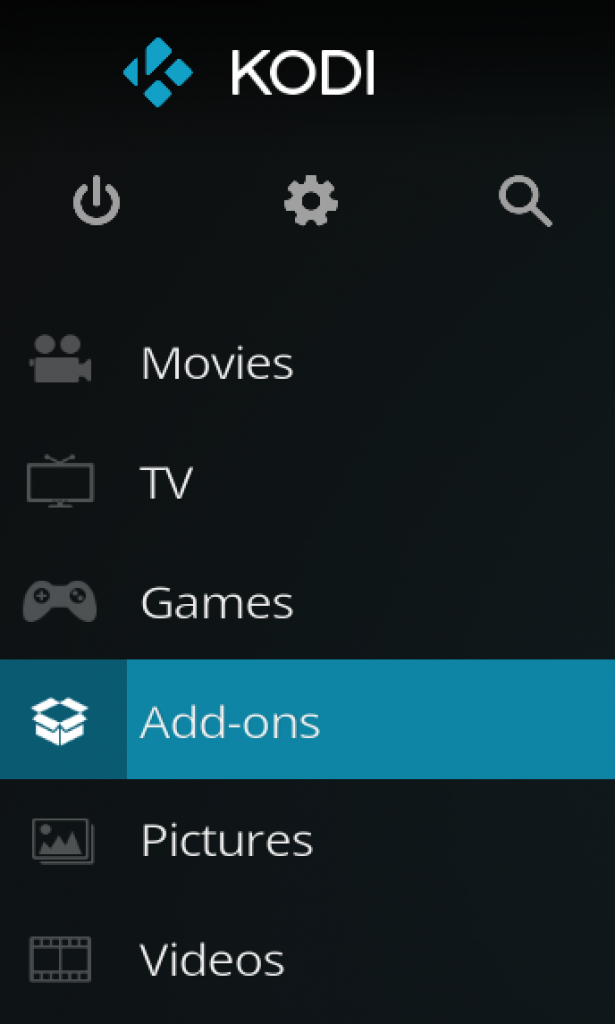
Go back to the Kodi home screen and then click on the Addons button.
Select the Addon Browser
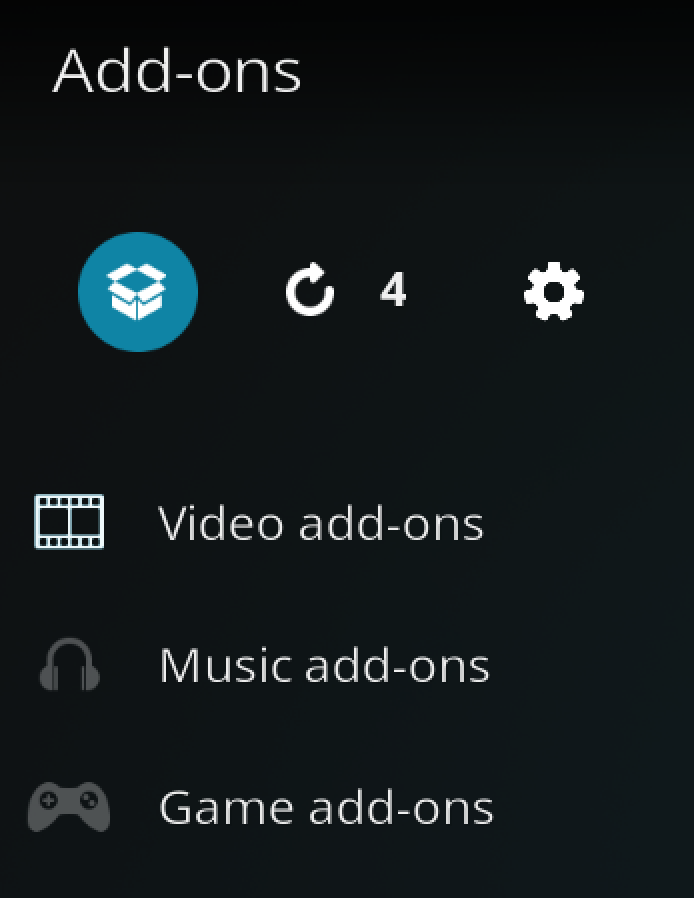
Access the Kodi Add-on Browser by clicking on the package icon in the upper-left corner of this screen.
Install the Jacktook Repository
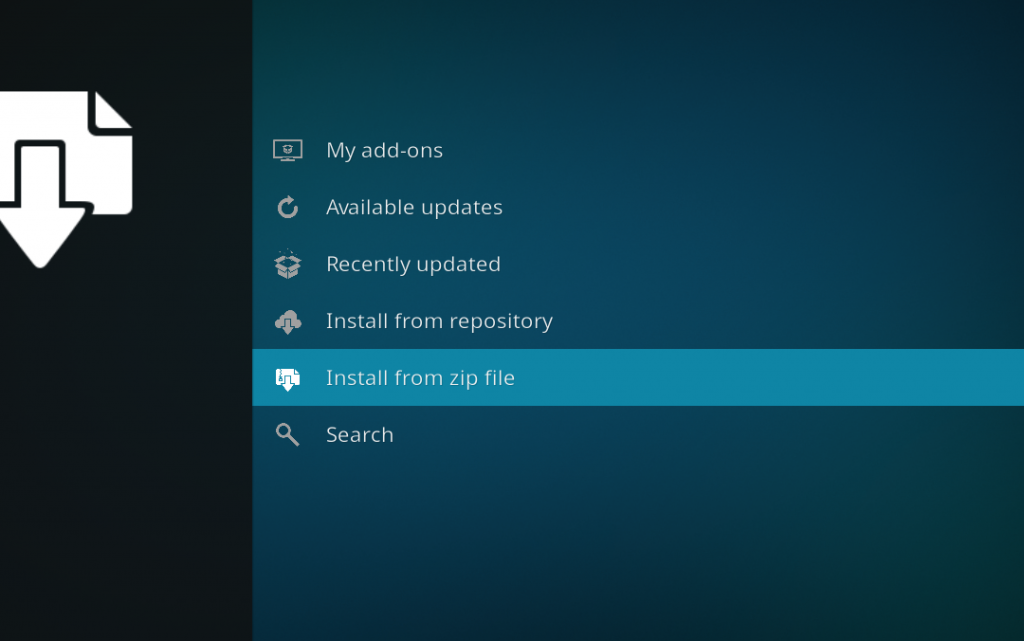
Install the repository by clicking on Install from Zip File then Jacktook then repository.jacktook-x.x.x.zip and waiting for the repository installed icon to appear in the top right corner.
Install the Jacktook Kodi Addon
Next, select Install From Repository then Jacktook Add-on Repository then Video Add-ons then Jacktook. Click on Install, click OK when Kodi lists the extra addons Jacktook needs, and wait for the Add-on Enabled Notification.
Jacktook is now in your Video Add-ons section, but it won’t find anything yet. Open it once, then follow the setup steps below.
Jacktook Setup: How to Connect Debrid, Torrents and Scrapers
To open the settings, hold the center button on your remote while Jacktook is highlighted, then choose Settings. The options you need sit in two places: the Services section (debrid and torrents) and the Sources section (Stremio, Jackett, Prowlarr and Burst). Pick one route below, you don’t need all of them.
Jacktook Real-Debrid Setup (Recommended)
This is the route I’d start with, because the file streams from the service instead of through your own connection. Go to Services, open the Real-Debrid group, switch it on, and follow the authorization prompt to link your account. Kodi shows a code that you enter on the Real-Debrid website from your phone or computer. You’ll need an active subscription, which you can get through our Real-Debrid link. The same section has switches for AllDebrid, Premiumize, OffCloud and TorBox if you use one of those instead. Our Real-Debrid authorization guide covers the code step in more detail.
Jacktook Setup Without Debrid (Torrent Engine)
If you don’t use debrid, go to Services, open the Torrents group, switch torrents on, and pick a torrent client: Jacktorr, Torrest or Elementum. Elementum is the one that works on every Kodi platform, so it’s the safest pick on a Firestick or Android TV box. Make sure the engine you choose is installed and enabled under My add-ons, then press OK to save. Expect slower starts than debrid, since the torrent downloads to your own device first.
How to Add Torrentio to Jacktook
Most people add Torrentio, a popular Stremio source, as their first scraper. Go to Sources, switch Stremio on, and add a custom addon by URL. Torrentio’s address is https://torrentio.strem.fun/manifest.json, so type it carefully, since one wrong character will make it fail to add. Then make sure the addon is selected as a stream addon. Torrentio results only play if you also have a debrid service or a torrent engine from the sections above. You can also sign in with a Stremio account to import your addons and debrid tokens instead of typing them.
Jacktook Jackett and Prowlarr Setup (Optional)
Jackett and Prowlarr are indexer apps that run on a computer, NAS or server on your network, so skip this unless you already use one. The developer’s advice is to select only three or four good trackers, and to avoid trackers behind Cloudflare unless you run FlareSolverr. With Prowlarr, you can type specific indexer IDs (separated by spaces) into the settings to target only those sources.
Jacktook GitHub Repository, Version and Updates
The addon’s code lives at github.com/Sam-Max/plugin.video.jacktook, and the install files live in a separate repository at github.com/Sam-Max/repository.jacktook. The repository zip is named repository.jacktook-0.0.5.zip, and Kodi lists it as “Jacktook Add-on Repository” once it’s installed. The addon version at the time of writing is 1.21.0, and the developer is still pushing fixes.
How to Update Jacktook
Because you installed Jacktook from its repository, Kodi updates it automatically when a new version is published. You can also open My add-ons, choose Video add-ons, select Jacktook and check for updates yourself. The developer’s GitHub page has no release downloads to install by hand, and the jacktook.select.zip file in the code is a player file for TMDb Helper, not the addon. So skip those and use the repository. If something acts strangely after an update, Jacktook has a cache section under its General settings, including an option to clear the cache on update. For Kodi itself, see our how to update Kodi guide.
Jacktook Not Working? Troubleshooting Fixes
Most Jacktook problems come down to setup, because the addon depends on the sources you connect. These are the errors people search for most, and the fixes worth trying first. For general Kodi problems, see our Kodi not working guide.
Jacktook No Results Found
This almost always means no source is switched on, or the source you turned on has nothing for that title. Check that at least one of Stremio, Jackett, Prowlarr or Burst is enabled in Sources, and that a debrid service or torrent engine is enabled in Services. If you use Jackett, too many or Cloudflare-protected trackers can also return nothing, so trim the list to a few good ones. If results appear but won’t play, see our Kodi No Stream Available fix.
Jacktook Burst Error
Jacktook Burst is a separate helper addon that the Jacktook repository provides as a local scraper. The developer doesn’t document its errors, so I can’t point to one definite cause. These steps cover the usual suspects. Open My add-ons and make sure Jacktook Burst is installed, enabled and up to date. If you don’t use it, switch Burst off in Sources so Jacktook stops calling it.
Then check the Kodi log for the exact error line, using our log file guide, because that line tells you which provider failed.
Jacktook Addon Not Working With Elementum or Another Torrent Engine
If playback never starts, check that the torrent client you picked is actually installed and enabled under My add-ons. Jacktook treats a disabled torrent client as unavailable. Also confirm torrents are switched on in Services. If Elementum itself fails, try Jacktorr or Torrest instead, or move to a debrid service.
Jacktook Real-Debrid Not Working
Check that your Real-Debrid subscription is active and that you authorized the account in Jacktook’s Services settings. If the link has expired, switch Real-Debrid off and on again and repeat the code step. Our Real-Debrid not working guide has more fixes.
Jacktook Repository Failed to Install or Couldn’t Connect
Re-check the source URL, because a single typo is the usual cause: https://sam-max.github.io/repository.jacktook. Make sure Unknown Sources is on, and that you installed the repository zip before opening Install from Repository. If Kodi still says it can’t connect, restart the device and try again, then check the log.
Is the Jacktook Kodi Addon Legal?
Determining the legality of the Jacktook Kodi addon is challenging without knowing if it possesses the proper licensing. Kodi Tips does not have the ability to confirm the legal status of these addons.
Plus, legality rules differ depending on what country you live in.
Copyright Concerns with Kodi Addon
At first glance, the addon appears to distribute copyrighted works without the necessary consent, which raises the concern about its legality.
Public Domain Titles
Users can access titles in the public domain, which are not subject to copyright laws. This allows free download, streaming, and sharing without legal issues.
User Responsibility
You, as the end user, bear responsibility for all content accessed through Kodi addons, making it crucial that you understand what is legal to view.
Legal Streaming Options
For those seeking legal and verified streaming options, check our list of legal Kodi addons with 100% legal content.
Jacktook Kodi Addon FAQ
How Do You Install the Jacktook Kodi Addon?
Add https://sam-max.github.io/repository.jacktook as a source in Kodi’s File Manager, install the repository zip from Install from Zip File, then go to Install from Repository, Jacktook Add-on Repository, Video Add-ons, and install Jacktook. The full step-by-step walkthrough is above.
Do You Need Real-Debrid for Jacktook?
No, but you need either a debrid service or a torrent engine, because Jacktook only collects sources and does not play anything by itself. Without debrid, you can use Jacktorr, Torrest or Elementum instead.
Why Is Jacktook Not Working?
The most common causes are no source enabled, no debrid service or torrent engine connected, or a disabled torrent client addon. Check Services and Sources in the Jacktook settings first, then look at the Kodi log for the exact error.
What Is Jacktook Burst?
Jacktook Burst is a local scraper that the Jacktook repository provides as a separate addon. You can switch it on or off in Jacktook’s Sources settings. If it throws errors and you don’t need it, turn it off.
Does Jacktook Work With Torrentio?
Yes. Torrentio is a Stremio addon, and Jacktook can add Stremio addons by URL. Torrentio results still need a debrid service or a torrent engine to play.
Is There a Jacktook APK or Downloader Code?
No. Jacktook is a Kodi addon, not a standalone Android app, so there is no APK or Downloader code. You install Kodi on your Firestick first, then install Jacktook inside Kodi from its repository.
What Are the Differences Between a Kodi Addon and a Kodi Build?
A Kodi build is a full package that changes Kodi’s skin and preinstalls many addons, while an addon is a single program you add to your existing Kodi setup. Jacktook is an addon, so you do not need a build to use it.
Is Using the Jacktook Kodi Addon Legal?
The Jacktook Kodi addon itself is legal to install. However, not all content it can access is legally permissible depending on the source. Ensure you access only content that is within the public domain or that you have the right to stream.
Should I Use a VPN With the Jacktook Kodi Addon?
Yes. Jacktook pulls from third-party sources, and a VPN keeps your connection private from your internet provider and the sites you are streaming from. It can also help if your provider throttles streaming traffic.
Disclaimer
We have no control over and do not host or upload any video, films, media file, or live streams. KodiTips is not responsible for the accuracy, compliance, copyright, legality, decency, or any other aspect of the content streamed from your device. If you have any legal issues please contact the appropriate media file owners or host sites.