

If you want to install the Daddy Live Kodi addon, here is the short version: the original is no longer in The Crew repository, but a rebuilt version called DLTV is live in the Arkane14 repository, and this guide shows you how to install it on a Firestick or Android TV box and how to fix it when it stops working.
The Daddy Live Kodi addon (now listed in Kodi as DLTV) is an unofficial live sports and live TV addon that pulls its schedule and channels from the DaddyLive website. It is installed from the third-party Arkane14 repository, not from Kodi’s official one.
I’ll also cover what happened to the old addon, whether the new one is safe, the errors people hit most, and what to use if it won’t load.
Is Daddy Live Kodi Still Working? Status After the Crew Removal
Short answer: a version of it works, but not the one most older guides tell you to install. The original DaddyLive addon is gone from The Crew repository, and the rebuild called DLTV is the one that is still being updated.
Here is what that is based on:
- The Crew no longer lists DaddyLive. The Crew repository’s own index only offers The Crew, so any guide that says to open The Crew and pick Daddy Live is out of date.
- The Arkane14 repository is live. It serves an addon named DLTV with the description Live TV and Sports, and its developer is still pushing updates to it.
- The addon depends on a website that keeps moving. It reads schedules and streams from third-party sites, and free sports streaming sites have been losing domains since the US Justice Department seized more than 1,000 World Cup streaming domains in 2026. When the site the addon reads from is down or blocked, the addon shows an error or an empty schedule.
So expect it to work some days and not others. If you want something that plays every time, jump to the alternatives section.
Was DaddyLive Discontinued?
The original addon was, in practice. It disappeared from The Crew repository, and people who kept it installed reported empty schedules and error messages. The website behind it did not vanish for good, which is why developers keep rebuilding the addon.
So the old addon is discontinued, but DaddyLive-style addons are not.
Why Can’t I Find DaddyLive in The Crew Repo?
Because it was removed. Open The Crew, go to Video Add-ons, and it is not there, and reinstalling The Crew will not bring it back. If you want The Crew for movies and shows, that is a separate install, covered in our The Crew Kodi addon guide.
DaddyLive V2, DaddyLive V3 and DLTV: Which Daddy Live Kodi Addon Is Which?
The names are a mess because each rebuild got renamed. DaddyLive, or DaddyLive V2, is the original that lived in The Crew. Some sites call the Arkane14 build DaddyLive V3, while others use the V3 label for different repositories.
DLTV is the name Kodi shows for the Arkane14 build, and it is the one this guide installs. Treat the version label as a hint, not a guarantee, and always check the repository URL.
Daddy Live Kodi Addon Quick Facts
| Addon Name | DLTV (the current Daddy Live Kodi addon) |
| Developer | Arkane14 |
| Repository | arkane14 Repository |
| Repository URL | https://arkane14.github.io/ |
| Repository Zip | repository.arkane14-x.x.x.zip |
| Kodi Version Compatibility | Kodi 19 or higher |
| What It Offers | Live sports schedule and live TV channels |
| Extra Addons Needed | None to set up (Kodi installs its helper addons for you) |
| Debrid Required? | No |
| Cost | Free |
- Is Daddy Live Kodi Still Working? Status After the Crew Removal
- Daddy Live Kodi Addon Quick Facts
- What Is the Daddy Live Kodi Addon?
- Is the Daddy Live Kodi Addon Safe to Use?
- How Do You Stay Protected While Using Daddy Live Kodi?
- How to Install Daddy Live Kodi Addon on Firestick or Android TV
- How to Use Daddy Live Kodi: Schedule, Live TV and Update Schedule
- DaddyLive Not Working on Kodi: Fixes by Error Message
- Daddy Live Kodi Alternatives: What to Use When It Stops Working
- Daddy Live IPTV, M3U and EPG: Other Ways to Use It on Kodi
- Is the Daddy Live Kodi Addon Legal?
- Daddy Live Kodi FAQ
- Disclaimer
What Is the Daddy Live Kodi Addon?
The Daddy Live Kodi addon is a live sports and live TV addon built around the DaddyLive website, which lists sports events from around the world and links to streams for them. The original lived in The Crew repository. After it left, other developers rebuilt it, and the rebuild that is actively updated right now is DLTV from Arkane14.
Open it and you get a simple menu: a live sports schedule, a list of live TV channels (plus a by-language list and favorites), searches for events, channels or a channel number, an extra channels and VODs section, an Export M3U option for Kodi’s PVR, and a Diagnostics page. It is free, and it does not need Real-Debrid or any other account.
Is the Daddy Live Kodi Addon Safe to Use?
The Daddy Live Kodi addon is not in Kodi’s official repository, so when you install it Kodi shows its standard warning about third-party addons.
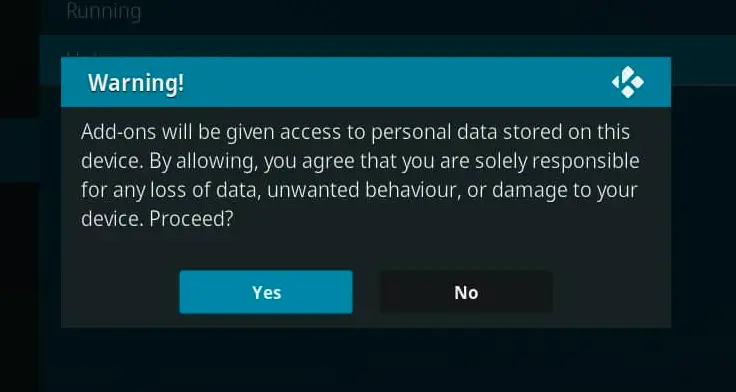
That warning shows up for any unofficial addon, but this one deserves a closer look. The Arkane14 repository is new and small: one developer, one repository, and a GitHub account created in 2026. That doesn’t make it unsafe. It does mean there is no long track record to lean on.
The addon’s code is public in the repository. Reading through it shows that it reaches out to many third-party streaming and playlist websites and runs a small helper on your own device to handle streams. We have not audited all of that code, so we can’t vouch for it, and the sites it pulls from are outside anyone’s control, including the developer’s.
Use it on a device you don’t mind experimenting on, never enter personal or payment details into anything it shows you, and check the repository URL character by character before you add it, because look-alike repositories with similar names are a common way to spread adware. A VPN is also worth using, which is covered next. Our Kodi VPN guide explains how to set one up.
How Do You Stay Protected While Using Daddy Live Kodi?
Sign up for a premium Kodi VPN and access the internet unrestricted. We offer exclusive discounts for IPVanish and NordVPN, the highest respected VPNs in the Kodi community. Both of these VPNs have some great features for users:
- Apps for Android, iOS, Mac, Linux & more
- Zero Logs
- Unlimited bandwidth
- Tier 1 hardware (no speed slowdown)
- Access to hundreds of VPN servers


How to Install Daddy Live Kodi Addon on Firestick or Android TV
These steps are the same on a Firestick, Fire TV Cube, Android TV box, or Kodi on a computer. If you haven’t already, turn on Unknown Sources in Kodi first, or the repository zip won’t install. This is how to start installing Daddy Live on Kodi:
This guide will show you how to install the Daddy Live Kodi addon (DLTV).
Total Time: 5 minutes
Access SYSTEM Page
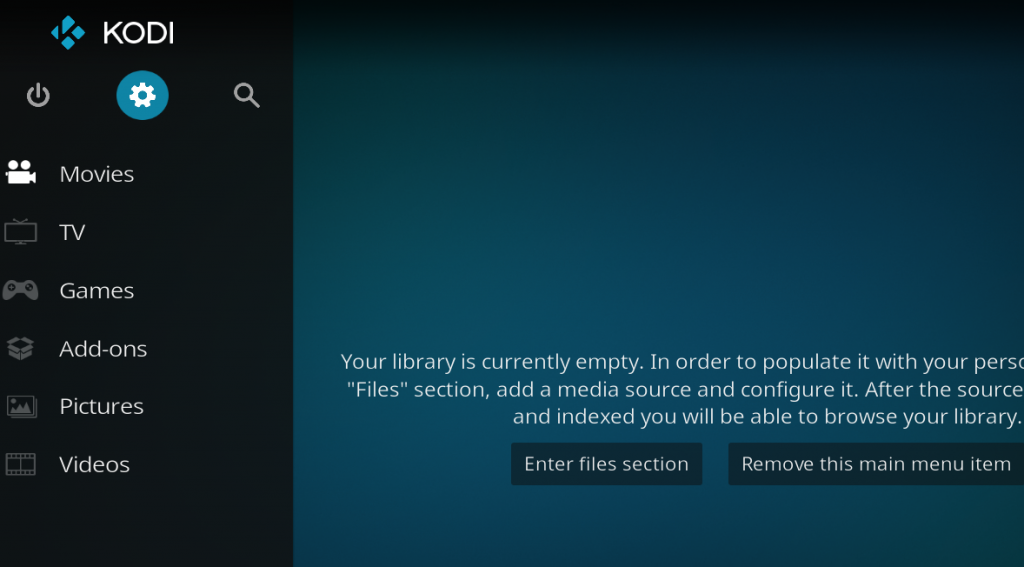
Access the Kodi SYSTEM screen by clicking on the gear icon on the Kodi main menu.
Click on File Manager
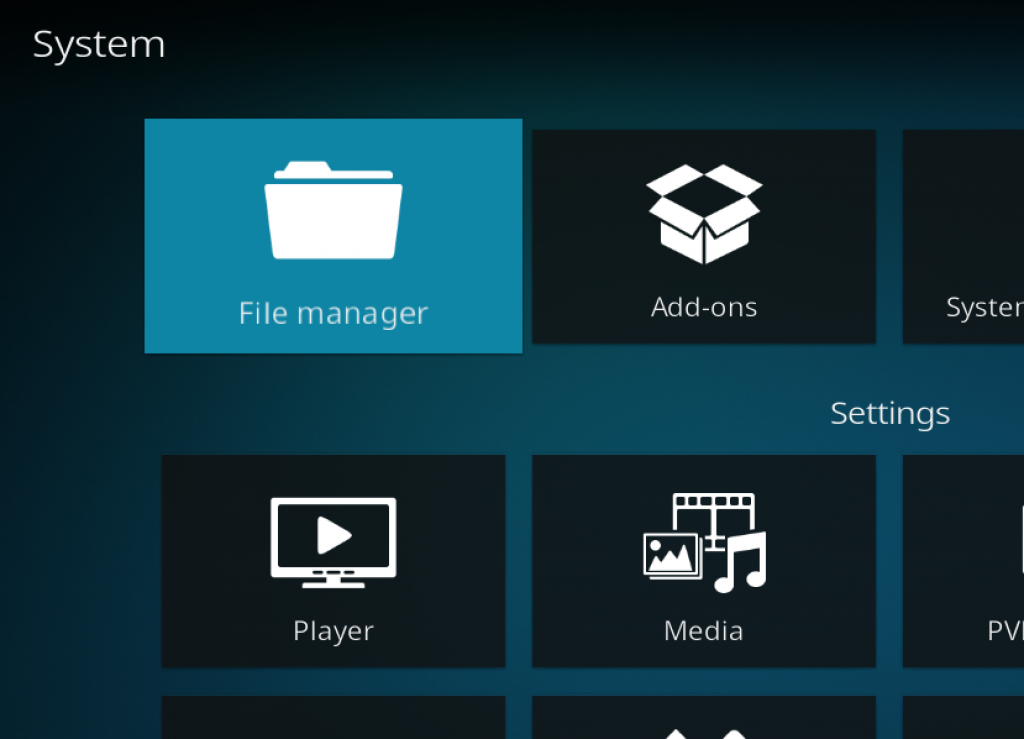
Click on the File Manager tile.
Select Add Source
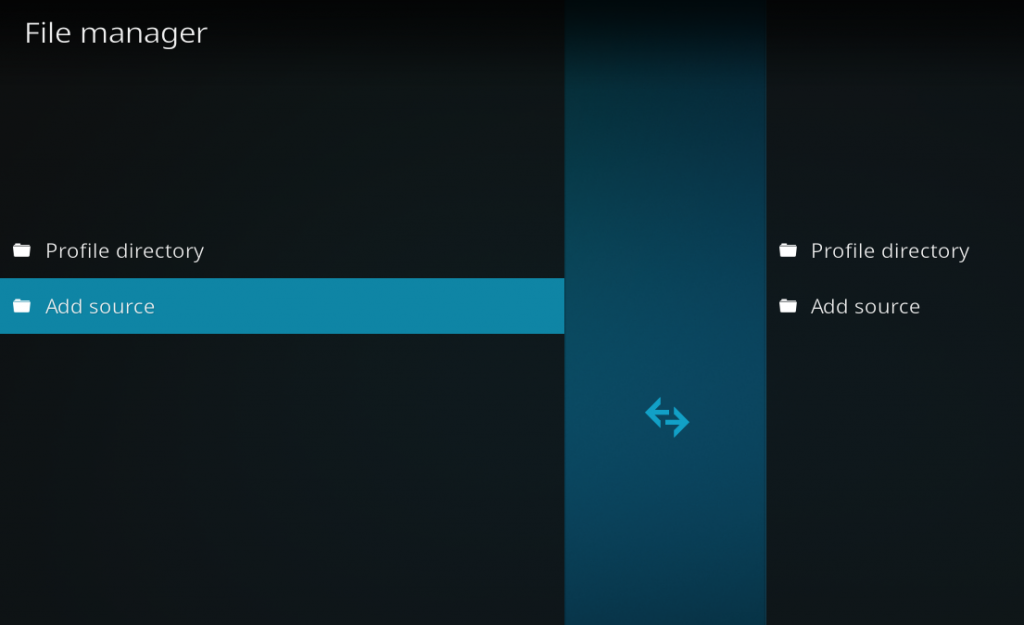
Click on Add Source at the bottom of the left side pane.
Add File Source
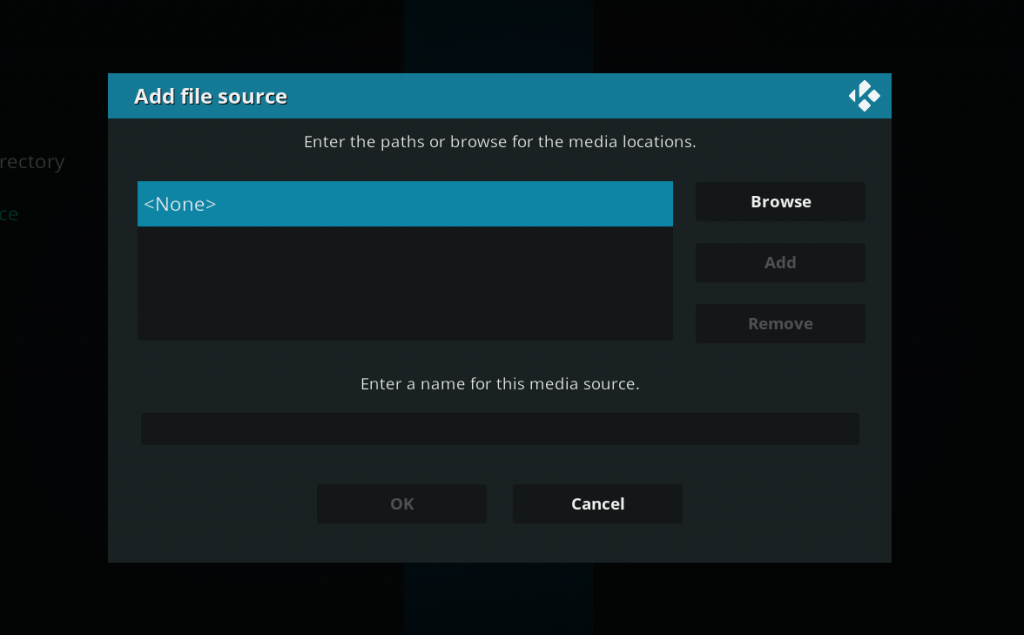
First, click on None and enter in https://arkane14.github.io/ and then select Done.
Click on the empty box underneath the media source name field and name it arkane14 and then click OK.
Access Kodi Addons Screen
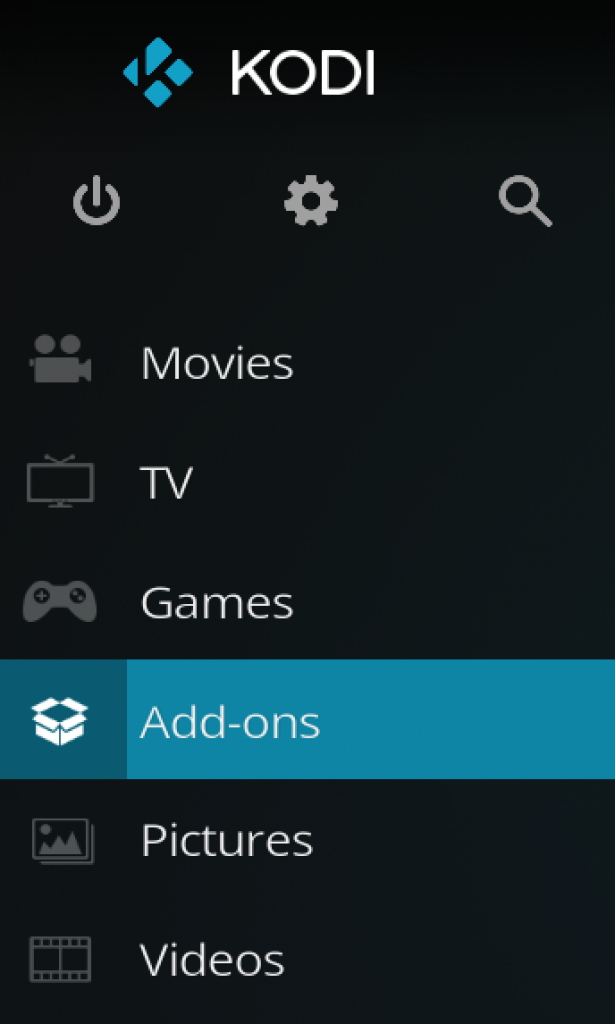
Go back to the Kodi home screen and then click on the Addons button.
Select the Addon Browser
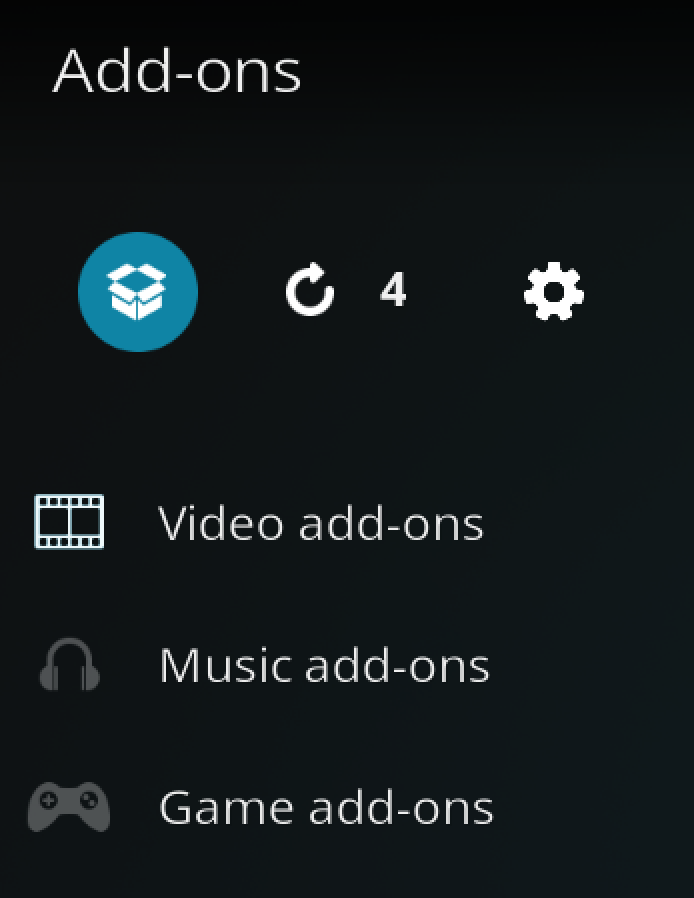
Access the Kodi Add-on Browser by clicking on the package icon in the upper-left corner of this screen.
Install the arkane14 Repository
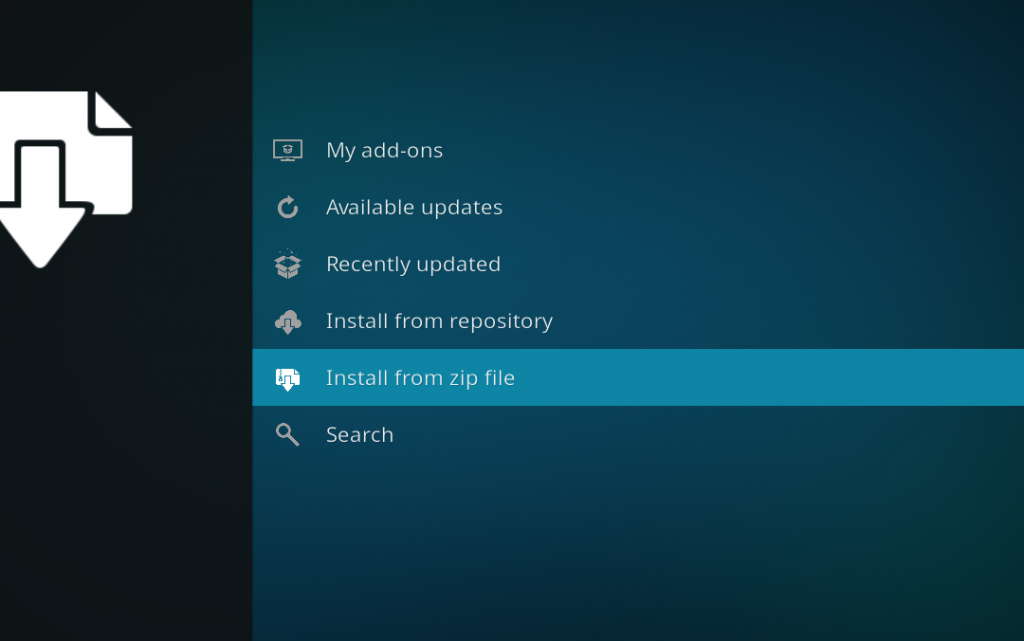
Install the repository by clicking on Install from Zip File then arkane14 then repository.arkane14-x.x.x.zip and waiting for the repository installed icon to appear in the top right corner.
Install the Daddy Live Kodi Addon
Next, select Install From Repository then arkane14 Repository then Video Add-ons then DLTV. Click on Install, click OK when Kodi lists the extra addons DLTV needs, and wait for the Add-on Enabled notification.
DLTV needs a few helper addons, including InputStream FFmpeg Direct. Kodi lists them during the install, and you just click OK so it can fetch them from its own repository. Daddy Live Kodi will then be in your Video Add-ons section. Open it once and let the schedule finish loading before you pick anything.
Install Daddy Live on Kodi on Windows, Mac, Apple TV, Samsung and LG TV
Windows, Mac, Linux and Android phones and tablets all use the same steps as above. Kodi is not officially available for Samsung or LG smart TVs, so there is nothing to install DLTV into on those. A Firestick plugged into the TV is the simple fix. Kodi on Apple TV is a sideloaded build, so check that yours supports third-party repositories before you spend time on it.
How to Update DaddyLive on Kodi
Kodi updates addons from their repository automatically when auto-updates are on. To force it, go to Add-ons, My add-ons, Video add-ons, open DLTV, and choose Update if it is offered. Do this first if your schedule is empty, because older builds point at domains that no longer work. Our guide to updating Kodi covers updating Kodi itself.
How to Use Daddy Live Kodi: Schedule, Live TV and Update Schedule
Open DLTV and choose Live Sports Schedule to see the events listed for the day. Pick a sport or event, then pick one of the numbered links under it. Links for some events only show up close to the start time, so if an event has none, check back nearer kick-off.
Choose Live TV Channels for the channel list, or Live TV by Language if you want channels from one country. The search options find a specific event, channel name or channel number. If the schedule looks stale, open the schedule and choose Update schedule. The sports on offer come from the site, so they change by day and usually include soccer, football, UFC and boxing, motorsport, tennis, rugby and cricket. For UFC nights specifically, our UFC on Kodi guide covers the legal route as well.
DaddyLive Not Working on Kodi: Fixes by Error Message
Almost every DaddyLive not working report has the same root cause: the addon reads schedules and streams from third-party websites, and those sites move, get blocked or go down. Some of that you can fix and some you can’t. Start with the quick checks, which are updating the addon, restarting Kodi and trying a VPN, then use the section that matches your error. If your message isn’t listed, check the Kodi log to see what failed.
DLTV also has a Diagnostics option in its main menu. It tests the channel list, the schedule and the streaming helpers and marks each one OK or KO, which tells you whether the problem is your connection or the site.
DaddyLive Error Fetching Category Data in Kodi
This pop-up means the addon opened the schedule page but couldn’t read it, usually because the site is down, blocked by your provider, or has changed its layout. Update the addon, restart Kodi, and try again with a VPN switched on. If Diagnostics shows the channel list as KO, the site itself is the problem and the only fix is to wait or switch to an alternative.
DaddyLive Wrong Version Number or SSL Error in Kodi
A wrong version number or SSL error usually means your internet provider or DNS is interfering with the connection to the site. Try a VPN first. If that doesn’t help, open the addon’s settings, go to the Network tab, and enter a public DNS server in the Custom DNS box. A public DNS server often gets around a provider that blocks the site by name, which is the usual cause of this error. Also make sure your device’s date and time are correct, since a wrong clock breaks secure connections.
DaddyLive Error Check the Log for More Information
This is a generic message, so it doesn’t tell you the cause. Turn on debug logging, repeat the error, and read the log using our Kodi log file guide. Look for lines with DLTV in them, which usually name the web address that failed.
DaddyLive Playback Failed or All Mirrors Failed
The addon found a link, but the stream behind it is dead or refused to start. Back out and try the next numbered link for that event, because they come from different servers. If every link fails, wait a few minutes and try again, as streams for big events often get overloaded.
DaddyLive No Streams Found or Empty Schedule
An empty schedule or a no streams found message means the addon couldn’t pull the day’s events. Choose Update schedule, restart Kodi, and update the addon to the newest build. If it still shows nothing, reinstall it from the Arkane14 repository. Our No Stream Available fix guide covers the generic Kodi version of this error.
DaddyLive Buffering or Freezing on Kodi
Free streams are often slow, so buffering is common even on a fast connection. Try another numbered link, pick a lower quality if the stream offers one, and use a wired connection if you can. Our guide to stopping buffering in Kodi has the full list of fixes.
DaddyLive Streams Have No Sound
If a stream plays with no audio, try a different link first, since the problem is often the stream itself. If every link is silent, check your Kodi audio output settings and turn off passthrough unless your TV or receiver needs it.
DaddyLive Not Working on Firestick: Dependency Cannot Be Installed
If Kodi says a dependency couldn’t be installed, DLTV couldn’t fetch one of its helper addons, usually InputStream FFmpeg Direct. Make sure Kodi’s official repository is enabled, check you have free storage on the Firestick, and then install DLTV again. Clearing Kodi’s cache from the Firestick’s app settings also helps when installs keep failing.
DaddyLive Not Working With a VPN
Some servers get blocked, so a VPN that works one day can fail the next. Switch to a different server or region, then restart Kodi. If it works with the VPN off, your VPN’s DNS is the likely cause, so try the Custom DNS setting mentioned above.
DaddyLive Not Working After a Kodi Update or Reinstall
After a big Kodi update, reinstall DLTV from the Arkane14 repository rather than restoring an old copy, because old builds point at domains that have changed. Be careful with the Clear Data button in Android settings: clearing data instead of cache wipes every addon, and you will have to add the repository and reinstall from scratch.
Daddy Live Kodi Alternatives: What to Use When It Stops Working
These are the other live sports options we cover. The unofficial ones are listed for their status, not as an endorsement, and their legality depends on where you live.
Mad Titan Sports vs Daddy Live Kodi
Mad Titan Sports is a live sports addon with its own install guide here. It is built around sports rather than a general channel list, so it is the first one to try if you mainly want major sports events.
The Crew vs Daddy Live Kodi
The Crew is an all-in-one repository addon with movies, shows and live TV, so it replaces more than DaddyLive does, but it no longer includes DaddyLive itself. It is the better choice if you want one addon for everything.
The Loop vs Daddy Live Kodi
The Loop is another live sports and IPTV addon with its own guide. It is a good second option to have installed when one addon’s sources are down.
Legal Ways to Watch Live Sports Instead of Daddy Live Kodi
If you want streams that don’t depend on a website that keeps moving, a licensed service is the reliable route. Our list of legal live TV services compares the options, and our legal Kodi addons list has free ones that are fully above board.
Daddy Live IPTV, M3U and EPG: Other Ways to Use It on Kodi
A common search is for a DaddyLive M3U playlist, so the channels show up in Kodi’s regular TV section. DLTV can build one for you, so you don’t need to hunt for a playlist link.
DaddyLive IPTV M3U Playlist in Kodi (Export M3U and IPTV Simple Client)
Open DLTV and choose Export M3U / Configure PVR. The addon creates a playlist file on your device and shows you the file path. Then install Kodi’s PVR IPTV Simple Client, open its settings, set the M3U play list to a local file, and point it at that path. Our M3U playlist setup guide walks through the PVR side step by step. Because the file is generated from the addon, it stops working when the addon does, so re-export it after updates.
DaddyLive EPG and TV Guide in Kodi
DLTV’s settings include an EPG section with guide sources by language, such as English (UK), Spanish and German. If you use the PVR route, you can load a guide in IPTV Simple Client as well, and our EPG setup guide shows how.
Is the Daddy Live Kodi Addon Legal?
Determining the legality of the Daddy Live Kodi Addon is challenging without knowing if it possesses the proper licensing. Kodi Tips does not have the ability to confirm the legal status of these addons.
Plus, legality rules differ depending on what country you live in.
Copyright Concerns with Kodi Addon
At first glance, the addon appears to distribute copyrighted works without the necessary consent, which raises the concern about its legality.
Public Domain Titles
Users can access titles in the public domain, which are not subject to copyright laws. This allows free download, streaming, and sharing without legal issues.
User Responsibility
You, as the end user, bear responsibility for all content accessed through Kodi addons, making it crucial that you understand what is legal to view.
Legal Streaming Options
For those seeking legal and verified streaming options, check our list of legal Kodi addons with 100% legal content.
Daddy Live Kodi FAQ
Was DaddyLive Discontinued?
The original DaddyLive addon was, in practice. It was removed from The Crew repository, and the rebuild called DLTV from the Arkane14 repository is the version still being updated. The website behind it has not disappeared for good.
Is Daddy Live Still Working on Kodi?
Sometimes. The DLTV rebuild installs and runs, but it depends on a website that is often blocked or moved, so some days the schedule loads and some days it doesn’t. Older guides that use The Crew will not work.
Why Isn’t DaddyLive Working in Kodi?
The most common causes are an old build pointing at a dead domain, a blocked connection, or the source website being down. Update the addon, restart Kodi, try a VPN, and use the Diagnostics option to see which part is failing.
Is There an Alternative to Daddy Live in Kodi?
Yes. Mad Titan Sports, The Crew and The Loop are the main ones we cover, and licensed live TV services are the reliable option if you want streams that don’t keep breaking.
How Do You Install the Daddy Live Kodi Addon?
Add https://arkane14.github.io/ as a source in Kodi’s File Manager, install the arkane14 repository zip from Install from Zip File, then go to Install from Repository, arkane14 Repository, Video Add-ons, and install DLTV. The full walkthrough is above.
What Is the Daddy Live Repo URL for Kodi?
The repository for the current build is https://arkane14.github.io/. The original DaddyLive was in The Crew repository, which no longer has it, so check any other URL a guide gives you before adding it.
Does DaddyLive Need Real-Debrid?
No. DaddyLive pulls free streams from websites and does not use Real-Debrid or any other debrid service.
Does DaddyLive Work on Firestick, Roku, Apple TV, Samsung and LG TV?
It works on a Firestick and any Android TV device, and on computers and phones that run Kodi. Roku, Samsung and LG TVs don’t run Kodi, and Apple TV only does with a sideloaded build.
What Is the DaddyLive Addon Password?
Older versions of the addon locked an adult section behind a password. The current DLTV build skips 18+ channels entirely, and sports and live TV need no password. We don’t cover adult content.
Should I Use a VPN With the Daddy Live Kodi Addon?
Yes. The addon streams from third-party websites, and a VPN keeps your connection private from your internet provider. It can also get around provider blocking that causes errors.
Is Using the Daddy Live Kodi Addon Legal?
The Daddy Live Kodi addon itself is legal to install. However, not all content it can access is legally permissible depending on the source. Ensure you access only content that is within the public domain or that you have the right to stream.
What Are the Differences Between a Kodi Addon and a Kodi Build?
A Kodi addon adds one feature or content source, like DLTV. A Kodi build is a full pre-configured Kodi setup with a custom skin and many addons bundled in. Builds are heavier and easier to break, so we recommend installing addons yourself.
Disclaimer
We have no control over and do not host or upload any video, films, media file, or live streams. KodiTips is not responsible for the accuracy, compliance, copyright, legality, decency, or any other aspect of the content streamed from your device. If you have any legal issues please contact the appropriate media file owners or host sites.