

The Crew Kodi addon is a simple and efficient multi-source addon for movies, TV shows and sports, with some one-click playlists as well. Our full guide below covers what it is, how to install it on Kodi 21, how to fix the most common errors, and what to use if it stops working.
Short answer: The Crew’s repository is still online and was last updated in February 2026. I tested it on Kodi 21 and 22 myself, and mostly everything is working! See for yourself today.
What Is The Crew?
The Crew is an all inclusive Kodi addon that contains everything you could ask for:
- Movies
- TV Shows
- Sports
The Crew consolidates sources from across the public internet into a single addon, and it is one of the add-ons in our best Kodi addons list.
The Crew Addon Not Working Fix
Is your Crew Kodi addon not working? Are you having trouble launching the addon? This issue can appear due to a number of reasons.
‘Playback Failed’ Error
The Crew pulls addon streams from a number of publicly available sources on the internet. The addon does not host any of its own content.
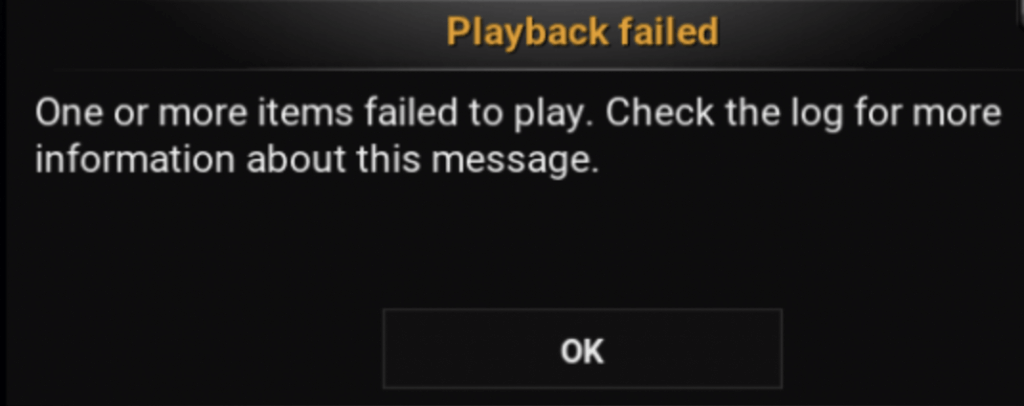
If you get a “Playback Failed” error message such as the one below, it simply means that the link you tried to play is not valid or working anymore. Try another link in the addon and if it is valid, your stream will start playing.
The Crew Repo URL Not Working?
If Kodi says it could not connect when you add the source, check for a typo first. The address is https://team-crew.github.io, typed exactly like that, with https and nothing after it.
If the address is right and Kodi still can’t reach it, see Can’t Install Kodi Addons.
Clear Providers
Sometimes, a cached error can cause The Crew to stop working indefinitely. To make sure that you are pulling fresh links and sources, use the instructions below to clear the providers in the addon:
- Launch The Crew Addon in Kodi
- Click on Tools from the main menu
- Click on Clear Providers
- Click on Yes to confirm that the providers are cleared
You have now refreshed The Crew and will be able to better diagnose your issues.
The Crew Kodi Features
The Crew is a playlist and multi-source combination Kodi addon. It is similar to multi-source add-ons such as Umbrella and POV but with custom-curated playlists included as well.
Give the add-on a try and check it out for yourself. Here are some of the features we really like.
Single Click and Play
A lot of the movie and TV show lists in the addon are single click and play so that you can start streaming faster.
Adult Content
The Crew has an adult section loaded into the app. Once you get the addon installed, you can enable the adult content by following these instructions:
- Launch The Crew Kodi Addon
- Scroll down to the bottom and select “Tools”
- Click “Settings: Navigation”
- Select “Adult Play Ground” and type in the password “lol” (without quotation marks)
- Go back to the main menu and a new section will appear there on the bottom
The Crew Sections
After installing The Crew Kodi addon, you’ll see sections like these in the main menu. Menus change between versions, so yours may look a little different:
- Movies
- TV Shows
- Sports
- Kids
- 1 Clicks
- CC Collections
- Tools
- Search
How to Install The Crew Kodi Add-on
These steps are for Kodi 21 Omega. Menu names can vary slightly by skin.
- Open Kodi and click the Settings gear, then go to System > Add-ons and turn on Unknown sources. Click Yes on the warning.
- Go back to Settings > File manager > Add source > None
- Type the following EXACTLY https://team-crew.github.io and select OK
- Highlight the box underneath and enter a name for this media Source like .crew and then click OK
- Go back to your home screen and select Add-ons > Add-on browser
- Select Install from Zip File > .crew > repository.thecrew-x.x.zip and wait for the Add-on enabled notification
- Select Install from Repository > The Crew > Video Add-ons > The Crew > Install
- Wait for Add-on enabled notification
Real-Debrid and Trakt With The Crew
Third-party guides recommend pairing The Crew with a premium debrid service for better quality links, and describe a place in the add-on’s settings to link Trakt as well. I have not tested either, so I am not giving menu steps. For the debrid services themselves, see our guides to Real-Debrid, Premiumize and TorBox.
The Crew Kodi Alternatives
The Crew Kodi addon is a multi-source and playlist Kodi addon that automatically pulls data from multiple websites on the internet. If it is not working to your liking, there are other similar Kodi addons you may want to check out such as:
More options are in our Best Kodi Addons guide.
The Crew Error Check Log
Sometimes you may get a message telling you to check your Kodi error log. If you see this error while streaming video, it can mean that your cache is full. If this appears while trying to navigate menus in The Crew Kodi addon, it means that the link you are trying to access does not exist anymore. If you are trying to start a stream from the addon, select another stream.
If you want to learn how to actually check your log and diagnose your issues, click here.
How to Fix No Stream Available in Kodi
If you see the error “stream not available” in Kodi while using this addon, it means that the addon was unable to retrieve results for your query. Kodi addons are simply search engines into the public internet and do not host any content of their own.
When you select a title or stream in Kodi, it searches the internet for media streams matching the title you’ve select. If it cannot find anything, you get the “stream not available” error. Most likely, you will have to try a different addon or select more popular content that is more likely to be available. Our No Stream Available guide has more fixes.
The Crew Kodi Not Working / Down
If the addon is not working and your issue is not covered in our guide above, make sure that you have the latest version of the addon installed. Check the add-on’s information screen in Kodi and update it from the repository if an update is offered.
Also, make sure that you are running a current version of Kodi, such as 21 Omega. Older versions are not compatible with many addons anymore due to changes in scrapers and code. For general fixes, see Kodi Not Working and, if streams stutter, Stop Buffering in Kodi.
Remember, Kodi addons simply query the public internet and do not host any streams. Streams, especially live content, is volatile and can go up and down. There is nothing you or the developer can do about streams not working in a lot of cases.
How Do Kodi Addons work?
Not seeing something you want? A specific title nowhere to be found and you aren’t sure who’s at fault?
Learn how Kodi addons work by clicking here. This guide is a crash course on scrapers, resolvers, pulling content from the internet, what Kodi addons are and aren’t, and more important information that everybody should know.
Is The Crew Safe and Legal?
The Crew does not host any content. It searches public sources, so links can lead anywhere and what you watch is your responsibility. Streaming copyrighted material without permission is illegal in many countries, so only watch what you have the right to watch.
Install The Crew only from the repository address above, not from zip files on random sites, and keep Kodi updated. A VPN hides your IP address from the sources you connect to and your internet provider. See our Best VPN for Kodi guide, where NordVPN is the one we lead with.
The Crew Kodi FAQ
Is The Crew Kodi addon still working?
The Crew’s repository at team-crew.github.io is online and was last updated in February 2026. The addon is active. Some individual links may fail over time, and this is normal.
Does The Crew work on Kodi 21 Omega?
Third-party guides say it does, and one says it was installed on Kodi 21 Omega, but I have not tested it. If it will not install or play, clear providers, check the log and see the not working fixes above.
What is The Crew repo address?
The address is https://team-crew.github.io. Type it exactly like that, with https and nothing after it.
Is The Crew safe to install?
The Crew does not host content, and the links it finds can lead anywhere. Install it only from the repository above, keep Kodi updated, avoid zip files from random sites and use a VPN.
What can I use instead of The Crew?
Umbrella and POV are similar multi-source add-ons with their own install guides on this site, and Best Kodi Addons lists more.
Last checked October 2026 against Kodi 21.3 Omega.
PROTECT YOURSELF ON THE INTERNET
Sign up for a premium Kodi VPN and access the internet unrestricted. We offer exclusive discounts for IPVanish and NordVPN, the highest respected VPNs in the Kodi community. Both of these VPNs have some great features for users:
Apps for Android, iOS, Mac, Linux & more
Zero Logs
Unlimited bandwidth
Tier 1 hardware (no speed slowdown)
Access to servers hundreds of VPN servers


Disclaimer
We have no control over and do not host or upload any video, films, media file, or live streams. KodiTips is not responsible for the accuracy, compliance, copyright, legality, decency, or any other aspect of the content of streamed from your device. If you have any legal issues please contact the appropriate media file owners or host sites.